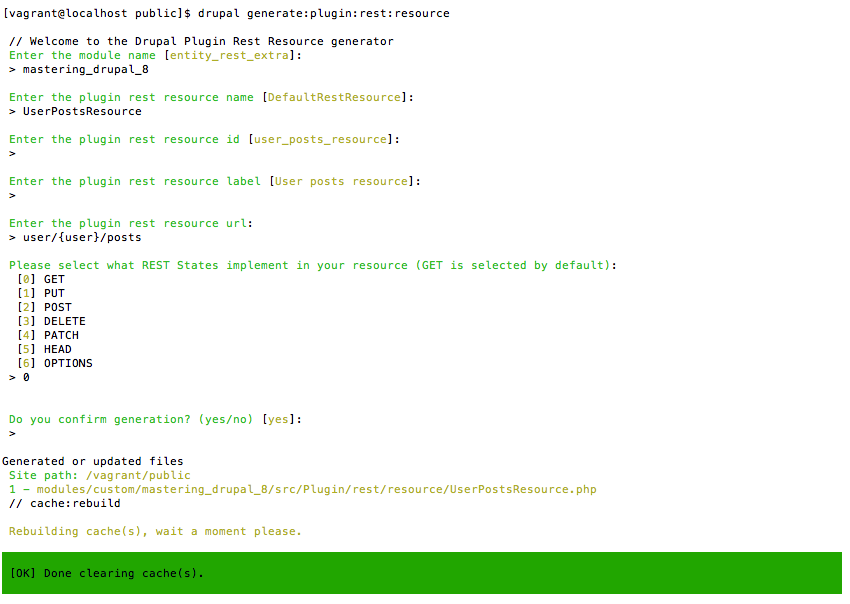
The simplest way to get started with a new REST plugin is to use the Drupal console to create the stub of a resource that extends ResourceBase. Start by typing drupal generate:plugin:rest:resource and then answer the prompts. We'll be recreating the functionality from the User Posts View from earlier in this chapter within the Mastering Drupal 8 module from previous chapters.
Once you've done that, you'll have a UserPostsResource.php in src/Plugin/rest/resource of the mastering_drupal_8 module. Once you create this and rebuild the cache you'll need to enable it at Configuration | REST. At first, this new REST resource doesn't do very much; it just prints out "Implement REST State GET!" when you go to localhost/user/1/posts?_format=hal_json. In fact, it doesn't even get the user ID correctly, so you need to change the signature of the get() function to do that. So, the first thing you need to do is change the signature to public function get($user). Now that we have the user ID, we need to get the nodes authored by the user and output them. Within the get() function, replace what's in there with:
// Load all nodes authored by the user
 $nids = \Drupal::entityQuery('node')
   ->condition('uid', $user)
   ->sort('created', 'ASC')
   ->execute();

 // Load the nodes
 $nodes = Node::loadMultiple($nids);

 return new ResourceResponse($nodes);
You will also have to add use Drupal\node\Entity\Node; at the top of the file, so you can use Node::loadMultiple. Now, when you rebuild the cache and return to localhost/user/1/posts?_format=hal_json, you'll see a list of nodes very much like what you received.
Now we'll want to take it further to get rid of some of the issues we had with the Views approach. The first thing we need to do is add pagination so we can handle cases where a user might have a large number of nodes. At the top of the get() function add:
$page = \Drupal::request()->query->has('page') ? \Drupal::request()->query->get('page') : 0;
Then we need to edit the query itself to use the pager. So change that to:
// Load all nodes authored by the user
$nids = \Drupal::entityQuery('node')
   ->condition('uid', $user)
   ->sort('created', 'ASC')
   ->pager()
   ->execute();
Perform a quick cache rebuild and now you can go to localhost/user/1/posts?_format=hal_json&page=0 and you'll see the same list as before. Now go to localhost/user/1/posts?_format=hal_json&page=1 and you see exactly the same list as you did on the previous page. In fact, no matter what you put in for the page query parameter, you get the same output. One of the major enhancements in Drupal 8 is in the caching system. REST resources vary, based on attributes defined for the route and by the output format, but nothing else. Since we want the output to differ based on the page, this isn't going to work. Since the ResourceResponse implements the CacheableResponseInterface, we can add a new cache context to prevent this issue. Instead of just returning a new ResourceResponse, add the following:
$response = new ResourceResponse($nodes);
// Add URL cache context
 $metadata = new CacheableMetadata();
 $metadata->addCacheContexts([ 'url' ]);
 $response->addCacheableDependency($metadata);
return $response;
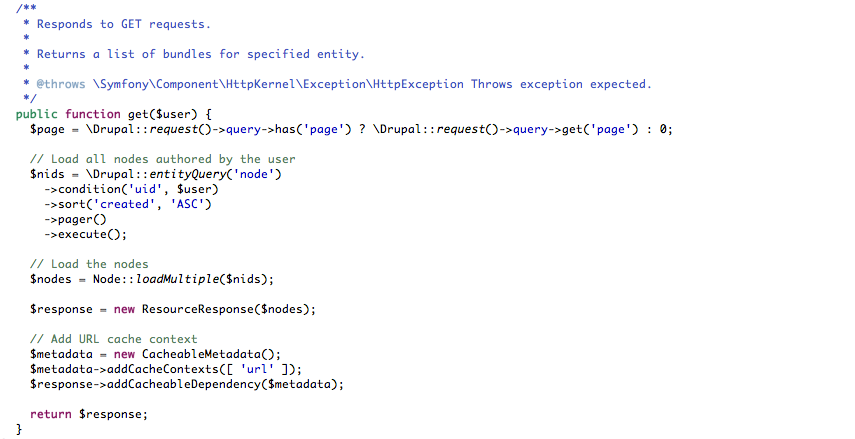
You will also need to add use Drupal\Core\Cache\CacheableMetadata; at the top of the file to pull in that namespace. Now, when you change the page in the query parameters, you'll get different results. The Cache Context of 'url' is pretty broad; if you wanted to, you could narrow it by using 'url.query_args', to just consider the query parameters, or even 'url.query_args:page', to bring it down to just the page query parameter. At this point, your function should look like this.
As we noted, at the moment this code isn't doing anything that the Views version of it wasn't. Since we're controlling the output, we have complete freedom to add additional information. A critical one would be a count of how many nodes are authored by this user, regardless of the number being output from this response. To do that we'll need to add a count query:
// Get count of all nodes authored by the user
 $count = \Drupal::entityQuery('node')
   ->condition('uid', $user)
   ->count()
   ->execute();
  $pages = floor($count / 10);
Now that we have the count, we need to add it to the response. So instead of just returning the array of nodes, we'll add an attribute for total:
$response = new ResourceResponse([ 'total' => $count, 'posts' => array_values($nodes) ]);
Test this by going to various pages and, seeing that regardless of how many nodes are shown, it always has the 'count' attribute. Okay, that's a good step toward making it more useful, but we're still lacking some of what makes HAL really useful: the links. We'll want to have the self link, of course, but also basic navigation like start, last, next, and prev. Since these are pretty much the same, we'll first need a function to generate those links:
/**
  * Returns a link to the Resource for a given user and page
  *
  * @param number $user
  * @param number $page
  *
  * @return string
  */
protected function getPagerLink($user = 0, $page = 0) {
   return URL::fromRoute('rest.user_posts_resource.GET.hal_json',
     [ 'user' => $user, 'page' => $page ], [ 'absolute' => TRUE])
   ->setRouteParameter('_format', 'hal_json')
   ->toString(TRUE)
   ->getGeneratedUrl();
 }
This function will generate a link back to this REST resource for a given user ID and page. Of course, we also need to add the use Drupal\Core\URL; to our namespace declaration. Next we'll construct the links:
$links = [
   'self' => [ 'href' => $this->getPagerLink($user, $page) ],
   'start' => [ 'href' => $this->getPagerLink($user, 0) ],
   'last' => [ 'href' => $this->getPagerLink($user, $pages) ],
 ];
if (0 < $page) {
   $links['prev'] = [ 'href' => $this->getPagerLink($user,
     ($page - 1)) ];
 }
if (0 < $pages && $page != $pages) {
   $links['next'] = [ 'href' => $this->getPagerLink($user,
     ($page + 1)) ];
 }
We'll then add them to the ResourceResponse by replacing the declaration with:
$response = new ResourceResponse([
   '_links' => $links,
   'total' => $count,
   'posts' => array_values($nodes)
 ]);
Now when you visit localhost/user/1/posts?_format=hal_json you will have links that allow you to traverse through the results page by page as well as skipping to the start or end of the list.
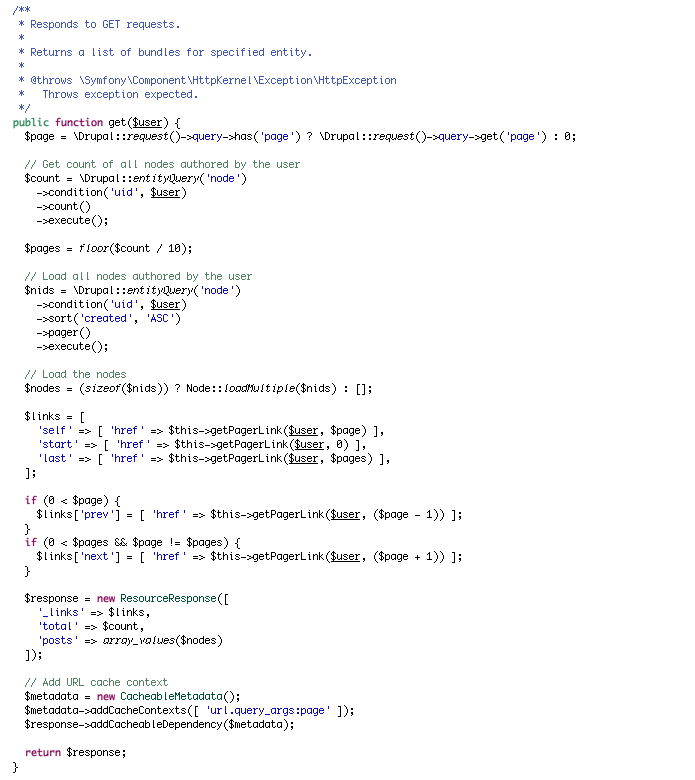
At this point your function will look like this: