
Node templates contain all the content and fields that make up a Content type. Each node has a template associated with it and several ways to name Node templates. The easiest way to determine where the template is coming from and what it is named is to inspect the page:
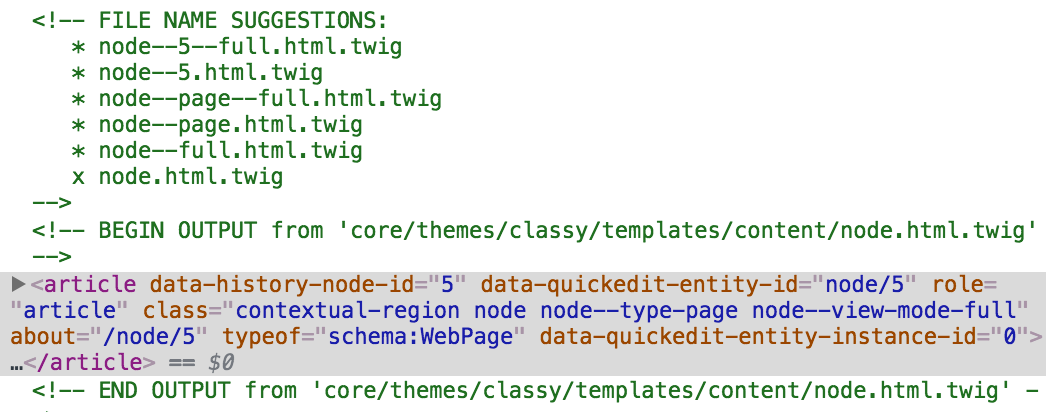
Based on the Twig comments, we know the exact location of the Twig template and that Drupal is using the base node.html.twig template. With this information, we can override the template by following these steps:
- Copy the node.html.twig template from /core/themes/classy/templates/content/node.html.twig.
- Paste the copy into /themes/twiggy/templates.
- Rename node.html.twig to node--page--full.html.twig.
Make sure to clear Drupal's cache and then refresh our page within the browser. Drupal is now using our copy of the template and we can proceed by modifying the markup as needed.
If we open our new node template and review the markup, we can see that there is quite a bit going on. For now, we can simplify the markup quite a bit by replacing everything with a simple {{ content }} variable and then save our template.
If we refresh the page, we will notice that visually nothing has changed. The reason is that the content variable will print out all the variables accessible to the Node. If we want to be more specific, then we can output specific fields using a syntax of {{ content.field_name }}, so in the case of the Body field, we can output it as {{ content.body }}.
The challenge with printing out specific field names is that if we add additional fields to our Content type, they will not print, so be careful if you choose to follow this method.
One other thing to point out is that when we printed the Body field specifically, the Page title is still displayed. The Page title is a block that takes the value of the Title field and prints it globally. We can fix this by simply deleting the Page title block from the Block layout page or by preventing it from displaying on specific content types.
With our Page title block removed, we can print the Title field within our Node template by adding the following markup:
<h1>{{ label }}</h1> {{ content }}
Now if we refresh our page, we will see that the Title field is being output using the {{ label }} variable and wrapped in a Heading 1.
All we have left now is to identify which Block template is being output and modify the template and markup accordingly.