
The tableselect type creates a table with checkboxes or radio buttons to allow a user to select either single or multiple rows within a table. You need to provide the #header attribute as an associative array of columns and #options as an array of values, each containing an associative array mapping a value to the key of the #header column. In addition, you can provide the following optional attributes:
- #empty: The value to display if the table has no options
- #multiple: Tells whether a user is able to select multiple values; it defaults to TRUE
- #js_select: Tells whether a select all checkbox should appear in the header, it defaults to TRUE
Consider this example:
$form['table'] = array(
  '#type' => 'tableselect',
  '#header' => [
    'column_one' => $this->t('Column one'),
    'column_two' => $this->t('Column two')
  ],
  '#options' => [
    [
      'column_one' => $this->t('Row'),
      'column_two' => $this->t('One') ,
    ],
    [
      'column_one' => $this->t('Row'),
      'column_two' => $this->t('Two'),
    ],
    [
      'column_one' => $this->t('Row'),
      'column_two' => $this->t('Three'),
    ],
    [
      'column_one' => $this->t('Row'),
      'column_two' => $this->t('Four'),
    ],
    [
      'column_one' => $this->t('Row'),
      'column_two' => $this->t('Five'),
    ],
  ],
);
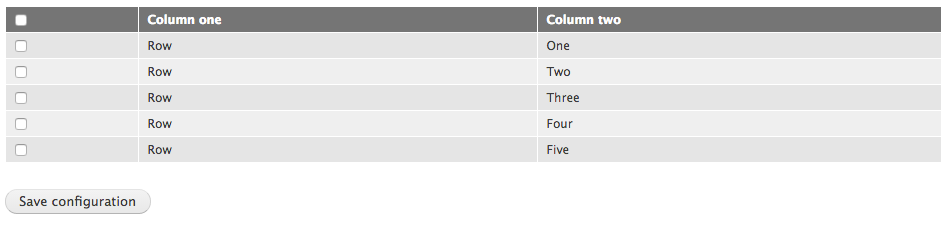
Table select type