
Since our WYSIWYG is using the Basic HTML filter, the Image button is configured to allow for the data-align attribute to be added to <img> tags.
This allows us to choose how an image is aligned on the page. We can align images left, right, center, or accept the default location. To demonstrate this, follow these steps:
- Select the Edit tab to take us back to the edit form and then place the cursor within the WYSIWYG directly after the image and add some additional text.
- Next, open the Edit Image dialog by double-clicking on the image.
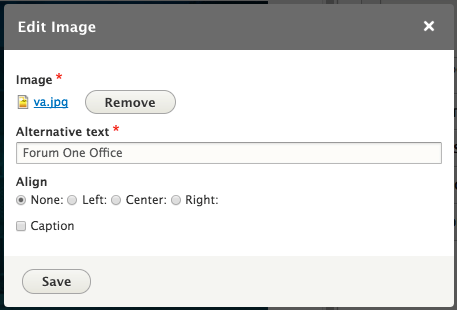
- Based on how we want text to flow on our page, we can choose to select the Left Align option to have the image float left with text displaying to the right of the image.
- If we place text before the image and choose to Right Align our image, then our image would float to the right with text displaying to the left of the image.
- Feel free to choose your preferred alignment and then select the Save button.