
Since the core REST module is included in Drupal 8 core, enabling it is simply a matter of going to the Extend page, selecting the checkbox next to RESTFul Web Services and clicking the Install button. If you want to enable HAL JSON you'll also want to select the HAL module and the HTTP Basic Authentication module.
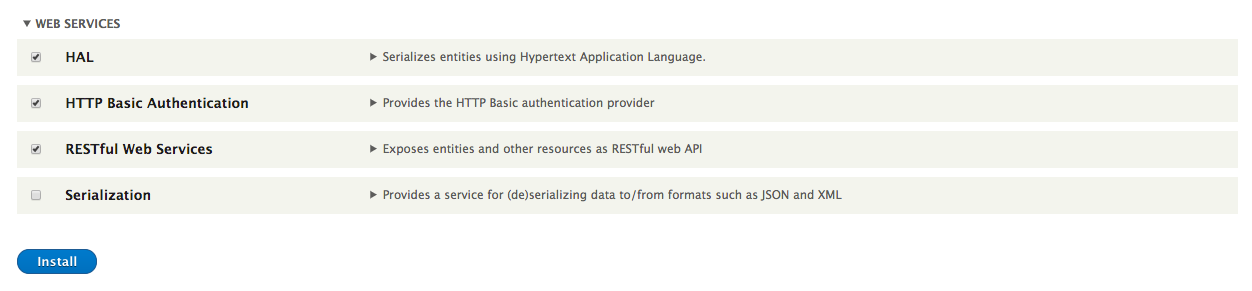
You can also enable it by running drush pm-enable rest hal basic_auth. Note that, if you are running PHP 5.6, you need to set always_populate_raw_post_data to -1 in your php.ini file; it cannot be set using ini_set. For more information, see https://www.drupal.org/node/2456025.
The core REST module allows access to the REST interface but it doesn't make configuring it simple. If you want to configure access to specific entities, specific verbs, change serialization methods, or change the authentication methods allowed, you need to create and import a rest.settings.yml file. For example, if you wanted to allow GET operations on nodes that output JSON and support either basic HTTP authentication or cookies, you'd need to create a YAML file like the following:
resources:
  'entity:node':
    GET:
      supported_formats:
        - json
      # Support both the core provided auth protocols.
      supported_auth:
        - cookie
        - http_basic
You'd then import it using Configuration Management. Alternatively, you could install the REST UI module (restui) and configure it through the user interface. To download and install that module, you can run drush dl restui and then drush pm-enable restui. The REST UI module adds the permission "Administer rest resources" that grants access to alter how the system exposes content via REST.
The core REST module exposes permissions for each verb for each resource. By default, the node interface is enabled so there are permissions for "Access DELETE on Content resource", "Access GET on Content resource", and so on. This allows you to be extremely granular with what operations you expose on your system.