
Page restriction allows us to either show or hide blocks of content based on the path to a specific page or set of pages. The path to the page needs to be entered one line at a time and can utilize a wildcard (*) character to specify all children pages. Once we have entered the path, we can choose to negate the condition by either selecting Show for the listed pages or Hide for the listed pages.
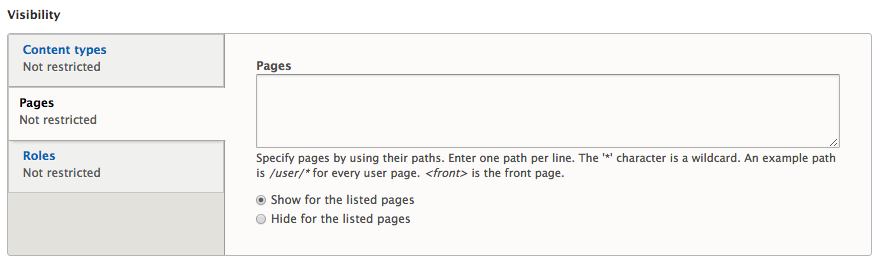
Page restriction visibility is probably the most common visibility setting used for blocks. Especially with Drupal 8 introducing the ability to reuse blocks, is being able to control what page a block displays. This is important to make sure that a block is not duplicated within the same region.
To demonstrate this functionality, we will prevent our block from displaying on the homepage by following these steps:
- Select the Pages tab from the Visibility section.
- Enter <front> as the Pages path.
- Select Hide for the listed pages.
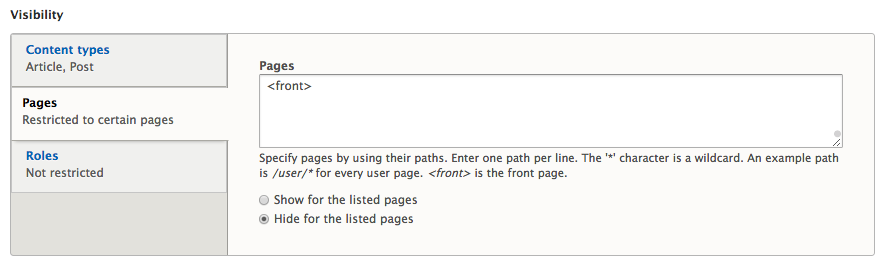
- Click on the Save block button.
If we now navigate back to the homepage, we will see that our Powered by Drupal block is no longer displayed. The only place the block will display is on any Articles we choose to create.
There are modules to extend the functionality of the Block layout page, such as Block Visibility Groups, https://www.drupal.org/project/block_visibility_groups, which allows the site admin to easily manage more complex block settings.