
If this option is selected, a default value will be used when no contextual filter value is provided. There are a number of methods to determine what this default value will be:
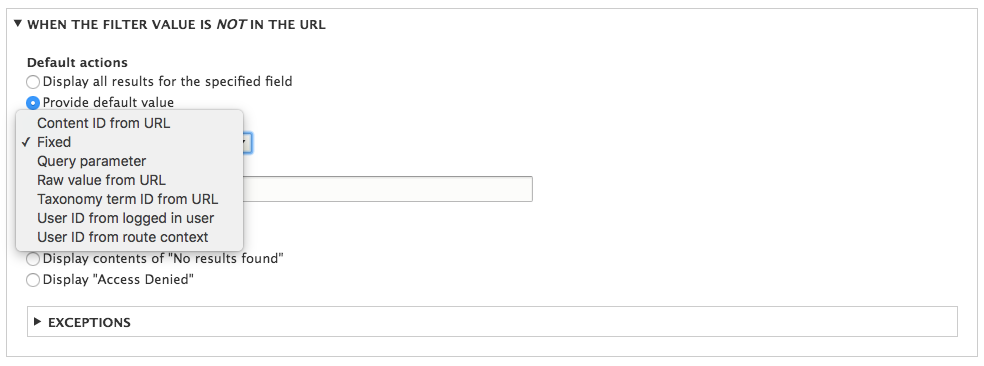
Default value options
- Fixed: If selected, the default value will always be the same regardless of the circumstances. You are prompted to enter a value, which will be substituted for the contextual filter value if none is provided.
- Content ID from URL: If selected, the View will use the node ID from the current URL. This can be from a URL, such as /node/1, or from a URL alias.
- Query parameter: If selected, you are prompted to enter the name of a query parameter to check for a value and then a fallback value in case that query parameter is not provided. For example, setting the parameter name to id and having a URL of /articles?id=1 would give a default value of 1.
- Raw value from URL: If selected, you are prompted to enter the path component as a number from 1 to 10. This retrieves the value, treating the URI as a slash-separated array starting from 1. For example, with the URL /articles/1, setting the path component to 2 would give a default value of 1.
- Taxonomy term ID from URL: If selected, the View will use the taxonomy term ID from the current URL. This can be from a URL such as /taxonomy/term/1 or from a URL alias.
- User ID from logged in user: If selected, the View will use the user ID from the current session.
- User ID from route context: If selected, the View will use the user ID from the current URL. This can be from a URL such as /user/1 or URL alias. It will also provide the user ID on menu routers that contain a {user} parameter. There is also a checkbox to allow the user ID to be provided from the author of a node. In that case, being on a URL such as /node/1 would provide the user ID corresponding to the author of the node with an ID of 1.