
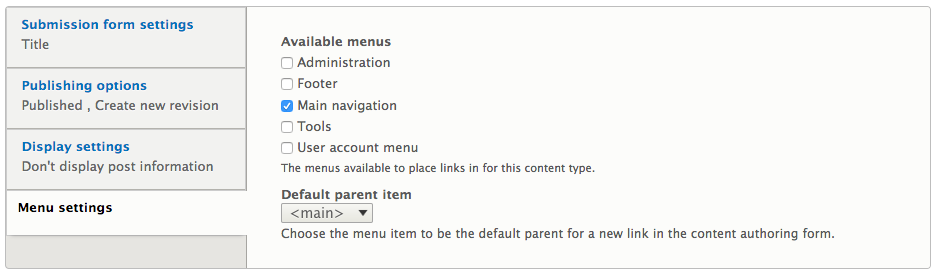
Menu settings determine which available menus can be added to the content. By default, Drupal displays all the menus that have been created. In this case, the Main navigation menu will be available for content creators to choose from:
Navigate back to the About Us page by entering /node/1/edit or using the Admin toolbar and selecting Manage | Content, selecting the About Us link and then the Edit tab. In the right sidebar of the Edit page, you'll find the Menu settings configuration.
By selecting the Provide a menu link, we have the following options:
- Menu link title: This defaults to our page title, but can be modified accordingly
- Description: This is the menu description that will display on certain browsers when a user hovers their mouse over the menu link
- Parent item: This is the default menu that was chosen when configuring the content type
- Weight: This controls how menu links are ordered within the menu
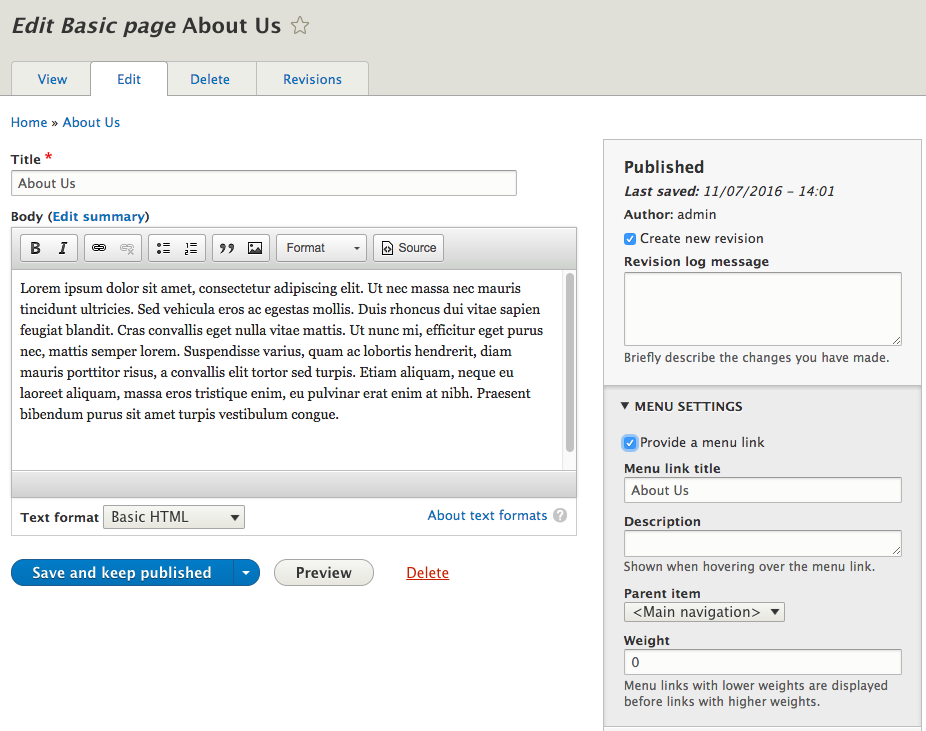
For demonstration purposes, we will leave the defaults and click on the Save and keep published button located at the bottom of the page. We now have a new menu item that allows us to navigate to the About Us page:

With a better understanding of the configuration options content types provide, it is now time to dive a little deeper and look at how we can manage fields associated with content types.