
By default, Drupal provides a Title field and a Body field. We saw an example of this when we created our first Basic page. However, we can add a wide array of fields to capture just about any type of content you can imagine.
Navigate back to the Basic page content type by entering /admin/structure/types/manage/page/fields or using the Admin toolbar and selecting Manage | Structure | Content types and then the Manage fields button for the Basic page content type. We will get our first glimpse of what is known as the Field UI:
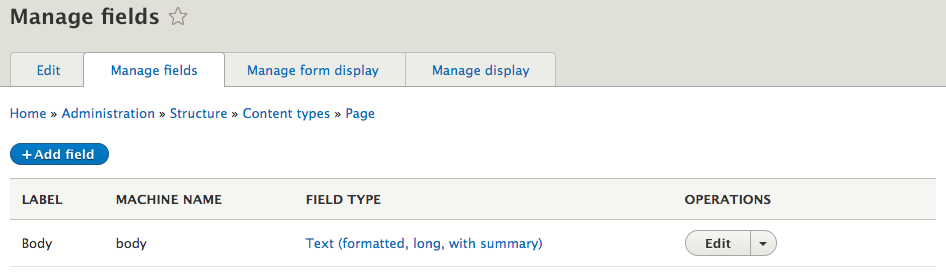
Remember I said there were two fields. Well, the Title field is a system field, so we won't see it displayed under Manage fields, but keep in mind that it is required by every content type.
Every new field we add will be listed here and will display the LABEL, MACHINE NAME, and FIELD TYPE. We can add fields, edit fields, and even delete fields from the Manage fields page. One caveat is that depending on the field, we may not be able to delete it if we have already added content to the content type that the field is attached to or if we have reused the field on multiple content types.
We will add fields later when we explore creating custom content types. For now, though, we will take a look at editing the Body field to get familiar with some of the basic configuration screens a field provides.
If we click on the Edit button for the Body field, we will see the settings page for the Text (formatted long) field type:
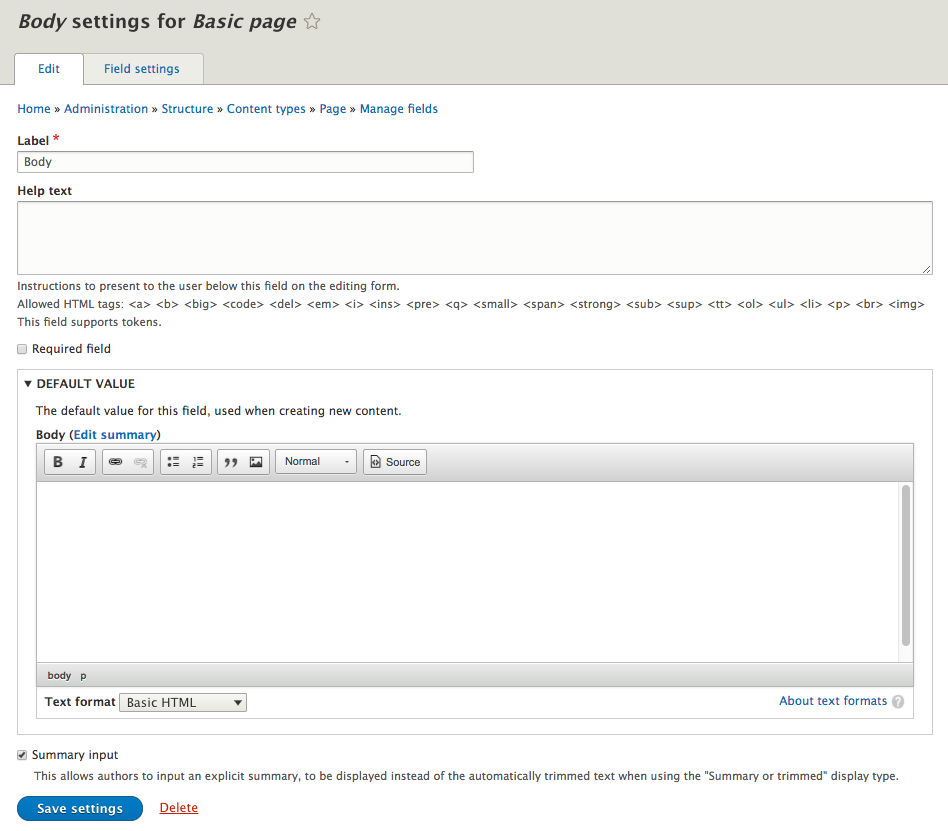
Every field type will provide a Label, Help text, Required field, and DEFAULT VALUE:
- Label: Provides the user with a label describing the type or name of the field
- Help text: Instructions to assist the user in what to enter in each field
- Required field: Provides the ability to enforce the field to have a value before the user can save the page
- DEFAULT VALUE: Allows for a default value to be used, and it varies based on the field type
As we begin creating new fields, we will look at additional settings based on the field type or additional configuration needed to properly create the field.