
To get started, let's make a brand new directory in the weather-app folder, that's the first thing we need to do. The directory is called geocode, which aligns with the require statement we have in the geocode variable. In geocode folder, we'll make our file geocode.js:
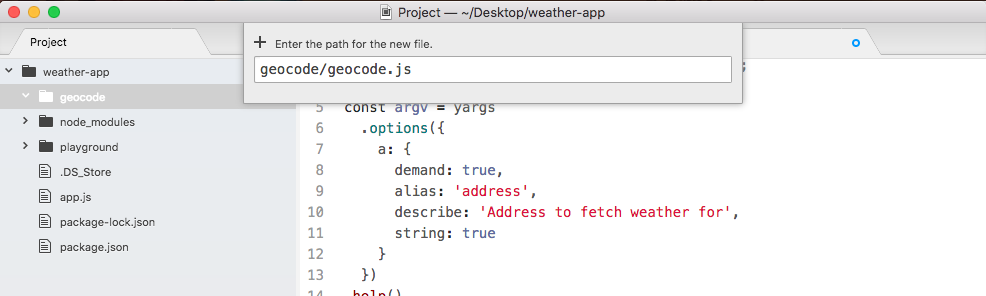
Now inside of geocode.js, we can get started by loading in request, let's make a constant called request, and we'll set it equal to require('request'):
const request = require('request');
Now we can go ahead and define the function responsible for geocoding, this one will be called geocodeAddress. We'll make a variable called geocodeAddress, setting it equal to an arrow function, and this arrow function will get an address argument past in:
var geocodeAddress = (address) => {

};
This is the plain text unencoded address. Now before we copy the code from app.js into this function body, we want to export our geocodeAddress function using module.exports, which we know as an object. Anything we put on module.exports object will be available to any files that require this file. In our case, we want to make a geocodeAddress property available, setting it equal to the geocodeAddress function that we defined in the preceding statement:
var geocodeAddress = (address) => {

};

module.exports.geocodeAddress = geocodeAddress;
Now it's time to actually copy all of the code from app.js in to geocode.js. We'll cut the request function code, move in to geocode.js, and paste it inside of the body of our function:
var geocodeAddress = (address) => {
  var encodedAddress = encodedURIComponent(argv.address);

  request({
    url: `https://maps.googleapis.com/maps/api/geocode/json?address=${encodedAddress}`,
    json: true
  }, (error, response, body) => {
    if (error) {
      console.log('Unable to connect Google servers.');
    } else if (body.status === 'ZERO_RESULTS') {
      console.log('Unable to find that address.');
    } else if (body.status === 'OK') {
      console.log(`Address: ${body.results[0].formatted_address}`);
      console.log(`Latitude: ${body.results[0].geometry.location.lat}`);
      console.log(`Longitude: ${body.results[0].geometry.location.lng}`);
    }
  });
};

module.exports.geocodeAddress = geocodeAddress;
The only thing we need to change inside of this code, is how we get the plaintext address. We no longer have that argv object, instead we get address passed in as an argument. The final code will look like the following code block:
const request = require('request');

var geocodeAddress = (address) => {
  var encodedAddress = encodedURIComponent(argv.address);

  request({
    url: `https://maps.googleapis.com/maps/api/geocode/json?address=${encodedAddress}`,
    json: true
  }, (error, response, body) => {
    if (error) {
      console.log('Unable to connect Google servers.');
    } else if (body.status === 'ZERO_RESULTS') {
      console.log('Unable to find that address.');
    } else if (body.status === 'OK') {
      console.log(`Address: ${body.results[0].formatted_address}`);
      console.log(`Latitude: ${body.results[0].geometry.location.lat}`);
      console.log(`Longitude: ${body.results[0].geometry.location.lng}`);
    }
  });
};

module.exports.geocodeAddress = geocodeAddress;
With this in place, we're now done with the geocode file. It contains all of the complex logic for making and finishing the request. Over at app.js, we can clean things up by removing some extra spaces, and removing the request module which is no longer used in this file. The final app.js file will look like the following code block:
const yargs = require('yargs');

const geocode = require('./geocode/geocode');

const argv = yargs
  .options({
    a: {
      demand: true,
      alias: 'address',
      describe: 'Address to fetch weather for',
      string: true
    }
  })
  .help()
  .alias('help', 'h')
  .argv;

geocode.geocodeAddress(argv.address);
Now at this point the functionality should be exactly the same. Inside of the Terminal, I'll go ahead and run a few to confirm the changes worked. We'll use the a flag to search for a zip code that does exist, something like 19147, and as shown, we can see the address, the latitude, and the longitude:

Now we'll swap out that zip code to one that does not exist, like 000000, when we run this through the geocoder, you can see Unable to find address prints to screen:

It means all of the logic inside of geocode.js is still working. Now the next step in the process is the process of adding a callback function to geocodeAddress.