
Now the reason this test is passing is not because the assertion in utils.test.js is valid. It's passing because we have an asynchronous action that takes 1 second. This function will return before the async callback gets fired. When I say function returning, I'm referring to the callback function, the second argument to it.
This is when Mocha thinks your test is done. This means that these assertions never run. The Mocha output has already said our test passes before this callback ever gets fired. What we need to do is tell Mocha this will be an asynchronous test that'll take time. To do this, all we do is we provide an argument inside the callback function we pass to it. We'll call this one done:
it('should async add two numbers', (done) => {
When we have the done argument specified, Mocha knows that means we have an asynchronous test and it'll not finish processing this test until done gets called. This means we can call done after our assertions:
it('should async add two numbers', (done) => {
  utils.asyncAdd(4, 3, (sum) => {
    expect(sum).toBe(10).toBeA('number');
    done();
  });
});
With this in place, our test will now run. The function will return right after it calls async.Add, but that's OK because we have done specified. About a second later, our callback function will fire. Inside the asyncAdd callback function, we'll make our assertions. This time the assertions will matter because we have done and we haven't called it yet. After the assertions we call done, this tells Mocha that we're all done with the test. It can go ahead and process the result, letting us know whether it passed or failed. This will fix that error.
If I save the file in this state, it'll rerun the tests and we'll see that our test should async.Add two numbers will indeed fail. Inside Terminal, let's open up the error message, we have Expected 7 to be 10:
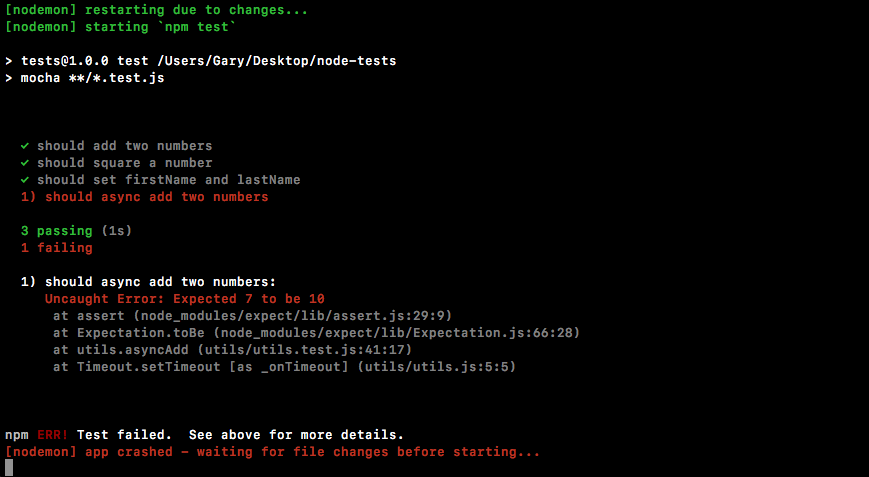
This is exactly what we thought would happen the first time around when we didn't use done, but as we can see, we do need to use done when we're doing something asynchronous inside of our tests.
Now we can change this expectation back to 7, save the file:
it('should async add two numbers', (done) => {
  utils.asyncAdd(4, 3, (sum) => {
    expect(sum).toBe(7).toBeA('number');
    done();
  });
});
This time around things should work as expected after 1 second delay as it runs this test:
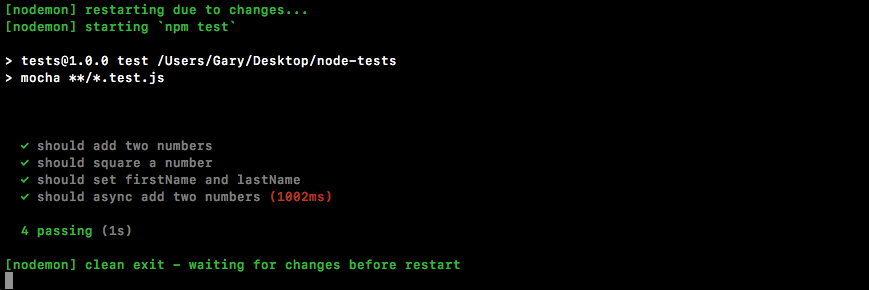
It can't report right away because it has to wait for done to get called. Notice that our total test time is now about a second. We can see that we have four tests passing. Mocha also warns us when a test takes a long time because it assumes that's not expected. Nothing inside Node, even a database or HTTP request, should take even close to a second, so it's essentially letting us know that there's probably an error somewhere inside of your function—it's taking a really, really long time to process. In our case though, the one second delay was clearly set up inside of utils so there's no need to worry about that warning.
With this in place, we now have a test for our very first asynchronous method. All we had to do is add a done as an argument and call it once we were done making our assertions.