
For now, we can move on to the final thing which is error. As I just mentioned, the status code can reveal that an error occurred, but this is going to be an error on the Google servers. Maybe the Google servers have a syntax error and their program is crashing, maybe the data that you sent is invalid, for example, you sent an address that doesn't exist. These errors are going to become evident via the status code.
What the error argument contains is errors related to the process of making that HTTP request. For example, maybe the domain is wrong: if I delete s and the dot with go in the URL, in our code, I get a URL that most likely doesn't exist:
const request = require('request');

request({
  url: 'https://mapogleapis.com/maps/api/geocode/json?address=1301%20lombard%20street%20philadelphia',
In this case, I'll get an error in the error object because Node cannot make the HTTP request, it can't even connect it to the server. I could also get an error if the machine I'm making the request from does not have access to the internet. It's going to try to reach out to the Google servers, it's going to fail, and we're going to get an error.
Now, we can check out the error object by deleting those pieces of text from the URL and making a request. In this case, I'll swap out response for error, as shown here:
const request = require('request');

request({
  url: 'https://mapogleapis.com/maps/api/geocode/json?address=1301%20lombard%20street%20philadelphia',
  json: true
}, (error, response, body) => {
  console.log(JSON.stringify(error, undefined, 2));
});
Now, inside the Terminal, let's rerun the application by running the node app.js command, and we can see exactly what we get back:
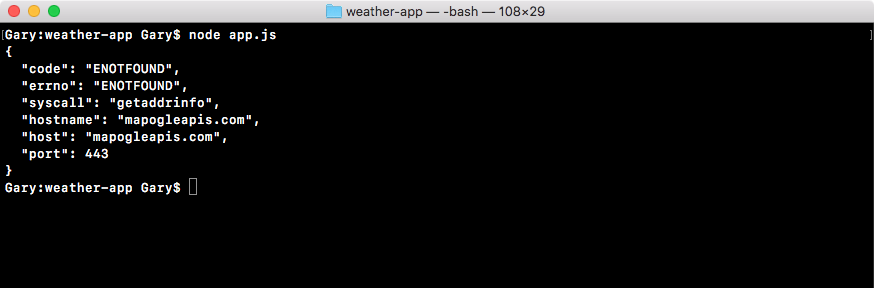
When we make the bad request, we get our error object printing to the screen, and the thing we really care about is the error code. In this case we have the ENOTFOUND error. This means that our local machine could not connect to the host provided. In this case mapogleapis.com, it doesn't exist so we'll get an error right here.
These are going to be the system errors, things such as your program not being able to connect to the internet or the domain not being found. This is also going to be really important when it comes to creating some error handling for our application there is a chance that the user's machine won't be connected to the internet. We're going to want to make sure to take the appropriate action and we'll do that depending on what is inside the error object.
If we can fix the URL, setting it back to maps.googleapis.com, and make the exact same request by using the up arrow key and the enter key, the request error object it's going to be empty, and you can see null print to the screen:

In this case, everything went great, there was no error, and it was able to successfully fetch the data, which it should be able to because we have a valid URL. That is a quick rundown of the body, the response, and the error argument. We will use them in more detail as we add error handling.