
Now aside from the success handler we used in the previous example, we can also add a call to catch, to let us catch all of the errors that might occur. We'll to get the error object as the one-and-only argument; then we can do something with that error object:
axios.get(geocodeUrl).then((response) => {
 console.log(response.data);
});catch((e) => {

});
Inside the function, we'll kick things off, using console.log to print the error argument:
}).catch((e) => {
 console.log(e)
});
Now let's simulate an error by removing the dot in the URL:
var encodedAddress = encodeURIComponent(argv.address);
var geocodeUrl = `https://mapsgoogleapis.com/maps/api/geocode/json?address=${encodedAddress}`;

axios.get(geocodeUrl).then((response) => {
   console.log(response.data);
}).catch((e) => {
   console.log(e)
});
We can see what happens when we rerun the program. Now I'm doing this to explore the axios library. I know exactly what will happen. This is not why I'm doing it. I'm doing it to show you how you should approach new libraries. When you get a new library, you want to play around with all the different ways it works. What exactly comes back in that error argument when we have a request that fails? This is important information to know; so when you write a real-world app, you can add the appropriate error handling code.
In this case, if we rerun the exact same command, we'll get an error:
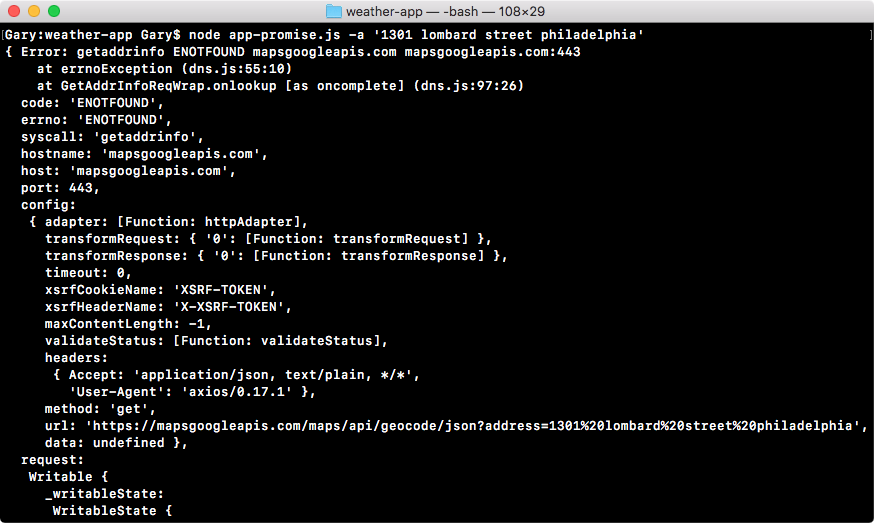
As you can see, there really is nothing to print on the screen. We have a lot of very cryptic error codes and even the errorMessage property, which usually contains something good or does not. Then we have an error code followed by the URL. What we want instead is print a plain text English message.
To do this, we'll use an if-else statement, checking what the code property is. This is the error code and in this case ENOTFOUND; we know it means that it could not connect to the server. In app-promise.js, inside the error handler, we can add this by having if and checking the condition:
}).catch((e) => {
 if (e.code === 'ENOTFOUND') {

}
If that is the case, we'll print some sort of custom message to the screen using console.log:
}).catch((e) => {
  if (e.code === 'ENOTFOUND') {
   console.log('Unable to connect to API servers.');
  }
  console.log(e);
 });
Now we have an error handler that handles this specific case. So we can remove our call to console.log:
axios.get(geocodeUrl).then((response) => {
  console.log(response.data);
}).catch((e) => {
  if (e.code === 'ENOTFOUND') {
    console.log('Unable to connect to API servers.');
 }
});
Now if we save the file, and rerun things from Terminal, we should get a much nicer error message printing to the screen:

This is exactly what we get: Unable to connect to API servers. Now I'll add that dot back in, so things start working. We can worry about the response that comes back.