
As you remember, inside the geocode file, there were some things we needed to do. We've already handled the error related to server connection, but there is still another error pending, that is, if the body.status property equals ZERO_RESULTS. We want to print an error message in that case.
To do this, we'll inside app-promise, create our very own error. We'll throw an error inside the axios.get function. This error will cause all of the code after it, not to run. It will move right into the error handler.
Now we only want to throw an error if the status property is set to ZERO_RESULTS. We'll add an if statement at the very top of the get function to check if (response.data.status) equals ZERO_RESULTS:
axios.get(geocodeUrl).then((response) => {
  if (response.data.status === 'ZERO_RESULTS') {

  }
If that is the case, then things went bad and we do not want to move on to make the weather request. We want to run our catch code we have. To throw a new error that our promise can catch, we'll use a syntax called throw new Error. This creates and throws an error letting Node know that something went wrong. We can provide our own error message, something that's readable to a user: Unable to find that address:
axios.get(geocodeUrl).then((response) => {
  if (response.data.status === 'ZERO_RESULTS') {
    throw new Error('Unable to find that address.');
  }
This is a message that'll let that user know exactly what went wrong. Now when this error gets thrown, the same catch code will run. Currently, we only have one if condition that checks whether the code property is ENOTFOUND. So we'll add an else clause:
axios.get(geocodeUrl).then((response) => {
 if (response.data.status === 'ZERO_RESULTS') {
   throw new Error('Unable to find that address.');
 }

 console.log(response.data);
}).catch((e) => {
 if (e.code === 'ENOTFOUND') {
   console.log('Unable to connect to API servers.');
 } else {

 }
});
Inside the else block, we can print the error message, which is the string we typed in the throw new Error syntax using the e. message property, as shown here:
axios.get(geocodeUrl).then((response) => {
 if (response.data.status === 'ZERO_RESULTS') {
   throw new Error('Unable to find that address.');
 }

 console.log(response.data);
}).catch((e) => {
  if (e.code === 'ENOTFOUND') {
   console.log('Unable to connect to API servers.');
 } else {
   console.log(e.message);
 }
});
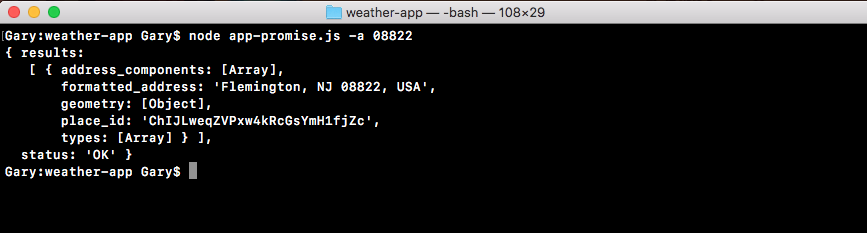
If the error code is not ENOTFOUND, we'll simply print the message to the screen. This will happen if we get zero results. So let's simulate that to make sure the code works. Inside Terminal, we'll rerun the previous command passing in a zip code. At first, we'll use a valid zip code, 08822 and we should get our data back. Then we'll use an invalid one: 00000.
When we run the request with a valid address, we get this:
When we run the request with the invalid address, we get the error:

By calling throw new Error, we're immediately stopping the execution of this function. So console.log with e.message never prints, which is exactly what we want. Now that we have our error handler in place, we can start generating that weather URL.