
To verify if handleSignup calls saveUser, inside app.test.js, we'll call it:
describe('App', () => {
  var db = {
    saveUser: expect.createSpy()
  };
  app.__set__('db', db);

  it('should call the spy correctly', () => {
    var spy = expect.createSpy();
    spy('Andrew', 25);
    expect(spy).toHaveBeenCalledWith('Andrew', 25);
  });

  it('should call saveUser with user object')
Then we can pass in our function, and this is what will actually run when the test gets executed, and there's no need to use any asynchronous done arguments. This will be a synchronous test for now:
  it('should call saveUser with user object', () => {

  });
Inside the callback function, we can come up with an email and a password that we'll pass in to handleSignup in db.js. We'll make a variable called email setting it equal to some email andrew@example.com, and we can do the same thing with the password, var password; we'll set that equal to 123abc:
  it('should call saveUser with user object', () => {
    var email = 'andrew@example.com';
    var password = '123abc';
  });
Next up, we will call handleSignup. This is the function we want to test. We'll call app.handleSignup, passing in our two arguments, email and password:
  it('should call saveUser with user object', () => {
    var email = 'andrew@example.com';
    var password = '123abc';

    app.handleSignup(email, password);
  });
Now at this point, handleSignup will get executed. This means that the code over here will run and it will fire db.saveUser, but db.saveUser is not the method in db.js; it's a spy instead, which means we can now use those assertions we just learned about.
Inside of the test case, we'll use expect to expect something about db; the variable .saveUser, which we set equal to a spy:
    app.handleSignup(email, password);
    expect(db.saveUser)
We'll call .toHaveBeenCalledWith with an object because that is what db.js should have been called with. We'll use that same ES6 shortcut: email, password:
    app.handleSignup(email, password);
    expect(db.saveUser).toHaveBeenCalledWith({email, password});
  });
This creates an email attribute set to the email variable, and a password attribute set to the password variable. With this in place, we can now save our test file, and in the Terminal we can restart the test-watch script by using the up arrow key twice to rerun our npm run test-watch command. This is going to kick off our test suite, starting up all of our tests:
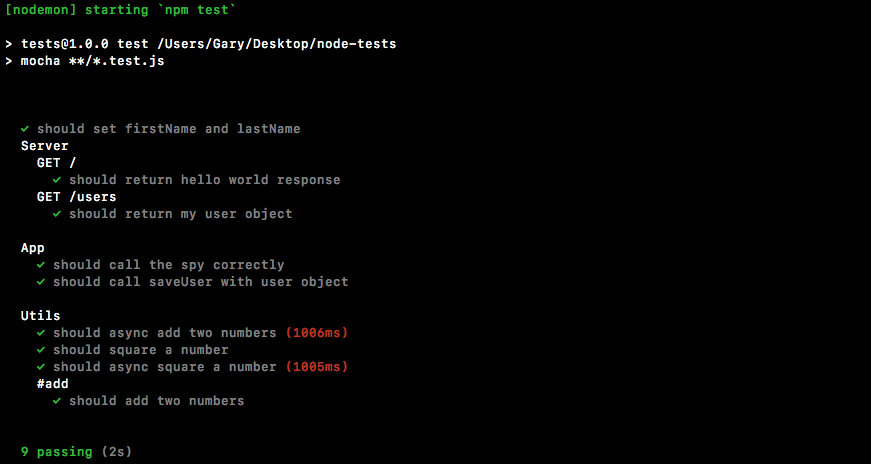
As shown in the previous screenshot, we see should call the spy correctly passes. Also, the test case we just created also passes. We can see should call saveUser with the user object, and this is fantastic. We now have a way to test pretty much anything inside Node. We can even test functions that call other functions, verifying that the communication happens as expected. All of this can be done using spies.