
Now what exactly will this look like? To show this, first we'll comment out all of the code we have in the newPromise variable of promise.js. Following this, we'll call the asyncAdd variable where we make asyncAdd. We'll call it like we would any other function, by passing in two values. Remember, this could be a database ID or anything else for an async function. In our case, it's just two numbers. Let's say, 5 and 7. Now the return value from this function is a promise. We can make a variable and call then on that variable, but we can also just tack the then method, as shown here:
asyncAdd(5, 7).then
This is exactly what we'll do when we use promises; we'll tack on then, passing in our callbacks. The first callback being the success case, and the second one being the error case:
ouldasyncAdd(5, 7).then(() => {
}, () => {

});
In the second callback, we'll get our errorMessage, which we can log to the screen using the console.log(errorMessage); statement, as shown here:
asyncAdd(5, 7).then(() => {

}, (errorMessage) => {
 console.log(errorMessage);
});
If one or more of the numbers are not actually numbers, the error function will fire because we called reject. If both are numbers, all we'll do will get the result and print it to the screen, using console.log. We'll add res and inside the arrow function (=>), we'll add the console.log statement and print the string Result with a colon. Then, as the second argument in console.log, we'll pass in the actual number, which will print it to the screen as well:
asyncAdd(5, 7).then(() => {
 console.log('Result:', res);
}, (errorMessage) => {
 console.log(errorMessage);
});
Now that we have our promise asyncAdd function in place, let's test this out inside Terminal. To do this, we'll run nodemon to start up nodemon playground/promise.js:
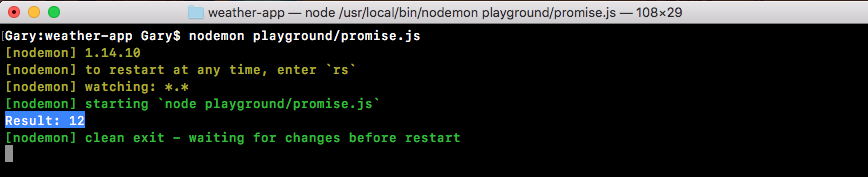
Right away, we'll get the delay and the result, 12 prints to the screen. This is fantastic! We are able to create the function that takes the dynamic input, but still returns a promise.
Now notice that we've taken an async function that usually requires callbacks and we've wrapped it to use promises. This is a good handy feature. As you start using promises in Node, you'll come to realize that some things do not support promises and you'd like them to. For example, the request library that we used to make our HTTP requests does not support promises natively. However, we can wrap our request call inside of a promise, which is what we'll to do later in the section. For now though, we have a basic example illustrating how this works. Next, we'd like to talk about promise chaining.