
First up in the server.js file down at the very bottom of the file, we have the port and our app.listen statically coded inside server.js:
app.listen(3000, () => {
  console.log('Server is up on port 3000');
});
We need to make this port dynamic, which means we want to use a variable. We'll be using an environment variable that Heroku is going to set. Heroku will tell your app which port to use because that port will change as you deploy your app, which means that we'll be using that environment variable so we don't have to swap out our code every time we want to deploy.
With environment variables, Heroku can set a variable on the operating system. Your Node app can read that variable and it can use it as the port. Now all machines have environment variables. You can actually view the ones on your machine by running the env command on Linux or macOS or the set command on Windows.
What you'll get when you do that is a really long list of key-value pairs, and this is all environment variables are:
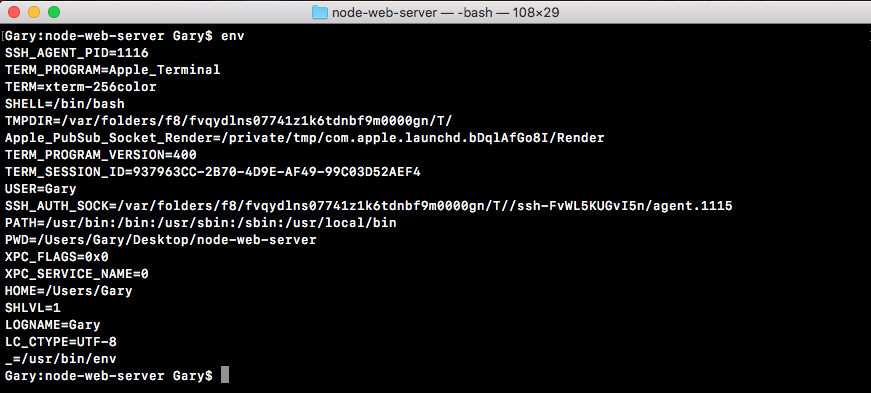
Here, we have a LOGNAME environment variable set to Andrew. I have a HOME environment variable set to my home directory, all sorts of environment variables throughout my operating system.
One of these that Heroku is going to set is called PORT, which means we need to go ahead and grab that port variable and use it in server.js instead of 3000. Up at the very top of the server.js file, we'd to make a constant called port, and this will store the port that we'll use for the app:
const express = require('express');.
const hbs = require('hbs');
const fs = require('fs');

const port
Now the first thing we'll do is grab a port from process.env. The process.env is an object that stores all our environment variables as key-value pairs. We're looking for one that Heroku is going to set called PORT:
const port = process.env.PORT;
This is going to work great for Heroku, but when we run the app locally, the PORT environment variable is not going to exist, so we'll set a default using the OR (||) operator in this statement. If process.env.port does not exist, we'll set port equal to 3000 instead:
const port = process.env.PORT || 3000;
Now we have an app that's configured to work with Heroku and to still run locally, just like it did before. All we have to do is take the PORT variable and use that in app.listen instead of 3000. As shown, I'm going to reference port and inside our message, I'll swap it out for template strings and now I can replace 3000 with the injected port variable, which will change over time:
app.listen(port, () => {
  console.log(`Server is up on port ${port}`);
});
With this in place, we have now fixed the first problem with our app. I'll now run node server.js from the Terminal, like we did in the previous chapter:
node server.js
We still get the exact same message: Server is up on port 3000, so your app will still works locally as expected:
