
Now, let's create some describe blocks in the server.test file. We'll create a route describe block called Server. Then we'll create describe blocks for both the route URL and for /users. We'll have GET/. That will have the test case in there, some test case. Then alongside //, we'll have GET /users, and that will have its own test case, some test case as explained in the comments next:
const request = require('supertest');
const expect = require('expect');

var app = require('./server').app;

// Server
  // GET /
    // some test case
  // GET / user
    // some test case
Now the test cases are obviously already defined. All we need to do is call describe three times to generate the previously explained structure.
We'll start with calling describe() once following the comments part, and this description will be for the route, so we'll call this one Server:
// Server
  // GET /
    // some test case
  // GET / user
    // some test case

  describe('Server')
This is going to contain all the tests in our server file. We can add the callback function next and we can move on:
describe('Server', () => {

})
Next up, we'll call describe again. This time we're creating a describe block for tests that test the GET / route and add the callback function:
describe('Server', () => {

  describe('GET /', () => {

  })

})
Now we can simply take our test, cut it out, and paste it right inside the describe callback. The resultant code is going to look like this:
describe('Server', () => {

  describe('GET /', () => {
    it('should return hello world response', (done) => {
      request(app)
        .get('/')
        .expect(404)
        .expect((res) => {
          expect(res.body).toInclude({
            error: 'Page not found.'
          });
        })
        .end(done);
    });
  });

})
Next up, we'll call describe the third time. We'll be calling describe passing in as the description GET /users:
describe('GET /users')
We'll have our callback function as always and then we can copy and paste our test right inside:
  describe('GET /users'), () => {
    it('should return my user object', (done) => {
      request(app)
        .get('/users')
        .expect(200)
        .expect((res) => {
          expect(res.body).toInclude({
            name: 'Andrew',
            age: 25
          });
        })
        .end(done);
    });
  });
With this in place, we are now done. We have a much better structure for our tests and when we rerun the test suite by saving the file, we'll be able to see that in the Terminal:
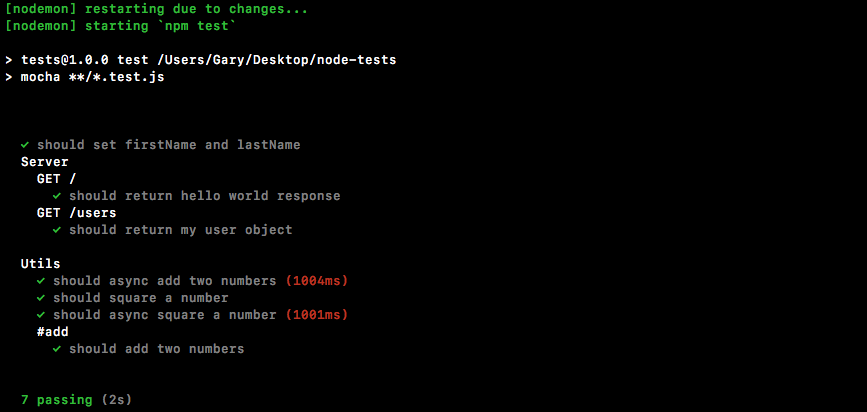
As shown in the previous code, we have a much more scannable test suite. We can see our server tests right away. We can create groups of tests for each feature. Since we have static data right now, we really don't need more than one test per feature. But down the line, we will have multiple tests for each of our HTTP requests, so it's a good idea to get into that habit of creating describe blocks early. And that's it for this one!