
Now let's wrap up this section with some more testing. Over in utils.js, we can make a new function, one that we'll be testing, module.exports.setName. The setName function is will take two arguments. It'll take a user object, some fictitious user object with some generic properties, and it'll take fullName as a string:
module.exports.add = (a, b) => a + b;

module.exports.square = (x) => x * x;

module.exports.setName (user, fullName)
The job of setName will be to rip apart fullName into two parts—the first name and the last name—by splitting it on the space. We'll set the two properties, first name and last name, and return the user object. We'll fill out the function then we'll write the test case.
The first thing we'll do is split the name into a names array, var names will be that array:
module.exports.add = (a, b) => a + b;

module.exports.square = (x) => x * x;

module.exports.setName (user, fullName) => {
  var names
};
It'll have two values, assuming there's only one space inside of the name. We're assuming someone types their first name, hits a space, and types their last name. We'll set this equal to fullName.split and we'll split on the space. So I'll pass in an empty string with a space inside it as the value to split:
module.exports.add = (a, b) => a + b;

module.exports.square = (x) => x * x;

module.exports.setName (user, fullName) => {
  var names = fullName.split(' ');
};
Now we have a names array where the first item is the firstName and the last item is the lastName. So we can start updating the user object. user.firstName will equal the first item in the names array and we'll grab the index of 0, which is the first item. We'll do something similar for last name, user.lastName equals the second item from the names array:
module.exports.add = (a, b) => a + b;

module.exports.square = (x) => x * x;

module.exports.setName (user, fullName) => {
  var names = fullName.split(' ');
  user.firstName = names[0];
  user.lastName = names[1];
};
Now we're all done, we have the names set, and we can return the user object using return user, just like this:
module.exports.add = (a, b) => a + b;

module.exports.square = (x) => x * x;

module.exports.setName (user, fullName) => {
  var names = fullName.split(' ');
  user.firstName = names[0];
  user.lastName = names[1];
  return user;
};
Inside the utils.test file, we can now kick things off. First, we'll comment out our it('should expect some values') handler:
const expect = require('expect');

const utils = require('./utils');

it('should add two numbers', () => {
  var res = utils.add(33, 11);

  expect(res).toBe(44).toBeA('number');
});

it('should square a number', () => {
  var res = utils.square(3);

  expect(res).toBe(9).toBeA('number');
});

// it('should expect some values', () => {
//   // expect(12).toNotBe(12);
//   // expect({name: 'andrew'}).toNotEqual({name: 'Andrew'});
//   // expect([2,3,4]).toExclude(1);
//   expect({
//      name: 'Andrew',
//      age: 25,
//      location: 'Philadelphia'
//    }).toExclude({
//      age: 23
//    })
//  });
This is pretty great for documentation. You can always explore it later if you forget how things work. We'll create a new test that should verify first and last names are set.
We'll create a user object. On that user object, we want to set some properties such as age and location. Then we'll pass the variable user into the setName method. That'll be the first argument defined in the utils.js file. We'll pass in a string. The string with firstName followed by a space followed by lastName. Then we'll get the result back and we'll make some assertions about it. We want to assert the returning object includes using the toInclude assertion.
As shown in the following code, we'll call it to make the new test case. We'll be testing:
it('should set firstName and lastName')
Inside it, we can now provide our second argument, which will be our callback function. Let's set that to an arrow function (=>) and now we can make the user object:
it('should set firstName and lastName', () => {

});
The user object will have a few properties. Let's add something like location, setting that equal to Philadelphia, and then set an age property, setting that equal to 25:
it('should set firstName and lastName', () => {
  var user = {location: 'Philadelphia', age: 25};
});
Now we'll call the method we defined over in utils.js, the setName method. We'll do that on the next line, creating a variable called res to store the response. Then we'll set that equal to utils.setName passing in the two arguments, the user object and fullName, Andrew Mead:
it('should set firstName and lastName', () => {
  var user = {location: 'Philadelphia', age: 25};
  var res = utils.setName(user, 'Andrew Mead');
});
Now at this point, the result should be what we expect. We should have the firstName and lastName properties. We should have the location property and the age property.
Now if you know a lot about JavaScript, you might know that objects are passed by reference, so the user variable has actually been updated as well. That is expected. Both user and res will have the exact same value. We can actually go ahead and prove that using an assertion. We'll expect that user equals using toEqual the res:
it('should set firstName and lastName', () => {
  var user = {location: 'Philadelphia', age: 25};
  var res = utils.setName(user, 'Andrew Mead');

  expect(user).toEqual(res);
});
Inside Terminal, we can see the test does indeed pass:
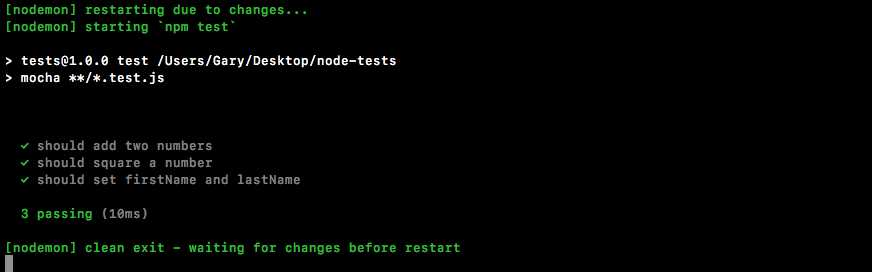
Let's delete expect(user).toEqual(res);. Now, we want check if the user object or the res object includes certain properties. We'll check using expect that the res variable has some properties using toInclude:
it('should set firstName and lastName', () => {
  var user = {location: 'Philadelphia', age: 25};
  var res = utils.setName(user, 'Andrew Mead');

  expect(res).toInclude({

  })
});
The properties we're looking for are firstName equal to what we would expect that to be, Andrew, and lastName equal to Mead:
it('should set firstName and lastName', () => {
  var user = {location: 'Philadelphia', age: 25};
  var res = utils.setName(user, 'Andrew Mead');

  expect(res).toInclude({
    firstName: 'Andrew',
    lastName: 'Mead'
  })
});
These are the assertions that should be made in order to verify that setName is working as expected. If I save the file, the test suite reruns and we do indeed get the passing tests as shown here:
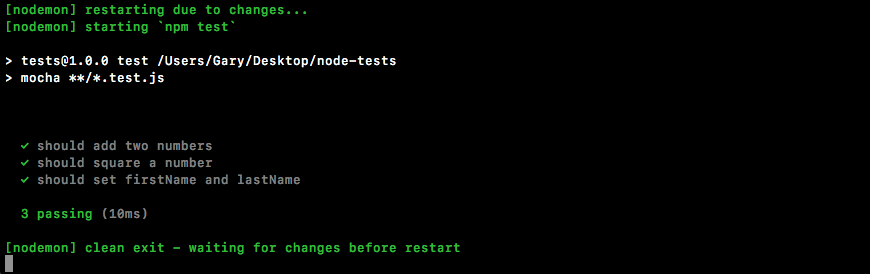
We have three of them and it took just 10 milliseconds to run.
And with this in place, we now have an assertion library for our test suite. That's fantastic because writing test cases just got way easier, and the whole goal of the chapter is to make testing approachable and easy.
In the next section, we'll start looking at how we can test more complex asynchronous functions.