
In this section, we will learn how to use describe(). describe is a function injected into our test files, just like the it function is. It comes from mocha and it's really fantastic. Essentially, it lets us group tests together. That makes it a lot easier to scan the test output. If we run our npm test command in the Terminal, we get our tests:
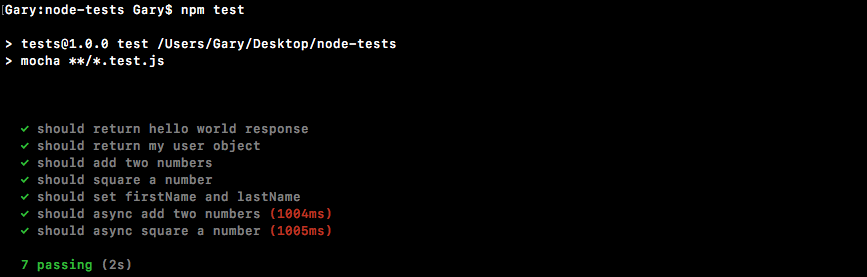
We have seven tests and currently they're all grouped together. It's really hard to look for the tests in the utils file and it's impossible to find the tests for asyncAdd without scanning all of the text. What we'll do is call describe(). This will let us make groups of tests. We can give that group a name. It will make our test output much more readable.
In the utils.test.js file, right after the utils constant, we'll call describe():
const expect = require('expect');

const utils = require('./utils');

describe()
The describe object takes two arguments, just like it. The first one is the name and the other is the callback function. We'll use Utils. This will be the describe block that contains all of the tests in the utils.test file. Then we'll provide the function. This is the callback function:
describe('Utils', () => {

});
Inside the callback function, we'll be defining tests. Any test defined in the callback function will be a part of the utils block. That means we can take our existing tests, cut them out of the file, paste them in there, and we'll have a describe block called utils with all of the tests for this file. So, let's do just that.
We'll grab all the tests, excluding the ones that are just playground tests where we play around with various expect functionality. We'll then paste them right into the callback function. The resultant code is going to look like this:
describe('Utils', () => {
  it('should add two numbers', () => {
    var res = utils.add(33, 11);

    expect(res).toBe(44).toBeA('number');
  });

  it('should async add two numbers', (done) => {
    utils.asyncAdd(4, 3, (sum) => {
      expect(sum).toBe(7).toBeA('number');
      done();
    });
  });

  it('should square a number', () => {
    var res = utils.square(3);

    expect(res).toBe(9).toBeA('number');
  });

  it('should async square a number', (done) => {
    utils.asyncSquare(5, (res) => {
      expect(res).toBe(25).toBeA('number');
      done();
    });
  });
});
These are four tests for add, asyncAdd, square, and asyncSquare respectively. Now we'll save the file and we can start up the test-watch script from the Terminal and check the output:
npm run test-watch
The script will start and run through our tests, and as shown in the following screenshot, we'll have different outputs:
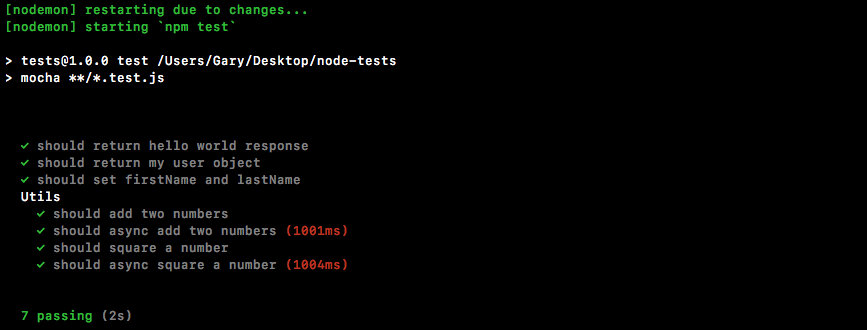
We have a Utils section and under Utils, we have all of the tests in that describe block. This makes reading and scanning your tests much, much easier. We can do the same thing for the individual methods.