
In order to create an app, all we have to do is call the method. Next to the variable app we can start setting up all of our HTTP route handlers. For example, if someone visits the root of the website we're going to want to send something back. Maybe it's some JSON data, maybe it's an HTML page.
We can register a handler using app.get function. This will let us set up a handler for an HTTP get request. There are two arguments we have to pass into app.get:
- The first argument is going to be a URL
- The second argument is going to be the function to run; the function that tells Express what to send back to the person who made at the request
In our case we're looking for the root of the app. So we can just use forward slash (/) for the first argument. In the second argument, we'll use a simple arrow function (=>) as shown here:
const express = require('express');

var app = express();

app.get('/', (req, res) => {

};
Now the arrow function (=>) will get called with two arguments. These are really important to how Express works:
- The first argument is request (req) stores a ton of information about the request coming in. Things like the headers that were used, any body information, or the method that was made with a request to the path. All of that is stored in request.
- The second argument, respond (res), has a bunch of methods available so we can respond to the HTTP request in whatever way we like. We can customize what data we send back and we could set our HTTP status codes.
We'll explore both of these in detail. For now though, we'll use one method, res.send. This will let us respond to the request, sending some data back. In app.get function, let's call res.send, passing in a string. In the parenthesis we'll add Hello Express!:
app.get('/', (req, res) => {
  res.send('Hello Express!');
});
This is the response for the HTTP request. So when someone views the website they will see this string. If they make a request from an application, they will get back Hello Express! as the body data.
Now at this point we're not quite done. We have one of our routes set up, but the app is never going to actually start listening. What we need to do is call app.listen. The app.listen function will bind the application to a port on our machine. In this case for our local host app, we will use port 3000, a really common port for developing locally. Later in the chapter, we'll talk about how to customize this depending on whatever server you use to deploy your app to production. For now though, a number like 3000 works:
app.get('/', (req, res) => {
  res.send('Hello Express!');
});

app.listen(3000);
With this in place we are now done. We have our very first Express server. We can actually run things from the Terminal, and view it in the browser. Inside the Terminal, we'll use nodemon server.js to start up our app:
nodemon server.js
This will start up the app and you'll see that the app never really finishes as shown here:

Right now it's hanging. It's waiting for requests to start coming in. The apps that use app.listen, they will never stop. You'll have to shut them down manually with control + C, like we've done before. It might crash if you have an error in your code. But it'll never stop normally, since we have that binding set up here. It will listen to requests until you tell it to stop.
Now that the server is up, we can move into the browser and open up a new tab visiting the website, localhost: followed by the port 3000:
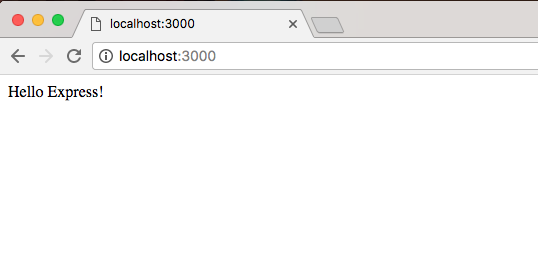
This will load up the root of the website, and we specify the handler for that route. Hello Express! shows up, which is exactly what we expected. Now there's no thrills. There's no formatting. We're just sending a string from the server back to the client that made the request.