
Now, we'll create a new function that squares a number and returns the result. We'll define that in the utils.js file using module.exports.square. We'll set that equal to an arrow function (=>) that takes in one number, x, and we'll return x times x, x * x, just like this:
module.exports.add = (a, b) => a + b;

module.exports.square = (x) => x * x;
Now we have this brand new function square and we'll create a new test case that makes sure square works as expected. In utils.test.js, next to the if condition for add function, we'll call the it function again:
const utils = require('./utils');

it('should add two numbers', () => {
  var res = utils.add(33, 11);

  if (res != 44){
    throw new Error(`Expected 44, but got ${res}.`);
  }
});

it();
Inside the it function, we'll add our two arguments, the string, and the callback function. Inside the string, we'll create our message, should square a number:
it('should square a number', () => {

});
And inside the callback function, we can actually go ahead and call square. Now we do want to create a variable to store the result so we can check that the result is what we expect it to be. Then we can call utils.square passing in a number. I'll go with 3 in this case, which means I should expect 9 to come back:
it('should square a number', () => {
  var res = utils.square(3);
});
In the next line, we can have an if statement, if the result does not equal 9, then we'll throw a message because things went wrong:
it('should square a number', () => {
  var res = utils.square(3);

  if (res !== 9) {

  }
});
We can throw an error using throw new Error, passing in whatever message we like. We can use a regular string, but I always prefer using a template string so we can inject values easily. I'll say something like Expected 9, but got, followed by the value that's not correct; in this case, that's stored in the response variable:
it('should square a number', () => {
  var res = utils.square(3);

  if (res !== 9) {
    throw new Error(`Expected 9, but got ${res}`);
  }
});
Now I can save this test case and run the test suite from the Terminal. Using the up arrow key and the enter key, we can rerun the last command:
npm test
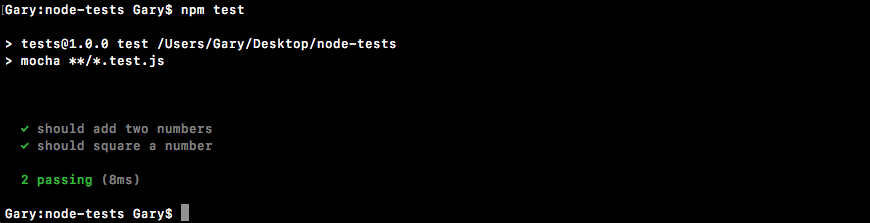
We get two tests passing, should add two numbers and should square a number both have checkmarks next to them. And we ran both tests in just 14 milliseconds, which is fantastic.
Now the next thing, we want to do is mess up the square function to make sure our test fails when the number is not correct. I'll add 1 on to the result in utils.js, which will cause the test to fail:
module.exports.add = (a, b) => a + b;

module.exports.square = (x) => x * x + 1;
Then we can rerun things from the Terminal and we should see the error message:
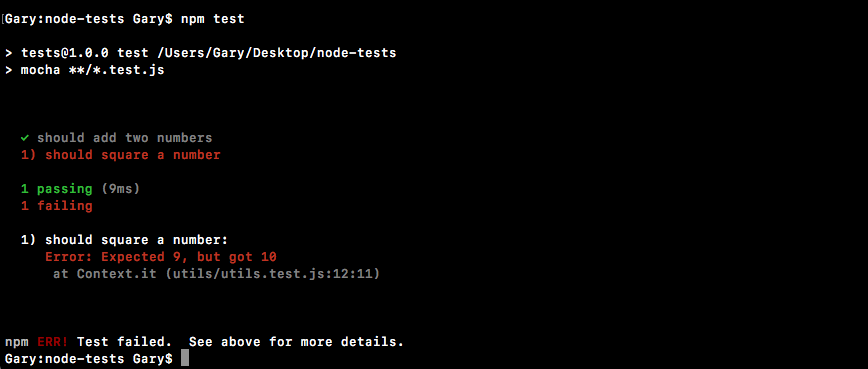
We get Expected 9, but got 10. This is fantastic. We now have a test suite capable of testing both the add function and the square function. I'll remove that + 1, and we are done.
We now have a very, very basic test suite that we can execute with Mocha. Currently, we have two tests and to create those tests we used the it method provided by Mocha. In the upcoming sections, we'll be exploring more methods that Mocha gives us and we'll also be looking at better ways to do our assertions. Instead of manually creating them, we'll be using an assertion library to help with the heavy lifting.