
Regular functions, like sayHiAlt, are going to have an arguments array that's accessible inside of the function:
var user = {
  name: 'Andrew',
  sayHi: () => {
    console.log(`Hi. I'm ${this.name}`);
  },
  sayHiAlt() {
    console.log(arguments);
    console.log(`Hi. I'm ${this.name}`);
  }
};
user.sayHiAlt();
Now, it's not an actual array, it's more like an object with array; like properties, but the arguments object is indeed specified in a regular function. If I pass in one, two, and three and save the file, we'll get that back when we log out arguments:
var user = {
  name: 'Andrew',
  sayHi: () => {
    console.log(`Hi. I'm ${this.name}`);
  },
  sayHiAlt() {
    console.log(arguments);
    console.log(`Hi. I'm ${this.name}`);
  }
};
user.sayHiAlt(1, 2, 3);
Inside nodemon, it's taking a quick second to restart, and right here we have our object:

We have one, two, and three, we have the index for each as the property name, and this works because we're using a regular function. If we were to switch to the arrow function (=>) though, it is not going to work as expected.
I'll add console.log(arguments) inside of my arrow function (=>), and I'll switch from calling sayHiAlt back to the original method sayHi, as shown here:
var user = {
  name: 'Andrew',
  sayHi: () => {
    console.log(arguments);
    console.log(`Hi. I'm ${this.name}`);
  },
  sayHiAlt() {
    console.log(arguments);
    console.log(`Hi. I'm ${this.name}`);
  }
};
user.sayHi(1, 2, 3);
When I save the file in arrow-function.js, we'll get something a lot different from what we had before. What we'll actually get is the global arguments variable, which is the arguments variable for that wrapper function we explored:
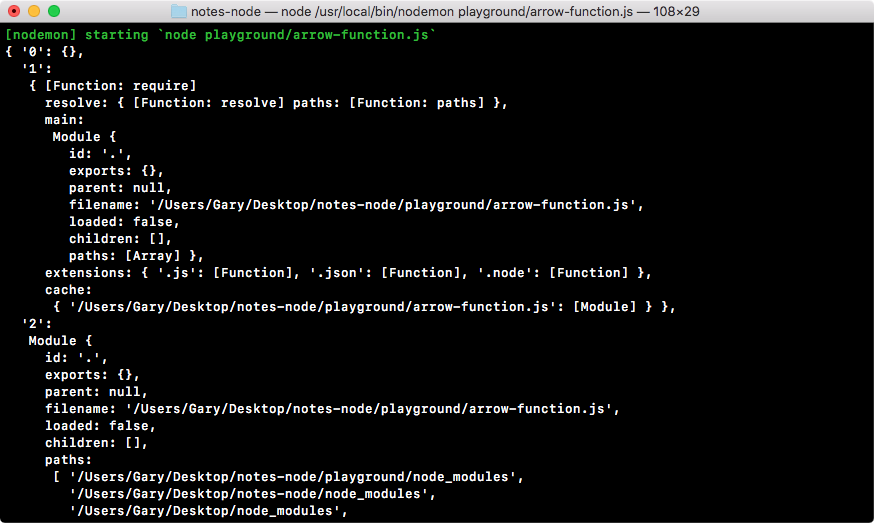
In the previous screenshot, we have things like the require function, definition, our modules object, and a couple of string paths to the file and to the current directory. These are obviously not what we're expecting, and that is another thing that you have to be aware of when you're using arrow functions; you're not going to get the arguments keyword, you're not going to get the this binding (defined in sayHi syntax) that you'd expect.
These problems mostly arise when you try to create methods on an object and use arrow functions. I would highly recommend that you switch to sayHiAlt syntax which we discussed, in those cases. You get a simplified syntax, but you also get the disk binding and you get your arguments variable as you'd expect.