
To get started, we'll return a call to axios.get, passing in the URL. We just defined that, it is weatherUrl:
 var lat = response.data.results[0].geometry.location.lat;
 var lng = response.data.results[0].geometry.location.lng;
 var weatherUrl = `https://api.forecast.io/forecast/4a04d1c42fd9d32c97a2c291a32d5e2d/${lat},${lng}`;
 console.log(response.data.results[0].formatted_address);
 return axios.get(weatherUrl);
Now that we have this call returning, we can attach another then call right between our previous then call and catch call, by calling then, passing in one function, just like this:
 return axios.get(weatherUrl);
}).then(() => {

}).catch((e) => {
 if (e.code === 'ENOTFOUND') {
This function will get called when the weather data comes back. We'll get that same response argument, because we're using the same method, axios.get:
}).then((response) => {
Inside the then call, we don't have to worry about throwing any errors, since we never needed to access a body property in order to check if something went wrong. With the weather request if this callback runs, then things went right. We can print the weather information. In order to get that done, we'll make two variables:
- temperature
- apparentTemperature
The temperature variable will get set equal to response.data. Then we'll access that currently property. Then we'll access temperature. We'll pull out the second variable, the actual temperature or apparentTemperature, which is the property name, var apparentTemperature. We'll be setting this equal to response.data.currently.apparentTemperature:
}).then((response) => {
 var temperature = response.data.currently.temperature;
 var apparentTemperature = response.data.currently.apparentTemperature;
Now that we have our two things pulled out into variables, we can add those things inside of a call, console.log. We chose to define two variables, so that we don't have to add the two really long property statements to console.log. We can simply reference the variables. We'll add console.log and we'll use template strings in the console.log statement, so that we can inject the previous mentioned two values inside of quotes: It's currently, followed by temperature. Then we can add a period, It feels like, followed by apparentTemperature:
}).then((response) => {
 var temperature = response.data.currently.temperature;
 var apparentTemperature = response.data.currently.apparentTemperature;
 console.log(`It's currently ${temperature}. It feels like ${apparentTemperature}.`);
Now that we have our string printing to the screen, we can test that our app works as expected. We'll save the file and inside Terminal, we'll rerun the command from two commands ago where we had a valid zip code:
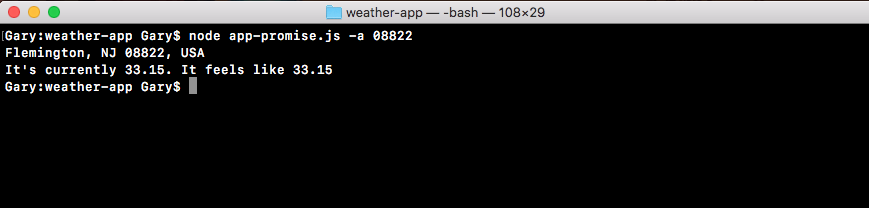
When we run this, we get the weather info for Flemington, New Jersey. It's currently 84 degrees, but it feels like 90. If we run something that has a bad address, we do get the error message:

So everything looks great! Using the axios library, we're able to chain promises like the app-promise without needing to do anything too crazy. The axios get method returns a promise, so we can access it directly using then.
In the code, we use then once to do something with that geolocation data. We print the address to the screen. Then we return another promise, where we make the request for the weather. Inside of our second then call, we print the weather to the screen. We also added a catch call, which will handle any errors. If anything goes wrong with either of our promises, or if we throw an error, catch will get fired printing the messages to the screen.
This is all it takes to use axios and set up promises for your HTTP requests. Now one reason people love promises over traditional callbacks is that instead of nesting we can simply chain. So our code doesn't get indented to crazy levels. As we saw in app.js in the previous chapter, we went a few indentation levels deep just to add two calls together. If we needed to add a third it would have gotten even worse. With promises, we can keep everything at the same level, keeping our code a lot easier to maintain.