
To print the message to a file, let's load in fs up in the server.js file. We'll create a constant. Call that const fs and set that equal to the return result from requiring the module:
const express = require('express');
const hbs = require('hbs');
const fs = require('fs');
Now we can implement this down following in the app.use. We'll take our template string, which is currently defined inside console.log. We'll cut it out and instead store in a variable. We'll make a variable called log, setting it equal to that template string as shown here:
app.use((req, res, next) => {
  var now = new Date().toString();
  var log = `${now}: ${req.method} ${req.url}`;

  console.log();
  next();
});
Now we can pass that log variable into both console.log and into an fs method to write to our file system. For console.log, we will call log like this:
console.log(log);
For fs, I'll call fs.appendFile. Now as you remember, appendFile lets you add on to a file. It takes two arguments: the file name and the thing we want to add. The file name we'll use is server.log. We'll create a nice log file and the actual contents will just be the log message. We will need to add one more thing: we also want to move on to the next line after every single request gets logged, so I'll concatenate the new line character, which will be \n:
fs.appendFile('server.log', log + '\n');
fs.appendFile('server.log', log + '\n', (err) => {
if (err) {
console.log('Unable to append to server.log.')
}
});
If you don't have a callback function, you'll get a deprecation warning over inside the console. Now as you can see, our callback function here takes an error argument. If there is an error, we just print a message to the screen. If you change your line to look like this, regardless of your Node version, you'll be future proof. If you're on Node V7 or greater, the warning in the console will go away. Now the warning is going to say something such as deprecation warning. Calling an asynchronous function without callback is deprecated. If you see that warning, make this change.
Now that we have this in place, we can test things out. I save the file, which should be restarting things inside of nodemon. Inside Chrome, we can give the page a refresh. If we head back into the Terminal, we do still get my log, which is great:

Notice we also have a request for a favicon.ico. This is usually the icon that's shown in the browser tab. I have one cached from a previous project. There actually is no icon file defined, which is totally fine. The browser still makes the request anyway, which is why that shows up as shown in the previous code snippet.
Inside Atom, we now have our server.log file, and if we open it up, we have a log of all the requests that were made:
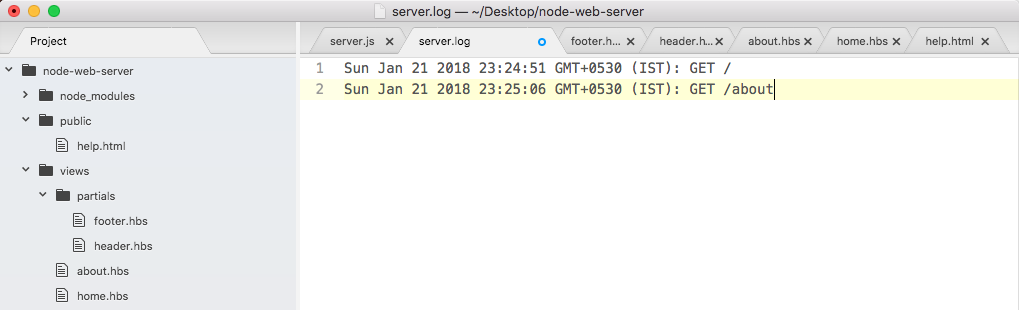
We have timestamps, HTTP methods, and paths. Using app.use, we were able to create some middleware that helps us keep track of how our server is working.
Now there are times where you might not want to call next. We learned that we could call next after we do something asynchronous, such as a read from a database, but imagine something goes wrong. You can avoid calling next to never move on to the next piece of middleware. We would like to create a new view inside the views folder. We'll call this one maintenance.hbs. This will be a handlebars template that will render when the site is in maintenance mode.