
A partial is a partial piece of your website. It's something you can reuse throughout your templates. For example, we might have a footer partial that renders the footer code. You can include that partial on any page you need a footer. You could do the same thing for header. In order to get started, the first thing we need to do is set up our server.js file just a little bit to let handlebars know that we want to add support for partials.
In order to do this, we'll add one line of code in the server.js file where we declared our view engine previously, and it will look something like this (hbs.registerPartials):
hbs.registerPartials
app.set('view engine', 'hbs');
app.use(express.static(__dirname + '/public'));
Now registerPartials is going to take the directory you want to use for all of your handlebar partial files, and we'll be specifying that directory as the first and only argument. Once again, this does need to be the absolute directory, so I'll use the __dirname variable:
hbs.registerPartials(__dirname)
Then we can concatenate the rest of the path, which will be /views. In this case, I want you to use /partials.
hbs.registerPartials(__dirname + '/views/partials')
We'll store our partial files right inside a directory in the views folder. Now we can create that folder right in views called partials.
Inside partials, we can put any of the handlebars partials we like. To illustrate how they work, we'll create a file called footer.hbs:
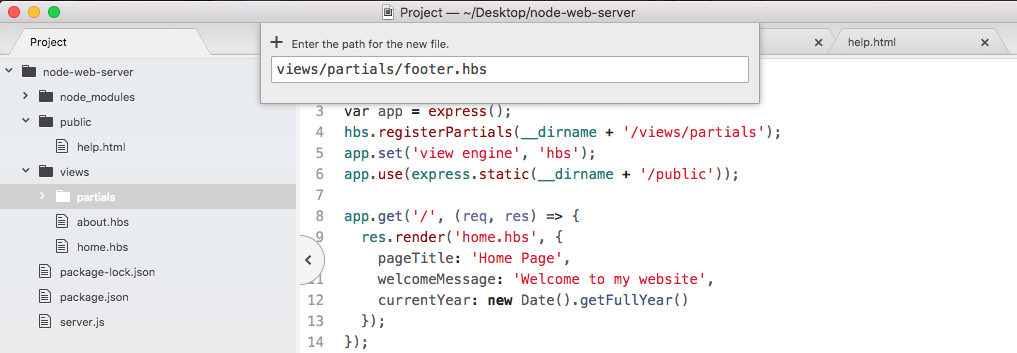
Inside footer.hbs, we'll have access to the same handlebars features, which means we can write some markup, we can inject variables, we can do whatever we like. For now, what we'll do is copy the footer tag exactly, pasting it inside footer.hbs:
<footer>
  <p>Copyright {{getCurrentYear}}</p>
</footer>
Now we have our footer.hbs file, this is the partial and we can include it in both about.hbs and home.hbs. In order to do that, we'll delete the code that we already have in the partial and we'll replace it with opening and closing two curly braces. Now instead of injecting data, we want to inject a template and the syntax for that is to add a greater than symbol with a space, followed by the partial name. In our case that partial is called footer, so we can add this right here:
    {{> footer}}
  </body>
</html>
Then I can save about and do the same thing over in home.hbs. We now have our footer partial. It's rendering on both pages.