
While working on this chapter's examples, you might have noticed that we cannot even start an edit session on our GeoNames layer. Why do different vector data types act differently? The answer is simple and it can be found in the implementation details. Every GIS software has to decide at one point how to handle vector data. They can build some kind of internal structure, read to and write from this structure, and handle every kind of vector data consistently during the workflow. This is one popular option. GRASS GIS does exactly this, additionally materializing this internal structure to make other processes more consistent and efficient.
QGIS, on the other hand, strives for extensibility and modularity before consistency. It utilizes one of the greatest features of object-oriented programming, polymorphism, to achieve this goal. It has a template class called qgsVectorDataProvider on which different data providers can implement their format-specific functionality. QGIS only communicates with this class, which can tell it the exact capabilities of the given implementation. For example, Shapefiles, among a lot of other vector formats, are handled by qgsOgrProvider, which can communicate with GDAL/OGR (Geospatial Data Abstraction Library), a library capable of reading and writing an excessive number of raster and vector formats. This way, this provider grants the capability of editing the given layer in place; therefore, we can start an edit session in QGIS. On the other hand, qgsDelimitedTextProvider doesn't offer the capabilities for editing the layer in any way; therefore, we cannot start an edit session until we change our layer's format to something more capable:
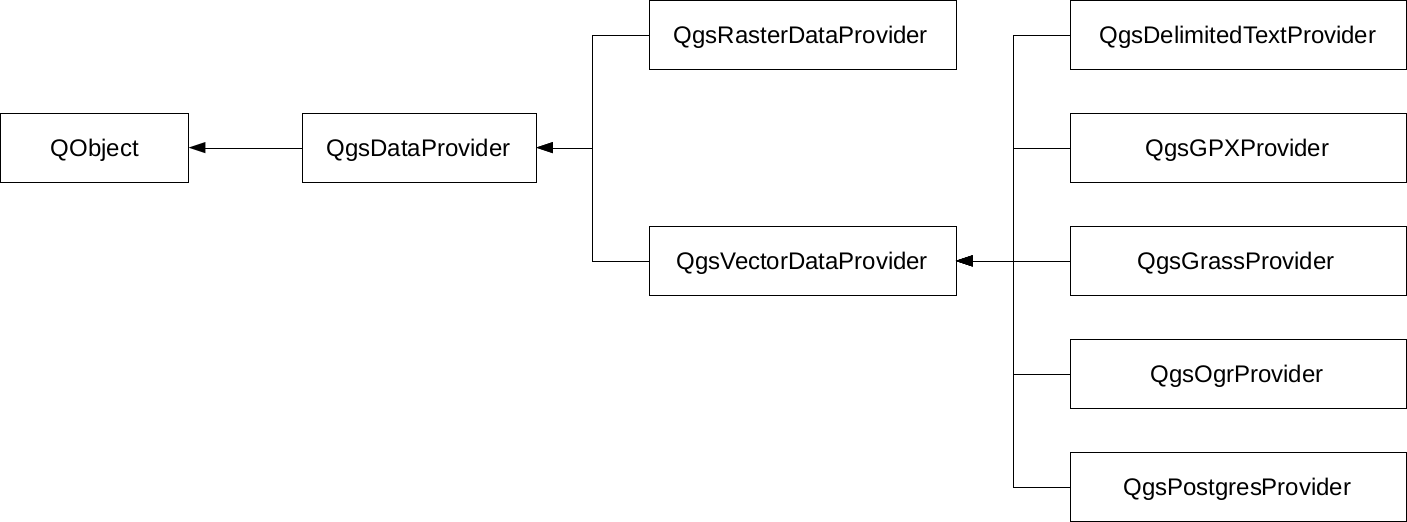
Of course, the preceding diagram only shows a few of the numerous providers that QGIS offers on the source code level. What can we do when we must edit a layer provided by an incapable vector provider? The answer is very simple--in spite of the capabilities of the given provider, once a vector layer is opened, QGIS can export it to any other supported format. Additionally, if we don't have to edit geometries, just add a few columns; QGIS has a concept for this which is called virtual fields. When we were in the field calculator, we saw an option of creating a virtual field. This is a pure QGIS concept with which we can add additional attributes on top of the existing ones in memory. Of course, we have to save the project if we would like to preserve them, or export the layer if we would like to materialize them.