
Table of Contents for
Practical GIS

Version ebook / Retour

Cover image for bash Cookbook, 2nd Edition Practical GIS by Gábor Farkas Published by Packt Publishing, 2017
  1. Practical GIS
  2. Title Page
  3. Copyright
  4. Credits
  5. About the Author
  6. About the Reviewer
  7. www.PacktPub.com
  8. Customer Feedback
  9. Dedication
  10. Table of Contents
  11. Preface
  12. What this book covers
  13. What you need for this book
  14. Who this book is for
  15. Conventions
  16. Reader feedback
  17. Customer support
  18. Downloading the example code
  19. Downloading the color images of this book
  20. Errata
  21. Piracy
  22. Questions
  23. Setting Up Your Environment
  24. Understanding GIS
  25. Setting up the tools
  26. Installing on Linux
  27. Installing on Windows
  28. Installing on macOS
  29. Getting familiar with the software
  30. About the software licenses
  31. Collecting some data
  32. Getting basic data
  33. Licenses
  34. Accessing satellite data
  35. Active remote sensing
  36. Passive remote sensing
  37. Licenses
  38. Using OpenStreetMap
  39. OpenStreetMap license
  40. Summary
  41. Accessing GIS Data With QGIS
  42. Accessing raster data
  43. Raster data model
  44. Rasters are boring
  45. Accessing vector data
  46. Vector data model
  47. Vector topology - the right way
  48. Opening tabular layers
  49. Understanding map scales
  50. Summary
  51. Using Vector Data Effectively
  52. Using the attribute table
  53. SQL in GIS
  54. Selecting features in QGIS
  55. Preparing our data
  56. Writing basic queries
  57. Filtering layers
  58. Spatial querying
  59. Writing advanced queries
  60. Modifying the attribute table
  61. Removing columns
  62. Joining tables
  63. Spatial joins
  64. Adding attribute data
  65. Understanding data providers
  66. Summary
  67. Creating Digital Maps
  68. Styling our data
  69. Styling raster data
  70. Styling vector data
  71. Mapping with categories
  72. Graduated mapping
  73. Understanding projections
  74. Plate Carrée - a simple example
  75. Going local with NAD83 / Conus Albers
  76. Choosing the right projection
  77. Preparing a map
  78. Rule-based styling
  79. Adding labels
  80. Creating additional thematics
  81. Creating a map
  82. Adding cartographic elements
  83. Summary
  84. Exporting Your Data
  85. Creating a printable map
  86. Clipping features
  87. Creating a background
  88. Removing dangling segments
  89. Exporting the map
  90. A good way for post-processing - SVG
  91. Sharing raw data
  92. Vector data exchange formats
  93. Shapefile
  94. WKT and WKB
  95. Markup languages
  96. GeoJSON
  97. Raster data exchange formats
  98. GeoTIFF
  99. Clipping rasters
  100. Other raster formats
  101. Summary
  102. Feeding a PostGIS Database
  103. A brief overview of databases
  104. Relational databases
  105. NoSQL databases
  106. Spatial databases
  107. Importing layers into PostGIS
  108. Importing vector data
  109. Spatial indexing
  110. Importing raster data
  111. Visualizing PostGIS layers in QGIS
  112. Basic PostGIS queries
  113. Summary
  114. A PostGIS Overview
  115. Customizing the database
  116. Securing our database
  117. Constraining tables
  118. Saving queries
  119. Optimizing queries
  120. Backing up our data
  121. Creating static backups
  122. Continuous archiving
  123. Summary
  124. Spatial Analysis in QGIS
  125. Preparing the workspace
  126. Laying down the rules
  127. Vector analysis
  128. Proximity analysis
  129. Understanding the overlay tools
  130. Towards some neighborhood analysis
  131. Building your models
  132. Using digital elevation models
  133. Filtering based on aspect
  134. Calculating walking times
  135. Summary
  136. Spatial Analysis on Steroids - Using PostGIS
  137. Delimiting quiet houses
  138. Proximity analysis in PostGIS
  139. Precision problems of buffering
  140. Querying distances effectively
  141. Saving the results
  142. Matching the rest of the criteria
  143. Counting nearby points
  144. Querying rasters
  145. Summary
  146. A Typical GIS Problem
  147. Outlining the problem
  148. Raster analysis
  149. Multi-criteria evaluation
  150. Creating the constraint mask
  151. Using fuzzy techniques in GIS
  152. Proximity analysis with rasters
  153. Fuzzifying crisp data
  154. Aggregating the results
  155. Calculating statistics
  156. Vectorizing suitable areas
  157. Using zonal statistics
  158. Accessing vector statistics
  159. Creating an atlas
  160. Summary
  161. Showcasing Your Data
  162. Spatial data on the web
  163. Understanding the basics of the web
  164. Spatial servers
  165. Using QGIS for publishing
  166. Using GeoServer
  167. General configuration
  168. GeoServer architecture
  169. Adding spatial data
  170. Tiling your maps
  171. Summary
  172. Styling Your Data in GeoServer
  173. Managing styles
  174. Writing SLD styles
  175. Styling vector layers
  176. Styling waters
  177. Styling polygons
  178. Creating labels
  179. Styling raster layers
  180. Using CSS in GeoServer
  181. Styling layers with CSS
  182. Creating complex styles
  183. Styling raster layers
  184. Summary
  185. Creating a Web Map
  186. Understanding the client side of the Web
  187. Creating a web page
  188. Writing HTML code
  189. Styling the elements
  190. Scripting your web page
  191. Creating web maps with Leaflet
  192. Creating a simple map
  193. Compositing layers
  194. Working with Leaflet plugins
  195. Loading raw vector data
  196. Styling vectors in Leaflet
  197. Annotating attributes with popups
  198. Using other projections
  199. Summary
  200. Appendix

Spatial servers

The only question that remains is; how can spatial data be inserted into this architecture? Well, they can be stored as static resources in vector formats like KML or GeoJSON. The browser can read the content of these structured text files, and client-side web mapping software can use them. Publishing raster layers is a little more tricky. As web browsers do not have a concept about raster data, they need those layers as regular images. Therefore, we have to create a representation model on the server side, and send the resulting images to the client. The usual way of storing pre-rendered raster layers is to tile them, and serve the tiles. Then, if the client-side web mapping software knows the tiling scheme, it can create an interactive map by requesting visible tiles, and sewing them together. For this, we need to create tiles for various zoom levels (fixed scales) for the entire extent of our raster layer. In order to improve compatibility, there are various open source tiling standards. Two of the more popular standards are OpenStreetMap's slippy map, and OSGeo's TMS (tile map service).

The other way to serve maps is, of course, via a CGI application. QGIS Server, for example, is a completely valid CGI application we can use with any web server. By sending parameters in a URL, we can get an image containing the requested layers rendered by QGIS Server on the fly. To make this concept a little bit more complex, there is also GeoServer, which is written in Java. Java is an exceptional language for writing web applications, as web servers cannot invoke those software directly as CGI scripts. In order to use a Java web application, we need a Java servlet, which is a specialized web server for running it. The platform-independent binary version of GeoServer is bundled with Jetty, a lightweight Java servlet listening on port 8080:
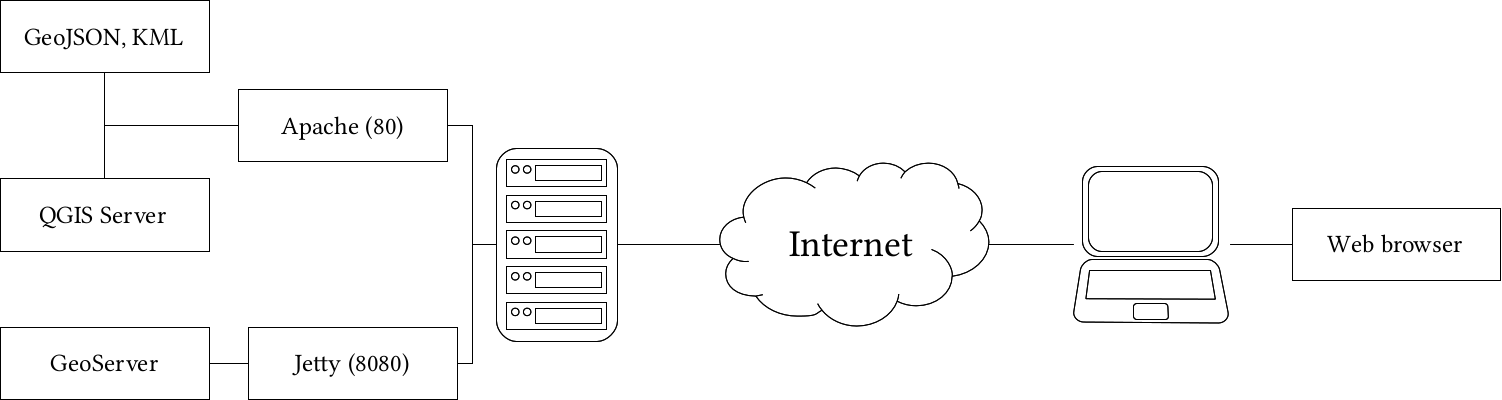
Using spatial servers instead of static files has a lot of advantages. For example, spatial servers can read out layers from spatial databases, therefore, we can always provide up-to-date data. We can also send only extracts of large datasets querying them by various means, or reproject them on the fly. As spatial servers need to be invoked by using some parameters, their interfaces are also standardized. Most of those standards are also maintained by experts and organizations forming the Open Geospatial Consortium (OGC). They define interfaces, that is, the communication between web clients and spatial servers. From the various OGC standards, there are some targeting the web. They are called Open Web Services (OWS), and define general spatial data transmission over the web. These standards are as follows:

  • Web Map Service (WMS): Layers rendered on the server side, and returned to the client as regular images.
  • Web Map Tile Service (WMTS): Layers rendered, tiled, and cached on the server side. Tiles are returned to the client.
  • Web Feature Service (WFS): Vector layers sent to the client as structured text. By default, WFS uses the GML vector format.
  • Web Coverage Service (WCS): Raster layers sent to the client as raw raster data. It is used by desktop GIS clients capable of reading raw raster data (for example, QGIS), therefore, we won't discuss it further.

While OWS standards allow communicating through GET and POST requests, both QGIS Server and GeoServer are mainly used with GET requests, therefore, parameterized URLs. There are some common parameters for every service, which are listed as follows:

  • Service: The abbreviation of the requested service. It can be WMS, WMTS, WFS, or WCS.
  • Version: The version of the requested service, as spatial servers can provide data using different versions for backward compatibility. For WMS, it is usually 1.3.01.1.0, 2.0, and 2.0.2 are widely used for WFS, while for WMTS, it is 1.0.
  • Request: The type of the operation that the spatial server should perform. A common value is GetCapabilities, which requests the metadata of the provided layers used with the requested service. For WMS, it is usually GetMap, for WFS it is GetFeature, while for WMTS, it is usually GetTile.

If we put this together, we can craft an URL, which can query a spatial server's WMS capabilities the following way:

    http://mysite.com/spatialserver?
Service=WMS&Version=1.3.0&Request=GetCapabilities
If you choose a service, there are other service-related parameters you have to provide to get spatial data or maps as output. As both of the servers we will use have convenient methods for creating previews, we won't discuss service-related parameters further. You can read more about them by downloading the whitepapers of the standards from OGC's website at http://www.opengeospatial.org/standards.