
For the next next task, let's create a map with our suitable zones. In this task, let's have an OpenStreetMap base map, the suitability layer from GeoServer as an overlay map, and the suitable zones as another overlay map:
- Extend the maps object with a function. The key must be the ID of our second button. The function should have the same map initializing code that we used with our road map:
        maps.suitability = function() {
         var map = L.map('map', {
         center: [46.08, 18.24],
         zoom: 10
         });
        };
- Add an OpenStreetMap base map to the composition. We can do that by calling the L.tileLayer function with the URL of the OSM tiles. As these tiles are not just separated by their layout and zoom level but also by cluster, we have to use wildcards according to the function's documentation:
        L.tileLayer(
         'http://{s}.tile.openstreetmap.org/
         {z}/{x}/{y}.png').addTo(map);
- Add our suitability map as a next layer according to the scheme we used with our layer group previously. In order to get transparent NULL values, provide an additional transparent: 'true' key-value pair in the list of optional parameters:
        L.tileLayer.wms('http://localhost:8080/geoserver/ows', {
         layers: 'practical_gis:suitability',
         format: 'image/png',
         transparent: 'true'
        }).addTo(map);
- Add our suitable areas layer as the final overlay map using the same options we used in the previous layer, but alter the layer's name:
        L.tileLayer.wms('http://localhost:8080/geoserver/ows', {
         layers: 'practical_gis:suitable',
         format: 'image/png',
         transparent: 'true'
        }).addTo(map);
Now we should be able to see our second map in action:
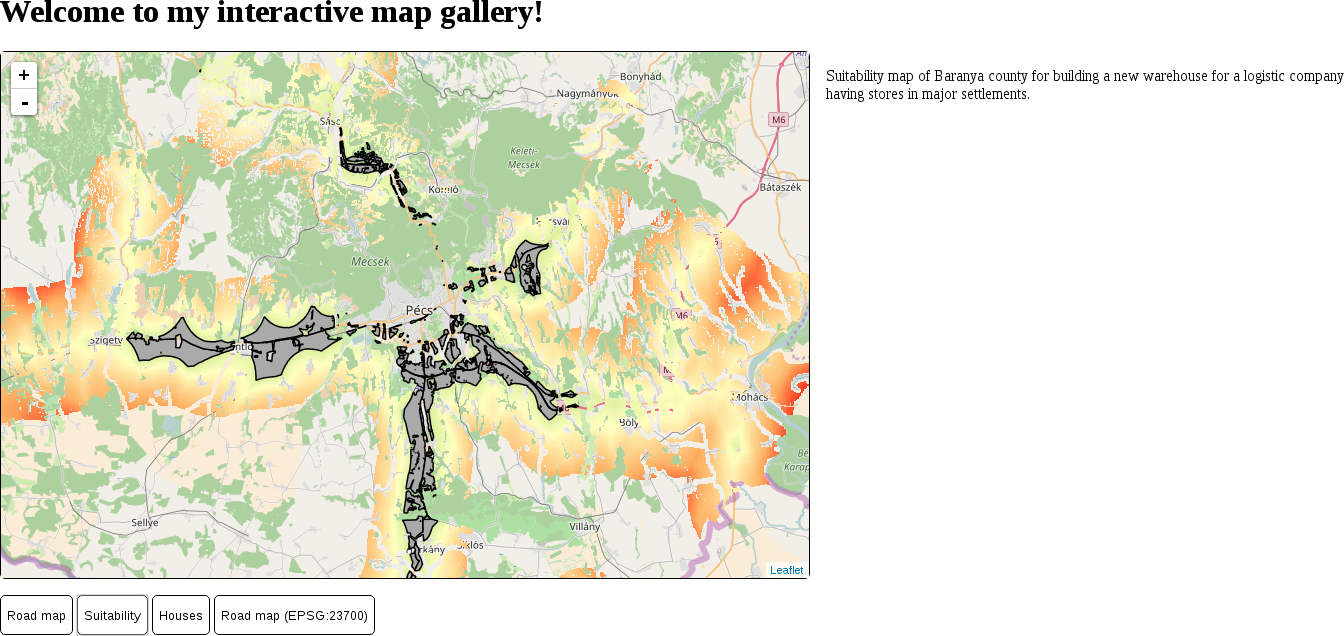
Now our second map loads, although we cannot change maps without reloading the page. The problem is that Leaflet recognizes if the provided container already has a loaded map and won't load another one until it is properly destroyed. We can destroy an existing Leaflet map; however, we need to understand another concept first--variable scope. In JavaScript, similarly to other programming languages, a variable cannot be accessed outside its valid scope. A valid scope in JavaScript is a function. We saved our map objects to variables in separate functions; therefore, they cannot see each other. Moreover, if we would like to access these map variables outside their functions, we would get an error. However, in these functions, we can access variables declared outside of them, just like we accessed our maps and descriptions objects. The solution is that we have to move our map declaration outside of the functions; by doing this, we can access the existing map instance (if any) before creating another one.
- Declare the map variable in the first line of our code:
var map;
- Remove the var keywords prior to the map variables in every function using Leaflet. This way, we only assign map objects to the already declared variable and won't declare it again.
- Write a statement in the beginning of the updateMap function, destroying the existing map. We can destroy a Leaflet map by calling its remove method. As we declared an empty map variable, it does not contain a map on the first click. Therefore, we should wrap our statement in an if statement. As empty variables default to the special value of undefined, we can provide a check against it in our conditional statement:
        if (map != undefined) {
         map.remove();
        }