
First, let's style the land use polygons. It would be very cumbersome to set up all the filters in SLD, however, in CSS, we have an easy job creating different categories.
- Create a new style. Name it accordingly, and limit it to our workspace.
- Select the CSS option in the Format field.
- Generate a polygon template, save the style, reopen it, and preview it on our landuse layer.
- The template contains a fill style, a stroke style, and a comment line with a @title directive. As we have no means to name legend labels in CSS, when GeoServer converts the stylesheet to SLD, it extracts label titles from specially formatted comment lines containing only a @title directive and a title name. Rewrite the block to show only forests with only a fill as follows:
        /* @title Forest */
        [fclass = 'forest'] {
         fill: #1ea914;
        }
- Finish the style by defining the rest of the declaration blocks with the appropriate selectors. When we would like to apply a single style to multiple classes, we can use multiple selectors separated by commas:
        /* @title Grassland */
        [fclass = 'farm'], [fclass = 'grass'], [fclass = 'meadow'],
         [fclass = 'vineyard'], [fclass = 'allotments'] {
          fill: #b2df8a;
         }
         /* @title Residential */
         [fclass = 'residential'] {
           fill: #fdbf6f;
         }
         /* @title Industrial */
         [fclass = 'industrial'], [fclass = 'quarry'] {
           fill: #b3b3b3;
         }
- If the stylesheet is valid, save it, and make it the default style of the landuse layer:
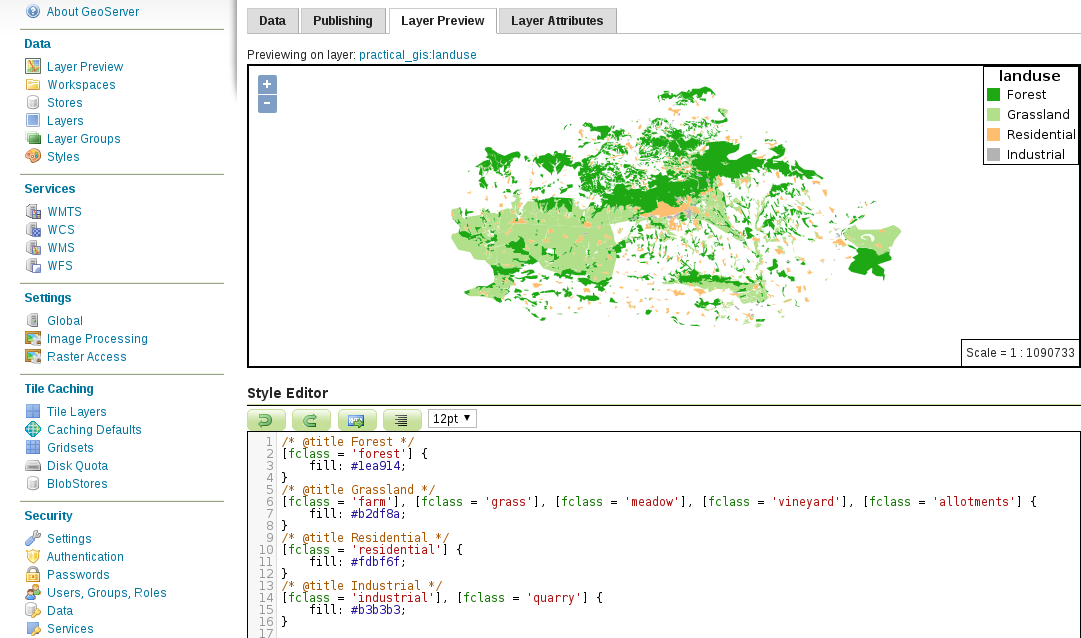
As the style definitions are mutually exclusive (there are no common rules), GeoServer has an easy job converting the title directives to legend labels. However, if we use some overlapping rules, and they have titles, GeoServer will concatenate the different titles into a single label. Currently, there is no workaround to solve that issue.