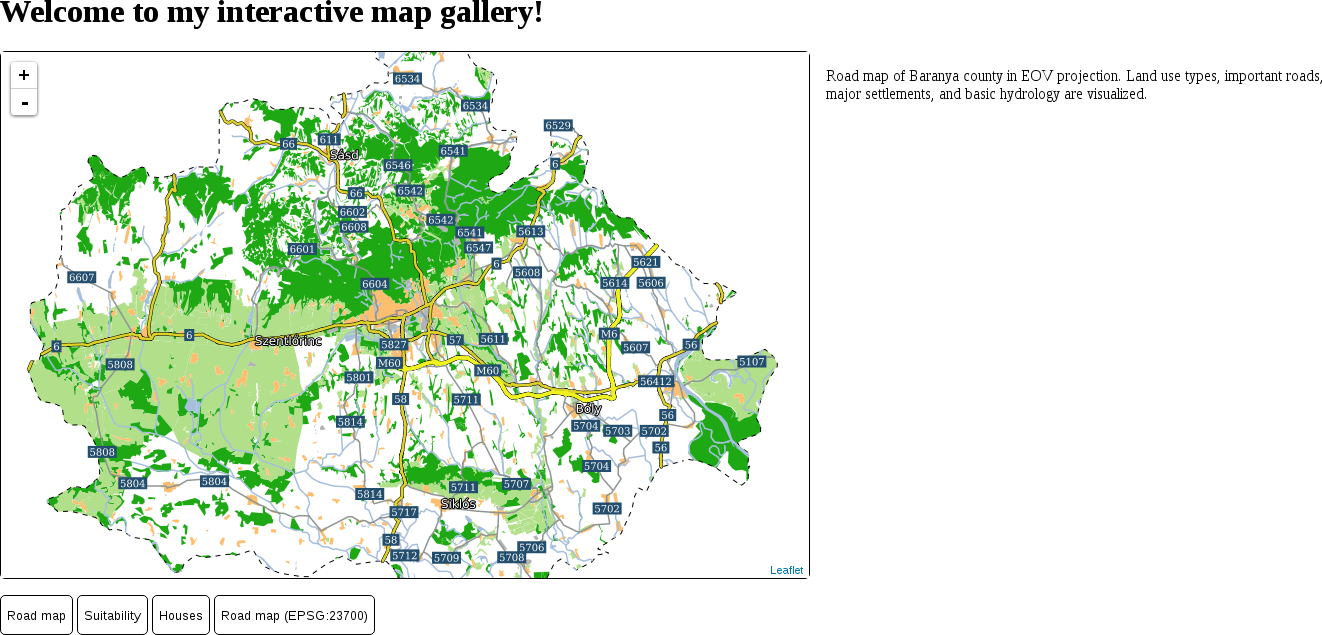
Leaflet can use some projections out of the box, of which two have cartographic significance--EPSG:3857 and EPSG:4326. The default projection is the Web Mercator, while the WGS 84 projection has to be specified in the map's crs property. The crs property's value must be a valid Leaflet projection object. This object contains methods to transform coordinates around and has predefined zoom levels fitting the given projection, among other things. Let's try out the WGS 84 projection on our road map first:
- Extend the maps object with a function corresponding to the ID of our fourth button. The function should be almost the same as the other road map function. The only difference is that the map should contain an additional crs parameter with the L.CRS.EPSG4326 projection object:
        map = L.map('map', {
         center: [46.06, 18.25],
         zoom: 9,
         crs: L.CRS.EPSG4326
        });
        L.tileLayer.wms('http://localhost:8080/geoserver/ows', {
         layers: 'practical_gis:road_map',
         format: 'image/png'
        }).addTo(map);
To use other projections, we can use yet another plugin. This plugin can utilize PROJ.4's JavaScript port--Proj4.js. It can create regular projection objects that Leaflet can use from projection definitions. Let's create a projection object representing our local projection:
- Look for the plugin named Proj4Leaflet in Leaflet's plugin list. The link points to its GitHub page, where we can download the latest release from the project's Releases page.
- We need two additional libraries, as Proj4Leaflet uses and depends on Proj4.js. Extract lib/proj4.js and src/proj4leaflet.js from the downloaded archive next to the Leaflet library.
- Edit map.html and include the two libraries in the <head> section, as usual:
        <script src="leaflet/proj4.js" type="text/javascript">
        </script>
        <script src="leaflet/proj4leaflet.js" type="text/javascript">
        </script>
- Look up the PROJ.4 definition of our local projection. We can use http://epsg.io for this. Search for the EPSG code of our local projection, and on the projection's page, select PROJ.4 from the Export menu. Copy the definition string to the clipboard by clicking on Copy TEXT.
- Go back to map.js, and in the function of the fourth map, create a new projection with the L.Proj.CRS constructor function available now. Constructor functions are special functions used to instantiate classes. For now, it is enough to know that they have to be called with the new keyword. The constructor function needs three parameters--a projection name containing the EPSG code of the local projection (for example, EPSG:23700), the PROJ.4 definition string of the projection, and an object containing optional parameters. The only optional parameter we need to provide is an array of resolutions that Leaflet will use for the various zoom levels in a descending order. There are no rules for the values of this array, but as a rule of thumb, using the powers of 2 (for example, 2, 4, 8, 16) is a good choice. We can start from 4096 and increase it later if it is not sufficient:
        var localProj = new L.Proj.CRS('EPSG:23700',
         '+proj=somerc +lat_0=47.14439372222222
          +lon_0=19.04857177777778 +k_0=0.99993 +x_0=650000
          +y_0=200000 +ellps=GRS67 +towgs84=52.17,
          -71.82,-14.9,0,0,0,0 +units=m +no_defs',
         {
           resolutions: [4096, 2048, 1024, 512, 256, 128, 64, 32,
            16, 8, 4, 2, 1]
         });
- Supply the variable containing the new projection object in the map function's crs parameter. We don't have to modify the center coordinates, as Leaflet needs them in WGS 84. It transforms them automatically if it needs to do so. We might have to adjust the starting zoom level, though, as we are using a custom set of resolutions:
        map = L.map('map', {
         center: [46.08, 18.24],
         zoom: 4,
         crs: localProj
        });
Our fourth map is now working, and showing our road map in our local projection: