Table of Contents for
Practical Malware Analysis
 Practical Malware Analysis
Published by
No Starch Press, 2012
Practical Malware Analysis
Published by
No Starch Press, 2012
- Cover
- Practical Malware Analysis: The Hands-On Guide to Dissecting Malicious Software
- Praise for Practical Malware Analysis
- Warning
- About the Authors
- About the Technical Reviewer
- About the Contributing Authors
- Foreword
- Acknowledgments
- Individual Thanks
- Introduction
- What Is Malware Analysis?
- Prerequisites
- Practical, Hands-On Learning
- What’s in the Book?
- 0. Malware Analysis Primer
- The Goals of Malware Analysis
- Malware Analysis Techniques
- Types of Malware
- General Rules for Malware Analysis
- I. Basic Analysis
- 1. Basic Static Techniques
- Antivirus Scanning: A Useful First Step
- Hashing: A Fingerprint for Malware
- Finding Strings
- Packed and Obfuscated Malware
- Portable Executable File Format
- Linked Libraries and Functions
- Static Analysis in Practice
- The PE File Headers and Sections
- Conclusion
- Labs
- 2. Malware Analysis in Virtual Machines
- The Structure of a Virtual Machine
- Creating Your Malware Analysis Machine
- Using Your Malware Analysis Machine
- The Risks of Using VMware for Malware Analysis
- Record/Replay: Running Your Computer in Reverse
- Conclusion
- 3. Basic Dynamic Analysis
- Sandboxes: The Quick-and-Dirty Approach
- Running Malware
- Monitoring with Process Monitor
- Viewing Processes with Process Explorer
- Comparing Registry Snapshots with Regshot
- Faking a Network
- Packet Sniffing with Wireshark
- Using INetSim
- Basic Dynamic Tools in Practice
- Conclusion
- Labs
- II. Advanced Static Analysis
- 4. A Crash Course in x86 Disassembly
- Levels of Abstraction
- Reverse-Engineering
- The x86 Architecture
- Conclusion
- 5. IDA Pro
- Loading an Executable
- The IDA Pro Interface
- Using Cross-References
- Analyzing Functions
- Using Graphing Options
- Enhancing Disassembly
- Extending IDA with Plug-ins
- Conclusion
- Labs
- 6. Recognizing C Code Constructs in Assembly
- Global vs. Local Variables
- Disassembling Arithmetic Operations
- Recognizing if Statements
- Recognizing Loops
- Understanding Function Call Conventions
- Analyzing switch Statements
- Disassembling Arrays
- Identifying Structs
- Analyzing Linked List Traversal
- Conclusion
- Labs
- 7. Analyzing Malicious Windows Programs
- The Windows API
- The Windows Registry
- Networking APIs
- Following Running Malware
- Kernel vs. User Mode
- The Native API
- Conclusion
- Labs
- III. Advanced Dynamic Analysis
- 8. Debugging
- Source-Level vs. Assembly-Level Debuggers
- Kernel vs. User-Mode Debugging
- Using a Debugger
- Exceptions
- Modifying Execution with a Debugger
- Modifying Program Execution in Practice
- Conclusion
- 9. OllyDbg
- Loading Malware
- The OllyDbg Interface
- Memory Map
- Viewing Threads and Stacks
- Executing Code
- Breakpoints
- Loading DLLs
- Tracing
- Exception Handling
- Patching
- Analyzing Shellcode
- Assistance Features
- Plug-ins
- Scriptable Debugging
- Conclusion
- Labs
- 10. Kernel Debugging with WinDbg
- Drivers and Kernel Code
- Setting Up Kernel Debugging
- Using WinDbg
- Microsoft Symbols
- Kernel Debugging in Practice
- Rootkits
- Loading Drivers
- Kernel Issues for Windows Vista, Windows 7, and x64 Versions
- Conclusion
- Labs
- IV. Malware Functionality
- 11. Malware Behavior
- Downloaders and Launchers
- Backdoors
- Credential Stealers
- Persistence Mechanisms
- Privilege Escalation
- Covering Its Tracks—User-Mode Rootkits
- Conclusion
- Labs
- 12. Covert Malware Launching
- Launchers
- Process Injection
- Process Replacement
- Hook Injection
- Detours
- APC Injection
- Conclusion
- Labs
- 13. Data Encoding
- The Goal of Analyzing Encoding Algorithms
- Simple Ciphers
- Common Cryptographic Algorithms
- Custom Encoding
- Decoding
- Conclusion
- Labs
- 14. Malware-Focused Network Signatures
- Network Countermeasures
- Safely Investigate an Attacker Online
- Content-Based Network Countermeasures
- Combining Dynamic and Static Analysis Techniques
- Understanding the Attacker’s Perspective
- Conclusion
- Labs
- V. Anti-Reverse-Engineering
- 15. Anti-Disassembly
- Understanding Anti-Disassembly
- Defeating Disassembly Algorithms
- Anti-Disassembly Techniques
- Obscuring Flow Control
- Thwarting Stack-Frame Analysis
- Conclusion
- Labs
- 16. Anti-Debugging
- Windows Debugger Detection
- Identifying Debugger Behavior
- Interfering with Debugger Functionality
- Debugger Vulnerabilities
- Conclusion
- Labs
- 17. Anti-Virtual Machine Techniques
- VMware Artifacts
- Vulnerable Instructions
- Tweaking Settings
- Escaping the Virtual Machine
- Conclusion
- Labs
- 18. Packers and Unpacking
- Packer Anatomy
- Identifying Packed Programs
- Unpacking Options
- Automated Unpacking
- Manual Unpacking
- Tips and Tricks for Common Packers
- Analyzing Without Fully Unpacking
- Packed DLLs
- Conclusion
- Labs
- VI. Special Topics
- 19. Shellcode Analysis
- Loading Shellcode for Analysis
- Position-Independent Code
- Identifying Execution Location
- Manual Symbol Resolution
- A Full Hello World Example
- Shellcode Encodings
- NOP Sleds
- Finding Shellcode
- Conclusion
- Labs
- 20. C++ Analysis
- Object-Oriented Programming
- Virtual vs. Nonvirtual Functions
- Creating and Destroying Objects
- Conclusion
- Labs
- 21. 64-Bit Malware
- Why 64-Bit Malware?
- Differences in x64 Architecture
- Windows 32-Bit on Windows 64-Bit
- 64-Bit Hints at Malware Functionality
- Conclusion
- Labs
- A. Important Windows Functions
- B. Tools for Malware Analysis
- C. Solutions to Labs
- Lab 1-1 Solutions
- Lab 1-2 Solutions
- Lab 1-3 Solutions
- Lab 1-4 Solutions
- Lab 3-1 Solutions
- Lab 3-2 Solutions
- Lab 3-3 Solutions
- Lab 3-4 Solutions
- Lab 5-1 Solutions
- Lab 6-1 Solutions
- Lab 6-2 Solutions
- Lab 6-3 Solutions
- Lab 6-4 Solutions
- Lab 7-1 Solutions
- Lab 7-2 Solutions
- Lab 7-3 Solutions
- Lab 9-1 Solutions
- Lab 9-2 Solutions
- Lab 9-3 Solutions
- Lab 10-1 Solutions
- Lab 10-2 Solutions
- Lab 10-3 Solutions
- Lab 11-1 Solutions
- Lab 11-2 Solutions
- Lab 11-3 Solutions
- Lab 12-1 Solutions
- Lab 12-2 Solutions
- Lab 12-3 Solutions
- Lab 12-4 Solutions
- Lab 13-1 Solutions
- Lab 13-2 Solutions
- Lab 13-3 Solutions
- Lab 14-1 Solutions
- Lab 14-2 Solutions
- Lab 14-3 Solutions
- Lab 15-1 Solutions
- Lab 15-2 Solutions
- Lab 15-3 Solutions
- Lab 16-1 Solutions
- Lab 16-2 Solutions
- Lab 16-3 Solutions
- Lab 17-1 Solutions
- Lab 17-2 Solutions
- Lab 17-3 Solutions
- Lab 18-1 Solutions
- Lab 18-2 Solutions
- Lab 18-3 Solutions
- Lab 18-4 Solutions
- Lab 18-5 Solutions
- Lab 19-1 Solutions
- Lab 19-2 Solutions
- Lab 19-3 Solutions
- Lab 20-1 Solutions
- Lab 20-2 Solutions
- Lab 20-3 Solutions
- Lab 21-1 Solutions
- Lab 21-2 Solutions
- Index
- Index
- Index
- Index
- Index
- Index
- Index
- Index
- Index
- Index
- Index
- Index
- Index
- Index
- Index
- Index
- Index
- Index
- Index
- Index
- Index
- Index
- Index
- Index
- Index
- Index
- Index
- Updates
- About the Authors
- Copyright
A virtual function is one that can be overridden by a subclass and whose execution is determined at runtime. If a function is defined within a parent class and a function with the same name is defined in a child class, the child class’s function overrides the parent’s function.
Several popular programming models use this functionality in order to greatly simplify complex
programming tasks. To illustrate why this is useful, return to the socket example in Example 20-5. There, we have code that is going to sendData over the network, and we want it to be able to send data via TCP and UDP. One
easy way to accomplish this is to create a parent class called Socket with a virtual function called sendData. Then
we have two children classes called UDPSocket and TCPSocket, which override the sendData
function to send the data over the appropriate protocol.
In the code that uses the socket, we create an object of type Socket, and create whichever socket we are using in this instance. Each time we call the
sendData function, the sendData function will be called from the proper subclass of Socket, whether UDPSocket or TCPSocket, based on which type of Socket object was
originally created.
The biggest advantage here is that if a new protocol—QDP, for example—is invented,
you simply create a new QDPSocket class, and then change the line
of code where the object is created. Then all calls to sendData
will call the new QDPSocket version of sendData without the need to change all the calls individually.
In the case of nonvirtual functions, the function to be executed is determined at compile time. If the object is an instance of the parent class, the parent class’s function will be called, even if the object at runtime belongs to the child class. When a virtual function is called on an object of the child class, the child class’s version of the function may be called, if the object is typed as an instance of the parent class.
Table 20-1 shows a code snippet that will execute differently if the function is virtual or nonvirtual.
Table 20-1. Source Code Example for Virtual Functions
The code contains two classes: class
A and class
B. The class B class overrides
the foo method from class A.
The code also contains a function to call the foo method from
outside either class. If the function is not declared as virtual, it will print “Class
A.” If it is declared as virtual, it will print “Class B.” The code on either side
is identical except for the virtual keywords at ❶ and ❷.
In the case of nonvirtual functions, the determination of which function to call is made at
compile time. In the two code samples in Example 20-6, when this code is
compiled, the object at ❸ is of class A. While the object at ❸ could be a
subclass of class A, at compile time, we know that it is an
object of class A, and the foo
function for class A is called. This is why the code on the left
will print “Class A.”
In the case of virtual functions, the determination of which function to call is made at
runtime. If a class A object is called at runtime, then the
class A version of the function is called. If the object is of
class B, then the class B
function is called. This is why the code on the right will print “Class B.”
This functionality is often referred to as polymorphism. The biggest advantage to polymorphism is that it allows objects that perform different functionality to share a common interface.
The C++ compiler will add special data structures when it compiles code to support virtual functions. These data structures are called virtual function tables, or vtables. These tables are simply arrays of function pointers. Each class using virtual functions has its own vtable, and each virtual function in a class has an entry in the vtable.
Table 20-2 shows a disassembly of g function from the two code snippets in Table 20-1. On the left is the nonvirtual function call to
foo, and on the right is the virtual call.
Table 20-2. Assembly Code of the Example from Table 20-1
The source code change is small, but the assembly looks completely different. The function
call on the left looks the same as the C functions that we have seen before. The virtual function
call on the right looks different. The biggest difference is that we can’t see the destination
for the call instruction, which can pose a big problem when
analyzing disassembled C++, because we need to track down the target of the call instruction.
The argument for the g function is a reference, which
can be used as a pointer, to an object of class A (or any
subclass of class A). The assembly code accesses the pointer to
the beginning of the object ❶. The code then accesses
the first 4 bytes of the object ❷.
Figure 20-2 shows how the virtual function is used in Table 20-2 to determine which code to call. The first 4 bytes of the object are a pointer to the vtable. The first 4-byte entry of the vtable is a pointer to the code for the first virtual function.
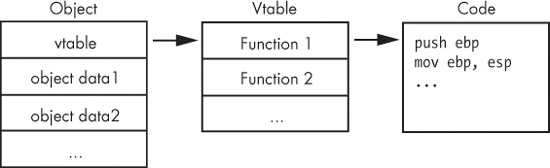
To figure out which function is being called, you find where the vtable is being accessed, and you see which offset is being called. In Table 20-2, we see the first vtable entry being accessed. To find the code that is called, we must find the vtable in memory and then go to the first function in the list.
Nonvirtual functions do not appear in a vtable because there is no need for them. The target for nonvirtual function calls is fixed at compile time.
In order to identify the call destination, we need to determine the type of object and locate
the vtable. If you can spot the new operator for the constructor
(a concept described in the next section), you can typically discover the address of the vtable
being accessed nearby.
The vtable looks like an array of function pointers. For example, Example 20-6 shows the vtable for a class with three virtual functions. When you see a vtable, only the first value in the table should have a cross-reference. The other elements of the table are accessed by their offset from the beginning of the table, and there are no accesses directly to items within the table.
Note
In this example, the line labeled
off_4020F0
is the beginning of the vtable, but don’t confuse this with switch offset tables,
covered in Chapter 6. A switch offset table would
have offsets to locations that are not subroutines, labeled
loc_######
instead of
sub_######.
Example 20-6. A vtable in IDA Pro
004020F0 off_4020F0      dd offset sub_4010A0
004020F4                 dd offset sub_4010C0
004020F8                 dd offset sub_4010E0
You can recognize virtual functions by their cross-references. Virtual functions are not
directly called by other parts of the code, and when you check cross-references for a virtual
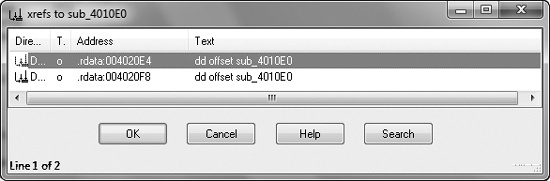
function, you should not see any calls to that function. For example, Figure 20-3 shows the cross-references for a virtual
function. Both cross-references are offsets to the function, and neither is a call instruction. Virtual functions almost always appear this way, whereas
nonvirtual functions are typically referenced via a call
instruction.
Once you have found a vtable and virtual functions, you can use that information to analyze them. When you identify a vtable, you instantly know that all functions within that table belong to the same class, and that functions within the same class are somehow related. You can also use vtables to determine if class relationships exist.
Example 20-7, an expansion of Example 20-6, includes vtables for two classes.
Example 20-7. Vtables for two different classes
004020DC off_4020DC      dd offset sub_401100
004020E0                 dd offset sub_4010C0
004020E4                ❶dd offset sub_4010E0
004020E8                 dd offset sub_401120
004020EC                 dd offset unk_402198
004020F0 off_4020F0      dd offset sub_4010A0
004020F4                 dd offset sub_4010C0
004020F8                ❷dd offset sub_4010E0
Notice that the functions at ❶ and ❷ are the same, and that there are two cross-references for this function, as shown in Figure 20-3. The two cross-references are from the two vtables that point to this function, which suggests an inheritance relationship.
Remember that child classes automatically include all functions from a parent class, unless
they override it. In Example 20-7, sub_4010E0 at ❶ and ❷ is a function from the parent class that is also in the vtable
for the child class, because it can also be called for the child class.
You can’t always differentiate a child class from a parent class, but if one vtable is larger than the other, it is the subclass. In this example, the vtable at offset 4020F0 is the parent class, and the vtable at offset 4020DC is the child class because its vtable is larger. (Remember that child classes always have the same functions as the parent class and may have additional functions.)