Table of Contents for
Practical Malware Analysis
 Practical Malware Analysis
Published by
No Starch Press, 2012
Practical Malware Analysis
Published by
No Starch Press, 2012
- Cover
- Practical Malware Analysis: The Hands-On Guide to Dissecting Malicious Software
- Praise for Practical Malware Analysis
- Warning
- About the Authors
- About the Technical Reviewer
- About the Contributing Authors
- Foreword
- Acknowledgments
- Individual Thanks
- Introduction
- What Is Malware Analysis?
- Prerequisites
- Practical, Hands-On Learning
- What’s in the Book?
- 0. Malware Analysis Primer
- The Goals of Malware Analysis
- Malware Analysis Techniques
- Types of Malware
- General Rules for Malware Analysis
- I. Basic Analysis
- 1. Basic Static Techniques
- Antivirus Scanning: A Useful First Step
- Hashing: A Fingerprint for Malware
- Finding Strings
- Packed and Obfuscated Malware
- Portable Executable File Format
- Linked Libraries and Functions
- Static Analysis in Practice
- The PE File Headers and Sections
- Conclusion
- Labs
- 2. Malware Analysis in Virtual Machines
- The Structure of a Virtual Machine
- Creating Your Malware Analysis Machine
- Using Your Malware Analysis Machine
- The Risks of Using VMware for Malware Analysis
- Record/Replay: Running Your Computer in Reverse
- Conclusion
- 3. Basic Dynamic Analysis
- Sandboxes: The Quick-and-Dirty Approach
- Running Malware
- Monitoring with Process Monitor
- Viewing Processes with Process Explorer
- Comparing Registry Snapshots with Regshot
- Faking a Network
- Packet Sniffing with Wireshark
- Using INetSim
- Basic Dynamic Tools in Practice
- Conclusion
- Labs
- II. Advanced Static Analysis
- 4. A Crash Course in x86 Disassembly
- Levels of Abstraction
- Reverse-Engineering
- The x86 Architecture
- Conclusion
- 5. IDA Pro
- Loading an Executable
- The IDA Pro Interface
- Using Cross-References
- Analyzing Functions
- Using Graphing Options
- Enhancing Disassembly
- Extending IDA with Plug-ins
- Conclusion
- Labs
- 6. Recognizing C Code Constructs in Assembly
- Global vs. Local Variables
- Disassembling Arithmetic Operations
- Recognizing if Statements
- Recognizing Loops
- Understanding Function Call Conventions
- Analyzing switch Statements
- Disassembling Arrays
- Identifying Structs
- Analyzing Linked List Traversal
- Conclusion
- Labs
- 7. Analyzing Malicious Windows Programs
- The Windows API
- The Windows Registry
- Networking APIs
- Following Running Malware
- Kernel vs. User Mode
- The Native API
- Conclusion
- Labs
- III. Advanced Dynamic Analysis
- 8. Debugging
- Source-Level vs. Assembly-Level Debuggers
- Kernel vs. User-Mode Debugging
- Using a Debugger
- Exceptions
- Modifying Execution with a Debugger
- Modifying Program Execution in Practice
- Conclusion
- 9. OllyDbg
- Loading Malware
- The OllyDbg Interface
- Memory Map
- Viewing Threads and Stacks
- Executing Code
- Breakpoints
- Loading DLLs
- Tracing
- Exception Handling
- Patching
- Analyzing Shellcode
- Assistance Features
- Plug-ins
- Scriptable Debugging
- Conclusion
- Labs
- 10. Kernel Debugging with WinDbg
- Drivers and Kernel Code
- Setting Up Kernel Debugging
- Using WinDbg
- Microsoft Symbols
- Kernel Debugging in Practice
- Rootkits
- Loading Drivers
- Kernel Issues for Windows Vista, Windows 7, and x64 Versions
- Conclusion
- Labs
- IV. Malware Functionality
- 11. Malware Behavior
- Downloaders and Launchers
- Backdoors
- Credential Stealers
- Persistence Mechanisms
- Privilege Escalation
- Covering Its Tracks—User-Mode Rootkits
- Conclusion
- Labs
- 12. Covert Malware Launching
- Launchers
- Process Injection
- Process Replacement
- Hook Injection
- Detours
- APC Injection
- Conclusion
- Labs
- 13. Data Encoding
- The Goal of Analyzing Encoding Algorithms
- Simple Ciphers
- Common Cryptographic Algorithms
- Custom Encoding
- Decoding
- Conclusion
- Labs
- 14. Malware-Focused Network Signatures
- Network Countermeasures
- Safely Investigate an Attacker Online
- Content-Based Network Countermeasures
- Combining Dynamic and Static Analysis Techniques
- Understanding the Attacker’s Perspective
- Conclusion
- Labs
- V. Anti-Reverse-Engineering
- 15. Anti-Disassembly
- Understanding Anti-Disassembly
- Defeating Disassembly Algorithms
- Anti-Disassembly Techniques
- Obscuring Flow Control
- Thwarting Stack-Frame Analysis
- Conclusion
- Labs
- 16. Anti-Debugging
- Windows Debugger Detection
- Identifying Debugger Behavior
- Interfering with Debugger Functionality
- Debugger Vulnerabilities
- Conclusion
- Labs
- 17. Anti-Virtual Machine Techniques
- VMware Artifacts
- Vulnerable Instructions
- Tweaking Settings
- Escaping the Virtual Machine
- Conclusion
- Labs
- 18. Packers and Unpacking
- Packer Anatomy
- Identifying Packed Programs
- Unpacking Options
- Automated Unpacking
- Manual Unpacking
- Tips and Tricks for Common Packers
- Analyzing Without Fully Unpacking
- Packed DLLs
- Conclusion
- Labs
- VI. Special Topics
- 19. Shellcode Analysis
- Loading Shellcode for Analysis
- Position-Independent Code
- Identifying Execution Location
- Manual Symbol Resolution
- A Full Hello World Example
- Shellcode Encodings
- NOP Sleds
- Finding Shellcode
- Conclusion
- Labs
- 20. C++ Analysis
- Object-Oriented Programming
- Virtual vs. Nonvirtual Functions
- Creating and Destroying Objects
- Conclusion
- Labs
- 21. 64-Bit Malware
- Why 64-Bit Malware?
- Differences in x64 Architecture
- Windows 32-Bit on Windows 64-Bit
- 64-Bit Hints at Malware Functionality
- Conclusion
- Labs
- A. Important Windows Functions
- B. Tools for Malware Analysis
- C. Solutions to Labs
- Lab 1-1 Solutions
- Lab 1-2 Solutions
- Lab 1-3 Solutions
- Lab 1-4 Solutions
- Lab 3-1 Solutions
- Lab 3-2 Solutions
- Lab 3-3 Solutions
- Lab 3-4 Solutions
- Lab 5-1 Solutions
- Lab 6-1 Solutions
- Lab 6-2 Solutions
- Lab 6-3 Solutions
- Lab 6-4 Solutions
- Lab 7-1 Solutions
- Lab 7-2 Solutions
- Lab 7-3 Solutions
- Lab 9-1 Solutions
- Lab 9-2 Solutions
- Lab 9-3 Solutions
- Lab 10-1 Solutions
- Lab 10-2 Solutions
- Lab 10-3 Solutions
- Lab 11-1 Solutions
- Lab 11-2 Solutions
- Lab 11-3 Solutions
- Lab 12-1 Solutions
- Lab 12-2 Solutions
- Lab 12-3 Solutions
- Lab 12-4 Solutions
- Lab 13-1 Solutions
- Lab 13-2 Solutions
- Lab 13-3 Solutions
- Lab 14-1 Solutions
- Lab 14-2 Solutions
- Lab 14-3 Solutions
- Lab 15-1 Solutions
- Lab 15-2 Solutions
- Lab 15-3 Solutions
- Lab 16-1 Solutions
- Lab 16-2 Solutions
- Lab 16-3 Solutions
- Lab 17-1 Solutions
- Lab 17-2 Solutions
- Lab 17-3 Solutions
- Lab 18-1 Solutions
- Lab 18-2 Solutions
- Lab 18-3 Solutions
- Lab 18-4 Solutions
- Lab 18-5 Solutions
- Lab 19-1 Solutions
- Lab 19-2 Solutions
- Lab 19-3 Solutions
- Lab 20-1 Solutions
- Lab 20-2 Solutions
- Lab 20-3 Solutions
- Lab 21-1 Solutions
- Lab 21-2 Solutions
- Index
- Index
- Index
- Index
- Index
- Index
- Index
- Index
- Index
- Index
- Index
- Index
- Index
- Index
- Index
- Index
- Index
- Index
- Index
- Index
- Index
- Index
- Index
- Index
- Index
- Index
- Index
- Updates
- About the Authors
- Copyright
The most popular covert launching technique is process injection. As the name implies, this technique injects code into another running process, and that process unwittingly executes the malicious code. Malware authors use process injection in an attempt to conceal the malicious behavior of their code, and sometimes they use this to try to bypass host-based firewalls and other process-specific security mechanisms.
Certain Windows API calls are commonly used for process injection. For example, the VirtualAllocEx function can be used to allocate space in an external
process’s memory, and WriteProcessMemory can be used to
write data to that allocated space. This pair of functions is essential to the first three loading
techniques that we’ll discuss in this chapter.
DLL injection—a form of process injection where a remote process is
forced to load a malicious DLL—is the most commonly used covert loading technique. DLL
injection works by injecting code into a remote process that calls LoadLibrary, thereby forcing a DLL to be loaded in the context of that process. Once the
compromised process loads the malicious DLL, the OS automatically calls the DLL’s DllMain function, which is defined by the author of the DLL. This function
contains the malicious code and has as much access to the system as the process in which it is
running. Malicious DLLs often have little content other than the Dllmain function, and everything they do will appear to originate from the compromised
process.
Figure 12-1 shows an example of DLL injection. In this example, the launcher malware injects its DLL into Internet Explorer’s memory, thereby giving the injected DLL the same access to the Internet as Internet Explorer. The loader malware had been unable to access the Internet prior to injection because a process-specific firewall detected it and blocked it.
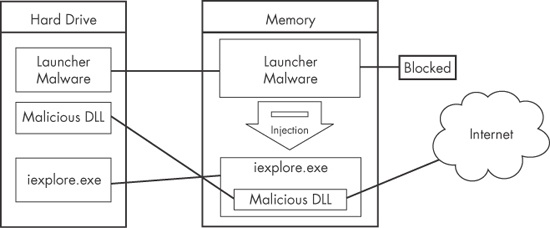
Figure 12-1. DLL injection—the launcher malware cannot access the Internet until it injects into iexplore.exe.
In order to inject the malicious DLL into a host program, the launcher malware must
first obtain a handle to the victim process. The most common way is to use the Windows API calls
CreateToolhelp32Snapshot, Process32First, and Process32Next to search the
process list for the injection target. Once the target is found, the launcher retrieves the process
identifier (PID) of the target process and then uses it to obtain the handle via a call to OpenProcess.
The function CreateRemoteThread is commonly used for DLL
injection to allow the launcher malware to create and execute a new thread in a remote process. When
CreateRemoteThread is used, it is passed three important
parameters: the process handle (hProcess) obtained with OpenProcess, along with the starting point of the injected thread
(lpStartAddress) and an argument for that thread (lpParameter). For example, the starting point might be set to LoadLibrary and the malicious DLL name passed as the argument. This will
trigger LoadLibrary to be run in the victim process with a
parameter of the malicious DLL, thereby causing that DLL to be loaded in the victim process
(assuming that LoadLibrary is available in the victim
process’s memory space and that the malicious library name string exists within that same
space).
Malware authors generally use VirtualAllocEx to create
space for the malicious library name string. The VirtualAllocEx
function allocates space in a remote process if a handle to that process is provided.
The last setup function required before CreateRemoteThread
can be called is WriteProcessMemory. This function writes the
malicious library name string into the memory space that was allocated with VirtualAllocEx.
Example 12-1 contains C pseudocode for performing DLL injection.
Example 12-1. C Pseudocode for DLL injection
  hVictimProcess = OpenProcess(PROCESS_ALL_ACCESS, 0, victimProcessID ❶);

  pNameInVictimProcess = VirtualAllocEx(hVictimProcess,...,sizeof(maliciousLibraryName),...,...);
  WriteProcessMemory(hVictimProcess,...,maliciousLibraryName, sizeof(maliciousLibraryName),...);
  GetModuleHandle("Kernel32.dll");
  GetProcAddress(...,"LoadLibraryA");
❷ CreateRemoteThread(hVictimProcess,...,...,LoadLibraryAddress,pNameInVictimProcess,...,...);
This listing assumes that we obtain the victim PID in victimProcessID when it is passed to OpenProcess at
❶ in order to get the handle to the victim process.
Using the handle, VirtualAllocEx and WriteProcessMemory then allocate space and write the name of the malicious DLL into the
victim process. Next, GetProcAddress is used to get the address
to LoadLibrary.
Finally, at ❷, CreateRemoteThread is passed the three important parameters discussed earlier: the handle
to the victim process, the address of LoadLibrary, and a pointer
to the malicious DLL name in the victim process. The easiest way to identify DLL injection is by
identifying this trademark pattern of Windows API calls when looking at the launcher malware’s
disassembly.
In DLL injection, the malware launcher never calls a malicious function. As stated earlier,
the malicious code is located in DllMain, which is automatically
called by the OS when the DLL is loaded into memory. The DLL injection launcher’s goal is to
call CreateRemoteThread in order to create the remote thread
LoadLibrary, with the parameter of the malicious DLL being
injected.
Figure 12-2 shows DLL injection code as seen through a debugger. The six function calls from our pseudocode in Example 12-1 can be seen in the disassembly, labeled ❶ through ❻.
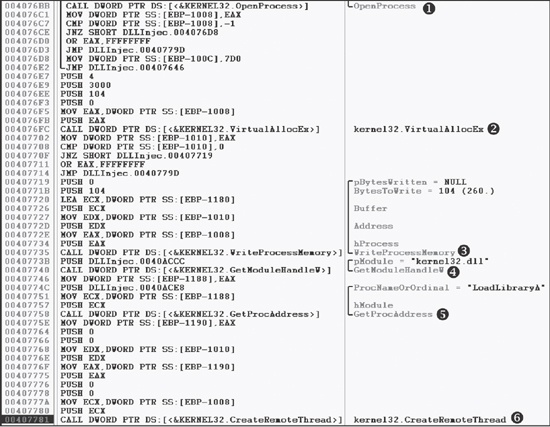
Once you find DLL injection activity in disassembly, you should start looking for the strings
containing the names of the malicious DLL and the victim process. In the case of Figure 12-2, we don’t see those strings, but they must be accessed
before this code executes. The victim process name can often be found in a strncmp function (or equivalent) when the launcher determines the victim process’s PID. To find the malicious DLL name, we could set
a breakpoint at 0x407735 and dump the contents of the stack to reveal the value of Buffer as it is being passed to WriteProcessMemory.
Once you’re able to recognize the DLL injection code pattern and identify these important strings, you should be able to quickly analyze an entire group of malware launchers.
Like DLL injection, direct injection involves allocating and inserting code into the memory space of a remote process. Direct injection uses many of the same Windows API calls as DLL injection. The difference is that instead of writing a separate DLL and forcing the remote process to load it, direct-injection malware injects the malicious code directly into the remote process.
Direct injection is more flexible than DLL injection, but it requires a lot of customized code in order to run successfully without negatively impacting the host process. This technique can be used to inject compiled code, but more often, it’s used to inject shellcode.
Three functions are commonly found in cases of direct injection: VirtualAllocEx, WriteProcessMemory, and CreateRemoteThread. There will typically be two calls to VirtualAllocEx and WriteProcessMemory.
The first will allocate and write the data used by the remote thread, and the second will allocate
and write the remote thread code. The call to CreateRemoteThread
will contain the location of the remote thread code (lpStartAddress) and the data (lpParameter).
Since the data and functions used by the remote thread must exist in the victim process,
normal compilation procedures will not work. For example, strings are not in the normal .data section, and LoadLibrary/GetProcAddress will need to be called to access functions that are not
already loaded. There are other restrictions, which we won’t go into here. Basically, direct
injection requires that authors either be skilled assembly language coders or that they will inject
only relatively simple shellcode.
In order to analyze the remote thread’s code, you may need to debug the malware and dump
all memory buffers that occur before calls to WriteProcessMemory
to be analyzed in a disassembler. Since these buffers most often contain shellcode, you will need
shellcode analysis skills, which we discuss extensively in Chapter 19.