Table of Contents for
Practical Malware Analysis
 Practical Malware Analysis
Published by
No Starch Press, 2012
Practical Malware Analysis
Published by
No Starch Press, 2012
- Cover
- Practical Malware Analysis: The Hands-On Guide to Dissecting Malicious Software
- Praise for Practical Malware Analysis
- Warning
- About the Authors
- About the Technical Reviewer
- About the Contributing Authors
- Foreword
- Acknowledgments
- Individual Thanks
- Introduction
- What Is Malware Analysis?
- Prerequisites
- Practical, Hands-On Learning
- What’s in the Book?
- 0. Malware Analysis Primer
- The Goals of Malware Analysis
- Malware Analysis Techniques
- Types of Malware
- General Rules for Malware Analysis
- I. Basic Analysis
- 1. Basic Static Techniques
- Antivirus Scanning: A Useful First Step
- Hashing: A Fingerprint for Malware
- Finding Strings
- Packed and Obfuscated Malware
- Portable Executable File Format
- Linked Libraries and Functions
- Static Analysis in Practice
- The PE File Headers and Sections
- Conclusion
- Labs
- 2. Malware Analysis in Virtual Machines
- The Structure of a Virtual Machine
- Creating Your Malware Analysis Machine
- Using Your Malware Analysis Machine
- The Risks of Using VMware for Malware Analysis
- Record/Replay: Running Your Computer in Reverse
- Conclusion
- 3. Basic Dynamic Analysis
- Sandboxes: The Quick-and-Dirty Approach
- Running Malware
- Monitoring with Process Monitor
- Viewing Processes with Process Explorer
- Comparing Registry Snapshots with Regshot
- Faking a Network
- Packet Sniffing with Wireshark
- Using INetSim
- Basic Dynamic Tools in Practice
- Conclusion
- Labs
- II. Advanced Static Analysis
- 4. A Crash Course in x86 Disassembly
- Levels of Abstraction
- Reverse-Engineering
- The x86 Architecture
- Conclusion
- 5. IDA Pro
- Loading an Executable
- The IDA Pro Interface
- Using Cross-References
- Analyzing Functions
- Using Graphing Options
- Enhancing Disassembly
- Extending IDA with Plug-ins
- Conclusion
- Labs
- 6. Recognizing C Code Constructs in Assembly
- Global vs. Local Variables
- Disassembling Arithmetic Operations
- Recognizing if Statements
- Recognizing Loops
- Understanding Function Call Conventions
- Analyzing switch Statements
- Disassembling Arrays
- Identifying Structs
- Analyzing Linked List Traversal
- Conclusion
- Labs
- 7. Analyzing Malicious Windows Programs
- The Windows API
- The Windows Registry
- Networking APIs
- Following Running Malware
- Kernel vs. User Mode
- The Native API
- Conclusion
- Labs
- III. Advanced Dynamic Analysis
- 8. Debugging
- Source-Level vs. Assembly-Level Debuggers
- Kernel vs. User-Mode Debugging
- Using a Debugger
- Exceptions
- Modifying Execution with a Debugger
- Modifying Program Execution in Practice
- Conclusion
- 9. OllyDbg
- Loading Malware
- The OllyDbg Interface
- Memory Map
- Viewing Threads and Stacks
- Executing Code
- Breakpoints
- Loading DLLs
- Tracing
- Exception Handling
- Patching
- Analyzing Shellcode
- Assistance Features
- Plug-ins
- Scriptable Debugging
- Conclusion
- Labs
- 10. Kernel Debugging with WinDbg
- Drivers and Kernel Code
- Setting Up Kernel Debugging
- Using WinDbg
- Microsoft Symbols
- Kernel Debugging in Practice
- Rootkits
- Loading Drivers
- Kernel Issues for Windows Vista, Windows 7, and x64 Versions
- Conclusion
- Labs
- IV. Malware Functionality
- 11. Malware Behavior
- Downloaders and Launchers
- Backdoors
- Credential Stealers
- Persistence Mechanisms
- Privilege Escalation
- Covering Its Tracks—User-Mode Rootkits
- Conclusion
- Labs
- 12. Covert Malware Launching
- Launchers
- Process Injection
- Process Replacement
- Hook Injection
- Detours
- APC Injection
- Conclusion
- Labs
- 13. Data Encoding
- The Goal of Analyzing Encoding Algorithms
- Simple Ciphers
- Common Cryptographic Algorithms
- Custom Encoding
- Decoding
- Conclusion
- Labs
- 14. Malware-Focused Network Signatures
- Network Countermeasures
- Safely Investigate an Attacker Online
- Content-Based Network Countermeasures
- Combining Dynamic and Static Analysis Techniques
- Understanding the Attacker’s Perspective
- Conclusion
- Labs
- V. Anti-Reverse-Engineering
- 15. Anti-Disassembly
- Understanding Anti-Disassembly
- Defeating Disassembly Algorithms
- Anti-Disassembly Techniques
- Obscuring Flow Control
- Thwarting Stack-Frame Analysis
- Conclusion
- Labs
- 16. Anti-Debugging
- Windows Debugger Detection
- Identifying Debugger Behavior
- Interfering with Debugger Functionality
- Debugger Vulnerabilities
- Conclusion
- Labs
- 17. Anti-Virtual Machine Techniques
- VMware Artifacts
- Vulnerable Instructions
- Tweaking Settings
- Escaping the Virtual Machine
- Conclusion
- Labs
- 18. Packers and Unpacking
- Packer Anatomy
- Identifying Packed Programs
- Unpacking Options
- Automated Unpacking
- Manual Unpacking
- Tips and Tricks for Common Packers
- Analyzing Without Fully Unpacking
- Packed DLLs
- Conclusion
- Labs
- VI. Special Topics
- 19. Shellcode Analysis
- Loading Shellcode for Analysis
- Position-Independent Code
- Identifying Execution Location
- Manual Symbol Resolution
- A Full Hello World Example
- Shellcode Encodings
- NOP Sleds
- Finding Shellcode
- Conclusion
- Labs
- 20. C++ Analysis
- Object-Oriented Programming
- Virtual vs. Nonvirtual Functions
- Creating and Destroying Objects
- Conclusion
- Labs
- 21. 64-Bit Malware
- Why 64-Bit Malware?
- Differences in x64 Architecture
- Windows 32-Bit on Windows 64-Bit
- 64-Bit Hints at Malware Functionality
- Conclusion
- Labs
- A. Important Windows Functions
- B. Tools for Malware Analysis
- C. Solutions to Labs
- Lab 1-1 Solutions
- Lab 1-2 Solutions
- Lab 1-3 Solutions
- Lab 1-4 Solutions
- Lab 3-1 Solutions
- Lab 3-2 Solutions
- Lab 3-3 Solutions
- Lab 3-4 Solutions
- Lab 5-1 Solutions
- Lab 6-1 Solutions
- Lab 6-2 Solutions
- Lab 6-3 Solutions
- Lab 6-4 Solutions
- Lab 7-1 Solutions
- Lab 7-2 Solutions
- Lab 7-3 Solutions
- Lab 9-1 Solutions
- Lab 9-2 Solutions
- Lab 9-3 Solutions
- Lab 10-1 Solutions
- Lab 10-2 Solutions
- Lab 10-3 Solutions
- Lab 11-1 Solutions
- Lab 11-2 Solutions
- Lab 11-3 Solutions
- Lab 12-1 Solutions
- Lab 12-2 Solutions
- Lab 12-3 Solutions
- Lab 12-4 Solutions
- Lab 13-1 Solutions
- Lab 13-2 Solutions
- Lab 13-3 Solutions
- Lab 14-1 Solutions
- Lab 14-2 Solutions
- Lab 14-3 Solutions
- Lab 15-1 Solutions
- Lab 15-2 Solutions
- Lab 15-3 Solutions
- Lab 16-1 Solutions
- Lab 16-2 Solutions
- Lab 16-3 Solutions
- Lab 17-1 Solutions
- Lab 17-2 Solutions
- Lab 17-3 Solutions
- Lab 18-1 Solutions
- Lab 18-2 Solutions
- Lab 18-3 Solutions
- Lab 18-4 Solutions
- Lab 18-5 Solutions
- Lab 19-1 Solutions
- Lab 19-2 Solutions
- Lab 19-3 Solutions
- Lab 20-1 Solutions
- Lab 20-2 Solutions
- Lab 20-3 Solutions
- Lab 21-1 Solutions
- Lab 21-2 Solutions
- Index
- Index
- Index
- Index
- Index
- Index
- Index
- Index
- Index
- Index
- Index
- Index
- Index
- Index
- Index
- Index
- Index
- Index
- Index
- Index
- Index
- Index
- Index
- Index
- Index
- Index
- Index
- Updates
- About the Authors
- Copyright
To install the malware as a service, run the malware’s exported
installAfunction via rundll32.exe withrundll32.exe Lab03-02.dll,installA.To run the malware, start the service it installs using the net command
net start IPRIP.Use Process Explorer to determine which process is running the service. Since the malware will be running within one of the svchost.exe files on the system, hover over each one until you see the service name, or search for Lab03-02.dll using the Find DLL feature of Process Explorer.
In procmon you can filter on the PID you found using Process Explorer.
By default, the malware installs as the service
IPRIPwith a display name ofIntranet Network Awareness (INA+)and description of “Depends INA+, Collects and stores network configuration and location information, and notifies applications when this information changes.” It installs itself for persistence in the registry atHKLM\SYSTEM\CurrentControlSet\Services\IPRIP\Parameters\ServiceDll: %CurrentDirectory%\Lab03-02.dll. If you rename Lab03-02.dll to something else, such as malware.dll, then it writes malware.dll into the registry key, instead of using the name Lab03-02.dll.The malware resolves the domain name practicalmalwareanalysis.com and connects to that host over port 80 using what appears to be HTTP. It does a
GETrequest for serve.html and uses the User-Agent%ComputerName% Windows XP 6.11.
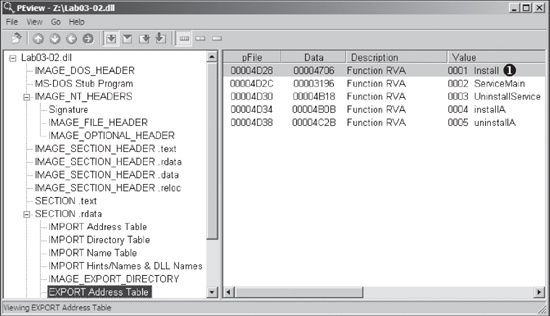
We begin with basic static analysis by looking at the PE file structure and strings. Figure C-5 shows that this DLL has five exports, as listed from
❶ and below. The export ServiceMain suggests that this malware needs to be installed as a service in order to run
properly.
The following listing shows the malware’s interesting imported functions in bold.
OpenService
DeleteService
OpenSCManager
CreateService
RegOpenKeyEx
RegQueryValueEx
RegCreateKey
RegSetValueEx
InternetOpen
InternetConnect
HttpOpenRequest
HttpSendRequest
InternetReadFile
These include service-manipulation functions, such as CreateService, and registry-manipulation functions, such as RegSetValueEx. Imported networking functions, such as HttpSendRequest, suggest that the malware uses HTTP.
Next, we examine the strings, as shown in the following listing.
Y29ubmVjdA==
practicalmalwareanalysis.com
serve.html
dW5zdXBwb3J0
c2xlZXA=
Y21k
cXVpdA==
Windows XP 6.11
HTTP/1.1
quit
exit
getfile
cmd.exe /c
Depends INA+, Collects and stores network configuration and location
information, and notifies applications when this information changes.
%SystemRoot%\System32\svchost.exe -k
SYSTEM\CurrentControlSet\Services\
Intranet Network Awareness (INA+)
%SystemRoot%\System32\svchost.exe -k netsvcs
netsvcs
SOFTWARE\Microsoft\Windows NT\CurrentVersion\Svchost
IPRIP
We see several interesting strings, including registry locations, a domain name, unique
strings like IPRIP and serve.html, and a variety of encoded strings. Basic dynamic techniques may show us how
these strings and imports are used.
The results of our basic static analysis techniques lead us to believe that this malware needs
to be installed as a service using the exported function installA. We’ll use that function to attempt to install this malware, but before we
do that, we’ll launch Regshot to take a baseline snapshot of the registry and use Process
Explorer to monitor the processes running on the system. After setting up Regshot and Process
Explorer, we install the malware using rundll32.exe, as follows:
C:\>rundll32.exe Lab03-02.dll,installAAfter installing the malware, we use Process Explorer to confirm that it has terminated by making sure that rundll32.exe is no longer in the process listing. Next, we take a second snapshot with Regshot to see if the malware installed itself in the registry.
The edited Regshot results are shown in the following listing.
----------------------------------
Keys added
----------------------------------
HKLM\SYSTEM\CurrentControlSet\Services\IPRIP ❶
----------------------------------
Values added
----------------------------------
HKLM\SYSTEM\CurrentControlSet\Services\IPRIP\Parameters\ServiceDll:
     "z:\Lab03-02.dll"
HKLM\SYSTEM\CurrentControlSet\Services\IPRIP\ImagePath:
     "%SystemRoot%\System32\svchost.exe -k netsvcs" ❷
HKLM\SYSTEM\CurrentControlSet\Services\IPRIP\DisplayName:
     "Intranet Network Awareness (INA+)" ❸
HKLM\SYSTEM\CurrentControlSet\Services\IPRIP\Description:
     "Depends INA+, Collects and stores network configuration and location
information, and notifies applications when this information changes." ❹
The Keys added section shows that the malware installed
itself as the service IPRIP at ❶. Since the malware is a DLL, it depends on an executable to launch it. In fact, we see
at ❷ that the ImagePath is set to svchost.exe, which means that the
malware will be launched inside an svchost.exe process. The rest of the
information, such as the DisplayName and Description at ❸ and ❹, creates a unique fingerprint that can be used to identify the
malicious service.
If we examine the strings closely, we see SOFTWARE\Microsoft\Windows
NT\CurrentVersion\SvcHost and a message "You specify service name not in Svchost//netsvcs, must be one of following". If we follow our hunch and examine the \SvcHost\netsvcs registry key, we can see other potential service names we
might use, like 6to4
AppMgmt. Running Lab03-02.dll,installA
6to4 will install this malware under the 6to4 service
instead of the IPRIP service, as in the previous listing.
After installing the malware as a service, we could launch it, but first we’ll set up the rest of our basic dynamic tools. We run procmon (after clearing out all events); start Process Explorer; and set up a virtual network, including ApateDNS and Netcat listening on port 80 (since we see HTTP in the strings listing).
Since this malware is installed as the IPRIP service, we
can start it using the net command in Windows, as follows:
c:\>net start IPRIP
The Intranet Network Awareness (INA+) service is starting.
The Intranet Network Awareness (INA+) service was started successfully.
The fact that the display name (INA+) matches the
information found in the registry tells us that our malicious service has started.
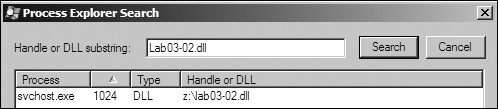
Next, we open Process Explorer and attempt to find the process in which the malware is running by selecting Find ▸ Find Handle or DLL to open the dialog shown in Figure C-6. We enter Lab03-02.dll and click Search. As shown in the figure, the result tells us that Lab03-02.dll is loaded by svchost.exe with the PID 1024. (The specific PID may differ on your system.)
In Process Explorer, we select View ▸ Lower Pane View ▸
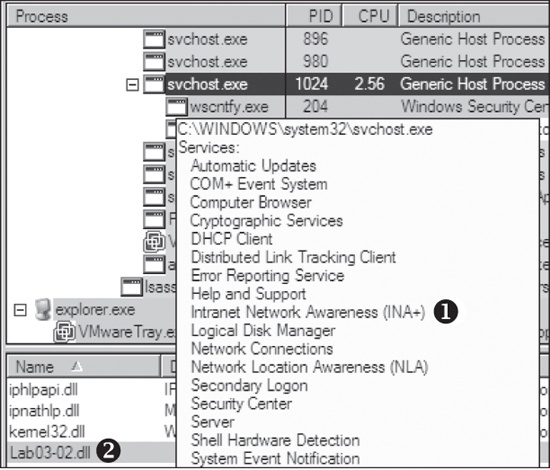
DLLs and choose the svchost.exe running with PID 1024. Figure C-7 shows the result. The display name Intranet Network Awareness (INA+) shown at ❶ confirms that the malware is running in
svchost.exe, which is further confirmed when we see at ❷ that Lab03-02.dll is loaded.
Next, we turn our attention to our network analysis tools. First, we check ApateDNS to see if the malware performed any DNS requests. The output shows a request for practicalmalwareanalysis.com, which matches the strings listing shown earlier.
Note
It takes 60 seconds after starting the service to see any network traffic (the
program does a Sleep(60000) before attempting network access). If
the networking connection fails for any reason (for example, you forgot to set up ApateDNS), it
waits 10 minutes before attempting to connect again.
We complete our network analysis by examining the Netcat results, as follows:
c:\>nc -l -p 80
GET /serve.html HTTP/1.1
Accept: */*
User-Agent: MalwareAnalysis2 Windows XP 6.11
Host: practicalmalwareanalysis.com
We see that the malware performs an HTTP GET request over
port 80 (we were listening over port 80 with Netcat since we saw HTTP in the string listing). We run
this test several times, and the data appears to be consistent across runs.
We can create a couple of network signatures from this data. Because the malware consistently
does a GET request for serve.html, we can
use that GET request as a network signature. The malware also
uses the User-Agent MalwareAnalysis2 Windows XP 6.11.
MalwareAnalysis2 is our malware analysis virtual machine’s name (so this portion of
the User-Agent will be different on your machine). The second part of the User-Agent (Windows XP 6.11) is consistent and can be used as a network
signature.