Table of Contents for
Practical Malware Analysis
 Practical Malware Analysis
Published by
No Starch Press, 2012
Practical Malware Analysis
Published by
No Starch Press, 2012
- Cover
- Practical Malware Analysis: The Hands-On Guide to Dissecting Malicious Software
- Praise for Practical Malware Analysis
- Warning
- About the Authors
- About the Technical Reviewer
- About the Contributing Authors
- Foreword
- Acknowledgments
- Individual Thanks
- Introduction
- What Is Malware Analysis?
- Prerequisites
- Practical, Hands-On Learning
- What’s in the Book?
- 0. Malware Analysis Primer
- The Goals of Malware Analysis
- Malware Analysis Techniques
- Types of Malware
- General Rules for Malware Analysis
- I. Basic Analysis
- 1. Basic Static Techniques
- Antivirus Scanning: A Useful First Step
- Hashing: A Fingerprint for Malware
- Finding Strings
- Packed and Obfuscated Malware
- Portable Executable File Format
- Linked Libraries and Functions
- Static Analysis in Practice
- The PE File Headers and Sections
- Conclusion
- Labs
- 2. Malware Analysis in Virtual Machines
- The Structure of a Virtual Machine
- Creating Your Malware Analysis Machine
- Using Your Malware Analysis Machine
- The Risks of Using VMware for Malware Analysis
- Record/Replay: Running Your Computer in Reverse
- Conclusion
- 3. Basic Dynamic Analysis
- Sandboxes: The Quick-and-Dirty Approach
- Running Malware
- Monitoring with Process Monitor
- Viewing Processes with Process Explorer
- Comparing Registry Snapshots with Regshot
- Faking a Network
- Packet Sniffing with Wireshark
- Using INetSim
- Basic Dynamic Tools in Practice
- Conclusion
- Labs
- II. Advanced Static Analysis
- 4. A Crash Course in x86 Disassembly
- Levels of Abstraction
- Reverse-Engineering
- The x86 Architecture
- Conclusion
- 5. IDA Pro
- Loading an Executable
- The IDA Pro Interface
- Using Cross-References
- Analyzing Functions
- Using Graphing Options
- Enhancing Disassembly
- Extending IDA with Plug-ins
- Conclusion
- Labs
- 6. Recognizing C Code Constructs in Assembly
- Global vs. Local Variables
- Disassembling Arithmetic Operations
- Recognizing if Statements
- Recognizing Loops
- Understanding Function Call Conventions
- Analyzing switch Statements
- Disassembling Arrays
- Identifying Structs
- Analyzing Linked List Traversal
- Conclusion
- Labs
- 7. Analyzing Malicious Windows Programs
- The Windows API
- The Windows Registry
- Networking APIs
- Following Running Malware
- Kernel vs. User Mode
- The Native API
- Conclusion
- Labs
- III. Advanced Dynamic Analysis
- 8. Debugging
- Source-Level vs. Assembly-Level Debuggers
- Kernel vs. User-Mode Debugging
- Using a Debugger
- Exceptions
- Modifying Execution with a Debugger
- Modifying Program Execution in Practice
- Conclusion
- 9. OllyDbg
- Loading Malware
- The OllyDbg Interface
- Memory Map
- Viewing Threads and Stacks
- Executing Code
- Breakpoints
- Loading DLLs
- Tracing
- Exception Handling
- Patching
- Analyzing Shellcode
- Assistance Features
- Plug-ins
- Scriptable Debugging
- Conclusion
- Labs
- 10. Kernel Debugging with WinDbg
- Drivers and Kernel Code
- Setting Up Kernel Debugging
- Using WinDbg
- Microsoft Symbols
- Kernel Debugging in Practice
- Rootkits
- Loading Drivers
- Kernel Issues for Windows Vista, Windows 7, and x64 Versions
- Conclusion
- Labs
- IV. Malware Functionality
- 11. Malware Behavior
- Downloaders and Launchers
- Backdoors
- Credential Stealers
- Persistence Mechanisms
- Privilege Escalation
- Covering Its Tracks—User-Mode Rootkits
- Conclusion
- Labs
- 12. Covert Malware Launching
- Launchers
- Process Injection
- Process Replacement
- Hook Injection
- Detours
- APC Injection
- Conclusion
- Labs
- 13. Data Encoding
- The Goal of Analyzing Encoding Algorithms
- Simple Ciphers
- Common Cryptographic Algorithms
- Custom Encoding
- Decoding
- Conclusion
- Labs
- 14. Malware-Focused Network Signatures
- Network Countermeasures
- Safely Investigate an Attacker Online
- Content-Based Network Countermeasures
- Combining Dynamic and Static Analysis Techniques
- Understanding the Attacker’s Perspective
- Conclusion
- Labs
- V. Anti-Reverse-Engineering
- 15. Anti-Disassembly
- Understanding Anti-Disassembly
- Defeating Disassembly Algorithms
- Anti-Disassembly Techniques
- Obscuring Flow Control
- Thwarting Stack-Frame Analysis
- Conclusion
- Labs
- 16. Anti-Debugging
- Windows Debugger Detection
- Identifying Debugger Behavior
- Interfering with Debugger Functionality
- Debugger Vulnerabilities
- Conclusion
- Labs
- 17. Anti-Virtual Machine Techniques
- VMware Artifacts
- Vulnerable Instructions
- Tweaking Settings
- Escaping the Virtual Machine
- Conclusion
- Labs
- 18. Packers and Unpacking
- Packer Anatomy
- Identifying Packed Programs
- Unpacking Options
- Automated Unpacking
- Manual Unpacking
- Tips and Tricks for Common Packers
- Analyzing Without Fully Unpacking
- Packed DLLs
- Conclusion
- Labs
- VI. Special Topics
- 19. Shellcode Analysis
- Loading Shellcode for Analysis
- Position-Independent Code
- Identifying Execution Location
- Manual Symbol Resolution
- A Full Hello World Example
- Shellcode Encodings
- NOP Sleds
- Finding Shellcode
- Conclusion
- Labs
- 20. C++ Analysis
- Object-Oriented Programming
- Virtual vs. Nonvirtual Functions
- Creating and Destroying Objects
- Conclusion
- Labs
- 21. 64-Bit Malware
- Why 64-Bit Malware?
- Differences in x64 Architecture
- Windows 32-Bit on Windows 64-Bit
- 64-Bit Hints at Malware Functionality
- Conclusion
- Labs
- A. Important Windows Functions
- B. Tools for Malware Analysis
- C. Solutions to Labs
- Lab 1-1 Solutions
- Lab 1-2 Solutions
- Lab 1-3 Solutions
- Lab 1-4 Solutions
- Lab 3-1 Solutions
- Lab 3-2 Solutions
- Lab 3-3 Solutions
- Lab 3-4 Solutions
- Lab 5-1 Solutions
- Lab 6-1 Solutions
- Lab 6-2 Solutions
- Lab 6-3 Solutions
- Lab 6-4 Solutions
- Lab 7-1 Solutions
- Lab 7-2 Solutions
- Lab 7-3 Solutions
- Lab 9-1 Solutions
- Lab 9-2 Solutions
- Lab 9-3 Solutions
- Lab 10-1 Solutions
- Lab 10-2 Solutions
- Lab 10-3 Solutions
- Lab 11-1 Solutions
- Lab 11-2 Solutions
- Lab 11-3 Solutions
- Lab 12-1 Solutions
- Lab 12-2 Solutions
- Lab 12-3 Solutions
- Lab 12-4 Solutions
- Lab 13-1 Solutions
- Lab 13-2 Solutions
- Lab 13-3 Solutions
- Lab 14-1 Solutions
- Lab 14-2 Solutions
- Lab 14-3 Solutions
- Lab 15-1 Solutions
- Lab 15-2 Solutions
- Lab 15-3 Solutions
- Lab 16-1 Solutions
- Lab 16-2 Solutions
- Lab 16-3 Solutions
- Lab 17-1 Solutions
- Lab 17-2 Solutions
- Lab 17-3 Solutions
- Lab 18-1 Solutions
- Lab 18-2 Solutions
- Lab 18-3 Solutions
- Lab 18-4 Solutions
- Lab 18-5 Solutions
- Lab 19-1 Solutions
- Lab 19-2 Solutions
- Lab 19-3 Solutions
- Lab 20-1 Solutions
- Lab 20-2 Solutions
- Lab 20-3 Solutions
- Lab 21-1 Solutions
- Lab 21-2 Solutions
- Index
- Index
- Index
- Index
- Index
- Index
- Index
- Index
- Index
- Index
- Index
- Index
- Index
- Index
- Index
- Index
- Index
- Index
- Index
- Index
- Index
- Index
- Index
- Index
- Index
- Index
- Index
- Updates
- About the Authors
- Copyright
Malware often goes to great lengths to hide its running processes and persistence mechanisms from users. The most common tool used to hide malicious activity is referred to as a rootkit.
Rootkits can come in many forms, but most of them work by modifying the internal functionality of the OS. These modifications cause files, processes, network connections, or other resources to be invisible to other programs, which makes it difficult for antivirus products, administrators, and security analysts to discover malicious activity.
Some rootkits modify user-space applications, but the majority modify the kernel, since protection mechanisms, such as intrusion prevention systems, are installed and running at the kernel level. Both the rootkit and the defensive mechanisms are more effective when they run at the kernel level, rather than at the user level. At the kernel level, rootkits can corrupt the system more easily than at the user level. The kernel-mode technique of SSDT hooking and IRP hooks were discussed in Chapter 10.
Here we’ll introduce you to a couple of user-space rootkit techniques, to give you a general understanding of how they work and how to recognize them in the field. (There are entire books devoted to rootkits, and we’ll only scratch the surface in this section.)
A good strategy for dealing with rootkits that install hooks at the user level is to first determine how the hook is placed, and then figure out what the hook is doing. Now we will look at the IAT and inline hooking techniques.
IAT hooking is a classic user-space rootkit method that hides files, processes, or network
connections on the local system. This hooking method modifies the import address table (IAT) or the
export address table (EAT). An example of IAT hooking is shown in Figure 11-4. A legitimate program calls the TerminateProcess function, as seen at ❶. Normally, the code will use the IAT to access the target function in
Kernel32.dll, but if an IAT hook is installed, as indicated at ❷, the malicious rootkit code will be called instead. The rootkit
code returns to the legitimate program to allow the TerminateProcess function to execute after manipulating some parameters. In this example,
the IAT hook prevents the legitimate program from terminating a process.
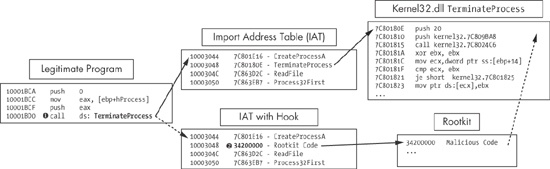
Figure 11-4. IAT hooking of TerminateProcess. The top path is the
normal flow, and the bottom path is the flow with a rootkit.
The IAT technique is an old and easily detectable form of hooking, so many modern rootkits use the more advanced inline hooking method instead.
Inline hooking overwrites the API function code contained in the imported DLLs, so it must wait until the DLL is loaded to begin executing. IAT hooking simply modifies the pointers, but inline hooking changes the actual function code.
A malicious rootkit performing inline hooking will often replace the start of the code with a jump that takes the execution to malicious code inserted by the rootkit. Alternatively, the rootkit can alter the code of the function to damage or change it, rather than jumping to malicious code.
An example of the inline hooking of the ZwDeviceIoControlFile function is shown in Example 11-7. This
function is used by programs like Netstat to retrieve network information from the system.
Example 11-7. Inline hooking example
100014B4         mov     edi, offset ProcName; "ZwDeviceIoControlFile"
100014B9         mov     esi, offset ntdll ; "ntdll.dll"
100014BE         push    edi                     ; lpProcName
100014BF         push    esi                     ; lpLibFileName
100014C0         call    ds:LoadLibraryA
100014C6         push    eax                     ; hModule
100014C7         call    ds:GetProcAddress ❶
100014CD         test    eax, eax
100014CF         mov     Ptr_ZwDeviceIoControlFile, eax
The location of the function being hooked is acquired at ❶. This rootkit’s goal is to install a 7-byte inline hook at the start of the
ZwDeviceIoControlFile function in memory. Table 11-2 shows how the hook was initialized; the raw bytes are shown on
the left, and the assembly is shown on the right.
The assembly starts with the opcode 0xB8 (mov imm/r), followed by four zero bytes, and then the opcodes 0xFF
0xE0 (jmp eax). The rootkit
will fill in these zero bytes with an address before it installs the hook, so that the jmp instruction will be valid. You can activate this view by pressing the
C key on the keyboard in IDA Pro.
The rootkit uses a simple memcpy to patch the zero bytes to
include the address of its hooking function, which hides traffic destined for port 443. Notice that
the address given (10004011) matches the address of the zero
bytes in the previous example.
100014D9 push 4 100014DB push eax 100014DC push offset unk_10004011100014E1 mov eax, offset hooking_function_hide_Port_443 100014E8 callmemcpy
The patch bytes (10004010) and the hook location are then
sent to a function that installs the inline hook, as shown in Example 11-8.
Example 11-8. Installing an inline hook
100014ED         push    7
100014EF         push    offset Ptr_ZwDeviceIoControlFile
100014F4         push    offset 10004010 ;patchBytes
100014F9         push    edi
100014FA         push    esi
100014FB         call    Install_inline_hook
Now ZwDeviceIoControlFile will call the rootkit function
first. The rootkit’s hooking function removes all traffic destined for port 443 and then calls
the real ZwDeviceIoControlFile, so everything continues to
operate as it did before the hook was installed.
Since many defense programs expect inline hooks to be installed at the beginning of functions,
some malware authors have attempted to insert the jmp or the code
modification further into the API code to make it harder to find.