Table of Contents for
Practical Malware Analysis
 Practical Malware Analysis
Published by
No Starch Press, 2012
Practical Malware Analysis
Published by
No Starch Press, 2012
- Cover
- Practical Malware Analysis: The Hands-On Guide to Dissecting Malicious Software
- Praise for Practical Malware Analysis
- Warning
- About the Authors
- About the Technical Reviewer
- About the Contributing Authors
- Foreword
- Acknowledgments
- Individual Thanks
- Introduction
- What Is Malware Analysis?
- Prerequisites
- Practical, Hands-On Learning
- What’s in the Book?
- 0. Malware Analysis Primer
- The Goals of Malware Analysis
- Malware Analysis Techniques
- Types of Malware
- General Rules for Malware Analysis
- I. Basic Analysis
- 1. Basic Static Techniques
- Antivirus Scanning: A Useful First Step
- Hashing: A Fingerprint for Malware
- Finding Strings
- Packed and Obfuscated Malware
- Portable Executable File Format
- Linked Libraries and Functions
- Static Analysis in Practice
- The PE File Headers and Sections
- Conclusion
- Labs
- 2. Malware Analysis in Virtual Machines
- The Structure of a Virtual Machine
- Creating Your Malware Analysis Machine
- Using Your Malware Analysis Machine
- The Risks of Using VMware for Malware Analysis
- Record/Replay: Running Your Computer in Reverse
- Conclusion
- 3. Basic Dynamic Analysis
- Sandboxes: The Quick-and-Dirty Approach
- Running Malware
- Monitoring with Process Monitor
- Viewing Processes with Process Explorer
- Comparing Registry Snapshots with Regshot
- Faking a Network
- Packet Sniffing with Wireshark
- Using INetSim
- Basic Dynamic Tools in Practice
- Conclusion
- Labs
- II. Advanced Static Analysis
- 4. A Crash Course in x86 Disassembly
- Levels of Abstraction
- Reverse-Engineering
- The x86 Architecture
- Conclusion
- 5. IDA Pro
- Loading an Executable
- The IDA Pro Interface
- Using Cross-References
- Analyzing Functions
- Using Graphing Options
- Enhancing Disassembly
- Extending IDA with Plug-ins
- Conclusion
- Labs
- 6. Recognizing C Code Constructs in Assembly
- Global vs. Local Variables
- Disassembling Arithmetic Operations
- Recognizing if Statements
- Recognizing Loops
- Understanding Function Call Conventions
- Analyzing switch Statements
- Disassembling Arrays
- Identifying Structs
- Analyzing Linked List Traversal
- Conclusion
- Labs
- 7. Analyzing Malicious Windows Programs
- The Windows API
- The Windows Registry
- Networking APIs
- Following Running Malware
- Kernel vs. User Mode
- The Native API
- Conclusion
- Labs
- III. Advanced Dynamic Analysis
- 8. Debugging
- Source-Level vs. Assembly-Level Debuggers
- Kernel vs. User-Mode Debugging
- Using a Debugger
- Exceptions
- Modifying Execution with a Debugger
- Modifying Program Execution in Practice
- Conclusion
- 9. OllyDbg
- Loading Malware
- The OllyDbg Interface
- Memory Map
- Viewing Threads and Stacks
- Executing Code
- Breakpoints
- Loading DLLs
- Tracing
- Exception Handling
- Patching
- Analyzing Shellcode
- Assistance Features
- Plug-ins
- Scriptable Debugging
- Conclusion
- Labs
- 10. Kernel Debugging with WinDbg
- Drivers and Kernel Code
- Setting Up Kernel Debugging
- Using WinDbg
- Microsoft Symbols
- Kernel Debugging in Practice
- Rootkits
- Loading Drivers
- Kernel Issues for Windows Vista, Windows 7, and x64 Versions
- Conclusion
- Labs
- IV. Malware Functionality
- 11. Malware Behavior
- Downloaders and Launchers
- Backdoors
- Credential Stealers
- Persistence Mechanisms
- Privilege Escalation
- Covering Its Tracks—User-Mode Rootkits
- Conclusion
- Labs
- 12. Covert Malware Launching
- Launchers
- Process Injection
- Process Replacement
- Hook Injection
- Detours
- APC Injection
- Conclusion
- Labs
- 13. Data Encoding
- The Goal of Analyzing Encoding Algorithms
- Simple Ciphers
- Common Cryptographic Algorithms
- Custom Encoding
- Decoding
- Conclusion
- Labs
- 14. Malware-Focused Network Signatures
- Network Countermeasures
- Safely Investigate an Attacker Online
- Content-Based Network Countermeasures
- Combining Dynamic and Static Analysis Techniques
- Understanding the Attacker’s Perspective
- Conclusion
- Labs
- V. Anti-Reverse-Engineering
- 15. Anti-Disassembly
- Understanding Anti-Disassembly
- Defeating Disassembly Algorithms
- Anti-Disassembly Techniques
- Obscuring Flow Control
- Thwarting Stack-Frame Analysis
- Conclusion
- Labs
- 16. Anti-Debugging
- Windows Debugger Detection
- Identifying Debugger Behavior
- Interfering with Debugger Functionality
- Debugger Vulnerabilities
- Conclusion
- Labs
- 17. Anti-Virtual Machine Techniques
- VMware Artifacts
- Vulnerable Instructions
- Tweaking Settings
- Escaping the Virtual Machine
- Conclusion
- Labs
- 18. Packers and Unpacking
- Packer Anatomy
- Identifying Packed Programs
- Unpacking Options
- Automated Unpacking
- Manual Unpacking
- Tips and Tricks for Common Packers
- Analyzing Without Fully Unpacking
- Packed DLLs
- Conclusion
- Labs
- VI. Special Topics
- 19. Shellcode Analysis
- Loading Shellcode for Analysis
- Position-Independent Code
- Identifying Execution Location
- Manual Symbol Resolution
- A Full Hello World Example
- Shellcode Encodings
- NOP Sleds
- Finding Shellcode
- Conclusion
- Labs
- 20. C++ Analysis
- Object-Oriented Programming
- Virtual vs. Nonvirtual Functions
- Creating and Destroying Objects
- Conclusion
- Labs
- 21. 64-Bit Malware
- Why 64-Bit Malware?
- Differences in x64 Architecture
- Windows 32-Bit on Windows 64-Bit
- 64-Bit Hints at Malware Functionality
- Conclusion
- Labs
- A. Important Windows Functions
- B. Tools for Malware Analysis
- C. Solutions to Labs
- Lab 1-1 Solutions
- Lab 1-2 Solutions
- Lab 1-3 Solutions
- Lab 1-4 Solutions
- Lab 3-1 Solutions
- Lab 3-2 Solutions
- Lab 3-3 Solutions
- Lab 3-4 Solutions
- Lab 5-1 Solutions
- Lab 6-1 Solutions
- Lab 6-2 Solutions
- Lab 6-3 Solutions
- Lab 6-4 Solutions
- Lab 7-1 Solutions
- Lab 7-2 Solutions
- Lab 7-3 Solutions
- Lab 9-1 Solutions
- Lab 9-2 Solutions
- Lab 9-3 Solutions
- Lab 10-1 Solutions
- Lab 10-2 Solutions
- Lab 10-3 Solutions
- Lab 11-1 Solutions
- Lab 11-2 Solutions
- Lab 11-3 Solutions
- Lab 12-1 Solutions
- Lab 12-2 Solutions
- Lab 12-3 Solutions
- Lab 12-4 Solutions
- Lab 13-1 Solutions
- Lab 13-2 Solutions
- Lab 13-3 Solutions
- Lab 14-1 Solutions
- Lab 14-2 Solutions
- Lab 14-3 Solutions
- Lab 15-1 Solutions
- Lab 15-2 Solutions
- Lab 15-3 Solutions
- Lab 16-1 Solutions
- Lab 16-2 Solutions
- Lab 16-3 Solutions
- Lab 17-1 Solutions
- Lab 17-2 Solutions
- Lab 17-3 Solutions
- Lab 18-1 Solutions
- Lab 18-2 Solutions
- Lab 18-3 Solutions
- Lab 18-4 Solutions
- Lab 18-5 Solutions
- Lab 19-1 Solutions
- Lab 19-2 Solutions
- Lab 19-3 Solutions
- Lab 20-1 Solutions
- Lab 20-2 Solutions
- Lab 20-3 Solutions
- Lab 21-1 Solutions
- Lab 21-2 Solutions
- Index
- Index
- Index
- Index
- Index
- Index
- Index
- Index
- Index
- Index
- Index
- Index
- Index
- Index
- Index
- Index
- Index
- Index
- Index
- Index
- Index
- Index
- Index
- Index
- Index
- Index
- Index
- Updates
- About the Authors
- Copyright
The malware extracts and drops the file msgina32.dll onto disk from a resource section named
TGAD.The malware installs msgina32.dll as a GINA DLL by adding it to the registry location
HKLM\SOFTWARE\Microsoft\Windows
NT\CurrentVersion\Winlogon\GinaDLL
, which causes the DLL to be loaded after system reboot.The malware steals user credentials by performing GINA interception. The msgina32.dll file is able to intercept all user credentials submitted to the system for authentication.
The malware logs stolen credentials to %SystemRoot%\System32\msutil32.sys. The username, domain, and password are logged to the file with a timestamp.
Once the malware is dropped and installed, there must be a system reboot for the GINA interception to begin. The malware logs credentials only when the user logs out, so log out and back in to see your credentials in the log file.
Beginning with basic static analysis, we see the strings GinaDLL and SOFTWARE\Microsoft\Windows
NT\CurrentVersion\Winlogon, which lead us to suspect that this might be GINA interception
malware. Examining the imports, we see functions for manipulating the registry and extracting a
resource section. Because we see resource extraction import functions, we examine the file structure
by loading Lab11-01.exe into PEview, as shown in Figure C-35.
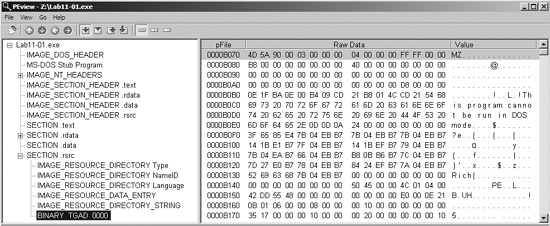
Examining the PE file format, we see a resource section named TGAD. When we click that section in PEview, we see that TGAD contains an embedded PE file.
Next, we perform dynamic analysis and monitor the malware with procmon by setting a filter for
Lab11-01.exe. When we launch the malware, we see that it creates a file named
msgina32.dll on disk in the same directory from which the malware was launched.
The malware inserts the path to msgina32.dll into the registry key HKLM\SOFTWARE\Microsoft\Windows NT\CurrentVersion\Winlogon\GinaDLL, so
that the DLL will be loaded by Winlogon when the system reboots.
Extracting the TGAD resource section from
Lab11-01.exe (using Resource Hacker) and comparing it to
msgina32.dll, we find that the two are identical.
Next, we load Lab11-01.exe into IDA Pro to confirm our findings. We see
that the main function calls two functions: sub_401080 (extracts the TGAD resource
section to msgina32.dll) and sub_401000
(sets the GINA registry value). We conclude that Lab11-01.exe is an installer
for msgina32.dll, which is loaded by Winlogon during system startup.
We’ll begin our analysis of msgina32.dll by looking at the Strings output, as shown in Example C-43.
Example C-43. Strings output of msgina32.dll
GinaDLL
Software\Microsoft\Windows NT\CurrentVersion\Winlogon
MSGina.dll
UN %s DM %s PW %s OLD %s ❶
msutil32.sys
The strings in this listing contain what appears to be a log message at ❶, which could be used to log user credentials if this is GINA
interception malware. The string msutil32.sys is interesting, and
we will determine its significance later in the lab.
Examining msgina32.dll’s exports, we see many functions that begin
with the prefix Wlx. Recall from Chapter 11 that GINA interception malware must contain all of these DLL exports because they are required by
GINA. We’ll analyze each of these functions in IDA Pro.
We begin by loading the malware into IDA Pro and analyzing DllMain, as shown in Example C-44.
Example C-44. DllMain of msgina32.dll getting a
handle to msgina.dll
1000105A         cmp     eax, DLL_PROCESS_ATTACH ❶
1000105D         jnz     short loc_100010B7
...
1000107E         call    ds:GetSystemDirectoryW ❷
10001084         lea     ecx, [esp+20Ch+LibFileName]
10001088         push    offset String2          ; "\\MSGina"
1000108D         push    ecx                     ; lpString1
1000108E         call    ds:lstrcatW
10001094         lea     edx, [esp+20Ch+LibFileName]
10001098         push    edx                     ; lpLibFileName
10001099         call    ds:LoadLibraryW ❸
1000109F         xor     ecx, ecx
100010A1         mov     hModule, eax ❹
As shown in the Example C-44, DllMain first checks the fdwReason
argument at ❶. This is an argument passed in to indicate
why the DLL entry-point function is being called. The malware checks for DLL_PROCESS_ATTACH, which is called when a process is starting up or when LoadLibrary is used to load the DLL. If this particular DllMain is called during a DLL_PROCESS_ATTACH, the code beginning at ❷
is called. This code gets a handle to msgina.dll in the Windows system
directory via the call to LoadLibraryW at ❸.
Note
msgina.dll is the Windows DLL that implements GINA, whereas msgina32.dll is the malware author’s GINA interception DLL. The name msgina32 is designed to deceive.
The malware saves the handle in a global variable that IDA Pro has named hModule at ❹. The use of this
variable allows the DLL’s exports to properly call functions in the
msgina.dll Windows DLL. Since msgina32.dll is intercepting
communication between Winlogon and msgina.dll, it must properly call the
functions in msgina.dll so that the system will continue to operate
normally.
Next, we analyze each export function. We begin with WlxLoggedOnSAS, as shown in Example C-45.
Example C-45. WlxLoggedOnSAS export just passing through to
msgina.dll
10001350 WlxLoggedOnSAS proc near
10001350         push    offset aWlxloggedons_0  ; "WlxLoggedOnSAS"
10001355         call    sub_10001000
1000135A         jmp     eax ❶
The WlxLoggedOnSAS export is short and simply passes
through to the true WlxLoggedOnSAS contained in
msgina.dll. There are now two WlxLoggedOnSAS
functions: the version in Example C-45 in
msgina32.dll and the original in msgina.dll. The function
in Example C-45 begins by passing the string WlxLoggedOnSAS to sub_10001000 and then
jumps to the result. The sub_10001000 function uses the hModule handle (to msgina.dll) and the string passed
in (in this case, WlxLoggedOnSAS) to use GetProcAddress to resolve a function in msgina.dll. The malware
doesn’t call the function; it simply resolves the address of WlxLoggedOnSAS in msgina.dll and jumps to the function, as seen at
❶. By jumping and not calling WlxLoggedOnSAS, this code will not set up a stack frame or push a return address onto the
stack. When WlxLoggedOnSAS in msgina.dll is
called, it will return execution directly to Winlogon because the return address on the stack is the
same as what was on the stack when the code in Example C-45 is called.
If we continue analyzing the other exports, we see that most operate like WlxLoggedOnSAS (they are pass-through functions), except for WlxLoggedOutSAS, which contains some extra code. (WlxLoggedOutSAS is called when the user logs out of the system.)
The export begins by resolving WlxLoggedOutSAS within
msgina.dll using GetProcAddress and then
calling it. The export also contains the code shown in Example C-46.
Example C-46. WlxLoggedOutSAS calling the credential logging function
sub_10001570
100014FC         push    offset aUnSDmSPwSOldS  ❶ ; "UN %s DM %s PW %s OLD %s"
10001501         push    0                        ; dwMessageId
10001503         call    sub_10001570 ❷
The code in Example C-46 passes a bunch of
arguments and a format string at ❶. This string is
passed to sub_10001570, which is called at ❷.
It seems like sub_10001570 may be the logging
function for stolen credentials, so let’s examine it to see what it does. Example C-47 shows the logging code contained in sub_10001570.
Example C-47. The credential-logging function logging to msutil32.sys
1000158E         call    _vsnwprintf ❶
10001593         push    offset Mode             ; Mode
10001598         push    offset Filename         ; "msutil32.sys"
1000159D         call    _wfopen ❷
100015A2         mov     esi, eax
100015A4         add     esp, 18h
100015A7         test    esi, esi
100015A9         jz      loc_1000164F
100015AF         lea     eax, [esp+858h+Dest]
100015B3         push    edi
100015B4         lea     ecx, [esp+85Ch+Buffer]
100015B8         push    eax
100015B9         push    ecx                     ; Buffer
100015BA         call    _wstrtime ❸
100015BF         add     esp, 4
100015C2         lea     edx, [esp+860h+var_828]
100015C6         push    eax
100015C7         push    edx                     ; Buffer
100015C8         call    _wstrdate ❹
100015CD         add     esp, 4
100015D0         push    eax
100015D1         push    offset Format           ; "%s %s - %s "
100015D6         push    esi                     ; File
100015D7         call    fwprintf ❺
The call to vsnwprintf at ❶ fills in the format string passed in by the WlxLoggedOutSAS export. Next, the malware opens the file
msutil32.sys at ❷, which is created
inside C:\Windows\System32\ since that is where Winlogon resides (and
msgina32.dll is running in the Winlogon process). At ❸ and ❹, the date and
time are recorded, and the information is logged at ❺.
You should now realize that msutil32.sys is used to store logged credentials
and that it is not a driver, although its name suggests that it is.
We force the malware to log credentials by running Lab11-01.exe, rebooting the machine, and then logging in and out of the system. The following is an example of the data contained in a log file created by this malware:
09/10/11 15:00:04 - UN user DM MALWAREVM PW test123 OLD (null)
09/10/11 23:09:44 - UN hacker DM MALWAREVM PW p@ssword OLD (null)
The usernames are user and hacker, their passwords are test123 and p@ssword, and the domain is MALWAREVM.
Lab 11-1 Solutions is a GINA interceptor installer. The malware drops a DLL on the system and installs it to steal user credentials, beginning after system reboot. Once the GINA interceptor DLL is installed and running, it logs credentials to msutil32.sys when a user logs out of the system.