Table of Contents for
Practical Malware Analysis
 Practical Malware Analysis
Published by
No Starch Press, 2012
Practical Malware Analysis
Published by
No Starch Press, 2012
- Cover
- Practical Malware Analysis: The Hands-On Guide to Dissecting Malicious Software
- Praise for Practical Malware Analysis
- Warning
- About the Authors
- About the Technical Reviewer
- About the Contributing Authors
- Foreword
- Acknowledgments
- Individual Thanks
- Introduction
- What Is Malware Analysis?
- Prerequisites
- Practical, Hands-On Learning
- What’s in the Book?
- 0. Malware Analysis Primer
- The Goals of Malware Analysis
- Malware Analysis Techniques
- Types of Malware
- General Rules for Malware Analysis
- I. Basic Analysis
- 1. Basic Static Techniques
- Antivirus Scanning: A Useful First Step
- Hashing: A Fingerprint for Malware
- Finding Strings
- Packed and Obfuscated Malware
- Portable Executable File Format
- Linked Libraries and Functions
- Static Analysis in Practice
- The PE File Headers and Sections
- Conclusion
- Labs
- 2. Malware Analysis in Virtual Machines
- The Structure of a Virtual Machine
- Creating Your Malware Analysis Machine
- Using Your Malware Analysis Machine
- The Risks of Using VMware for Malware Analysis
- Record/Replay: Running Your Computer in Reverse
- Conclusion
- 3. Basic Dynamic Analysis
- Sandboxes: The Quick-and-Dirty Approach
- Running Malware
- Monitoring with Process Monitor
- Viewing Processes with Process Explorer
- Comparing Registry Snapshots with Regshot
- Faking a Network
- Packet Sniffing with Wireshark
- Using INetSim
- Basic Dynamic Tools in Practice
- Conclusion
- Labs
- II. Advanced Static Analysis
- 4. A Crash Course in x86 Disassembly
- Levels of Abstraction
- Reverse-Engineering
- The x86 Architecture
- Conclusion
- 5. IDA Pro
- Loading an Executable
- The IDA Pro Interface
- Using Cross-References
- Analyzing Functions
- Using Graphing Options
- Enhancing Disassembly
- Extending IDA with Plug-ins
- Conclusion
- Labs
- 6. Recognizing C Code Constructs in Assembly
- Global vs. Local Variables
- Disassembling Arithmetic Operations
- Recognizing if Statements
- Recognizing Loops
- Understanding Function Call Conventions
- Analyzing switch Statements
- Disassembling Arrays
- Identifying Structs
- Analyzing Linked List Traversal
- Conclusion
- Labs
- 7. Analyzing Malicious Windows Programs
- The Windows API
- The Windows Registry
- Networking APIs
- Following Running Malware
- Kernel vs. User Mode
- The Native API
- Conclusion
- Labs
- III. Advanced Dynamic Analysis
- 8. Debugging
- Source-Level vs. Assembly-Level Debuggers
- Kernel vs. User-Mode Debugging
- Using a Debugger
- Exceptions
- Modifying Execution with a Debugger
- Modifying Program Execution in Practice
- Conclusion
- 9. OllyDbg
- Loading Malware
- The OllyDbg Interface
- Memory Map
- Viewing Threads and Stacks
- Executing Code
- Breakpoints
- Loading DLLs
- Tracing
- Exception Handling
- Patching
- Analyzing Shellcode
- Assistance Features
- Plug-ins
- Scriptable Debugging
- Conclusion
- Labs
- 10. Kernel Debugging with WinDbg
- Drivers and Kernel Code
- Setting Up Kernel Debugging
- Using WinDbg
- Microsoft Symbols
- Kernel Debugging in Practice
- Rootkits
- Loading Drivers
- Kernel Issues for Windows Vista, Windows 7, and x64 Versions
- Conclusion
- Labs
- IV. Malware Functionality
- 11. Malware Behavior
- Downloaders and Launchers
- Backdoors
- Credential Stealers
- Persistence Mechanisms
- Privilege Escalation
- Covering Its Tracks—User-Mode Rootkits
- Conclusion
- Labs
- 12. Covert Malware Launching
- Launchers
- Process Injection
- Process Replacement
- Hook Injection
- Detours
- APC Injection
- Conclusion
- Labs
- 13. Data Encoding
- The Goal of Analyzing Encoding Algorithms
- Simple Ciphers
- Common Cryptographic Algorithms
- Custom Encoding
- Decoding
- Conclusion
- Labs
- 14. Malware-Focused Network Signatures
- Network Countermeasures
- Safely Investigate an Attacker Online
- Content-Based Network Countermeasures
- Combining Dynamic and Static Analysis Techniques
- Understanding the Attacker’s Perspective
- Conclusion
- Labs
- V. Anti-Reverse-Engineering
- 15. Anti-Disassembly
- Understanding Anti-Disassembly
- Defeating Disassembly Algorithms
- Anti-Disassembly Techniques
- Obscuring Flow Control
- Thwarting Stack-Frame Analysis
- Conclusion
- Labs
- 16. Anti-Debugging
- Windows Debugger Detection
- Identifying Debugger Behavior
- Interfering with Debugger Functionality
- Debugger Vulnerabilities
- Conclusion
- Labs
- 17. Anti-Virtual Machine Techniques
- VMware Artifacts
- Vulnerable Instructions
- Tweaking Settings
- Escaping the Virtual Machine
- Conclusion
- Labs
- 18. Packers and Unpacking
- Packer Anatomy
- Identifying Packed Programs
- Unpacking Options
- Automated Unpacking
- Manual Unpacking
- Tips and Tricks for Common Packers
- Analyzing Without Fully Unpacking
- Packed DLLs
- Conclusion
- Labs
- VI. Special Topics
- 19. Shellcode Analysis
- Loading Shellcode for Analysis
- Position-Independent Code
- Identifying Execution Location
- Manual Symbol Resolution
- A Full Hello World Example
- Shellcode Encodings
- NOP Sleds
- Finding Shellcode
- Conclusion
- Labs
- 20. C++ Analysis
- Object-Oriented Programming
- Virtual vs. Nonvirtual Functions
- Creating and Destroying Objects
- Conclusion
- Labs
- 21. 64-Bit Malware
- Why 64-Bit Malware?
- Differences in x64 Architecture
- Windows 32-Bit on Windows 64-Bit
- 64-Bit Hints at Malware Functionality
- Conclusion
- Labs
- A. Important Windows Functions
- B. Tools for Malware Analysis
- C. Solutions to Labs
- Lab 1-1 Solutions
- Lab 1-2 Solutions
- Lab 1-3 Solutions
- Lab 1-4 Solutions
- Lab 3-1 Solutions
- Lab 3-2 Solutions
- Lab 3-3 Solutions
- Lab 3-4 Solutions
- Lab 5-1 Solutions
- Lab 6-1 Solutions
- Lab 6-2 Solutions
- Lab 6-3 Solutions
- Lab 6-4 Solutions
- Lab 7-1 Solutions
- Lab 7-2 Solutions
- Lab 7-3 Solutions
- Lab 9-1 Solutions
- Lab 9-2 Solutions
- Lab 9-3 Solutions
- Lab 10-1 Solutions
- Lab 10-2 Solutions
- Lab 10-3 Solutions
- Lab 11-1 Solutions
- Lab 11-2 Solutions
- Lab 11-3 Solutions
- Lab 12-1 Solutions
- Lab 12-2 Solutions
- Lab 12-3 Solutions
- Lab 12-4 Solutions
- Lab 13-1 Solutions
- Lab 13-2 Solutions
- Lab 13-3 Solutions
- Lab 14-1 Solutions
- Lab 14-2 Solutions
- Lab 14-3 Solutions
- Lab 15-1 Solutions
- Lab 15-2 Solutions
- Lab 15-3 Solutions
- Lab 16-1 Solutions
- Lab 16-2 Solutions
- Lab 16-3 Solutions
- Lab 17-1 Solutions
- Lab 17-2 Solutions
- Lab 17-3 Solutions
- Lab 18-1 Solutions
- Lab 18-2 Solutions
- Lab 18-3 Solutions
- Lab 18-4 Solutions
- Lab 18-5 Solutions
- Lab 19-1 Solutions
- Lab 19-2 Solutions
- Lab 19-3 Solutions
- Lab 20-1 Solutions
- Lab 20-2 Solutions
- Lab 20-3 Solutions
- Lab 21-1 Solutions
- Lab 21-2 Solutions
- Index
- Index
- Index
- Index
- Index
- Index
- Index
- Index
- Index
- Index
- Index
- Index
- Index
- Index
- Index
- Index
- Index
- Index
- Index
- Index
- Index
- Index
- Index
- Index
- Index
- Index
- Index
- Updates
- About the Authors
- Copyright
One of the most useful pieces of information that we can gather about an executable is the list of functions that it imports. Imports are functions used by one program that are actually stored in a different program, such as code libraries that contain functionality common to many programs. Code libraries can be connected to the main executable by linking.
Programmers link imports to their programs so that they don’t need to re-implement certain functionality in multiple programs. Code libraries can be linked statically, at runtime, or dynamically. Knowing how the library code is linked is critical to our understanding of malware because the information we can find in the PE file header depends on how the library code has been linked. We’ll discuss several tools for viewing an executable’s imported functions in this section.
Static linking is the least commonly used method of linking libraries, although it is common in UNIX and Linux programs. When a library is statically linked to an executable, all code from that library is copied into the executable, which makes the executable grow in size. When analyzing code, it’s difficult to differentiate between statically linked code and the executable’s own code, because nothing in the PE file header indicates that the file contains linked code.
While unpopular in friendly programs, runtime linking is commonly used in malware, especially when it’s packed or obfuscated. Executables that use runtime linking connect to libraries only when that function is needed, not at program start, as with dynamically linked programs.
Several Microsoft Windows functions allow programmers to import linked functions not listed in
a program’s file header. Of these, the two most commonly used are LoadLibrary and GetProcAddress. LdrGetProcAddress and LdrLoadDll are
also used. LoadLibrary and GetProcAddress allow a program to access any function in any library on the system, which
means that when these functions are used, you can’t tell statically which functions are being
linked to by the suspect program.
Of all linking methods, dynamic linking is the most common and the most interesting for malware analysts. When libraries are dynamically linked, the host OS searches for the necessary libraries when the program is loaded. When the program calls the linked library function, that function executes within the library.
The PE file header stores information about every library that will be loaded and every
function that will be used by the program. The libraries used and functions called are often the
most important parts of a program, and identifying them is particularly important, because it allows
us to guess at what the program does. For example, if a program imports the function URLDownloadToFile, you might guess that it connects to the Internet to
download some content that it then stores in a local file.
The Dependency Walker program (http://www.dependencywalker.com/), distributed with some versions of Microsoft Visual Studio and other Microsoft development packages, lists only dynamically linked functions in an executable.
Figure 1-6 shows the Dependency Walker’s analysis of SERVICES.EX_ ❶. The far left pane at ❷ shows the program as well as the DLLs being imported, namely KERNEL32.DLL and WS2_32.DLL.
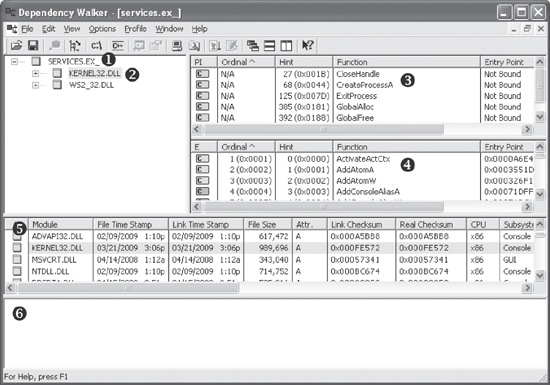
Clicking KERNEL32.DLL shows its imported functions in the upper-right
pane at ❸. We see several functions, but the most
interesting is CreateProcessA, which tells us that the program
will probably create another process, and suggests that when running the program, we should watch
for the launch of additional programs.
The middle right pane at ❹ lists all functions in KERNEL32.DLL that can be imported—information that is not particularly useful to us. Notice the column in panes ❸ and ❹ labeled Ordinal. Executables can import functions by ordinal instead of name. When importing a function by ordinal, the name of the function never appears in the original executable, and it can be harder for an analyst to figure out which function is being used. When malware imports a function by ordinal, you can find out which function is being imported by looking up the ordinal value in the pane at ❹.
The bottom two panes (❺ and ❻) list additional information about the versions of DLLs that would be loaded if you ran the program and any reported errors, respectively.
A program’s DLLs can tell you a lot about its functionality. For example, Table 1-1 lists common DLLs and what they tell you about an application.
Table 1-1. Common DLLs
DLL | Description |
|---|---|
Kernel32.dll | This is a very common DLL that contains core functionality, such as access and manipulation of memory, files, and hardware. |
Advapi32.dll | This DLL provides access to advanced core Windows components such as the Service Manager and Registry. |
User32.dll | This DLL contains all the user-interface components, such as buttons, scroll bars, and components for controlling and responding to user actions. |
Gdi32.dll | This DLL contains functions for displaying and manipulating graphics. |
Ntdll.dll | This DLL is the interface to the Windows kernel. Executables generally do not import this file directly, although it is always imported indirectly by Kernel32.dll. If an executable imports this file, it means that the author intended to use functionality not normally available to Windows programs. Some tasks, such as hiding functionality or manipulating processes, will use this interface. |
WSock32.dll and Ws2_32.dll | These are networking DLLs. A program that accesses either of these most likely connects to a network or performs network-related tasks. |
Wininet.dll | This DLL contains higher-level networking functions that implement protocols such as FTP, HTTP, and NTP. |
The PE file header also includes information about specific functions used by an executable. The names of these Windows functions can give you a good idea about what the executable does. Microsoft does an excellent job of documenting the Windows API through the Microsoft Developer Network (MSDN) library. (You’ll also find a list of functions commonly used by malware in Appendix A.)
Like imports, DLLs and EXEs export functions to interact with other programs and code. Typically, a DLL implements one or more functions and exports them for use by an executable that can then import and use them.
The PE file contains information about which functions a file exports. Because DLLs are specifically implemented to provide functionality used by EXEs, exported functions are most common in DLLs. EXEs are not designed to provide functionality for other EXEs, and exported functions are rare. If you discover exports in an executable, they often will provide useful information.
In many cases, software authors name their exported functions in a way that provides useful
information. One common convention is to use the name used in the Microsoft documentation. For
example, in order to run a program as a service, you must first define a ServiceMain function. The presence of an exported function called ServiceMain tells you that the malware runs as part of a service.
Unfortunately, while the Microsoft documentation calls this function ServiceMain, and it’s common for programmers to do the same, the function can have
any name. Therefore, the names of exported functions are actually of limited use against
sophisticated malware. If malware uses exports, it will often either omit names entirely or use
unclear or misleading names.
You can view export information using the Dependency Walker program discussed in Exploring Dynamically Linked Functions with Dependency Walker. For a list of exported functions, click the name of the file you want to examine. Referring back to Figure 1-6, window ❹ shows all of a file’s exported functions.