Table of Contents for
Practical Malware Analysis
 Practical Malware Analysis
Published by
No Starch Press, 2012
Practical Malware Analysis
Published by
No Starch Press, 2012
- Cover
- Practical Malware Analysis: The Hands-On Guide to Dissecting Malicious Software
- Praise for Practical Malware Analysis
- Warning
- About the Authors
- About the Technical Reviewer
- About the Contributing Authors
- Foreword
- Acknowledgments
- Individual Thanks
- Introduction
- What Is Malware Analysis?
- Prerequisites
- Practical, Hands-On Learning
- What’s in the Book?
- 0. Malware Analysis Primer
- The Goals of Malware Analysis
- Malware Analysis Techniques
- Types of Malware
- General Rules for Malware Analysis
- I. Basic Analysis
- 1. Basic Static Techniques
- Antivirus Scanning: A Useful First Step
- Hashing: A Fingerprint for Malware
- Finding Strings
- Packed and Obfuscated Malware
- Portable Executable File Format
- Linked Libraries and Functions
- Static Analysis in Practice
- The PE File Headers and Sections
- Conclusion
- Labs
- 2. Malware Analysis in Virtual Machines
- The Structure of a Virtual Machine
- Creating Your Malware Analysis Machine
- Using Your Malware Analysis Machine
- The Risks of Using VMware for Malware Analysis
- Record/Replay: Running Your Computer in Reverse
- Conclusion
- 3. Basic Dynamic Analysis
- Sandboxes: The Quick-and-Dirty Approach
- Running Malware
- Monitoring with Process Monitor
- Viewing Processes with Process Explorer
- Comparing Registry Snapshots with Regshot
- Faking a Network
- Packet Sniffing with Wireshark
- Using INetSim
- Basic Dynamic Tools in Practice
- Conclusion
- Labs
- II. Advanced Static Analysis
- 4. A Crash Course in x86 Disassembly
- Levels of Abstraction
- Reverse-Engineering
- The x86 Architecture
- Conclusion
- 5. IDA Pro
- Loading an Executable
- The IDA Pro Interface
- Using Cross-References
- Analyzing Functions
- Using Graphing Options
- Enhancing Disassembly
- Extending IDA with Plug-ins
- Conclusion
- Labs
- 6. Recognizing C Code Constructs in Assembly
- Global vs. Local Variables
- Disassembling Arithmetic Operations
- Recognizing if Statements
- Recognizing Loops
- Understanding Function Call Conventions
- Analyzing switch Statements
- Disassembling Arrays
- Identifying Structs
- Analyzing Linked List Traversal
- Conclusion
- Labs
- 7. Analyzing Malicious Windows Programs
- The Windows API
- The Windows Registry
- Networking APIs
- Following Running Malware
- Kernel vs. User Mode
- The Native API
- Conclusion
- Labs
- III. Advanced Dynamic Analysis
- 8. Debugging
- Source-Level vs. Assembly-Level Debuggers
- Kernel vs. User-Mode Debugging
- Using a Debugger
- Exceptions
- Modifying Execution with a Debugger
- Modifying Program Execution in Practice
- Conclusion
- 9. OllyDbg
- Loading Malware
- The OllyDbg Interface
- Memory Map
- Viewing Threads and Stacks
- Executing Code
- Breakpoints
- Loading DLLs
- Tracing
- Exception Handling
- Patching
- Analyzing Shellcode
- Assistance Features
- Plug-ins
- Scriptable Debugging
- Conclusion
- Labs
- 10. Kernel Debugging with WinDbg
- Drivers and Kernel Code
- Setting Up Kernel Debugging
- Using WinDbg
- Microsoft Symbols
- Kernel Debugging in Practice
- Rootkits
- Loading Drivers
- Kernel Issues for Windows Vista, Windows 7, and x64 Versions
- Conclusion
- Labs
- IV. Malware Functionality
- 11. Malware Behavior
- Downloaders and Launchers
- Backdoors
- Credential Stealers
- Persistence Mechanisms
- Privilege Escalation
- Covering Its Tracks—User-Mode Rootkits
- Conclusion
- Labs
- 12. Covert Malware Launching
- Launchers
- Process Injection
- Process Replacement
- Hook Injection
- Detours
- APC Injection
- Conclusion
- Labs
- 13. Data Encoding
- The Goal of Analyzing Encoding Algorithms
- Simple Ciphers
- Common Cryptographic Algorithms
- Custom Encoding
- Decoding
- Conclusion
- Labs
- 14. Malware-Focused Network Signatures
- Network Countermeasures
- Safely Investigate an Attacker Online
- Content-Based Network Countermeasures
- Combining Dynamic and Static Analysis Techniques
- Understanding the Attacker’s Perspective
- Conclusion
- Labs
- V. Anti-Reverse-Engineering
- 15. Anti-Disassembly
- Understanding Anti-Disassembly
- Defeating Disassembly Algorithms
- Anti-Disassembly Techniques
- Obscuring Flow Control
- Thwarting Stack-Frame Analysis
- Conclusion
- Labs
- 16. Anti-Debugging
- Windows Debugger Detection
- Identifying Debugger Behavior
- Interfering with Debugger Functionality
- Debugger Vulnerabilities
- Conclusion
- Labs
- 17. Anti-Virtual Machine Techniques
- VMware Artifacts
- Vulnerable Instructions
- Tweaking Settings
- Escaping the Virtual Machine
- Conclusion
- Labs
- 18. Packers and Unpacking
- Packer Anatomy
- Identifying Packed Programs
- Unpacking Options
- Automated Unpacking
- Manual Unpacking
- Tips and Tricks for Common Packers
- Analyzing Without Fully Unpacking
- Packed DLLs
- Conclusion
- Labs
- VI. Special Topics
- 19. Shellcode Analysis
- Loading Shellcode for Analysis
- Position-Independent Code
- Identifying Execution Location
- Manual Symbol Resolution
- A Full Hello World Example
- Shellcode Encodings
- NOP Sleds
- Finding Shellcode
- Conclusion
- Labs
- 20. C++ Analysis
- Object-Oriented Programming
- Virtual vs. Nonvirtual Functions
- Creating and Destroying Objects
- Conclusion
- Labs
- 21. 64-Bit Malware
- Why 64-Bit Malware?
- Differences in x64 Architecture
- Windows 32-Bit on Windows 64-Bit
- 64-Bit Hints at Malware Functionality
- Conclusion
- Labs
- A. Important Windows Functions
- B. Tools for Malware Analysis
- C. Solutions to Labs
- Lab 1-1 Solutions
- Lab 1-2 Solutions
- Lab 1-3 Solutions
- Lab 1-4 Solutions
- Lab 3-1 Solutions
- Lab 3-2 Solutions
- Lab 3-3 Solutions
- Lab 3-4 Solutions
- Lab 5-1 Solutions
- Lab 6-1 Solutions
- Lab 6-2 Solutions
- Lab 6-3 Solutions
- Lab 6-4 Solutions
- Lab 7-1 Solutions
- Lab 7-2 Solutions
- Lab 7-3 Solutions
- Lab 9-1 Solutions
- Lab 9-2 Solutions
- Lab 9-3 Solutions
- Lab 10-1 Solutions
- Lab 10-2 Solutions
- Lab 10-3 Solutions
- Lab 11-1 Solutions
- Lab 11-2 Solutions
- Lab 11-3 Solutions
- Lab 12-1 Solutions
- Lab 12-2 Solutions
- Lab 12-3 Solutions
- Lab 12-4 Solutions
- Lab 13-1 Solutions
- Lab 13-2 Solutions
- Lab 13-3 Solutions
- Lab 14-1 Solutions
- Lab 14-2 Solutions
- Lab 14-3 Solutions
- Lab 15-1 Solutions
- Lab 15-2 Solutions
- Lab 15-3 Solutions
- Lab 16-1 Solutions
- Lab 16-2 Solutions
- Lab 16-3 Solutions
- Lab 17-1 Solutions
- Lab 17-2 Solutions
- Lab 17-3 Solutions
- Lab 18-1 Solutions
- Lab 18-2 Solutions
- Lab 18-3 Solutions
- Lab 18-4 Solutions
- Lab 18-5 Solutions
- Lab 19-1 Solutions
- Lab 19-2 Solutions
- Lab 19-3 Solutions
- Lab 20-1 Solutions
- Lab 20-2 Solutions
- Lab 20-3 Solutions
- Lab 21-1 Solutions
- Lab 21-2 Solutions
- Index
- Index
- Index
- Index
- Index
- Index
- Index
- Index
- Index
- Index
- Index
- Index
- Index
- Index
- Index
- Index
- Index
- Index
- Index
- Index
- Index
- Index
- Index
- Index
- Index
- Index
- Index
- Updates
- About the Authors
- Copyright
Programmers use if statements to alter program execution
based on certain conditions. if statements are common in C code
and disassembly. We’ll examine basic and nested if
statements in this section. Your goal should be to learn how to recognize different types of
if statements.
Example 6-8 displays a simple if statement in C with the assembly for this code shown in Example 6-9. Notice the conditional jump jnz at ❷. There must be a
conditional jump for an if statement, but not all conditional
jumps correspond to if statements.
Example 6-8. C code if statement example
int x = 1;
int y = 2;

if(x == y){
      printf("x equals y.\n");
}else{
      printf("x is not equal to y.\n");
}
Example 6-9. Assembly code for the if statement example in Example 6-8
00401006        mov     [ebp+var_8], 1
0040100D        mov     [ebp+var_4], 2
00401014        mov     eax, [ebp+var_8]
00401017        cmp     eax, [ebp+var_4] ❶
0040101A        jnz     short loc_40102B ❷
0040101C        push    offset aXEqualsY_ ; "x equals y.\n"
00401021        call    printf
00401026        add     esp, 4
00401029        jmp     short loc_401038 ❸
0040102B loc_40102B:
0040102B        push    offset aXIsNotEqualToY ; "x is not equal to y.\n"
00401030        call    printf
As you can see in Example 6-9, a decision
must be made before the code inside the if statement in Example 6-8 will execute. This decision corresponds to the conditional
jump (jnz) shown at ❷. The decision to jump is made based on the comparison (cmp), which checks to see if var_4 equals var_8 (var_4 and var_8 correspond to x and y in our source code) at ❶. If
the values are not equal, the jump occurs, and the code prints "x is not
equal to y."; otherwise, the code continues the path of execution and prints "x equals y."
Notice also the jump (jmp) that jumps over the else section
of the code at ❸. It is important that you recognize
that only one of these two code paths can be taken.
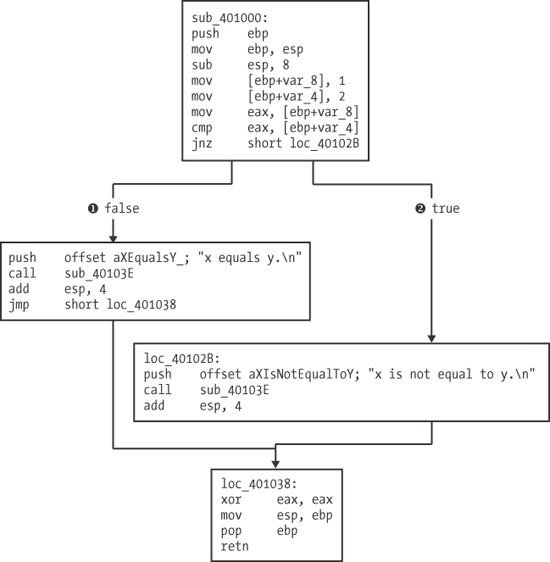
IDA Pro has a graphing tool that is useful in recognizing constructs, as shown in Figure 6-1. This feature is the default view for analyzing functions.
Figure 6-1 shows a graph of the assembly code
example in Example 6-9. As you can see, two different
paths (❶ and ❷) of code execution lead to the end of the function, and each path prints a different
string. Code path ❶ will print "x equals y.", and ❷ will print "x is not equal to y."
IDA Pro adds false
❶ and true
❷ labels at the decision points at the bottom of the
upper code box. As you can imagine, graphing a function can greatly speed up the reverse-engineering
process.
Example 6-10 shows C code for a nested if statement that is similar to Example 6-8, except that two additional if statements have been added within the original if
statement. These additional statements test to determine whether z is equal to 0.
Example 6-10. C code for a nested if statement
int x = 0;
int y = 1;
int z = 2;

if(x == y){
     if(z==0){
          printf("z is zero and x = y.\n");
     }else{
          printf("z is non-zero and x = y.\n");
     }
}else{
     if(z==0){
          printf("z zero and x != y.\n");
     }else{
          printf("z non-zero and x != y.\n");
     }
}
Despite this minor change to the C code, the assembly code is more complicated, as shown in Example 6-11.
Example 6-11. Assembly code for the nested if statement example shown in
Example 6-10
00401006        mov     [ebp+var_8], 0
0040100D        mov     [ebp+var_4], 1
00401014        mov     [ebp+var_C], 2
0040101B        mov     eax, [ebp+var_8]
0040101E        cmp     eax, [ebp+var_4]
00401021        jnz     short loc_401047 ❶
00401023        cmp     [ebp+var_C], 0
00401027        jnz     short loc_401038 ❷
00401029        push    offset aZIsZeroAndXY_ ; "z is zero and x = y.\n"
0040102E        call    printf
00401033        add     esp, 4
00401036        jmp     short loc_401045
00401038 loc_401038:
00401038        push    offset aZIsNonZeroAndX ; "z is non-zero and x = y.\n"
0040103D        call    printf
00401042        add     esp, 4
00401045 loc_401045:
00401045        jmp     short loc_401069
00401047 loc_401047:
00401047        cmp     [ebp+var_C], 0
0040104B        jnz     short loc_40105C ❸
0040104D        push    offset aZZeroAndXY_ ; "z zero and x != y.\n"
00401052        call    printf
00401057        add     esp, 4
0040105A        jmp     short loc_401069
0040105C loc_40105C:
0040105C        push    offset aZNonZeroAndXY_ ; "z non-zero and x != y.\n"
00401061        call    printf00401061
As you can see, three different conditional jumps occur. The first occurs if var_4 does not equal var_8 at ❶. The other two occur if var_C
is not equal to zero at ❷ and ❸.