Table of Contents for
Practical Malware Analysis
 Practical Malware Analysis
Published by
No Starch Press, 2012
Practical Malware Analysis
Published by
No Starch Press, 2012
- Cover
- Practical Malware Analysis: The Hands-On Guide to Dissecting Malicious Software
- Praise for Practical Malware Analysis
- Warning
- About the Authors
- About the Technical Reviewer
- About the Contributing Authors
- Foreword
- Acknowledgments
- Individual Thanks
- Introduction
- What Is Malware Analysis?
- Prerequisites
- Practical, Hands-On Learning
- What’s in the Book?
- 0. Malware Analysis Primer
- The Goals of Malware Analysis
- Malware Analysis Techniques
- Types of Malware
- General Rules for Malware Analysis
- I. Basic Analysis
- 1. Basic Static Techniques
- Antivirus Scanning: A Useful First Step
- Hashing: A Fingerprint for Malware
- Finding Strings
- Packed and Obfuscated Malware
- Portable Executable File Format
- Linked Libraries and Functions
- Static Analysis in Practice
- The PE File Headers and Sections
- Conclusion
- Labs
- 2. Malware Analysis in Virtual Machines
- The Structure of a Virtual Machine
- Creating Your Malware Analysis Machine
- Using Your Malware Analysis Machine
- The Risks of Using VMware for Malware Analysis
- Record/Replay: Running Your Computer in Reverse
- Conclusion
- 3. Basic Dynamic Analysis
- Sandboxes: The Quick-and-Dirty Approach
- Running Malware
- Monitoring with Process Monitor
- Viewing Processes with Process Explorer
- Comparing Registry Snapshots with Regshot
- Faking a Network
- Packet Sniffing with Wireshark
- Using INetSim
- Basic Dynamic Tools in Practice
- Conclusion
- Labs
- II. Advanced Static Analysis
- 4. A Crash Course in x86 Disassembly
- Levels of Abstraction
- Reverse-Engineering
- The x86 Architecture
- Conclusion
- 5. IDA Pro
- Loading an Executable
- The IDA Pro Interface
- Using Cross-References
- Analyzing Functions
- Using Graphing Options
- Enhancing Disassembly
- Extending IDA with Plug-ins
- Conclusion
- Labs
- 6. Recognizing C Code Constructs in Assembly
- Global vs. Local Variables
- Disassembling Arithmetic Operations
- Recognizing if Statements
- Recognizing Loops
- Understanding Function Call Conventions
- Analyzing switch Statements
- Disassembling Arrays
- Identifying Structs
- Analyzing Linked List Traversal
- Conclusion
- Labs
- 7. Analyzing Malicious Windows Programs
- The Windows API
- The Windows Registry
- Networking APIs
- Following Running Malware
- Kernel vs. User Mode
- The Native API
- Conclusion
- Labs
- III. Advanced Dynamic Analysis
- 8. Debugging
- Source-Level vs. Assembly-Level Debuggers
- Kernel vs. User-Mode Debugging
- Using a Debugger
- Exceptions
- Modifying Execution with a Debugger
- Modifying Program Execution in Practice
- Conclusion
- 9. OllyDbg
- Loading Malware
- The OllyDbg Interface
- Memory Map
- Viewing Threads and Stacks
- Executing Code
- Breakpoints
- Loading DLLs
- Tracing
- Exception Handling
- Patching
- Analyzing Shellcode
- Assistance Features
- Plug-ins
- Scriptable Debugging
- Conclusion
- Labs
- 10. Kernel Debugging with WinDbg
- Drivers and Kernel Code
- Setting Up Kernel Debugging
- Using WinDbg
- Microsoft Symbols
- Kernel Debugging in Practice
- Rootkits
- Loading Drivers
- Kernel Issues for Windows Vista, Windows 7, and x64 Versions
- Conclusion
- Labs
- IV. Malware Functionality
- 11. Malware Behavior
- Downloaders and Launchers
- Backdoors
- Credential Stealers
- Persistence Mechanisms
- Privilege Escalation
- Covering Its Tracks—User-Mode Rootkits
- Conclusion
- Labs
- 12. Covert Malware Launching
- Launchers
- Process Injection
- Process Replacement
- Hook Injection
- Detours
- APC Injection
- Conclusion
- Labs
- 13. Data Encoding
- The Goal of Analyzing Encoding Algorithms
- Simple Ciphers
- Common Cryptographic Algorithms
- Custom Encoding
- Decoding
- Conclusion
- Labs
- 14. Malware-Focused Network Signatures
- Network Countermeasures
- Safely Investigate an Attacker Online
- Content-Based Network Countermeasures
- Combining Dynamic and Static Analysis Techniques
- Understanding the Attacker’s Perspective
- Conclusion
- Labs
- V. Anti-Reverse-Engineering
- 15. Anti-Disassembly
- Understanding Anti-Disassembly
- Defeating Disassembly Algorithms
- Anti-Disassembly Techniques
- Obscuring Flow Control
- Thwarting Stack-Frame Analysis
- Conclusion
- Labs
- 16. Anti-Debugging
- Windows Debugger Detection
- Identifying Debugger Behavior
- Interfering with Debugger Functionality
- Debugger Vulnerabilities
- Conclusion
- Labs
- 17. Anti-Virtual Machine Techniques
- VMware Artifacts
- Vulnerable Instructions
- Tweaking Settings
- Escaping the Virtual Machine
- Conclusion
- Labs
- 18. Packers and Unpacking
- Packer Anatomy
- Identifying Packed Programs
- Unpacking Options
- Automated Unpacking
- Manual Unpacking
- Tips and Tricks for Common Packers
- Analyzing Without Fully Unpacking
- Packed DLLs
- Conclusion
- Labs
- VI. Special Topics
- 19. Shellcode Analysis
- Loading Shellcode for Analysis
- Position-Independent Code
- Identifying Execution Location
- Manual Symbol Resolution
- A Full Hello World Example
- Shellcode Encodings
- NOP Sleds
- Finding Shellcode
- Conclusion
- Labs
- 20. C++ Analysis
- Object-Oriented Programming
- Virtual vs. Nonvirtual Functions
- Creating and Destroying Objects
- Conclusion
- Labs
- 21. 64-Bit Malware
- Why 64-Bit Malware?
- Differences in x64 Architecture
- Windows 32-Bit on Windows 64-Bit
- 64-Bit Hints at Malware Functionality
- Conclusion
- Labs
- A. Important Windows Functions
- B. Tools for Malware Analysis
- C. Solutions to Labs
- Lab 1-1 Solutions
- Lab 1-2 Solutions
- Lab 1-3 Solutions
- Lab 1-4 Solutions
- Lab 3-1 Solutions
- Lab 3-2 Solutions
- Lab 3-3 Solutions
- Lab 3-4 Solutions
- Lab 5-1 Solutions
- Lab 6-1 Solutions
- Lab 6-2 Solutions
- Lab 6-3 Solutions
- Lab 6-4 Solutions
- Lab 7-1 Solutions
- Lab 7-2 Solutions
- Lab 7-3 Solutions
- Lab 9-1 Solutions
- Lab 9-2 Solutions
- Lab 9-3 Solutions
- Lab 10-1 Solutions
- Lab 10-2 Solutions
- Lab 10-3 Solutions
- Lab 11-1 Solutions
- Lab 11-2 Solutions
- Lab 11-3 Solutions
- Lab 12-1 Solutions
- Lab 12-2 Solutions
- Lab 12-3 Solutions
- Lab 12-4 Solutions
- Lab 13-1 Solutions
- Lab 13-2 Solutions
- Lab 13-3 Solutions
- Lab 14-1 Solutions
- Lab 14-2 Solutions
- Lab 14-3 Solutions
- Lab 15-1 Solutions
- Lab 15-2 Solutions
- Lab 15-3 Solutions
- Lab 16-1 Solutions
- Lab 16-2 Solutions
- Lab 16-3 Solutions
- Lab 17-1 Solutions
- Lab 17-2 Solutions
- Lab 17-3 Solutions
- Lab 18-1 Solutions
- Lab 18-2 Solutions
- Lab 18-3 Solutions
- Lab 18-4 Solutions
- Lab 18-5 Solutions
- Lab 19-1 Solutions
- Lab 19-2 Solutions
- Lab 19-3 Solutions
- Lab 20-1 Solutions
- Lab 20-2 Solutions
- Lab 20-3 Solutions
- Lab 21-1 Solutions
- Lab 21-2 Solutions
- Index
- Index
- Index
- Index
- Index
- Index
- Index
- Index
- Index
- Index
- Index
- Index
- Index
- Index
- Index
- Index
- Index
- Index
- Index
- Index
- Index
- Index
- Index
- Index
- Index
- Index
- Index
- Updates
- About the Authors
- Copyright
Anti-disassembly techniques are born out of inherent weaknesses in disassembler algorithms. Any disassembler must make certain assumptions in order to present the code it is disassembling clearly. When these assumptions fail, the malware author has an opportunity to fool the malware analyst.
There are two types of disassembler algorithms: linear and flow-oriented. Linear disassembly is easier to implement, but it’s also more error-prone.
The linear-disassembly strategy iterates over a block of code, disassembling one instruction at a time linearly, without deviating. This basic strategy is employed by disassembler writing tutorials and is widely used by debuggers. Linear disassembly uses the size of the disassembled instruction to determine which byte to disassemble next, without regard for flow-control instructions.
The following code fragment shows the use of the disassembly library libdisasm (http://sf.net/projects/bastard/files/libdisasm/) to implement a crude disassembler in a handful of lines of C using linear disassembly:
char buffer[BUF_SIZE];
int position = 0;

while (position < BUF_SIZE) {
   x86_insn_t insn;
   int size = x86_disasm(buf, BUF_SIZE, 0, position, &insn);

   if (size != 0) {
      char disassembly_line[1024];
        x86_format_insn(&insn, disassembly_line, 1024, intel_syntax);
        printf("%s\n", disassembly_line);
      ❶position += size;
   } else {
        /* invalid/unrecognized instruction */
      ❷position++;
      }
}
x86_cleanup();
In this example, a buffer of data named buffer contains
instructions to be disassembled. The function x86_disasm will
populate a data structure with the specifics of the instruction it just disassembled and return the
size of the instruction. The loop increments the position
variable by the size value ❶ if a valid instruction was disassembled; otherwise, it increments by one ❷.
This algorithm will disassemble most code without a problem, but it will introduce occasional errors even in nonmalicious binaries. The main drawback to this method is that it will disassemble too much code. The algorithm will keep blindly disassembling until the end of the buffer, even if flow-control instructions will cause only a small portion of the buffer to execute.
In a PE-formatted executable file, the executable code is typically contained in a single
section. It is reasonable to assume that you could get away with just applying this
linear-disassembly algorithm to the .text section containing the
code, but the problem is that the code section of nearly all binaries will also contain data that
isn’t instructions.
One of the most common types of data items found in a code section is a pointer value, which is used in a table-driven switch idiom. The following disassembly fragment (from a nonlinear disassembler) shows a function that contains switch pointers immediately following the function code.
          jmp     ds:off_401050[eax*4] ; switch jump

          ; switch cases omitted ...

          xor     eax, eax
          pop     esi
          retn
; ---------------------------------------------------------------------------
off_401050  ❶dd offset loc_401020    ; DATA XREF: _main+19r
             dd offset loc_401027    ; jump table for switch statement
             dd offset loc_40102E
             dd offset loc_401035
The last instruction in this function is retn. In
memory, the bytes immediately following the retn instruction are
the pointer values beginning with 401020 at ❶, which in
memory will appear as the byte sequence 20 10 40 00 in hex. These four pointer values shown in the
code fragment make up 16 bytes of data inside the .text section
of this binary. They also happen to disassemble to valid instructions. The following disassembly
fragment would be produced by a linear-disassembly algorithm when it continues disassembling
instructions beyond the end of the function:
and [eax],dl
inc eax
add [edi],ah
adc [eax+0x0],al
adc cs:[eax+0x0],al
xor eax,0x4010
Many of instructions in this fragment consist of multiple bytes. The key way that malware
authors exploit linear-disassembly algorithms lies in planting data bytes that form the opcodes of
multibyte instructions. For example, the standard local call
instruction is 5 bytes, beginning with the opcode 0xE8. If the 16
bytes of data that compose the switch table end with the value 0xE8, the disassembler would encounter the call
instruction opcode and treat the next 4 bytes as an operand to that instruction, instead of the
beginning of the next function.
Linear-disassembly algorithms are the easiest to defeat because they are unable to distinguish between code and data.
A more advanced category of disassembly algorithms is the flow-oriented disassembler. This is the method used by most commercial disassemblers such as IDA Pro.
The key difference between flow-oriented and linear disassembly is that the disassembler doesn’t blindly iterate over a buffer, assuming the data is nothing but instructions packed neatly together. Instead, it examines each instruction and builds a list of locations to disassemble.
The following fragment shows code that can be disassembled correctly only with a flow-oriented disassembler.
                test    eax, eax
               ❶jz      short loc_1A
               ❷push    Failed_string
               ❸call    printf
               ❹jmp     short loc_1D
; ---------------------------------------------------------------------------
Failed_string:  db 'Failed',0
; ---------------------------------------------------------------------------
loc_1A: ❺
                xor     eax, eax
loc_1D:
                retn
This example begins with a test and a conditional jump.
When the flow-oriented disassembler reaches the conditional branch instruction jz at ❶, it notes that at some
point in the future it needs to disassemble the location loc_1A
at ❺. Because this is only a conditional branch, the
instruction at ❷ is also a possibility in execution, so
the disassembler will disassemble this as well.
The lines at ❷ and ❸ are responsible for printing the string Failed to the screen. Following this is a jmp
instruction at ❹. The flow-oriented disassembler will
add the target of this, loc_1D, to the list of places to
disassemble in the future. Since jmp is unconditional, the
disassembler will not automatically disassemble the instruction immediately following in memory.
Instead, it will step back and check the list of places it noted previously, such as loc_1A, and disassemble starting from that point.
In contrast, when a linear disassembler encounters the jmp
instruction, it will continue blindly disassembling instructions sequentially in memory, regardless
of the logical flow of the code. In this case, the Failed string
would be disassembled as code, inadvertently hiding the ASCII string and the last two instructions
in the example fragment. For example, the following fragment shows the same code disassembled with a
linear-disassembly algorithm.
                test    eax, eax
                jz      short near ptr loc_15+5
                push    Failed_string
                call    printf
                jmp     short loc_15+9
Failed_string:
                inc     esi
                popa
loc_15:
                imul    ebp, [ebp+64h], 0C3C03100h
In linear disassembly, the disassembler has no choice to make about which instructions to disassemble at a given time. Flow-oriented disassemblers make choices and assumptions. Though assumptions and choices might seem unnecessary, simple machine code instructions are complicated by the addition of problematic code aspects such as pointers, exceptions, and conditional branching.
Conditional branches give the flow-oriented disassembler a choice of two places to disassemble: the true or the false branch. In typical compiler-generated code, there would be no difference in output if the disassembler processes the true or false branch first. In handwritten assembly code and anti-disassembly code, however, the two branches can often produce different disassembly for the same block of code. When there is a conflict, most disassemblers trust their initial interpretation of a given location first. Most flow-oriented disassemblers will process (and thus trust) the false branch of any conditional jump first.
Figure 15-1 shows a sequence of bytes and their
corresponding machine instructions. Notice the string hello in
the middle of the instructions. When the program executes, this string is skipped by the call instruction, and its 6 bytes and NULL terminator are never executed
as instructions.
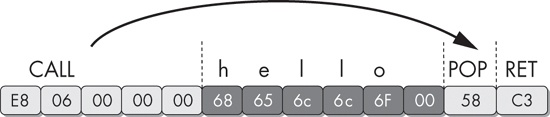
The call instruction is another place where the
disassembler must make a decision. The location being called is added to the future disassembly
list, along with the location immediately after the call. Just as with the conditional jump
instructions, most disassemblers will disassemble the bytes after the call instruction first and the called location later. In handwritten assembly,
programmers will often use the call instruction to get a pointer
to a fixed piece of data instead of actually calling a subroutine. In this example, the call instruction is used to create a pointer for the string hello on the stack. The pop instruction
following the call then takes this value off the top of the stack and puts it into a register (EAX
in this case).
When we disassemble this binary with IDA Pro, we see that it has produced disassembly that is not what we expected:
E8 06 00 00 00       call    near ptr loc_4011CA+1
68 65 6C 6C 6F      ❶push    6F6C6C65h

                     loc_4011CA:
00 58 C3             add     [eax-3Dh], bl
As it turns out, the first letter of the string hello is
the letter h, which is 0x68 in hexadecimal. This is also the opcode of the
5-byte instruction ❶
push DWORD. The null terminator for the hello string turned out to also be the first byte of another legitimate instruction. The flow-oriented disassembler in IDA Pro
decided to process the thread of disassembly at ❶
(immediately following the call instruction) before processing
the target of the call instruction, and thus produced these two
erroneous instructions. Had it processed the target first, it still would have produced the first
push instruction, but the instruction following the push would have conflicted with the real instructions it disassembled as a
result of the call target.
If IDA Pro produces inaccurate results, you can manually switch bytes from data to instructions or instructions to data by using the C or D keys on the keyboard, as follows:
Pressing the C key turns the cursor location into code.
Pressing the D key turns the cursor location into data.
Here is the same function after manual cleanup:
E8 06 00 00 00                       call    loc_4011CB
68 65 6C 6C 6F 00    aHello          db 'hello',0
                                     loc_4011CB:
58                                   pop     eax
C3                                   retn