Table of Contents for
Practical Malware Analysis
 Practical Malware Analysis
Published by
No Starch Press, 2012
Practical Malware Analysis
Published by
No Starch Press, 2012
- Cover
- Practical Malware Analysis: The Hands-On Guide to Dissecting Malicious Software
- Praise for Practical Malware Analysis
- Warning
- About the Authors
- About the Technical Reviewer
- About the Contributing Authors
- Foreword
- Acknowledgments
- Individual Thanks
- Introduction
- What Is Malware Analysis?
- Prerequisites
- Practical, Hands-On Learning
- What’s in the Book?
- 0. Malware Analysis Primer
- The Goals of Malware Analysis
- Malware Analysis Techniques
- Types of Malware
- General Rules for Malware Analysis
- I. Basic Analysis
- 1. Basic Static Techniques
- Antivirus Scanning: A Useful First Step
- Hashing: A Fingerprint for Malware
- Finding Strings
- Packed and Obfuscated Malware
- Portable Executable File Format
- Linked Libraries and Functions
- Static Analysis in Practice
- The PE File Headers and Sections
- Conclusion
- Labs
- 2. Malware Analysis in Virtual Machines
- The Structure of a Virtual Machine
- Creating Your Malware Analysis Machine
- Using Your Malware Analysis Machine
- The Risks of Using VMware for Malware Analysis
- Record/Replay: Running Your Computer in Reverse
- Conclusion
- 3. Basic Dynamic Analysis
- Sandboxes: The Quick-and-Dirty Approach
- Running Malware
- Monitoring with Process Monitor
- Viewing Processes with Process Explorer
- Comparing Registry Snapshots with Regshot
- Faking a Network
- Packet Sniffing with Wireshark
- Using INetSim
- Basic Dynamic Tools in Practice
- Conclusion
- Labs
- II. Advanced Static Analysis
- 4. A Crash Course in x86 Disassembly
- Levels of Abstraction
- Reverse-Engineering
- The x86 Architecture
- Conclusion
- 5. IDA Pro
- Loading an Executable
- The IDA Pro Interface
- Using Cross-References
- Analyzing Functions
- Using Graphing Options
- Enhancing Disassembly
- Extending IDA with Plug-ins
- Conclusion
- Labs
- 6. Recognizing C Code Constructs in Assembly
- Global vs. Local Variables
- Disassembling Arithmetic Operations
- Recognizing if Statements
- Recognizing Loops
- Understanding Function Call Conventions
- Analyzing switch Statements
- Disassembling Arrays
- Identifying Structs
- Analyzing Linked List Traversal
- Conclusion
- Labs
- 7. Analyzing Malicious Windows Programs
- The Windows API
- The Windows Registry
- Networking APIs
- Following Running Malware
- Kernel vs. User Mode
- The Native API
- Conclusion
- Labs
- III. Advanced Dynamic Analysis
- 8. Debugging
- Source-Level vs. Assembly-Level Debuggers
- Kernel vs. User-Mode Debugging
- Using a Debugger
- Exceptions
- Modifying Execution with a Debugger
- Modifying Program Execution in Practice
- Conclusion
- 9. OllyDbg
- Loading Malware
- The OllyDbg Interface
- Memory Map
- Viewing Threads and Stacks
- Executing Code
- Breakpoints
- Loading DLLs
- Tracing
- Exception Handling
- Patching
- Analyzing Shellcode
- Assistance Features
- Plug-ins
- Scriptable Debugging
- Conclusion
- Labs
- 10. Kernel Debugging with WinDbg
- Drivers and Kernel Code
- Setting Up Kernel Debugging
- Using WinDbg
- Microsoft Symbols
- Kernel Debugging in Practice
- Rootkits
- Loading Drivers
- Kernel Issues for Windows Vista, Windows 7, and x64 Versions
- Conclusion
- Labs
- IV. Malware Functionality
- 11. Malware Behavior
- Downloaders and Launchers
- Backdoors
- Credential Stealers
- Persistence Mechanisms
- Privilege Escalation
- Covering Its Tracks—User-Mode Rootkits
- Conclusion
- Labs
- 12. Covert Malware Launching
- Launchers
- Process Injection
- Process Replacement
- Hook Injection
- Detours
- APC Injection
- Conclusion
- Labs
- 13. Data Encoding
- The Goal of Analyzing Encoding Algorithms
- Simple Ciphers
- Common Cryptographic Algorithms
- Custom Encoding
- Decoding
- Conclusion
- Labs
- 14. Malware-Focused Network Signatures
- Network Countermeasures
- Safely Investigate an Attacker Online
- Content-Based Network Countermeasures
- Combining Dynamic and Static Analysis Techniques
- Understanding the Attacker’s Perspective
- Conclusion
- Labs
- V. Anti-Reverse-Engineering
- 15. Anti-Disassembly
- Understanding Anti-Disassembly
- Defeating Disassembly Algorithms
- Anti-Disassembly Techniques
- Obscuring Flow Control
- Thwarting Stack-Frame Analysis
- Conclusion
- Labs
- 16. Anti-Debugging
- Windows Debugger Detection
- Identifying Debugger Behavior
- Interfering with Debugger Functionality
- Debugger Vulnerabilities
- Conclusion
- Labs
- 17. Anti-Virtual Machine Techniques
- VMware Artifacts
- Vulnerable Instructions
- Tweaking Settings
- Escaping the Virtual Machine
- Conclusion
- Labs
- 18. Packers and Unpacking
- Packer Anatomy
- Identifying Packed Programs
- Unpacking Options
- Automated Unpacking
- Manual Unpacking
- Tips and Tricks for Common Packers
- Analyzing Without Fully Unpacking
- Packed DLLs
- Conclusion
- Labs
- VI. Special Topics
- 19. Shellcode Analysis
- Loading Shellcode for Analysis
- Position-Independent Code
- Identifying Execution Location
- Manual Symbol Resolution
- A Full Hello World Example
- Shellcode Encodings
- NOP Sleds
- Finding Shellcode
- Conclusion
- Labs
- 20. C++ Analysis
- Object-Oriented Programming
- Virtual vs. Nonvirtual Functions
- Creating and Destroying Objects
- Conclusion
- Labs
- 21. 64-Bit Malware
- Why 64-Bit Malware?
- Differences in x64 Architecture
- Windows 32-Bit on Windows 64-Bit
- 64-Bit Hints at Malware Functionality
- Conclusion
- Labs
- A. Important Windows Functions
- B. Tools for Malware Analysis
- C. Solutions to Labs
- Lab 1-1 Solutions
- Lab 1-2 Solutions
- Lab 1-3 Solutions
- Lab 1-4 Solutions
- Lab 3-1 Solutions
- Lab 3-2 Solutions
- Lab 3-3 Solutions
- Lab 3-4 Solutions
- Lab 5-1 Solutions
- Lab 6-1 Solutions
- Lab 6-2 Solutions
- Lab 6-3 Solutions
- Lab 6-4 Solutions
- Lab 7-1 Solutions
- Lab 7-2 Solutions
- Lab 7-3 Solutions
- Lab 9-1 Solutions
- Lab 9-2 Solutions
- Lab 9-3 Solutions
- Lab 10-1 Solutions
- Lab 10-2 Solutions
- Lab 10-3 Solutions
- Lab 11-1 Solutions
- Lab 11-2 Solutions
- Lab 11-3 Solutions
- Lab 12-1 Solutions
- Lab 12-2 Solutions
- Lab 12-3 Solutions
- Lab 12-4 Solutions
- Lab 13-1 Solutions
- Lab 13-2 Solutions
- Lab 13-3 Solutions
- Lab 14-1 Solutions
- Lab 14-2 Solutions
- Lab 14-3 Solutions
- Lab 15-1 Solutions
- Lab 15-2 Solutions
- Lab 15-3 Solutions
- Lab 16-1 Solutions
- Lab 16-2 Solutions
- Lab 16-3 Solutions
- Lab 17-1 Solutions
- Lab 17-2 Solutions
- Lab 17-3 Solutions
- Lab 18-1 Solutions
- Lab 18-2 Solutions
- Lab 18-3 Solutions
- Lab 18-4 Solutions
- Lab 18-5 Solutions
- Lab 19-1 Solutions
- Lab 19-2 Solutions
- Lab 19-3 Solutions
- Lab 20-1 Solutions
- Lab 20-2 Solutions
- Lab 20-3 Solutions
- Lab 21-1 Solutions
- Lab 21-2 Solutions
- Index
- Index
- Index
- Index
- Index
- Index
- Index
- Index
- Index
- Index
- Index
- Index
- Index
- Index
- Index
- Index
- Index
- Index
- Index
- Index
- Index
- Index
- Index
- Index
- Index
- Index
- Index
- Updates
- About the Authors
- Copyright
The hard-coded headers include
Accept,Accept-Language,UA-CPU,Accept-Encoding, andUser-Agent. The malware author mistakenly adds an additionalUser-Agent:in the actual User-Agent, resulting in a duplicate string:User-Agent: User-Agent: Mozilla.... The complete User-Agent header (including the duplicate) makes an effective signature.Both the domain name and path of the URL are hard-coded only where the configuration file is unavailable. Signatures should be made for this hard-coded URL, as well as any configuration files observed. However, it would probably be more fruitful to target just the hard-coded components than to link them with the more dynamic URL. Because the URL used is stored in a configuration file and can be changed with one of the commands, we know that it is ephemeral.
The malware obtains commands from specific components of a web page from inside
noscripttags, which is similar to the Comment field example mentioned in the chapter. Using this technique, malware can beacon to a legitimate web page and receive legitimate content, making analysis of malicious versus legitimate traffic more difficult for a defender.In order for content to be interpreted as a command, it must include an initial
noscripttag followed by a full URL (including http://) that contains the same domain name being used for the original web page request. The path of that URL must end with96'. Between the domain name and the96(which is truncated), two sections compose command and arguments (in a form similar to/command/1213141516). The first letter of the command must correspond with an allowed command, and, when applicable, the argument must be translatable into a meaningful argument for the given command.The malware author limits the strings available to provide clues about the malware functionality. When searching for
noscript, the malware searches for<no, and then verifies thenoscripttag with independent and scrambled character comparisons. The malware also reuses the same buffer used for the domain to check for command content. The other string search for96'is only three characters, and the only other searches are for the/character. When evaluating the command, only the first character is considered, so the attacker may, for example, give the malware the command to sleep with either the wordsoftorsellerin the web response. Traffic analysis might identify the attacker’s use of the wordsoftto send a command to the malware, and that might lead to the misguided use of the complete word in a signature. The attacker is free to useselleror any other word starting withswithout modification of the malware.There is no encoding for the
sleepcommand; the number represents the number of seconds to sleep. For two of the commands, the argument is encoded with a custom, albeit simple, encoding that is not Base64. The argument is presented as an even number of digits (once the trailing96is removed). Each set of two digits represents the raw number that is an index into the array/abcdefghijklmnopqrstuvwxyz0123456789:.. These arguments are used only to communicate URLs, so there is no need for capital characters. The advantage to this scheme is that it is nonstandard, so we need to reverse-engineer it in order to understand its content. The disadvantage is that it is simple. It may be identified as suspicious in strings output, and because the URLs always begin in the same way, there will be a consistent pattern.The malware commands include
quit,download,sleep, andredirect. Thequitcommand simply quits the program. Thedownloadcommand downloads and runs an executable, except that, unlike in the previous lab, the attacker can specify the URL from which to download. Theredirectcommand modifies the configuration file used by the malware so that there is a new beacon URL.This malware is inherently a downloader. It comes with some important advantages, such as web-based control and the ability to easily adjust as malicious domains are identified and shut down.
Some distinct elements of malware behavior that may be independently targetable include the following:
Signatures related to the statically defined domain and path and similar information from any dynamically discovered URLs
Signatures related to the static components of the beacon
Signatures that identify the initial requirements for a command
Signatures that identify specific attributes of command and argument pairs
See the detailed analysis for specific signatures.
Running the malware, we see that it produces the following beacon packet:
GET /start.htm HTTP/1.1
Accept: */*
Accept-Language: en-US
UA-CPU: x86
Accept-Encoding: gzip, deflate
User-Agent: User-Agent: Mozilla/4.0 (compatible; MSIE 7.0; Windows NT 5.1;
.NET CLR 3.0.4506.2152; .NET CLR 3.5.30729)
Host: www.practicalmalwareanalysis.com
Cache-Control: no-cache
We begin by identifying the networking functions used by the malware. Looking at the imports,
we see functions from two libraries: WinINet and COM. The functions used include InternetOpenA, InternetOpenUrlA,
InternetCloseHandle, and InternetReadFile.
Starting with the WinINet functions, navigate to the function containing InternetOpenUrlA at 0x004011F3. Notice that there are some static strings
in the code leading up to InternetOpenA as shown in Example C-119.
Example C-119. Static strings used in beacon
"Accept: */*\nAccept-Language: en-US\nUA-CPU: x86\nAccept-Encoding: gzip,
deflate"
"User-Agent: Mozilla/4.0 (compatible; MSIE 7.0; Windows NT 5.1; .NET CLR
3.0.4506.2152; .NET CLR 3.5.30729)"
These strings agree with the strings in the initial beacon. At first glance, they appear to be fairly common, but the combination of elements may actually be rare. By writing a signature that looks for a specific combination of headers, you can get a sense of exactly how rare the combination is based on how many times the signature is triggered.
Take a second look at the strings in Example C-119 and
compare them with the raw beacon packet at the beginning of the analysis. Do you notice the repeated
User-Agent: User-Agent: in the beacon packet? Although it looks
correct in the strings output, the malware author made a mistake and forgot that the InternetOpenA call includes the header title. This oversight will allow
for an effective signature.
Let’s first identify the beacon content, and then we will investigate how the malware
processes a response. We see that the networking function at 0x004011F3 takes two parameters, only
one of which is used before the InternetOpenUrlA call. This
parameter is the URL that defines the beacon destination. The parent function is WinMain, which contains the primary loop with a Sleep call. Tracing the URL parameter backward within WinMain, we see that it is set in the function at 0x00401457, which contains a CreateFile call. This function (0x00401457) references a couple of
strings, including C:\\autobat.exe and http://www.practicalmalwareanalysis.com/start.htm. The static URL (ending in
start.htm) appears to be on a branch that represents a failure to open a file,
suggesting that it is the fallback beaconing URL if the file does not exist.
Examining the CreateFile function, which uses the reference
to C:\\autobat.exe, it appears as if the ReadFile command takes a buffer as an argument that is eventually passed all the way back
to the InternetOpenUrlA function. Thus, we can conclude that
autobat.exe is a configuration file that stores the URL in plaintext.
Having identified all of the source components of the beacon, navigate back to the original
call to identify what can happen after some content is received. Following the InternetReadFile call at 0x004012C7, we see another call to strstr, with one of the parameters being <no. This strstr function sits within two loops,
with the outer call containing the InternetReadFile call to
obtain more data, and the inner call containing the strstr
function and a call to another function (0x00401000), which is called when we find the <no string, and which we can presume is an additional test of whether
we have found the correct content. This hypothesis is confirmed when we examine the internal
function.
Figure C-56 shows a test of the input buffer using a chain
of small connected blocks. The attacker has tried to disguise the string he is looking for by
breaking the comparison into many small tests to eliminate the telltale comparison string.
Additionally, notice that the required string (<noscript>)
is mixed up in order to avoid producing an obvious pattern. The first three comparisons in Figure C-56 are the n in position 0,
the i in position 5, and the o
in position 1.
Two large comparison blocks follow the single-byte comparisons. The first contains a search
for the / character, as well as a string comparison (strstr) of two strings, both of which are passed in as arguments. With
some backtracking, it is clear that one of the arguments is the string that has been read in
from the Internet, and the other is the URL that originally came from the configuration file. The
search for the / is a backward search within the URL. Once found,
the / is converted to a NULL to NULL-terminate the string.
Essentially, this block is searching for the URL (minus the filename) within the returned
buffer.
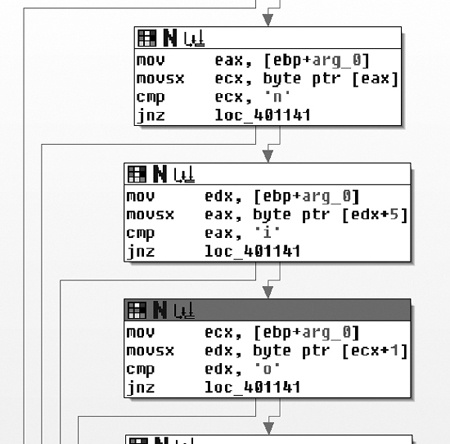
The second block is a search for the static string 96'
starting at the end of the truncated URL. There are two paths at the bottom of the function: one
representing a failure to find the desired characteristics and one representing success. Notice the
large number of paths focused on the failure state (loc_401141).
These paths represent an early termination of the search.
In summary, assuming that the default URL is being used, the filter function in this part of
the code is looking for the following (the ellipsis after the noscript tag represents variable content):
<noscript>... http://www.practicalmalwareanalysis.comreturned_content96'Now, let’s shift focus to what happens with the returned content. Returning to WinMain, we see that the function at 0x00401684 immediately follows the
Internet function (0x004011F3) and takes a similar parameter,
which turns out to be the URL.
This is the decision function, which is confirmed by recognizing the switch structure that
uses a jump table. Before the switch structure, strtok is used to
divide the command content into two parts, which are put into two variables. The following is the
disassembly that pulls the first character out of the first string and uses it for the switch statement:
004016BF         mov     ecx, [ebp+var_10]
004016C2         movsx   edx, byte ptr [ecx]
004016C5         mov     [ebp+var_14], edx
004016C8         mov     eax, [ebp+var_14]
004016CB         sub     eax, 'd'
Case 0 is the character 'd'. All other cases are
greater than that value by 10, 14, and 15, which translates to 'n', 'r', and 's'.
The 'n' function is the easiest one to figure out, since it does
nothing other than set a variable that causes the main loop to exit. The 's' function turns out to be sleep, and it uses the
second part of the command directly as a number value for the sleep command. The 'r' and 'd' functions are related, as they both pass the second part of the command into the same
function early in their execution, as shown in Figure C-57.
The 'd' function calls both URLDownloadToCacheFileA and CreateProcessA, and looks
very much like the code from Lab 14-1 Solutions. The URL is provided by the output
of the shared function in Figure C-57 (0x00401147),
which we can now assume is some sort of decoding function. The 'r' function also uses the encoding function, and it takes the output and uses it in the
function at 0x00401372, which references CreateFile, WriteFile, and the same C:\\autobat.exe configuration
file referenced earlier. From this evidence, we can infer that the intent of the 'r' function is to redirect the malware to a different beacon site by
overwriting the configuration file.
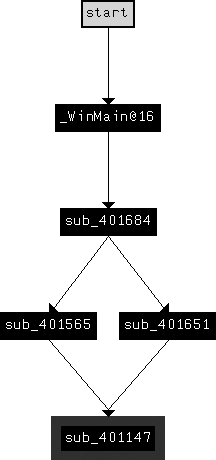
Lastly, let’s look into the encoding function used for the redirect and download functions. We already know that
once decoded, the contents are used as a URL. Examining the decoding function at 0x00401147, notice
the loop in the lower-right corner. At the start of the loop is a call to strlen, which implies that the input is encoded in pieces. Examining the end of the loop,
we see that before returning to the top, the variable containing the output (identified by its
presence at the end of the function) is increased by one, while the source function is increased by
two. The function takes two characters at a time from the source, turns them into a number (with the
atoi function), and then uses that number as an index into the
following string:
/abcdefghijklmnopqrstuvwxyz0123456789:.
While this string looks somewhat similar to a Base64 string, it doesn’t have capital letters, and it has only 39 characters. (A URL can be adequately described with only lowercase letters.) Given our understanding of the algorithm, let’s encode the default URL for the malware with the encoding shown in Figure C-58.

As you can see, any encoding of a URL that starts with http:// will
always have the string 08202016370000.
Now, let’s use what we’ve learned to generate a suitable set of signatures for the malware. Overall, we have three kinds of communication: beacon packets, commands embedded in web pages, and a request to download and execute a file. Since the request to download is based entirely on the data that comes from the attacker, it is difficult to produce a signature for it.
The beacon packet has the following structure:
GET /start.htm HTTP/1.1
Accept: */*
Accept-Language: en-US
UA-CPU: x86
Accept-Encoding: gzip, deflate
User-Agent: User-Agent: Mozilla/4.0 (compatible; MSIE 7.0; Windows NT 5.1;
.NET CLR 3.0.4506.2152; .NET CLR 3.5.30729)
Host: www.practicalmalwareanalysis.com
Cache-Control: no-cache
The elements in italic are defined by the URL, and they can be ephemeral (though they should
certainly be used if known). The bold elements are static and come from two different strings in the
code (see Example C-119). Since the attacker made a mistake by
including an extra User-Agent:, the obvious signature to target
is the specific User-Agent string with the additional User-Agent header:
alert tcp $HOME_NET any -> $EXTERNAL_NET $HTTP_PORTS (msg:"PM14.3.1 Specific
User-Agent with duplicate header"; content:"User-Agent|3a20|User-Agent|3a20|
Mozilla/4.0|20|(compatible\;|20|MSIE|20|7.0\;|20|Windows|20|NT|20|5.1\;|20|
.NET|20|CLR|20|3.0.4506.2152\;|20|.NET|20|CLR|20|3.5.30729)"; http_header;
sid:20001431; rev:1;)
The overall picture of the command provided by the web page is the following:
<noscript>... truncated_url/cmd_char.../arg96'
The malware searches for several static elements in the web page, including the noscript tag, the first characters of the URL
(http://), and the trailing 96'. Since the
parsing function that reads the cmd_char
structure is in a different area of the code and may be changed independently, it should be targeted
separately. Thus, the following is the signature for targeting just the static elements expected by
the malware:
alert tcp $EXTERNAL_NET $HTTP_PORTS -> $HOME_NET any (msg:"PM14.3.2 Noscript
tag with ending"; content:"<noscript>"; content:"http\://"; distance:0;
within:512; content:"96'"; distance:0; within:512; sid:20001432; rev:1;)
The other section of code to target is the command processing. The commands accepted by the malware are listed in Table C-8.
Table C-8. Malware Commands
Name | Command | Argument |
|---|---|---|
|
| Encoded URL |
|
| NA |
|
| Encoded URL |
|
| Number of seconds |
The download and redirect functions both share the same routine to decode the URL (as shown in Figure C-57), so we will target these two commands
together:
alert tcp $EXTERNAL_NET $HTTP_PORTS -> $HOME_NET any (msg:"PM14.3.3 Download
or Redirect Command"; content:"/08202016370000"; pcre:"/\/[dr][^\/]*\/
08202016370000/"; sid:20001433; rev:1;)
This signature uses the string 08202016370000, which we
previously identified as the encoded representation of http://. The PCRE rule
option includes this string and forward slashes, and the d and
r that indicate the download
and redirect commands. The \/
is an escaped forward slash, the [dr] represents either the
character d or r, the [^\/]* matches zero or more characters that are not a forward slash, and
the \/ is another escaped slash.
The quit command by itself only has one known character,
which is insufficient to target by itself. Thus, the last command we need to target is sleep, which can be detected with the following signature:
alert tcp $EXTERNAL_NET $HTTP_PORTS -> $HOME_NET any (msg:"PM14.3.4 Sleep
Command"; content:"96'"; pcre:"/\/s[^\/]{0,15}\/[0-9]{2,20}96'/"; sid:20001434;
rev:1;)
Since there is no fixed content expression target to provide sufficient processing
performance, we will use one element from outside the command string itself (the 96') to achieve an efficient signature. The PCRE identifies the forward
slash followed by an s, then between 0 and 15 characters that are
not a forward slash ('[^\/]{0,15}), a forward slash, and then
between 2 and 20 digits plus a trailing 96'.
Note that the upper and lower bounds on the number of characters that will match the regular
expression are not being driven by what the malware will accept. Rather, they are determined by a
trade-off between what is reasonably expected from an attacker and the costs associated with an
unbounded regular expression. So while the malware may indeed be able to accept a sleep value of more than 20 digits, it is doubtful that the attacker would
send such a value, since that translates to more than 3 trillion years. The 15 characters for the
term starting with an s assumes that the attacker would continue
to choose a single word starting with s, though this value can
certainly be increased if a more foolproof signature is needed.