Table of Contents for
Practical Malware Analysis
 Practical Malware Analysis
Published by
No Starch Press, 2012
Practical Malware Analysis
Published by
No Starch Press, 2012
- Cover
- Practical Malware Analysis: The Hands-On Guide to Dissecting Malicious Software
- Praise for Practical Malware Analysis
- Warning
- About the Authors
- About the Technical Reviewer
- About the Contributing Authors
- Foreword
- Acknowledgments
- Individual Thanks
- Introduction
- What Is Malware Analysis?
- Prerequisites
- Practical, Hands-On Learning
- What’s in the Book?
- 0. Malware Analysis Primer
- The Goals of Malware Analysis
- Malware Analysis Techniques
- Types of Malware
- General Rules for Malware Analysis
- I. Basic Analysis
- 1. Basic Static Techniques
- Antivirus Scanning: A Useful First Step
- Hashing: A Fingerprint for Malware
- Finding Strings
- Packed and Obfuscated Malware
- Portable Executable File Format
- Linked Libraries and Functions
- Static Analysis in Practice
- The PE File Headers and Sections
- Conclusion
- Labs
- 2. Malware Analysis in Virtual Machines
- The Structure of a Virtual Machine
- Creating Your Malware Analysis Machine
- Using Your Malware Analysis Machine
- The Risks of Using VMware for Malware Analysis
- Record/Replay: Running Your Computer in Reverse
- Conclusion
- 3. Basic Dynamic Analysis
- Sandboxes: The Quick-and-Dirty Approach
- Running Malware
- Monitoring with Process Monitor
- Viewing Processes with Process Explorer
- Comparing Registry Snapshots with Regshot
- Faking a Network
- Packet Sniffing with Wireshark
- Using INetSim
- Basic Dynamic Tools in Practice
- Conclusion
- Labs
- II. Advanced Static Analysis
- 4. A Crash Course in x86 Disassembly
- Levels of Abstraction
- Reverse-Engineering
- The x86 Architecture
- Conclusion
- 5. IDA Pro
- Loading an Executable
- The IDA Pro Interface
- Using Cross-References
- Analyzing Functions
- Using Graphing Options
- Enhancing Disassembly
- Extending IDA with Plug-ins
- Conclusion
- Labs
- 6. Recognizing C Code Constructs in Assembly
- Global vs. Local Variables
- Disassembling Arithmetic Operations
- Recognizing if Statements
- Recognizing Loops
- Understanding Function Call Conventions
- Analyzing switch Statements
- Disassembling Arrays
- Identifying Structs
- Analyzing Linked List Traversal
- Conclusion
- Labs
- 7. Analyzing Malicious Windows Programs
- The Windows API
- The Windows Registry
- Networking APIs
- Following Running Malware
- Kernel vs. User Mode
- The Native API
- Conclusion
- Labs
- III. Advanced Dynamic Analysis
- 8. Debugging
- Source-Level vs. Assembly-Level Debuggers
- Kernel vs. User-Mode Debugging
- Using a Debugger
- Exceptions
- Modifying Execution with a Debugger
- Modifying Program Execution in Practice
- Conclusion
- 9. OllyDbg
- Loading Malware
- The OllyDbg Interface
- Memory Map
- Viewing Threads and Stacks
- Executing Code
- Breakpoints
- Loading DLLs
- Tracing
- Exception Handling
- Patching
- Analyzing Shellcode
- Assistance Features
- Plug-ins
- Scriptable Debugging
- Conclusion
- Labs
- 10. Kernel Debugging with WinDbg
- Drivers and Kernel Code
- Setting Up Kernel Debugging
- Using WinDbg
- Microsoft Symbols
- Kernel Debugging in Practice
- Rootkits
- Loading Drivers
- Kernel Issues for Windows Vista, Windows 7, and x64 Versions
- Conclusion
- Labs
- IV. Malware Functionality
- 11. Malware Behavior
- Downloaders and Launchers
- Backdoors
- Credential Stealers
- Persistence Mechanisms
- Privilege Escalation
- Covering Its Tracks—User-Mode Rootkits
- Conclusion
- Labs
- 12. Covert Malware Launching
- Launchers
- Process Injection
- Process Replacement
- Hook Injection
- Detours
- APC Injection
- Conclusion
- Labs
- 13. Data Encoding
- The Goal of Analyzing Encoding Algorithms
- Simple Ciphers
- Common Cryptographic Algorithms
- Custom Encoding
- Decoding
- Conclusion
- Labs
- 14. Malware-Focused Network Signatures
- Network Countermeasures
- Safely Investigate an Attacker Online
- Content-Based Network Countermeasures
- Combining Dynamic and Static Analysis Techniques
- Understanding the Attacker’s Perspective
- Conclusion
- Labs
- V. Anti-Reverse-Engineering
- 15. Anti-Disassembly
- Understanding Anti-Disassembly
- Defeating Disassembly Algorithms
- Anti-Disassembly Techniques
- Obscuring Flow Control
- Thwarting Stack-Frame Analysis
- Conclusion
- Labs
- 16. Anti-Debugging
- Windows Debugger Detection
- Identifying Debugger Behavior
- Interfering with Debugger Functionality
- Debugger Vulnerabilities
- Conclusion
- Labs
- 17. Anti-Virtual Machine Techniques
- VMware Artifacts
- Vulnerable Instructions
- Tweaking Settings
- Escaping the Virtual Machine
- Conclusion
- Labs
- 18. Packers and Unpacking
- Packer Anatomy
- Identifying Packed Programs
- Unpacking Options
- Automated Unpacking
- Manual Unpacking
- Tips and Tricks for Common Packers
- Analyzing Without Fully Unpacking
- Packed DLLs
- Conclusion
- Labs
- VI. Special Topics
- 19. Shellcode Analysis
- Loading Shellcode for Analysis
- Position-Independent Code
- Identifying Execution Location
- Manual Symbol Resolution
- A Full Hello World Example
- Shellcode Encodings
- NOP Sleds
- Finding Shellcode
- Conclusion
- Labs
- 20. C++ Analysis
- Object-Oriented Programming
- Virtual vs. Nonvirtual Functions
- Creating and Destroying Objects
- Conclusion
- Labs
- 21. 64-Bit Malware
- Why 64-Bit Malware?
- Differences in x64 Architecture
- Windows 32-Bit on Windows 64-Bit
- 64-Bit Hints at Malware Functionality
- Conclusion
- Labs
- A. Important Windows Functions
- B. Tools for Malware Analysis
- C. Solutions to Labs
- Lab 1-1 Solutions
- Lab 1-2 Solutions
- Lab 1-3 Solutions
- Lab 1-4 Solutions
- Lab 3-1 Solutions
- Lab 3-2 Solutions
- Lab 3-3 Solutions
- Lab 3-4 Solutions
- Lab 5-1 Solutions
- Lab 6-1 Solutions
- Lab 6-2 Solutions
- Lab 6-3 Solutions
- Lab 6-4 Solutions
- Lab 7-1 Solutions
- Lab 7-2 Solutions
- Lab 7-3 Solutions
- Lab 9-1 Solutions
- Lab 9-2 Solutions
- Lab 9-3 Solutions
- Lab 10-1 Solutions
- Lab 10-2 Solutions
- Lab 10-3 Solutions
- Lab 11-1 Solutions
- Lab 11-2 Solutions
- Lab 11-3 Solutions
- Lab 12-1 Solutions
- Lab 12-2 Solutions
- Lab 12-3 Solutions
- Lab 12-4 Solutions
- Lab 13-1 Solutions
- Lab 13-2 Solutions
- Lab 13-3 Solutions
- Lab 14-1 Solutions
- Lab 14-2 Solutions
- Lab 14-3 Solutions
- Lab 15-1 Solutions
- Lab 15-2 Solutions
- Lab 15-3 Solutions
- Lab 16-1 Solutions
- Lab 16-2 Solutions
- Lab 16-3 Solutions
- Lab 17-1 Solutions
- Lab 17-2 Solutions
- Lab 17-3 Solutions
- Lab 18-1 Solutions
- Lab 18-2 Solutions
- Lab 18-3 Solutions
- Lab 18-4 Solutions
- Lab 18-5 Solutions
- Lab 19-1 Solutions
- Lab 19-2 Solutions
- Lab 19-3 Solutions
- Lab 20-1 Solutions
- Lab 20-2 Solutions
- Lab 20-3 Solutions
- Lab 21-1 Solutions
- Lab 21-2 Solutions
- Index
- Index
- Index
- Index
- Index
- Index
- Index
- Index
- Index
- Index
- Index
- Index
- Index
- Index
- Index
- Index
- Index
- Index
- Index
- Index
- Index
- Index
- Index
- Index
- Index
- Index
- Index
- Updates
- About the Authors
- Copyright
The malware contains the resource sections
X64,X64DLL, andX86. Each of the resources contains an embedded PE file.Lab21-02.exe is compiled for a 32-bit system. This is shown in the PE header’s
Characteristicsfield, where theIMAGE_FILE_32BIT_MACHINEflag is set.The malware attempts to resolve and call
IsWow64Processto determine if it is running on an x64 system.On an x86 machine, the malware drops the
X86resource to disk and injects it into explorer.exe. On an x64 machine, the malware drops two files from theX64andX64DLLresource sections to disk and launches the executable as a 64-bit process.On an x86 system, the malware drops Lab21-02.dll into the Windows system directory, which will typically be C:\Windows\System32\.
On an x64 system, the malware drops Lab21-02x.dll and Lab21-02x.exe into the Windows system directory, but because this is a 32-bit process running in WOW64, the directory is C:\Windows\SysWOW64\.
On an x64 system, the malware launches Lab21-02x.exe, which is a 64-bit process. You can see this in the PE header, where the
Characteristicsfield has theIMAGE_FILE_64BIT_MACHINEflag set.On both x64 and x86 systems, the malware performs DLL injection into explorer.exe. On an x64 system, it drops and runs a 64-bit binary to inject a 64-bit DLL into the 64-bit running explorer.exe. On an x86 system, it injects a 32-bit DLL into the 32-bit running explorer.exe.
Because this malware is the same as Lab12-01.exe except with an added x64 component, a good place to begin our analysis is with Lab 12-1 Solutions. Let’s start by examining the new strings found in this binary, as follows:
IsWow64Process
Lab21-02x.dll
X64DLL
X64
X86
Lab21-02x.exe
Lab21-02.dll
We see a couple of strings that reference x64, as well as the string IsWow64Process, an API call that can tell malware if it is running as a 32-bit process on
a 64-bit machine. We also see three suspicious filenames: Lab21-02.dll, Lab21-02x.dll, and Lab21-02x.exe.
Next, we look at the malware in PEview, as shown in Figure C-70.
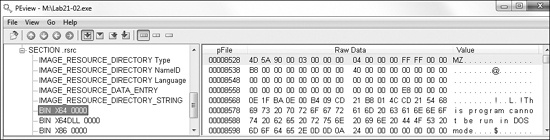
We see three different resource sections: X64, X64DLL, and X86. Each appears to
contain an embedded PE format file, as evidenced by the MZ header
and DOS stub. If we perform a quick dynamic analysis of this malware on x86 and x64 systems, they
both produce the annoying pop-ups just like Lab 12-1 Solutions.
Next, we move our analysis to IDA Pro to find out how the malware uses IsWow64Process. We see that Lab21-02.exe begins with
the same code as Lab12-01.exe, which dynamically resolves the API functions for
iterating through the process list. After those functions are resolved, the code deviates and
attempts to dynamically resolve the IsWow64Process function, as
shown in Example C-231.
Example C-231. Dynamically resolving IsWow64Process and calling
it
004012F2         push    offset aIswow64process  ; "IsWow64Process"
004012F7         push    offset ModuleName       ; "kernel32"
004012FC         mov     [ebp+var_10], 0
00401303         call    ebx ; GetModuleHandleA ❶
00401305         push    eax             ; hModule
00401306         call    edi ; GetProcAddress ❷
00401308         mov     myIsWow64Process, eax
0040130D         test    eax, eax ❸
0040130F         jz      short loc_401322
00401311         lea     edx, [ebp+var_10]
00401314         push    edx
00401315         call    ds:GetCurrentProcess
0040131B         push    eax
0040131C         call    myIsWow64Process ❹
At ❶, the malware obtains a handle to
kernel32.dll and calls GetProcAddress at
❷ in order to try to resolve IsWow64Process. If it succeeds, it loads the address of the function into myIsWow64Process.
The test at ❸ is used to determine if the malware
found the IsWow64Process function, which is available only on
newer OSs. The malware does this resolution check first for compatibility with older systems that do
not support IsWow64Process. Next, the malware gets its own PID
using GetCurrentProcess, and then calls IsWow64Process at ❹, which will return true
in var_10 only if the process is a 32-bit application running
under WOW64.
Based on the result of the IsWow64Process check, there are
two code paths for the malware to take: x86 and x64. We’ll begin our analysis with the x86
path.
The x86 code path first passes the strings Lab21-02.dll and
X86 to sub_401000. Based on
our static analysis, we can guess and rename this function extractResource, as shown in Example C-232
at ❶.
Example C-232. extractResource being called with X86 parameters
004013D9         push    offset aLab2102_dll     ; "Lab21-02.dll"
004013DE         push    offset aX86             ; "X86"
004013E3         call    extractResource ❶       ; formerly sub_401000
Examining the extractResource function, we see that it, in
fact, extracts the X86 resource to disk and appends the second
argument to the result of GetSystemDirectoryA, thereby extracting
the X86 resource to
C:\Windows\System32\Lab21-02.dll.
Next, the malware sets SeDebugPrivilege with the call to
sub_401130, which uses the API functions OpenProcessToken, LookupPrivilegeValueA, and AdjustTokenPrivileges, as explained in Using SeDebugPrivilege. Then the malware calls EnumProcesses and loops through the process list looking for a module base name of
explorer.exe using the strnicmp function.
Finally, the malware performs DLL injection of Lab21-02.dll into
explorer.exe using VirtualAllocEx and
CreateRemoteThread. This method of DLL injection is identical to
Lab 12-1 Solutions. Comparing the MD5 hash of Lab21-02.dll
with Lab12-01.dll, we see that they are identical. Therefore, we conclude that
this malware operates the same as Lab 12-1 Solutions when it is run on a 32-bit
machine. We must investigate the x64 code path to figure out if this malware operates differently on
a 64-bit machine.
The x64 code path begins by calling the extractResource
function twice to extract the X64 and X64DLL resources to disk, as shown in Example C-233.
Example C-233. Resource extraction of two binaries when run on x64
0040132F         push    offset aLab2102x_dll    ; "Lab21-02x.dll"
00401334         push    offset aX64dll          ; "X64DLL"
00401339         mov     eax, edi
0040133B         call    extractResource
...
0040134D         push    offset aLab2102x_exe    ; "Lab21-02x.exe"
00401352         push    offset aX64             ; "X64"
00401357         mov     eax, edi
00401359         call    extractResource
The two binaries are extracted to the files Lab21-02x.dll and
Lab21-02x.exe, and placed into the directory returned by GetSystemDirectoryA. However, if we run this malware dynamically on a
64-bit system, we won’t see those binaries in C:\Windows\System32. Since
Lab21-02.exe is a 32-bit binary running on a 64-bit machine, it is running
under WOW64. The system directory is mapped to C:\Windows\SysWOW64, and that is
where we will find these files on a 64-bit machine.
Next, the malware launches Lab21-02x.exe on the local machine using
ShellExecuteA. Looking at the PE header of
Lab21-02x.exe, we see that the IMAGE_FILE_64BIT_MACHINE flag is set for the Characteristics field. This tells us that this binary is compiled for and will run as a
64-bit process.
In order to disassemble Lab21-02x.exe with IDA Pro, we need to use the
x64 advanced version of IDA Pro. When we disassemble this file, we see that from a high level, its
structure looks like Lab21-02.exe. For example,
Lab21-02x.exe also starts by dynamically resolving the API functions for
iterating through the process list. Lab21-02x.exe deviates from
Lab21-02.exe when it builds a string using lstrcpyA and lstrcatA, as seen at ❶ and ❷ in Example C-234.
Example C-234. Building the DLL path string and writing it to a remote process
00000001400011BF         lea     rdx, String2 ; "C:\\Windows\\SysWOW64\\"
00000001400011C6         lea     rcx, [rsp+1168h+Buffer] ; lpString1
...
00000001400011D2         call    cs:lstrcpyA ❶
00000001400011D8         lea     rdx, aLab2102x_dll      ; "Lab21-02x.dll"
00000001400011DF         lea     rcx, [rsp+1168h+Buffer] ; lpString1
00000001400011E4         call    cs:lstrcatA ❷
...
00000001400012CF         lea     r8, [rsp+1168h+Buffer]❸ ; lpBuffer
00000001400012D4         mov     r9d, 104h               ; nSize
00000001400012DA         mov     rdx, rax        ; lpBaseAddress
00000001400012DD         mov     rcx, rsi        ; hProcess
00000001400012E0         mov     [rsp+1168h+var_1148], 0
00000001400012E9         call    cs:WriteProcessMemory
The string built matches the location of where the DLL was dropped to disk:
C:\Windows\SysWOW64\Lab21-02x.dll. The result of this string will be contained
in the local variable Buffer (shown in bold in the listing).
Buffer is eventually passed to WriteProcessMemory in register r8 (lpBuffer parameter) at ❸, and
luckily IDA Pro has recognized and added comments for the parameters, even though there are not any
push instructions.
Seeing the DLL string written to memory like this followed by a call to CreateRemoteThread tells us that this binary also performs DLL injection.
We find the string explorer.exe in the strings listing and track
its cross-reference to 0x140001100, as shown in Example C-235 at ❶.
Example C-235. Code that uses QueryFullProcessImageNameA to look for the
explorer.exe process
00000001400010FA         call    cs:QueryFullProcessImageNameA
0000000140001100         lea     rdx, aExplorer_exe ❶    ; "explorer.exe"
0000000140001107         lea     rcx, [rsp+138h+var_118]
000000014000110C         call    sub_140001368
This code is called within the process iteration loop, and the result of QueryFullProcessImageNameA is passed with explorer.exe to sub_140001368. By inference, we can
conclude that this is some sort of string-comparison function that the IDA Pro FLIRT library
didn’t recognize.
This malware operates in the same way as the x86 version by injecting into explorer.exe. However, this 64-bit version injects into the 64-bit version of Explorer. We open Lab21-02x.dll in the advanced version of IDA Pro and see that it is identical to Lab21-02.dll, but compiled for x64.