Table of Contents for
Practical Malware Analysis
 Practical Malware Analysis
Published by
No Starch Press, 2012
Practical Malware Analysis
Published by
No Starch Press, 2012
- Cover
- Practical Malware Analysis: The Hands-On Guide to Dissecting Malicious Software
- Praise for Practical Malware Analysis
- Warning
- About the Authors
- About the Technical Reviewer
- About the Contributing Authors
- Foreword
- Acknowledgments
- Individual Thanks
- Introduction
- What Is Malware Analysis?
- Prerequisites
- Practical, Hands-On Learning
- What’s in the Book?
- 0. Malware Analysis Primer
- The Goals of Malware Analysis
- Malware Analysis Techniques
- Types of Malware
- General Rules for Malware Analysis
- I. Basic Analysis
- 1. Basic Static Techniques
- Antivirus Scanning: A Useful First Step
- Hashing: A Fingerprint for Malware
- Finding Strings
- Packed and Obfuscated Malware
- Portable Executable File Format
- Linked Libraries and Functions
- Static Analysis in Practice
- The PE File Headers and Sections
- Conclusion
- Labs
- 2. Malware Analysis in Virtual Machines
- The Structure of a Virtual Machine
- Creating Your Malware Analysis Machine
- Using Your Malware Analysis Machine
- The Risks of Using VMware for Malware Analysis
- Record/Replay: Running Your Computer in Reverse
- Conclusion
- 3. Basic Dynamic Analysis
- Sandboxes: The Quick-and-Dirty Approach
- Running Malware
- Monitoring with Process Monitor
- Viewing Processes with Process Explorer
- Comparing Registry Snapshots with Regshot
- Faking a Network
- Packet Sniffing with Wireshark
- Using INetSim
- Basic Dynamic Tools in Practice
- Conclusion
- Labs
- II. Advanced Static Analysis
- 4. A Crash Course in x86 Disassembly
- Levels of Abstraction
- Reverse-Engineering
- The x86 Architecture
- Conclusion
- 5. IDA Pro
- Loading an Executable
- The IDA Pro Interface
- Using Cross-References
- Analyzing Functions
- Using Graphing Options
- Enhancing Disassembly
- Extending IDA with Plug-ins
- Conclusion
- Labs
- 6. Recognizing C Code Constructs in Assembly
- Global vs. Local Variables
- Disassembling Arithmetic Operations
- Recognizing if Statements
- Recognizing Loops
- Understanding Function Call Conventions
- Analyzing switch Statements
- Disassembling Arrays
- Identifying Structs
- Analyzing Linked List Traversal
- Conclusion
- Labs
- 7. Analyzing Malicious Windows Programs
- The Windows API
- The Windows Registry
- Networking APIs
- Following Running Malware
- Kernel vs. User Mode
- The Native API
- Conclusion
- Labs
- III. Advanced Dynamic Analysis
- 8. Debugging
- Source-Level vs. Assembly-Level Debuggers
- Kernel vs. User-Mode Debugging
- Using a Debugger
- Exceptions
- Modifying Execution with a Debugger
- Modifying Program Execution in Practice
- Conclusion
- 9. OllyDbg
- Loading Malware
- The OllyDbg Interface
- Memory Map
- Viewing Threads and Stacks
- Executing Code
- Breakpoints
- Loading DLLs
- Tracing
- Exception Handling
- Patching
- Analyzing Shellcode
- Assistance Features
- Plug-ins
- Scriptable Debugging
- Conclusion
- Labs
- 10. Kernel Debugging with WinDbg
- Drivers and Kernel Code
- Setting Up Kernel Debugging
- Using WinDbg
- Microsoft Symbols
- Kernel Debugging in Practice
- Rootkits
- Loading Drivers
- Kernel Issues for Windows Vista, Windows 7, and x64 Versions
- Conclusion
- Labs
- IV. Malware Functionality
- 11. Malware Behavior
- Downloaders and Launchers
- Backdoors
- Credential Stealers
- Persistence Mechanisms
- Privilege Escalation
- Covering Its Tracks—User-Mode Rootkits
- Conclusion
- Labs
- 12. Covert Malware Launching
- Launchers
- Process Injection
- Process Replacement
- Hook Injection
- Detours
- APC Injection
- Conclusion
- Labs
- 13. Data Encoding
- The Goal of Analyzing Encoding Algorithms
- Simple Ciphers
- Common Cryptographic Algorithms
- Custom Encoding
- Decoding
- Conclusion
- Labs
- 14. Malware-Focused Network Signatures
- Network Countermeasures
- Safely Investigate an Attacker Online
- Content-Based Network Countermeasures
- Combining Dynamic and Static Analysis Techniques
- Understanding the Attacker’s Perspective
- Conclusion
- Labs
- V. Anti-Reverse-Engineering
- 15. Anti-Disassembly
- Understanding Anti-Disassembly
- Defeating Disassembly Algorithms
- Anti-Disassembly Techniques
- Obscuring Flow Control
- Thwarting Stack-Frame Analysis
- Conclusion
- Labs
- 16. Anti-Debugging
- Windows Debugger Detection
- Identifying Debugger Behavior
- Interfering with Debugger Functionality
- Debugger Vulnerabilities
- Conclusion
- Labs
- 17. Anti-Virtual Machine Techniques
- VMware Artifacts
- Vulnerable Instructions
- Tweaking Settings
- Escaping the Virtual Machine
- Conclusion
- Labs
- 18. Packers and Unpacking
- Packer Anatomy
- Identifying Packed Programs
- Unpacking Options
- Automated Unpacking
- Manual Unpacking
- Tips and Tricks for Common Packers
- Analyzing Without Fully Unpacking
- Packed DLLs
- Conclusion
- Labs
- VI. Special Topics
- 19. Shellcode Analysis
- Loading Shellcode for Analysis
- Position-Independent Code
- Identifying Execution Location
- Manual Symbol Resolution
- A Full Hello World Example
- Shellcode Encodings
- NOP Sleds
- Finding Shellcode
- Conclusion
- Labs
- 20. C++ Analysis
- Object-Oriented Programming
- Virtual vs. Nonvirtual Functions
- Creating and Destroying Objects
- Conclusion
- Labs
- 21. 64-Bit Malware
- Why 64-Bit Malware?
- Differences in x64 Architecture
- Windows 32-Bit on Windows 64-Bit
- 64-Bit Hints at Malware Functionality
- Conclusion
- Labs
- A. Important Windows Functions
- B. Tools for Malware Analysis
- C. Solutions to Labs
- Lab 1-1 Solutions
- Lab 1-2 Solutions
- Lab 1-3 Solutions
- Lab 1-4 Solutions
- Lab 3-1 Solutions
- Lab 3-2 Solutions
- Lab 3-3 Solutions
- Lab 3-4 Solutions
- Lab 5-1 Solutions
- Lab 6-1 Solutions
- Lab 6-2 Solutions
- Lab 6-3 Solutions
- Lab 6-4 Solutions
- Lab 7-1 Solutions
- Lab 7-2 Solutions
- Lab 7-3 Solutions
- Lab 9-1 Solutions
- Lab 9-2 Solutions
- Lab 9-3 Solutions
- Lab 10-1 Solutions
- Lab 10-2 Solutions
- Lab 10-3 Solutions
- Lab 11-1 Solutions
- Lab 11-2 Solutions
- Lab 11-3 Solutions
- Lab 12-1 Solutions
- Lab 12-2 Solutions
- Lab 12-3 Solutions
- Lab 12-4 Solutions
- Lab 13-1 Solutions
- Lab 13-2 Solutions
- Lab 13-3 Solutions
- Lab 14-1 Solutions
- Lab 14-2 Solutions
- Lab 14-3 Solutions
- Lab 15-1 Solutions
- Lab 15-2 Solutions
- Lab 15-3 Solutions
- Lab 16-1 Solutions
- Lab 16-2 Solutions
- Lab 16-3 Solutions
- Lab 17-1 Solutions
- Lab 17-2 Solutions
- Lab 17-3 Solutions
- Lab 18-1 Solutions
- Lab 18-2 Solutions
- Lab 18-3 Solutions
- Lab 18-4 Solutions
- Lab 18-5 Solutions
- Lab 19-1 Solutions
- Lab 19-2 Solutions
- Lab 19-3 Solutions
- Lab 20-1 Solutions
- Lab 20-2 Solutions
- Lab 20-3 Solutions
- Lab 21-1 Solutions
- Lab 21-2 Solutions
- Index
- Index
- Index
- Index
- Index
- Index
- Index
- Index
- Index
- Index
- Index
- Index
- Index
- Index
- Index
- Index
- Index
- Index
- Index
- Index
- Index
- Index
- Index
- Index
- Index
- Index
- Index
- Updates
- About the Authors
- Copyright
You can extend the functionality of IDA Pro in several ways, typically via its scripting facilities. Potential uses for scripts are infinite and can range from simple code markup to complicated functionality such as performing difference comparisons between IDA Pro database files.
Here, we’ll give you a taste of the two most popular ways of scripting using IDC and Python scripts. IDC and Python scripts can be run easily as files by choosing File ▶ Script File or as individual commands by selecting File ▶ IDC Command or File ▶ Python Command, as shown in Figure 5-12. The output window at the bottom of the workspace contains a log view that is extensively used by plug-ins for debugging and status messages.
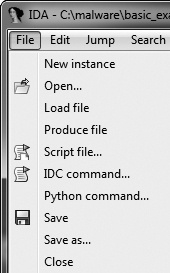
Table 5-4. Manually Disassembling Shellcode in the paycuts.pdf Document
IDA Pro has had a built-in scripting language known as IDC that predates the widespread popularity of scripting languages such as Python and Ruby. The IDC subdirectory within the IDA installation directory contains several sample IDC scripts that IDA Pro uses to analyze disassembled texts. Refer to these programs if you want to learn IDC.
IDC scripts are programs made up of functions, with all functions declared as static.
Arguments don’t need the type specified, and auto is used
to define local variables. IDC has many built-in functions, as described in the IDA Pro help index
or the idc.idc file typically included with scripts that use the built-in
functions.
In Chapter 1, we discussed the PEiD tool and its plug-in Krypto ANALyzer (KANAL), which can export an IDC script. The IDC script sets bookmarks and comments in the IDA Pro database for a given binary, as shown in Example 5-5.
Example 5-5. IDC script generated by the PEiD KANAL plug-in
#include <idc.idc>
static main(void){
      auto slotidx;
      slotidx = 1;
      MarkPosition(0x00403108, 0, 0, 0, slotidx + 0, "RIJNDAEL [S] [char]");
      MakeComm(PrevNotTail(0x00403109), "RIJNDAEL [S] [char]\nRIJNDAEL (AES):
               SBOX (also used in other ciphers).");

      MarkPosition(0x00403208, 0, 0, 0, slotidx + 1, "RIJNDAEL [S-inv] [char]");
      MakeComm(PrevNotTail(0x00403209), "RIJNDAEL [S-inv] [char]\nRIJNDAEL (AES):
               inverse SBOX (for decryption)");
}
To load an IDC script, select File ▶ Script File. The IDC script should be executed immediately, and a toolbar window should open with one button for editing and another for re-executing the script if needed.
IDAPython is fully integrated into the current version of IDA Pro, bringing the power and convenience of Python scripting to binary analysis. IDAPython exposes a significant portion of IDA Pro’s SDK functionality, allowing for far more powerful scripting than offered with IDC. IDAPython has three modules that provide access to the IDA API (idaapi), IDC interface (idc), and IDAPython utility functions (idautils).
IDAPython scripts are programs that use an effective address (EA) to perform the primary method of referencing. There are no abstract data types, and most calls take either an EA or a symbol name string. IDAPython has many wrapper functions around the core IDC functions.
Example 5-6 shows a sample IDAPython script.
The goal of this script is to color-code all call instructions in
an idb to make them stand out more to the analyst. For example, ScreenEA is a common function that gets the location of the cursor.
Heads is a function that will be used to walk through the defined
elements, which is each instruction in this case. Once we’ve collected all of the function
calls in functionCalls, we iterate through those instructions and
use SetColor to set the color.
Example 5-6. Useful Python script to color all function calls
from idautils import * from idc import * heads =Heads(SegStart(ScreenEA()), SegEnd(ScreenEA()))functionCalls= [] for i in heads: if GetMnem(i) == "call":functionCalls.append(i) print "Number of calls found: %d" % (len(functionCalls)) for i infunctionCalls:SetColor(i, CIC_ITEM, 0xc7fdff)
After you have gained solid experience with IDA Pro, you should consider purchasing a few commercial plug-ins, such as the Hex-Rays Decompiler and zynamics BinDiff. The Hex-Rays Decompiler is a useful plug-in that converts IDA Pro disassembly into a human-readable, C-like pseudocode text. Reading C-like code instead of disassembly can often speed up your analysis because it gets you closer to the original source code the malware author wrote.
zynamics BinDiff is a useful tool for comparing two IDA Pro databases. It allows you to pinpoint differences between malware variants, including new functions and differences between similar functions. One of its features is the ability to provide a similarity rating when you’re comparing two pieces of malware. We describe these IDA Pro extensions more extensively in Appendix B.