Table of Contents for
Practical Malware Analysis
 Practical Malware Analysis
Published by
No Starch Press, 2012
Practical Malware Analysis
Published by
No Starch Press, 2012
- Cover
- Practical Malware Analysis: The Hands-On Guide to Dissecting Malicious Software
- Praise for Practical Malware Analysis
- Warning
- About the Authors
- About the Technical Reviewer
- About the Contributing Authors
- Foreword
- Acknowledgments
- Individual Thanks
- Introduction
- What Is Malware Analysis?
- Prerequisites
- Practical, Hands-On Learning
- What’s in the Book?
- 0. Malware Analysis Primer
- The Goals of Malware Analysis
- Malware Analysis Techniques
- Types of Malware
- General Rules for Malware Analysis
- I. Basic Analysis
- 1. Basic Static Techniques
- Antivirus Scanning: A Useful First Step
- Hashing: A Fingerprint for Malware
- Finding Strings
- Packed and Obfuscated Malware
- Portable Executable File Format
- Linked Libraries and Functions
- Static Analysis in Practice
- The PE File Headers and Sections
- Conclusion
- Labs
- 2. Malware Analysis in Virtual Machines
- The Structure of a Virtual Machine
- Creating Your Malware Analysis Machine
- Using Your Malware Analysis Machine
- The Risks of Using VMware for Malware Analysis
- Record/Replay: Running Your Computer in Reverse
- Conclusion
- 3. Basic Dynamic Analysis
- Sandboxes: The Quick-and-Dirty Approach
- Running Malware
- Monitoring with Process Monitor
- Viewing Processes with Process Explorer
- Comparing Registry Snapshots with Regshot
- Faking a Network
- Packet Sniffing with Wireshark
- Using INetSim
- Basic Dynamic Tools in Practice
- Conclusion
- Labs
- II. Advanced Static Analysis
- 4. A Crash Course in x86 Disassembly
- Levels of Abstraction
- Reverse-Engineering
- The x86 Architecture
- Conclusion
- 5. IDA Pro
- Loading an Executable
- The IDA Pro Interface
- Using Cross-References
- Analyzing Functions
- Using Graphing Options
- Enhancing Disassembly
- Extending IDA with Plug-ins
- Conclusion
- Labs
- 6. Recognizing C Code Constructs in Assembly
- Global vs. Local Variables
- Disassembling Arithmetic Operations
- Recognizing if Statements
- Recognizing Loops
- Understanding Function Call Conventions
- Analyzing switch Statements
- Disassembling Arrays
- Identifying Structs
- Analyzing Linked List Traversal
- Conclusion
- Labs
- 7. Analyzing Malicious Windows Programs
- The Windows API
- The Windows Registry
- Networking APIs
- Following Running Malware
- Kernel vs. User Mode
- The Native API
- Conclusion
- Labs
- III. Advanced Dynamic Analysis
- 8. Debugging
- Source-Level vs. Assembly-Level Debuggers
- Kernel vs. User-Mode Debugging
- Using a Debugger
- Exceptions
- Modifying Execution with a Debugger
- Modifying Program Execution in Practice
- Conclusion
- 9. OllyDbg
- Loading Malware
- The OllyDbg Interface
- Memory Map
- Viewing Threads and Stacks
- Executing Code
- Breakpoints
- Loading DLLs
- Tracing
- Exception Handling
- Patching
- Analyzing Shellcode
- Assistance Features
- Plug-ins
- Scriptable Debugging
- Conclusion
- Labs
- 10. Kernel Debugging with WinDbg
- Drivers and Kernel Code
- Setting Up Kernel Debugging
- Using WinDbg
- Microsoft Symbols
- Kernel Debugging in Practice
- Rootkits
- Loading Drivers
- Kernel Issues for Windows Vista, Windows 7, and x64 Versions
- Conclusion
- Labs
- IV. Malware Functionality
- 11. Malware Behavior
- Downloaders and Launchers
- Backdoors
- Credential Stealers
- Persistence Mechanisms
- Privilege Escalation
- Covering Its Tracks—User-Mode Rootkits
- Conclusion
- Labs
- 12. Covert Malware Launching
- Launchers
- Process Injection
- Process Replacement
- Hook Injection
- Detours
- APC Injection
- Conclusion
- Labs
- 13. Data Encoding
- The Goal of Analyzing Encoding Algorithms
- Simple Ciphers
- Common Cryptographic Algorithms
- Custom Encoding
- Decoding
- Conclusion
- Labs
- 14. Malware-Focused Network Signatures
- Network Countermeasures
- Safely Investigate an Attacker Online
- Content-Based Network Countermeasures
- Combining Dynamic and Static Analysis Techniques
- Understanding the Attacker’s Perspective
- Conclusion
- Labs
- V. Anti-Reverse-Engineering
- 15. Anti-Disassembly
- Understanding Anti-Disassembly
- Defeating Disassembly Algorithms
- Anti-Disassembly Techniques
- Obscuring Flow Control
- Thwarting Stack-Frame Analysis
- Conclusion
- Labs
- 16. Anti-Debugging
- Windows Debugger Detection
- Identifying Debugger Behavior
- Interfering with Debugger Functionality
- Debugger Vulnerabilities
- Conclusion
- Labs
- 17. Anti-Virtual Machine Techniques
- VMware Artifacts
- Vulnerable Instructions
- Tweaking Settings
- Escaping the Virtual Machine
- Conclusion
- Labs
- 18. Packers and Unpacking
- Packer Anatomy
- Identifying Packed Programs
- Unpacking Options
- Automated Unpacking
- Manual Unpacking
- Tips and Tricks for Common Packers
- Analyzing Without Fully Unpacking
- Packed DLLs
- Conclusion
- Labs
- VI. Special Topics
- 19. Shellcode Analysis
- Loading Shellcode for Analysis
- Position-Independent Code
- Identifying Execution Location
- Manual Symbol Resolution
- A Full Hello World Example
- Shellcode Encodings
- NOP Sleds
- Finding Shellcode
- Conclusion
- Labs
- 20. C++ Analysis
- Object-Oriented Programming
- Virtual vs. Nonvirtual Functions
- Creating and Destroying Objects
- Conclusion
- Labs
- 21. 64-Bit Malware
- Why 64-Bit Malware?
- Differences in x64 Architecture
- Windows 32-Bit on Windows 64-Bit
- 64-Bit Hints at Malware Functionality
- Conclusion
- Labs
- A. Important Windows Functions
- B. Tools for Malware Analysis
- C. Solutions to Labs
- Lab 1-1 Solutions
- Lab 1-2 Solutions
- Lab 1-3 Solutions
- Lab 1-4 Solutions
- Lab 3-1 Solutions
- Lab 3-2 Solutions
- Lab 3-3 Solutions
- Lab 3-4 Solutions
- Lab 5-1 Solutions
- Lab 6-1 Solutions
- Lab 6-2 Solutions
- Lab 6-3 Solutions
- Lab 6-4 Solutions
- Lab 7-1 Solutions
- Lab 7-2 Solutions
- Lab 7-3 Solutions
- Lab 9-1 Solutions
- Lab 9-2 Solutions
- Lab 9-3 Solutions
- Lab 10-1 Solutions
- Lab 10-2 Solutions
- Lab 10-3 Solutions
- Lab 11-1 Solutions
- Lab 11-2 Solutions
- Lab 11-3 Solutions
- Lab 12-1 Solutions
- Lab 12-2 Solutions
- Lab 12-3 Solutions
- Lab 12-4 Solutions
- Lab 13-1 Solutions
- Lab 13-2 Solutions
- Lab 13-3 Solutions
- Lab 14-1 Solutions
- Lab 14-2 Solutions
- Lab 14-3 Solutions
- Lab 15-1 Solutions
- Lab 15-2 Solutions
- Lab 15-3 Solutions
- Lab 16-1 Solutions
- Lab 16-2 Solutions
- Lab 16-3 Solutions
- Lab 17-1 Solutions
- Lab 17-2 Solutions
- Lab 17-3 Solutions
- Lab 18-1 Solutions
- Lab 18-2 Solutions
- Lab 18-3 Solutions
- Lab 18-4 Solutions
- Lab 18-5 Solutions
- Lab 19-1 Solutions
- Lab 19-2 Solutions
- Lab 19-3 Solutions
- Lab 20-1 Solutions
- Lab 20-2 Solutions
- Lab 20-3 Solutions
- Lab 21-1 Solutions
- Lab 21-2 Solutions
- Index
- Index
- Index
- Index
- Index
- Index
- Index
- Index
- Index
- Index
- Index
- Index
- Index
- Index
- Index
- Index
- Index
- Index
- Index
- Index
- Index
- Index
- Index
- Index
- Index
- Index
- Index
- Updates
- About the Authors
- Copyright
Attackers often go to great lengths to steal credentials, primarily with three types of malware:
Programs that wait for a user to log in in order to steal their credentials
Programs that dump information stored in Windows, such as password hashes, to be used directly or cracked offline
Programs that log keystrokes
In this section, we will discuss each of these types of malware.
On Windows XP, Microsoft’s Graphical Identification and Authentication (GINA) interception is a technique that malware uses to steal user credentials. The GINA system was intended to allow legitimate third parties to customize the logon process by adding support for things like authentication with hardware radio-frequency identification (RFID) tokens or smart cards. Malware authors take advantage of this third-party support to load their credential stealers.
GINA is implemented in a DLL, msgina.dll, and is loaded by the Winlogon executable during the login process. Winlogon also works for third-party customizations implemented in DLLs by loading them in between Winlogon and the GINA DLL (like a man-in-the-middle attack). Windows conveniently provides the following registry location where third-party DLLs will be found and loaded by Winlogon:
HKLM\SOFTWARE\Microsoft\Windows NT\CurrentVersion\Winlogon\GinaDLL
In one instance, we found a malicious file fsgina.dll installed in this registry location as a GINA interceptor.
Figure 11-2 shows an example of the way that logon credentials flow through a system with a malicious file between Winlogon and msgina.dll. The malware (fsgina.dll) is able to capture all user credentials submitted to the system for authentication. It can log that information to disk or pass it over the network.

Because fsgina.dll intercepts the communication between Winlogon and
msgina.dll, it must pass the credential information on to
msgina.dll so that the system will continue to operate normally. In order to do
so, the malware must contain all DLL exports required by GINA; specifically, it must export more
than 15 functions, most of which are prepended with Wlx. Clearly, if you find
that you are analyzing a DLL with many export functions that begin with the string Wlx, you have a good indicator that you are examining a GINA
interceptor.
Most of these exports simply call through to the real functions in
msgina.dll. In the case of fsgina.dll, all but the
WlxLoggedOutSAS export call through to the real functions. Example 11-1 shows the WlxLoggedOutSAS export of fsgina.dll.
Example 11-1. GINA DLL WlxLoggedOutSAS export function for logging
stolen credentials
100014A0 WlxLoggedOutSAS
100014A0         push    esi
100014A1         push    edi
100014A2         push    offset aWlxloggedout_0 ; "WlxLoggedOutSAS"
100014A7         call    Call_msgina_dll_function ❶
...
100014FB         push    eax ; Args
100014FC         push    offset aUSDSPSOpS ;"U: %s D: %s P: %s OP: %s"
10001501         push    offset aDRIVERS ; "drivers\tcpudp.sys"
10001503         call    Log_To_File ❷
As you can see at ❶, the credential
information is immediately passed to msgina.dll by the call we have labeled
Call_msgina_dll_function. This function dynamically resolves and
calls WlxLoggedOutSAS in msgina.dll, which
is passed in as a parameter. The call at ❷ performs the
logging. It takes parameters of the credential information, a format string that will be used to
print the credentials, and the log filename. As a result, all successful user logons are logged to
%SystemRoot%\system32\drivers\tcpudp.sys. The log includes the username,
domain, password, and old password.
Dumping Windows hashes is a popular way for malware to access system credentials. Attackers try to grab these hashes in order to crack them offline or to use them in a pass-the-hash attack. A pass-the-hash attack uses LM and NTLM hashes to authenticate to a remote host (using NTLM authentication) without needing to decrypt or crack the hashes to obtain the plaintext password to log in.
Pwdump and the Pass-the-Hash (PSH) Toolkit are freely available packages that provide hash dumping. Since both of these tools are open source, a lot of malware is derived from their source code. Most antivirus programs have signatures for the default compiled versions of these tools, so attackers often try to compile their own versions in order to avoid detection. The examples in this section are derived versions of pwdump or PSH that we have encountered in the field.
Pwdump is a set of programs that outputs the LM and NTLM password hashes of local user accounts from the Security Account Manager (SAM). Pwdump works by performing DLL injection inside the Local Security Authority Subsystem Service (LSASS) process (better known as lsass.exe). We’ll discuss DLL injection in depth in Chapter 12. For now, just know that it is a way that malware can run a DLL inside another process, thereby providing that DLL with all of the privileges of that process. Hash dumping tools often target lsass.exe because it has the necessary privilege level as well as access to many useful API functions.
Standard pwdump uses the DLL lsaext.dll. Once it is running inside
lsass.exe, pwdump calls GetHash, which is
exported by lsaext.dll in order to perform the hash extraction. This extraction
uses undocumented Windows function calls to enumerate the users on a system and get the password
hashes in unencrypted form for each user.
When dealing with pwdump variants, you will need to analyze DLLs in order to determine how the
hash dumping operates. Start by looking at the DLL’s exports. The default export name for
pwdump is GetHash, but attackers can easily change the name to make it less obvious. Next, try to determine the API
functions used by the exports. Many of these functions will be dynamically resolved, so the hash
dumping exports often call GetProcAddress many times.
Example 11-2 shows the code in the exported
function GrabHash from a pwdump variant DLL. Since this DLL was
injected into lsass.exe, it must manually resolve numerous symbols before using
them.
Example 11-2. Unique API calls used by a pwdump variant’s export function GrabHash
1000123F         push    offset LibFileName      ; "samsrv.dll" ❶
10001244         call    esi ; LoadLibraryA
...
10001248         push    offset aAdvapi32_dll_0  ; "advapi32.dll" ❷
...
10001251         call    esi ; LoadLibraryA
...
1000125B         push    offset ProcName         ; "SamIConnect"
10001260         push    ebx                     ; hModule
...
10001265         call    esi ; GetProcAddress
...
10001281         push    offset aSamrqu ; "SamrQueryInformationUser"
10001286         push    ebx                     ; hModule
...
1000128C         call    esi ; GetProcAddress
...
100012C2         push    offset aSamigetpriv ; "SamIGetPrivateData"
100012C7         push    ebx                     ; hModule
...
100012CD         call    esi ; GetProcAddress
100012CF         push    offset aSystemfuncti  ; "SystemFunction025" ❸
100012D4         push    edi                     ; hModule
...
100012DA         call    esi ; GetProcAddress
100012DC         push    offset aSystemfuni_0  ; "SystemFunction027" ❹
100012E1         push    edi                     ; hModule
...
100012E7         call    esi ; GetProcAddress
Example 11-2 shows the code obtaining handles to
the libraries samsrv.dll and advapi32.dll via LoadLibrary at ❶ and ❷. Samsrv.dll contains an API to easily
access the SAM, and advapi32.dll is resolved to access functions not already
imported into lsass.exe. The pwdump variant DLL uses the handles to these
libraries to resolve many functions, with the most important five shown in the listing (look for the
GetProcAddress calls and parameters).
The interesting imports resolved from samsrv.dll are SamIConnect, SamrQueryInformationUser,
and SamIGetPrivateData. Later in the code, SamIConnect is used to connect to the SAM, followed by calling SamrQueryInformationUser for each user on the system.
The hashes will be extracted with SamIGetPrivateData and
decrypted by SystemFunction025 and SystemFunction027, which are imported from advapi32.dll, as seen at
❸ and ❹.
None of the API functions in this listing are documented by Microsoft.
The PSH Toolkit contains programs that dump hashes, the most popular of which is known
as whosthere-alt. whosthere-alt dumps the SAM by injecting a DLL into
lsass.exe, but using a completely different set of API functions from pwdump.
Example 11-3 shows code from a whosthere-alt variant
that exports a function named TestDump.
Example 11-3. Unique API calls used by a whosthere-alt variant’s export function TestDump
10001119        push    offset LibFileName ; "secur32.dll"
1000111E        call    ds:LoadLibraryA
10001130        push    offset ProcName ; "LsaEnumerateLogonSessions"
10001135        push    esi             ; hModule
10001136        call    ds:GetProcAddress ❶
...
10001670        call    ds:GetSystemDirectoryA
10001676        mov     edi, offset aMsv1_0_dll ; \\msv1_0.dll
...
100016A6        push    eax             ; path to msv1_0.dll
100016A9        call    ds:GetModuleHandleA ❷
Since this DLL is injected into lsass.exe, its TestDump function performs the hash dumping. This export dynamically loads
secur32.dll and resolves its LsaEnumerateLogonSessions function at ❶ to
obtain a list of locally unique identifiers (known as LUIDs). This list contains the usernames and
domains for each logon and is iterated through by the DLL, which gets access to the credentials by
finding a nonexported function in the msv1_0.dll Windows DLL in the memory
space of lsass.exe using the call to GetModuleHandle shown at ❷. This function,
NlpGetPrimaryCredential, is used to dump the NT and LM
hashes.
Note
While it is important to recognize the dumping technique, it might be more critical to determine what the malware is doing with the hashes. Is it storing them on a disk, posting them to a website, or using them in a pass-the-hash attack? These details could be really important, so identifying the low-level hash dumping method should be avoided until the overall functionality is determined.
Keylogging is a classic form of credential stealing. When keylogging, malware records keystrokes so that an attacker can observe typed data like usernames and passwords. Windows malware uses many forms of keylogging.
Kernel-based keyloggers are difficult to detect with user-mode applications. They are frequently part of a rootkit and they can act as keyboard drivers to capture keystrokes, bypassing user-space programs and protections.
Windows user-space keyloggers typically use the Windows API and are usually implemented
with either hooking or polling. Hooking uses the Windows API to notify the
malware each time a key is pressed, typically with the SetWindowsHookEx function. Polling uses the Windows API to
constantly poll the state of the keys, typically using the GetAsyncKeyState and GetForegroundWindow
functions.
Hooking keyloggers leverage the Windows API function SetWindowsHookEx. This type of keylogger may come packaged as an executable that
initiates the hook function, and may include a DLL file to handle logging that can be mapped into
many processes on the system automatically. We discuss using SetWindowsHookEx in Chapter 12.
We’ll focus on polling keyloggers that use GetAsyncKeyState and GetForegroundWindow. The GetAsyncKeyState function identifies whether a key is pressed or
depressed, and whether the key was pressed after the most recent call to GetAsyncKeyState. The GetForegroundWindow function
identifies the foreground window—the one that has focus—which tells the keylogger which
application is being used for keyboard entry (Notepad or Internet Explorer, for example).
Figure 11-3 illustrates a typical loop
structure found in a polling keylogger. The program begins by calling GetForegroundWindow, which logs the active window. Next, the inner loop iterates through
a list of keys on the keyboard. For each key, it calls GetAsyncKeyState to determine if a key has been pressed. If so, the program checks the
SHIFT and CAPS LOCK keys to
determine how to log the keystroke properly. Once the inner loop has iterated through the entire
list of keys, the GetForegroundWindow function is called again to
ensure the user is still in the same window. This process repeats quickly enough to keep up with a
user’s typing. (The keylogger may call the Sleep function
to keep the program from eating up system resources.)
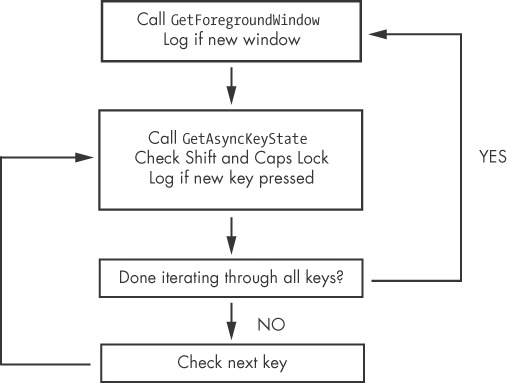
Example 11-4 shows the loop structure in Figure 11-3 disassembled.
Example 11-4. Disassembly of GetAsyncKeyState and GetForegroundWindow keylogger
00401162         call    ds:GetForegroundWindow
...
00401272         push    10h ❶                   ; nVirtKey Shift
00401274         call    ds:GetKeyState
0040127A         mov     esi, dword_403308[ebx] ❷
00401280         push    esi                     ; vKey
00401281         movsx   edi, ax
00401284         call    ds:GetAsyncKeyState
0040128A         test    ah, 80h
0040128D         jz      short loc_40130A
0040128F         push    14h                     ; nVirtKey Caps Lock
00401291         call    ds:GetKeyState
...
004013EF         add     ebx, 4 ❸
004013F2         cmp     ebx, 368
004013F8         jl      loc_401272
The program calls GetForegroundWindow before entering the
inner loop. The inner loop starts at ❶ and immediately
checks the status of the SHIFT key using a call to GetKeyState. GetKeyState is a quick way
to check a key status, but it does not remember whether or not the key was pressed since the last
time it was called, as GetAsyncKeyState does. Next, at ❷ the keylogger indexes an array of the keys on the keyboard using
EBX. If a new key is pressed, then the keystroke is logged after calling GetKeyState to see if CAPS LOCK is activated.
Finally, EBX is incremented at ❸ so that the next key in
the list can be checked. Once 92 keys (368/4) have been checked, the inner loop terminates, and
GetForegroundWindow is called again to start the inner loop from
the beginning.
You can recognize keylogger functionality in malware by looking at the imports for the API functions, or by examining the strings listing for indicators, which is particularly useful if the imports are obfuscated or the malware is using keylogging functionality that you have not encountered before. For example, the following listing of strings is from the keylogger described in the previous section:
[Up]
[Num Lock]
[Down]
[Right]
[UP]
[Left]
[PageDown]
If a keylogger wants to log all keystrokes, it must have a way to print keys like PAGE DOWN, and must have access to these strings. Working backward from the cross-references to these strings can be a way to recognize keylogging functionality in malware.