Table of Contents for
Practical Malware Analysis
 Practical Malware Analysis
Published by
No Starch Press, 2012
Practical Malware Analysis
Published by
No Starch Press, 2012
- Cover
- Practical Malware Analysis: The Hands-On Guide to Dissecting Malicious Software
- Praise for Practical Malware Analysis
- Warning
- About the Authors
- About the Technical Reviewer
- About the Contributing Authors
- Foreword
- Acknowledgments
- Individual Thanks
- Introduction
- What Is Malware Analysis?
- Prerequisites
- Practical, Hands-On Learning
- What’s in the Book?
- 0. Malware Analysis Primer
- The Goals of Malware Analysis
- Malware Analysis Techniques
- Types of Malware
- General Rules for Malware Analysis
- I. Basic Analysis
- 1. Basic Static Techniques
- Antivirus Scanning: A Useful First Step
- Hashing: A Fingerprint for Malware
- Finding Strings
- Packed and Obfuscated Malware
- Portable Executable File Format
- Linked Libraries and Functions
- Static Analysis in Practice
- The PE File Headers and Sections
- Conclusion
- Labs
- 2. Malware Analysis in Virtual Machines
- The Structure of a Virtual Machine
- Creating Your Malware Analysis Machine
- Using Your Malware Analysis Machine
- The Risks of Using VMware for Malware Analysis
- Record/Replay: Running Your Computer in Reverse
- Conclusion
- 3. Basic Dynamic Analysis
- Sandboxes: The Quick-and-Dirty Approach
- Running Malware
- Monitoring with Process Monitor
- Viewing Processes with Process Explorer
- Comparing Registry Snapshots with Regshot
- Faking a Network
- Packet Sniffing with Wireshark
- Using INetSim
- Basic Dynamic Tools in Practice
- Conclusion
- Labs
- II. Advanced Static Analysis
- 4. A Crash Course in x86 Disassembly
- Levels of Abstraction
- Reverse-Engineering
- The x86 Architecture
- Conclusion
- 5. IDA Pro
- Loading an Executable
- The IDA Pro Interface
- Using Cross-References
- Analyzing Functions
- Using Graphing Options
- Enhancing Disassembly
- Extending IDA with Plug-ins
- Conclusion
- Labs
- 6. Recognizing C Code Constructs in Assembly
- Global vs. Local Variables
- Disassembling Arithmetic Operations
- Recognizing if Statements
- Recognizing Loops
- Understanding Function Call Conventions
- Analyzing switch Statements
- Disassembling Arrays
- Identifying Structs
- Analyzing Linked List Traversal
- Conclusion
- Labs
- 7. Analyzing Malicious Windows Programs
- The Windows API
- The Windows Registry
- Networking APIs
- Following Running Malware
- Kernel vs. User Mode
- The Native API
- Conclusion
- Labs
- III. Advanced Dynamic Analysis
- 8. Debugging
- Source-Level vs. Assembly-Level Debuggers
- Kernel vs. User-Mode Debugging
- Using a Debugger
- Exceptions
- Modifying Execution with a Debugger
- Modifying Program Execution in Practice
- Conclusion
- 9. OllyDbg
- Loading Malware
- The OllyDbg Interface
- Memory Map
- Viewing Threads and Stacks
- Executing Code
- Breakpoints
- Loading DLLs
- Tracing
- Exception Handling
- Patching
- Analyzing Shellcode
- Assistance Features
- Plug-ins
- Scriptable Debugging
- Conclusion
- Labs
- 10. Kernel Debugging with WinDbg
- Drivers and Kernel Code
- Setting Up Kernel Debugging
- Using WinDbg
- Microsoft Symbols
- Kernel Debugging in Practice
- Rootkits
- Loading Drivers
- Kernel Issues for Windows Vista, Windows 7, and x64 Versions
- Conclusion
- Labs
- IV. Malware Functionality
- 11. Malware Behavior
- Downloaders and Launchers
- Backdoors
- Credential Stealers
- Persistence Mechanisms
- Privilege Escalation
- Covering Its Tracks—User-Mode Rootkits
- Conclusion
- Labs
- 12. Covert Malware Launching
- Launchers
- Process Injection
- Process Replacement
- Hook Injection
- Detours
- APC Injection
- Conclusion
- Labs
- 13. Data Encoding
- The Goal of Analyzing Encoding Algorithms
- Simple Ciphers
- Common Cryptographic Algorithms
- Custom Encoding
- Decoding
- Conclusion
- Labs
- 14. Malware-Focused Network Signatures
- Network Countermeasures
- Safely Investigate an Attacker Online
- Content-Based Network Countermeasures
- Combining Dynamic and Static Analysis Techniques
- Understanding the Attacker’s Perspective
- Conclusion
- Labs
- V. Anti-Reverse-Engineering
- 15. Anti-Disassembly
- Understanding Anti-Disassembly
- Defeating Disassembly Algorithms
- Anti-Disassembly Techniques
- Obscuring Flow Control
- Thwarting Stack-Frame Analysis
- Conclusion
- Labs
- 16. Anti-Debugging
- Windows Debugger Detection
- Identifying Debugger Behavior
- Interfering with Debugger Functionality
- Debugger Vulnerabilities
- Conclusion
- Labs
- 17. Anti-Virtual Machine Techniques
- VMware Artifacts
- Vulnerable Instructions
- Tweaking Settings
- Escaping the Virtual Machine
- Conclusion
- Labs
- 18. Packers and Unpacking
- Packer Anatomy
- Identifying Packed Programs
- Unpacking Options
- Automated Unpacking
- Manual Unpacking
- Tips and Tricks for Common Packers
- Analyzing Without Fully Unpacking
- Packed DLLs
- Conclusion
- Labs
- VI. Special Topics
- 19. Shellcode Analysis
- Loading Shellcode for Analysis
- Position-Independent Code
- Identifying Execution Location
- Manual Symbol Resolution
- A Full Hello World Example
- Shellcode Encodings
- NOP Sleds
- Finding Shellcode
- Conclusion
- Labs
- 20. C++ Analysis
- Object-Oriented Programming
- Virtual vs. Nonvirtual Functions
- Creating and Destroying Objects
- Conclusion
- Labs
- 21. 64-Bit Malware
- Why 64-Bit Malware?
- Differences in x64 Architecture
- Windows 32-Bit on Windows 64-Bit
- 64-Bit Hints at Malware Functionality
- Conclusion
- Labs
- A. Important Windows Functions
- B. Tools for Malware Analysis
- C. Solutions to Labs
- Lab 1-1 Solutions
- Lab 1-2 Solutions
- Lab 1-3 Solutions
- Lab 1-4 Solutions
- Lab 3-1 Solutions
- Lab 3-2 Solutions
- Lab 3-3 Solutions
- Lab 3-4 Solutions
- Lab 5-1 Solutions
- Lab 6-1 Solutions
- Lab 6-2 Solutions
- Lab 6-3 Solutions
- Lab 6-4 Solutions
- Lab 7-1 Solutions
- Lab 7-2 Solutions
- Lab 7-3 Solutions
- Lab 9-1 Solutions
- Lab 9-2 Solutions
- Lab 9-3 Solutions
- Lab 10-1 Solutions
- Lab 10-2 Solutions
- Lab 10-3 Solutions
- Lab 11-1 Solutions
- Lab 11-2 Solutions
- Lab 11-3 Solutions
- Lab 12-1 Solutions
- Lab 12-2 Solutions
- Lab 12-3 Solutions
- Lab 12-4 Solutions
- Lab 13-1 Solutions
- Lab 13-2 Solutions
- Lab 13-3 Solutions
- Lab 14-1 Solutions
- Lab 14-2 Solutions
- Lab 14-3 Solutions
- Lab 15-1 Solutions
- Lab 15-2 Solutions
- Lab 15-3 Solutions
- Lab 16-1 Solutions
- Lab 16-2 Solutions
- Lab 16-3 Solutions
- Lab 17-1 Solutions
- Lab 17-2 Solutions
- Lab 17-3 Solutions
- Lab 18-1 Solutions
- Lab 18-2 Solutions
- Lab 18-3 Solutions
- Lab 18-4 Solutions
- Lab 18-5 Solutions
- Lab 19-1 Solutions
- Lab 19-2 Solutions
- Lab 19-3 Solutions
- Lab 20-1 Solutions
- Lab 20-2 Solutions
- Lab 20-3 Solutions
- Lab 21-1 Solutions
- Lab 21-2 Solutions
- Index
- Index
- Index
- Index
- Index
- Index
- Index
- Index
- Index
- Index
- Index
- Index
- Index
- Index
- Index
- Index
- Index
- Index
- Index
- Index
- Index
- Index
- Index
- Index
- Index
- Index
- Index
- Updates
- About the Authors
- Copyright
Hook injection describes a way to load malware that takes advantage of Windows hooks, which are used to intercept messages destined for applications. Malware authors can use hook injection to accomplish two things:
To be sure that malicious code will run whenever a particular message is intercepted
To be sure that a particular DLL will be loaded in a victim process’s memory space
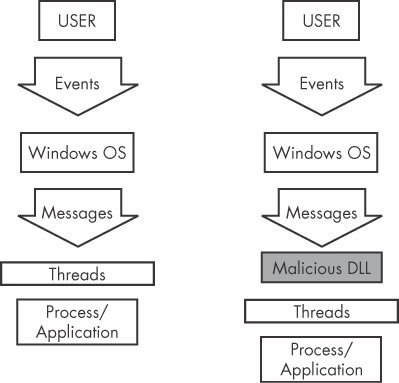
As shown in Figure 12-3, users generate events that are sent to the OS, which then sends messages created by those events to threads registered to receive them. The right side of the figure shows one way that an attacker can insert a malicious DLL to intercept messages.
There are two types of Windows hooks:
Local hooks are used to observe or manipulate messages destined for an internal process.
Remote hooks are used to observe or manipulate messages destined for a remote process (another process on the system).
Remote hooks are available in two forms: high and low level. High-level remote hooks require that the hook procedure be an exported function contained in a DLL, which will be mapped by the OS into the process space of a hooked thread or all threads. Low-level remote hooks require that the hook procedure be contained in the process that installed the hook. This procedure is notified before the OS gets a chance to process the event.
Hook injection is frequently used in malicious applications known as
keyloggers, which record keystrokes. Keystrokes can be captured by registering
high- or low-level hooks using the WH_KEYBOARD or WH_KEYBOARD_LL hook procedure types, respectively.
For WH_KEYBOARD procedures, the hook will often be running
in the context of a remote process, but it can also run in the process that installed the hook. For
WH_KEYBOARD_LL procedures, the events are sent directly to the
process that installed the hook, so the hook will be running in the context of the process that
created it. Using either hook type, a keylogger can intercept keystrokes and log them to a file or
alter them before passing them along to the process or system.
The principal function call used to perform remote Windows hooking is SetWindowsHookEx, which has the following parameters:
idHook. Specifies the type of hook procedure to install.lpfn. Points to the hook procedure.hMod. For high-level hooks, identifies the handle to the DLL containing the hook procedure defined bylpfn. For low-level hooks, this identifies the local module in which thelpfnprocedure is defined.dwThreadId. Specifies the identifier of the thread with which the hook procedure is to be associated. If this parameter is zero, the hook procedure is associated with all existing threads running in the same desktop as the calling thread. This must be set to zero for low-level hooks.
The hook procedure can contain code to process messages as they come in from the system, or it
can do nothing. Either way, the hook procedure must call CallNextHookEx, which ensures that the next hook procedure in the call chain gets the
message and that the system continues to run properly.
When targeting a specific dwThreadId, malware
generally includes instructions for determining which system thread identifier to use, or it is
designed to load into all threads. That said, malware will load into all threads only if it’s
a keylogger or the equivalent (when the goal is message interception). However, loading into all
threads can degrade the running system and may trigger an IPS. Therefore, if the goal is to simply
load a DLL in a remote process, only a single thread will be injected in order to remain
stealthy.
Targeting a single thread requires a search of the process listing for the target process and
can require that the malware run a program if the target process is not already running. If a
malicious application hooks a Windows message that is used frequently, it’s more likely to
trigger an IPS, so malware will often set a hook with a message that is not often used, such as
WH_CBT (a computer-based training message).
Example 12-4 shows the assembly code for performing hook injection in order to load a DLL in a different process’s memory space.
Example 12-4. Hook injection, assembly code
00401100 push esi 00401101 push edi 00401102 push offset LibFileName ; "hook.dll" 00401107 call LoadLibraryA 0040110D mov esi, eax 0040110F push offset ProcName ; "MalwareProc" 00401114 push esi ; hModule 00401115 call GetProcAddress 0040111B mov edi, eax 0040111D callGetNotepadThreadId00401122 push eax ; dwThreadId 00401123 push esi ; hmod 00401124 push edi ; lpfn 00401125 pushWH_CBT; idHook 00401127 callSetWindowsHookExA
In Example 12-4, the malicious DLL
(hook.dll) is loaded by the malware, and the malicious hook procedure address
is obtained. The hook procedure, MalwareProc, calls only CallNextHookEx. SetWindowsHookEx is
then called for a thread in notepad.exe (assuming that
notepad.exe is running). GetNotepadThreadId
is a locally defined function that obtains a dwThreadId for
notepad.exe. Finally, a WH_CBT message is
sent to the injected notepad.exe in order to force
hook.dll to be loaded by notepad.exe. This allows
hook.dll to run in the notepad.exe process space.
Once hook.dll is injected, it can execute the full malicious code stored
in DllMain, while disguised as the
notepad.exe process. Since MalwareProc calls
only CallNextHookEx, it should not interfere with incoming
messages, but malware often immediately calls LoadLibrary and
UnhookWindowsHookEx in DllMain
to ensure that incoming messages are not impacted.