Table of Contents for
Practical Malware Analysis
 Practical Malware Analysis
Published by
No Starch Press, 2012
Practical Malware Analysis
Published by
No Starch Press, 2012
- Cover
- Practical Malware Analysis: The Hands-On Guide to Dissecting Malicious Software
- Praise for Practical Malware Analysis
- Warning
- About the Authors
- About the Technical Reviewer
- About the Contributing Authors
- Foreword
- Acknowledgments
- Individual Thanks
- Introduction
- What Is Malware Analysis?
- Prerequisites
- Practical, Hands-On Learning
- What’s in the Book?
- 0. Malware Analysis Primer
- The Goals of Malware Analysis
- Malware Analysis Techniques
- Types of Malware
- General Rules for Malware Analysis
- I. Basic Analysis
- 1. Basic Static Techniques
- Antivirus Scanning: A Useful First Step
- Hashing: A Fingerprint for Malware
- Finding Strings
- Packed and Obfuscated Malware
- Portable Executable File Format
- Linked Libraries and Functions
- Static Analysis in Practice
- The PE File Headers and Sections
- Conclusion
- Labs
- 2. Malware Analysis in Virtual Machines
- The Structure of a Virtual Machine
- Creating Your Malware Analysis Machine
- Using Your Malware Analysis Machine
- The Risks of Using VMware for Malware Analysis
- Record/Replay: Running Your Computer in Reverse
- Conclusion
- 3. Basic Dynamic Analysis
- Sandboxes: The Quick-and-Dirty Approach
- Running Malware
- Monitoring with Process Monitor
- Viewing Processes with Process Explorer
- Comparing Registry Snapshots with Regshot
- Faking a Network
- Packet Sniffing with Wireshark
- Using INetSim
- Basic Dynamic Tools in Practice
- Conclusion
- Labs
- II. Advanced Static Analysis
- 4. A Crash Course in x86 Disassembly
- Levels of Abstraction
- Reverse-Engineering
- The x86 Architecture
- Conclusion
- 5. IDA Pro
- Loading an Executable
- The IDA Pro Interface
- Using Cross-References
- Analyzing Functions
- Using Graphing Options
- Enhancing Disassembly
- Extending IDA with Plug-ins
- Conclusion
- Labs
- 6. Recognizing C Code Constructs in Assembly
- Global vs. Local Variables
- Disassembling Arithmetic Operations
- Recognizing if Statements
- Recognizing Loops
- Understanding Function Call Conventions
- Analyzing switch Statements
- Disassembling Arrays
- Identifying Structs
- Analyzing Linked List Traversal
- Conclusion
- Labs
- 7. Analyzing Malicious Windows Programs
- The Windows API
- The Windows Registry
- Networking APIs
- Following Running Malware
- Kernel vs. User Mode
- The Native API
- Conclusion
- Labs
- III. Advanced Dynamic Analysis
- 8. Debugging
- Source-Level vs. Assembly-Level Debuggers
- Kernel vs. User-Mode Debugging
- Using a Debugger
- Exceptions
- Modifying Execution with a Debugger
- Modifying Program Execution in Practice
- Conclusion
- 9. OllyDbg
- Loading Malware
- The OllyDbg Interface
- Memory Map
- Viewing Threads and Stacks
- Executing Code
- Breakpoints
- Loading DLLs
- Tracing
- Exception Handling
- Patching
- Analyzing Shellcode
- Assistance Features
- Plug-ins
- Scriptable Debugging
- Conclusion
- Labs
- 10. Kernel Debugging with WinDbg
- Drivers and Kernel Code
- Setting Up Kernel Debugging
- Using WinDbg
- Microsoft Symbols
- Kernel Debugging in Practice
- Rootkits
- Loading Drivers
- Kernel Issues for Windows Vista, Windows 7, and x64 Versions
- Conclusion
- Labs
- IV. Malware Functionality
- 11. Malware Behavior
- Downloaders and Launchers
- Backdoors
- Credential Stealers
- Persistence Mechanisms
- Privilege Escalation
- Covering Its Tracks—User-Mode Rootkits
- Conclusion
- Labs
- 12. Covert Malware Launching
- Launchers
- Process Injection
- Process Replacement
- Hook Injection
- Detours
- APC Injection
- Conclusion
- Labs
- 13. Data Encoding
- The Goal of Analyzing Encoding Algorithms
- Simple Ciphers
- Common Cryptographic Algorithms
- Custom Encoding
- Decoding
- Conclusion
- Labs
- 14. Malware-Focused Network Signatures
- Network Countermeasures
- Safely Investigate an Attacker Online
- Content-Based Network Countermeasures
- Combining Dynamic and Static Analysis Techniques
- Understanding the Attacker’s Perspective
- Conclusion
- Labs
- V. Anti-Reverse-Engineering
- 15. Anti-Disassembly
- Understanding Anti-Disassembly
- Defeating Disassembly Algorithms
- Anti-Disassembly Techniques
- Obscuring Flow Control
- Thwarting Stack-Frame Analysis
- Conclusion
- Labs
- 16. Anti-Debugging
- Windows Debugger Detection
- Identifying Debugger Behavior
- Interfering with Debugger Functionality
- Debugger Vulnerabilities
- Conclusion
- Labs
- 17. Anti-Virtual Machine Techniques
- VMware Artifacts
- Vulnerable Instructions
- Tweaking Settings
- Escaping the Virtual Machine
- Conclusion
- Labs
- 18. Packers and Unpacking
- Packer Anatomy
- Identifying Packed Programs
- Unpacking Options
- Automated Unpacking
- Manual Unpacking
- Tips and Tricks for Common Packers
- Analyzing Without Fully Unpacking
- Packed DLLs
- Conclusion
- Labs
- VI. Special Topics
- 19. Shellcode Analysis
- Loading Shellcode for Analysis
- Position-Independent Code
- Identifying Execution Location
- Manual Symbol Resolution
- A Full Hello World Example
- Shellcode Encodings
- NOP Sleds
- Finding Shellcode
- Conclusion
- Labs
- 20. C++ Analysis
- Object-Oriented Programming
- Virtual vs. Nonvirtual Functions
- Creating and Destroying Objects
- Conclusion
- Labs
- 21. 64-Bit Malware
- Why 64-Bit Malware?
- Differences in x64 Architecture
- Windows 32-Bit on Windows 64-Bit
- 64-Bit Hints at Malware Functionality
- Conclusion
- Labs
- A. Important Windows Functions
- B. Tools for Malware Analysis
- C. Solutions to Labs
- Lab 1-1 Solutions
- Lab 1-2 Solutions
- Lab 1-3 Solutions
- Lab 1-4 Solutions
- Lab 3-1 Solutions
- Lab 3-2 Solutions
- Lab 3-3 Solutions
- Lab 3-4 Solutions
- Lab 5-1 Solutions
- Lab 6-1 Solutions
- Lab 6-2 Solutions
- Lab 6-3 Solutions
- Lab 6-4 Solutions
- Lab 7-1 Solutions
- Lab 7-2 Solutions
- Lab 7-3 Solutions
- Lab 9-1 Solutions
- Lab 9-2 Solutions
- Lab 9-3 Solutions
- Lab 10-1 Solutions
- Lab 10-2 Solutions
- Lab 10-3 Solutions
- Lab 11-1 Solutions
- Lab 11-2 Solutions
- Lab 11-3 Solutions
- Lab 12-1 Solutions
- Lab 12-2 Solutions
- Lab 12-3 Solutions
- Lab 12-4 Solutions
- Lab 13-1 Solutions
- Lab 13-2 Solutions
- Lab 13-3 Solutions
- Lab 14-1 Solutions
- Lab 14-2 Solutions
- Lab 14-3 Solutions
- Lab 15-1 Solutions
- Lab 15-2 Solutions
- Lab 15-3 Solutions
- Lab 16-1 Solutions
- Lab 16-2 Solutions
- Lab 16-3 Solutions
- Lab 17-1 Solutions
- Lab 17-2 Solutions
- Lab 17-3 Solutions
- Lab 18-1 Solutions
- Lab 18-2 Solutions
- Lab 18-3 Solutions
- Lab 18-4 Solutions
- Lab 18-5 Solutions
- Lab 19-1 Solutions
- Lab 19-2 Solutions
- Lab 19-3 Solutions
- Lab 20-1 Solutions
- Lab 20-2 Solutions
- Lab 20-3 Solutions
- Lab 21-1 Solutions
- Lab 21-2 Solutions
- Index
- Index
- Index
- Index
- Index
- Index
- Index
- Index
- Index
- Index
- Index
- Index
- Index
- Index
- Index
- Index
- Index
- Index
- Index
- Index
- Index
- Index
- Index
- Index
- Index
- Index
- Index
- Updates
- About the Authors
- Copyright
The exports are
InstallRT,InstallSA,InstallSB,PSLIST,ServiceMain,StartEXS,UninstallRT,UninstallSA, andUninstallSB.The DLL is deleted from the system using a .bat file.
A .bat file containing self-deletion code is created, as well as a file named xinstall.log containing the string
"Found Virtual Machine, Install Cancel".This malware queries the VMware backdoor I/O communication port using the magic value
VXand the action0xAby using theinx86 instruction.To get the malware to install, patch the
ininstruction at 0x100061DB at runtime.To permanently disable the VM check, use a hex editor to modify the static string in the binary from
[This is DVM]5to[This is DVM]0. Alternatively, NOP-out the check in OllyDbg and write the change to disk.InstallRTperforms installation via DLL injection with an optional parameter containing the process to inject into.InstallSAperforms installation via service installation.InstallSBperforms installation via service install and DLL injection if the service to overwrite is still running.
Lab 17-2 Solutions is an extensive piece of malware. Our goal with this lab is to demonstrate how anti-VM techniques can slow your efforts to analyze malware. We’ll focus our discussion on disabling and understanding the anti-VM aspects of the malware. We leave the task of fully reversing the malware in this sample to you.
Begin by loading the malware into PEview to examine its exports and imports. The
malware’s extensive import list suggests that it has a wide range of functionality, including
functions for manipulating the registry (RegSetValueEx),
manipulating services (ChangeService), screen capturing (BitBlt), process listing (CreateToolhelp32Snapshot), process injection (CreateRemoteThread), and networking functionality (WS2_32.dll). We also see a set of export functions, mostly related to installation or
removal of the malware, as shown here:
InstallRT   InstallSA   InstallSB
PSLIST
ServiceMain
StartEXS
UninstallRT   UninstallSA   UninstallSB
The ServiceMain function in the export list tells us that
this malware probably can be run as a service. The names of the installation exports that end in the
strings SA and SB may be the
methods related to service installation.
We attempt to run this malware and monitor it using dynamic analysis techniques. Using procmon, we set a filter on rundll32.exe (since we will use it to run the malware from the command line), and then run the following from the command line within our VM:
rundll32.exe Lab17-02.dll,InstallRT
We immediately notice that the malware is deleted from the system and a file
xinstall.log is left behind. This file contains the string "Found Virtual Machine, Install Cancel", which means that there is an
anti-VM technique in the binary.
Note
You will sometimes encounter logging capability in real malware because logging errors can help malware authors determine what they need to change in order for their attack to succeed. Also, by logging the result of the various system configurations they encounter, such as VMs, attackers can identify issues they may encounter during an attack.
When we check our procmon output, we see that the malware created the file
vmselfdel.bat for the malware to delete itself. When we load the malware into
IDA Pro and follow the cross-references back from the vmselfdel.bat string, we reach sub_10005567, which
shows the self-deletion scripting code that is written to the .bat file.
Next, we focus on determining why the malware deleted itself. We can use the
findAntiVM.py script from the previous lab or work backward through the code by
examining the cross-references to sub_10005567 (the
vmselfdel.bat creation method). Let’s examine the cross-references, as
shown in Figure C-64.
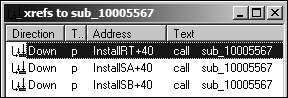
As you can see in Figure C-64, there are three
cross-references to this function, each of which is located in a different export from the malware.
Following the cross-reference to InstallRT, we see the code shown
in Example C-161 in the InstallRT export function.
Example C-161. Anti-VM check inside InstallRT
1000D870         push    offset unk_1008E5F0 ; char *
1000D875        ❸call    sub_10003592
1000D87A        ❷mov     [esp+8+var_8], offset aFoundVirtualMa ; "Found Virtual Machine,..."
1000D881        ❹call    sub_10003592
1000D886         pop     ecx
1000D887        ❶call    sub_10005567
1000D88C         jmp     short loc_1000D8A4
The call at ❶ is to the vmselfdel.bat function. At ❷, we see a
reference to the string we found earlier in xinstall.log, as shown in bold.
Examining the functions at ❸ and ❹, we see that ❸ opens
xinstall.log and ❹ logs "Found Virtual Machine, Install Cancel"
to the file.
Examining the code section shown in Example C-161 in graph
mode, we see two code paths to it, both conditional jumps after the calls to sub_10006119 or sub_10006196. Because
the function sub_10006119 is empty, we know that sub_10006196 must contain our anti-VM technique. Example C-162 shows a subset of the instructions from
sub_10006196.
Example C-162. Querying the I/O communication port
100061C7         mov     eax, 564D5868h  ;'VMXh' ❸
100061CC         mov     ebx, 0
100061D1         mov     ecx, 0Ah
100061D6         mov     edx, 5658h  ;'VX' ❷
100061DB         in      eax, dx ❶
100061DC         cmp     ebx, 564D5868h  ;'VMXh' ❹
100061E2         setz    [ebp+var_1C]
...
100061FA         mov     al, [ebp+var_1C]
The malware is querying the I/O communication port (0x5668) using the in instruction at ❶. (VMware uses the virtual
I/O port for communication between the VM and the host OS.) This VMware port is loaded into EDX at
❷, and the action performed is loaded into ECX in the
previous instruction. In this case, the action is 0xA, which
means “get VMware version type.” EAX is loaded with the magic number 0x564d5868
(VMXh) at ❸, and the
malware checks that the magic number is echoed back immediately after the in instruction with the cmp at ❹. The result of the comparison is moved into var_1C, and is ultimately moved into AL as sub_10006196’s return value.
This malware doesn’t appear to care about the VMware version. It just wants to see if
the I/O communication port echoes back with the magic value. At runtime, we can bypass the backdoor
I/O communication port technique by replacing the in instruction
with a NOP. Inserting the NOP allows the program to complete installation.
Before further analyzing the imports dynamically, let’s continue to examine the InstallRT export. The code in Example C-163 is taken from the start of the InstallRT export. The jz instruction at
❶ determines if the anti-VM check will be
performed.
Example C-163. Checking the DVM static configuration option
1000D847 mov eax, off_10019034 ;[This is DVM]51000D84C push esi 1000D84D mov esi, ds:atoi 1000D853 add eax, 0Dh ❷ 1000D856 push eax ; Str 1000D857 call esi ;atoi1000D859 test eax, eax ❸ 1000D85B pop ecx 1000D85C jz short loc_1000D88E ❶
The code uses atoi (shown in bold) to turn a string
into a number. The number is parsed out of the string [This is
DVM]5 (also shown in bold). The reference to [This is
DVM]5 is loaded into EAX, and EAX is advanced by 0xD at ❷, which moves the string pointer to the 5 character,
which is turned into the number 5 with the call to atoi. The test
at ❸ checks to see if the number parsed is 0.
Note
DVM is a static configuration option. If we open the malware in a hex editor, we can
manually change the string to read [This is DVM]0, and the
malware will no longer perform the anti-VM check.
The following excerpt shows a subset of the static configuration options in
Lab17-02.exe, with a domain name and port 80 shown in bold. The LOG option (also shown in bold) is probably used by the malware to
determine if xinstall.log should be created and used.
[This is RNA]newsnews
[This is RDO]newsnews.practicalmalwareanalysis.com
[This is RPO]80
[This is DVM]5
[This is SSD]
[This is LOG]1
We’ll complete our analysis of InstallRT by analyzing
the method sub_1000D3D0. This method is long, but all of its
imported functions and logging strings make the analysis process much easier.
The sub_1000D3D0 method begins by copying the malware into
the Windows system directory. As shown in Example C-164, InstallRT takes an optional argument. The strlen at ❶ checks the string
length of the argument. If the string length is 0 (meaning no argument), iexplore.exe is used (shown in bold).
Example C-164. Argument used as the target process name with iexplore.exe
as the default
1000D50E         push    [ebp+process_name]      ; Str
1000D511         call    strlen ❶
1000D516         test    eax, eax
1000D518         pop     ecx
1000D519         jnz     short loc_1000D522
1000D51B         push    offset aIexplore_exe    ; "iexplore.exe"
The export argument (or iexplore.exe) is used as a target
process for DLL injection of this malware. At 0x1000D53A, the malware calls a function to find the
target process in the process listing. If the process is found, the malware uses the process’s
PID in the call to sub_1000D10D, which uses a common process
injection trio of calls: VirtualAllocEx, WriteProcessMemory, and CreateRemoteThread. We conclude that InstallRT performs
DLL injection to launch the malware, which we confirm by running the malware (after patching the
static DVM option) and using Process Explorer to see the DLL load into another process.
Next, we focus on the InstallSA export, which has the
same high-level structure as InstallRT. Both exports check the
DVM static configuration option before performing the anti-VM checks. The only difference between
the two is that InstallSA calls sub_1000D920 for its main functionality.
Examining sub_1000D920, we see that it takes an optional
argument (by default Irmon). This function creates a service at
0x1000DBC4 if you specify a service name in the Svchost Netsvcs group, or it creates the Irmon
service if you don’t specify a service name. The service is set with a blank description and a
display name of X System Services, where X is the service
name. After creating the service, InstallSA sets the
ServiceDLL path to this malware in the Windows system directory. We confirm
this by performing dynamic analysis and using rundll32.exe to call the InstallSA function. We use Regedit to look at the Irmon service in the
registry and see the change shown in Figure C-65.

Because the InstallSA method doesn’t copy the malware
to the Windows system directory, this installation method fails to install the malware.
Finally, we focus on the InstallSB export, which has the
same high-level structure as InstallSA and InstallRT. All three exports check the DVM static configuration option
before performing the anti-VM check. InstallSB calls sub_1000DF22 for its main functionality and contains an extra call to
sub_10005A0A. The function sub_10005A0A disables Windows File Protection using the method discussed in Lab 12-4 Solutions.
The sub_1000DF22 function appears to contain functionality
from both InstallSA and InstallRT. InstallSB also takes an optional argument
containing a service name (by default NtmsSvc) that the malware uses to overwrite a service on the
local system. In the default case, the malware stops the NtmsSvc service if it is running and
overwrites ntmssvc.dll in the Windows system directory with itself. The malware
then attempts to start the service again. If the malware cannot start the service, the malware
performs DLL injection, as seen with the call at 0x1000E571. (This is similar to how InstallRT works, except InstallSB
injects into svchost.exe.) InstallSB also
saves the old service binary, so that UninstallSB can restore it
if necessary.
We’ll leave the full analysis of this malware to you, since our focus here is on anti-VM techniques. This malware is an extensive backdoor with considerable functionality, including keylogging, capturing audio and video, transferring files, acting as a proxy, retrieving system information, using a reverse command shell, injecting DLLs, and downloading and launching commands.
To fully analyze this malware, analyze its export functions and static configuration options before focusing on the backdoor network communication capability. See if you can write a script to decode network traffic generated by this malware.