Table of Contents for
Practical Malware Analysis
 Practical Malware Analysis
Published by
No Starch Press, 2012
Practical Malware Analysis
Published by
No Starch Press, 2012
- Cover
- Practical Malware Analysis: The Hands-On Guide to Dissecting Malicious Software
- Praise for Practical Malware Analysis
- Warning
- About the Authors
- About the Technical Reviewer
- About the Contributing Authors
- Foreword
- Acknowledgments
- Individual Thanks
- Introduction
- What Is Malware Analysis?
- Prerequisites
- Practical, Hands-On Learning
- What’s in the Book?
- 0. Malware Analysis Primer
- The Goals of Malware Analysis
- Malware Analysis Techniques
- Types of Malware
- General Rules for Malware Analysis
- I. Basic Analysis
- 1. Basic Static Techniques
- Antivirus Scanning: A Useful First Step
- Hashing: A Fingerprint for Malware
- Finding Strings
- Packed and Obfuscated Malware
- Portable Executable File Format
- Linked Libraries and Functions
- Static Analysis in Practice
- The PE File Headers and Sections
- Conclusion
- Labs
- 2. Malware Analysis in Virtual Machines
- The Structure of a Virtual Machine
- Creating Your Malware Analysis Machine
- Using Your Malware Analysis Machine
- The Risks of Using VMware for Malware Analysis
- Record/Replay: Running Your Computer in Reverse
- Conclusion
- 3. Basic Dynamic Analysis
- Sandboxes: The Quick-and-Dirty Approach
- Running Malware
- Monitoring with Process Monitor
- Viewing Processes with Process Explorer
- Comparing Registry Snapshots with Regshot
- Faking a Network
- Packet Sniffing with Wireshark
- Using INetSim
- Basic Dynamic Tools in Practice
- Conclusion
- Labs
- II. Advanced Static Analysis
- 4. A Crash Course in x86 Disassembly
- Levels of Abstraction
- Reverse-Engineering
- The x86 Architecture
- Conclusion
- 5. IDA Pro
- Loading an Executable
- The IDA Pro Interface
- Using Cross-References
- Analyzing Functions
- Using Graphing Options
- Enhancing Disassembly
- Extending IDA with Plug-ins
- Conclusion
- Labs
- 6. Recognizing C Code Constructs in Assembly
- Global vs. Local Variables
- Disassembling Arithmetic Operations
- Recognizing if Statements
- Recognizing Loops
- Understanding Function Call Conventions
- Analyzing switch Statements
- Disassembling Arrays
- Identifying Structs
- Analyzing Linked List Traversal
- Conclusion
- Labs
- 7. Analyzing Malicious Windows Programs
- The Windows API
- The Windows Registry
- Networking APIs
- Following Running Malware
- Kernel vs. User Mode
- The Native API
- Conclusion
- Labs
- III. Advanced Dynamic Analysis
- 8. Debugging
- Source-Level vs. Assembly-Level Debuggers
- Kernel vs. User-Mode Debugging
- Using a Debugger
- Exceptions
- Modifying Execution with a Debugger
- Modifying Program Execution in Practice
- Conclusion
- 9. OllyDbg
- Loading Malware
- The OllyDbg Interface
- Memory Map
- Viewing Threads and Stacks
- Executing Code
- Breakpoints
- Loading DLLs
- Tracing
- Exception Handling
- Patching
- Analyzing Shellcode
- Assistance Features
- Plug-ins
- Scriptable Debugging
- Conclusion
- Labs
- 10. Kernel Debugging with WinDbg
- Drivers and Kernel Code
- Setting Up Kernel Debugging
- Using WinDbg
- Microsoft Symbols
- Kernel Debugging in Practice
- Rootkits
- Loading Drivers
- Kernel Issues for Windows Vista, Windows 7, and x64 Versions
- Conclusion
- Labs
- IV. Malware Functionality
- 11. Malware Behavior
- Downloaders and Launchers
- Backdoors
- Credential Stealers
- Persistence Mechanisms
- Privilege Escalation
- Covering Its Tracks—User-Mode Rootkits
- Conclusion
- Labs
- 12. Covert Malware Launching
- Launchers
- Process Injection
- Process Replacement
- Hook Injection
- Detours
- APC Injection
- Conclusion
- Labs
- 13. Data Encoding
- The Goal of Analyzing Encoding Algorithms
- Simple Ciphers
- Common Cryptographic Algorithms
- Custom Encoding
- Decoding
- Conclusion
- Labs
- 14. Malware-Focused Network Signatures
- Network Countermeasures
- Safely Investigate an Attacker Online
- Content-Based Network Countermeasures
- Combining Dynamic and Static Analysis Techniques
- Understanding the Attacker’s Perspective
- Conclusion
- Labs
- V. Anti-Reverse-Engineering
- 15. Anti-Disassembly
- Understanding Anti-Disassembly
- Defeating Disassembly Algorithms
- Anti-Disassembly Techniques
- Obscuring Flow Control
- Thwarting Stack-Frame Analysis
- Conclusion
- Labs
- 16. Anti-Debugging
- Windows Debugger Detection
- Identifying Debugger Behavior
- Interfering with Debugger Functionality
- Debugger Vulnerabilities
- Conclusion
- Labs
- 17. Anti-Virtual Machine Techniques
- VMware Artifacts
- Vulnerable Instructions
- Tweaking Settings
- Escaping the Virtual Machine
- Conclusion
- Labs
- 18. Packers and Unpacking
- Packer Anatomy
- Identifying Packed Programs
- Unpacking Options
- Automated Unpacking
- Manual Unpacking
- Tips and Tricks for Common Packers
- Analyzing Without Fully Unpacking
- Packed DLLs
- Conclusion
- Labs
- VI. Special Topics
- 19. Shellcode Analysis
- Loading Shellcode for Analysis
- Position-Independent Code
- Identifying Execution Location
- Manual Symbol Resolution
- A Full Hello World Example
- Shellcode Encodings
- NOP Sleds
- Finding Shellcode
- Conclusion
- Labs
- 20. C++ Analysis
- Object-Oriented Programming
- Virtual vs. Nonvirtual Functions
- Creating and Destroying Objects
- Conclusion
- Labs
- 21. 64-Bit Malware
- Why 64-Bit Malware?
- Differences in x64 Architecture
- Windows 32-Bit on Windows 64-Bit
- 64-Bit Hints at Malware Functionality
- Conclusion
- Labs
- A. Important Windows Functions
- B. Tools for Malware Analysis
- C. Solutions to Labs
- Lab 1-1 Solutions
- Lab 1-2 Solutions
- Lab 1-3 Solutions
- Lab 1-4 Solutions
- Lab 3-1 Solutions
- Lab 3-2 Solutions
- Lab 3-3 Solutions
- Lab 3-4 Solutions
- Lab 5-1 Solutions
- Lab 6-1 Solutions
- Lab 6-2 Solutions
- Lab 6-3 Solutions
- Lab 6-4 Solutions
- Lab 7-1 Solutions
- Lab 7-2 Solutions
- Lab 7-3 Solutions
- Lab 9-1 Solutions
- Lab 9-2 Solutions
- Lab 9-3 Solutions
- Lab 10-1 Solutions
- Lab 10-2 Solutions
- Lab 10-3 Solutions
- Lab 11-1 Solutions
- Lab 11-2 Solutions
- Lab 11-3 Solutions
- Lab 12-1 Solutions
- Lab 12-2 Solutions
- Lab 12-3 Solutions
- Lab 12-4 Solutions
- Lab 13-1 Solutions
- Lab 13-2 Solutions
- Lab 13-3 Solutions
- Lab 14-1 Solutions
- Lab 14-2 Solutions
- Lab 14-3 Solutions
- Lab 15-1 Solutions
- Lab 15-2 Solutions
- Lab 15-3 Solutions
- Lab 16-1 Solutions
- Lab 16-2 Solutions
- Lab 16-3 Solutions
- Lab 17-1 Solutions
- Lab 17-2 Solutions
- Lab 17-3 Solutions
- Lab 18-1 Solutions
- Lab 18-2 Solutions
- Lab 18-3 Solutions
- Lab 18-4 Solutions
- Lab 18-5 Solutions
- Lab 19-1 Solutions
- Lab 19-2 Solutions
- Lab 19-3 Solutions
- Lab 20-1 Solutions
- Lab 20-2 Solutions
- Lab 20-3 Solutions
- Lab 21-1 Solutions
- Lab 21-2 Solutions
- Index
- Index
- Index
- Index
- Index
- Index
- Index
- Index
- Index
- Index
- Index
- Index
- Index
- Index
- Index
- Index
- Index
- Index
- Index
- Index
- Index
- Index
- Index
- Index
- Index
- Index
- Index
- Updates
- About the Authors
- Copyright
The functions at 0x401000 and 0x401040 are the same as those in Lab 6-2 Solutions. At 0x401271 is
printf. The 0x401130 function is new to this lab.The new function takes two parameters. The first is the command character parsed from the HTML comment, and the second is the program name
argv[0], the standardmainparameter.The new function contains a
switchstatement with a jump table.The new function can print error messages, delete a file, create a directory, set a registry value, copy a file, or sleep for 100 seconds.
The registry key
Software\Microsoft\Windows\CurrentVersion\Run\Malwareand the file location C:\Temp\cc.exe can both be host-based indicators.The program first checks for an active Internet connection. If no Internet connection is found, the program terminates. Otherwise, the program will attempt to download a web page containing an embedded HTML comment beginning with
<!--. The first character of the comment is parsed and used in aswitchstatement to determine which action to take on the local system, including whether to delete a file, create a directory, set a registry run key, copy a file, or sleep for 100 seconds.
We begin by performing basic static analysis on the binary and find several new strings of interest, as shown in Example C-6.
Example C-6. Interesting new strings contained in Lab 6-3 Solutions
Error 3.2: Not a valid command provided
Error 3.1: Could not set Registry value
Malware
Software\Microsoft\Windows\CurrentVersion\Run
C:\Temp\cc.exe
C:\Temp
These error messages suggest that the program may be able to modify the registry. Software\Microsoft\Windows\CurrentVersion\Run is a common autorun location
in the registry. C:\Temp\cc.exe is a directory and filename that may be useful
as a host-based indicator.
Looking at the imports, we see several new Windows API functions not found in Lab 6-2 Solutions, as shown in Example C-7.
Example C-7. Interesting new import functions contained in Lab 6-3 Solutions
DeleteFileA
CopyFileA
CreateDirectoryA
RegOpenKeyExA
RegSetValueExA
The first three imports are self-explanatory. The RegOpenKeyExA function is typically used with RegSetValueExA to insert information into the registry, usually when the malware sets
itself or another program to start on system boot for the sake of persistence. (We discuss the
Windows registry in depth in Chapter 7.)
Next, we perform dynamic analysis, but find that it isn’t very fruitful (not surprising based on what we discovered in Lab 6-2 Solutions). We could connect the malware directly to the Internet or use INetSim to serve web pages to the malware, but we wouldn’t know what to put in the HTML comment. Therefore, we need to perform more in-depth analysis by looking at the disassembly.
Finally, we load the executable into IDA Pro. The main
method looks nearly identical to the one from Lab 6-2 Solutions, except there is
an extra call to 0x401130. The calls to 0x401000 (check Internet connection) and 0x401040 (download
web page and parse HTML comment) are identical to those in Lab 6-2 Solutions.
Next, we examine the parameters passed to 0x401130. It looks like argv and var_8 are pushed onto the stack before the
call. In this case, argv is Argv[0], a reference to a string containing the current program’s name,
Lab06-03.exe. Examining the disassembly, we see that var_8 is set to AL at 0x40122D. Remember that EAX is the return value from the previous
function call, and that AL is contained within EAX. In this case, the previous function call
is 0x401040 (download web page and parse HTML comment). Therefore, var_8 is passed to 0x401130 containing the command character parsed from
the HTML comment.
Now that we know what is passed to the function at 0x401130, we can analyze it. Example C-8 is from the start of the function.
Example C-8. Analyzing the function at 0x401130
00401136     movsx eax, [ebp+arg_0]
0040113A     mov [ebp+var_8], eax
0040113D     mov ecx, [ebp+var_8] ❶
00401140     sub ecx, 61h
00401143     mov [ebp+var_8], ecx
00401146     cmp [ebp+var_8], 4 ❷
0040114A     ja loc_4011E1
00401150     mov edx, [ebp+var_8]
00401153     jmp ds:off_4011F2[edx*4] ❸
...
004011F2 off_4011F2 dd offset loc_40115A ❹
004011F6          dd offset loc_40116C
004011FA          dd offset loc_40117F
004011FE          dd offset loc_40118C
00401202          dd offset loc_4011D4
arg_0 is an automatic label from IDA Pro that lists the
last parameter pushed before the call; therefore, arg_0 is the
parsed command character retrieved from the Internet. The parsed command character is moved into
var_8 and eventually loaded into ECX at ❶. The next instruction subtracts 0x61 (the letter
a in ASCII) from ECX. Therefore, once this instruction executes, ECX will equal
0 when arg_0 is equal to a.
Next, a comparison to the number 4 at ❷ checks to
see if the command character (arg_0) is a, b, c, d, or e. Any other result will force
the ja instruction to leave this section of code. Otherwise, we
see the parsed command character used as an index into the jump table at ❸.
The EDX is multiplied by 4 at ❸ because the jump
table is a set of memory addresses referencing the different possible paths, and each memory address
is 4 bytes in size. The jump table at ❹ has five
entries, as expected. A jump table like this is often used by a compiler when generating assembly
for a switch statement, as described in Chapter 6.
Now let’s look at the graphical view of this function, as shown in Figure C-20. We see six possible paths through the code,
including five cases and the default. The “jump above 4” instruction takes us down the
default path; otherwise, the jump table causes an execution path of the a through e branches. When you see a graph like the
one in the figure (a single box going to many different boxes), you should suspect a switch statement. You can confirm that suspicion by looking at the code
logic and jump table.
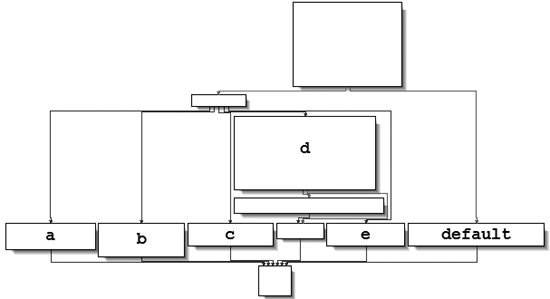
Next, we will examine each of the switch options (a
through e) individually.
The
aoption callsCreateDirectorywith the parameterC:\\Temp, to create the path if it doesn’t already exist.The
boption callsCopyFile, which takes two parameters: a source and a destination file. The destination isC:\\Temp\\cc.exe. The source is a parameter passed to this function, which, based on our earlier analysis, we know to be the program name (Argv[0]). Therefore, this option would copy Lab06-03.exe to C:\Temp\cc.exe.The
coption callsDeleteFilewith the parameterC:\\Temp\\cc.exe, which deletes that file if it exists.The
doption sets a value in the Windows registry for persistence. Specifically, it setsSoftware\Microsoft\Windows\CurrentVersion\Run\Malwareto C:\Temp\cc.exe, which makes the malware start at system boot (if it is first copied to the Temp location).The
eoption sleeps for 100 seconds.Finally, the default option prints “Error 3.2: Not a valid command provided.”
Having analyzed this function fully, we can combine it with our analysis from Lab 6-2 Solutions to gain a strong understanding of how the overall program operates.
We now know that the program checks for an active Internet connection using the if construct.
If there is no valid Internet connection, the program terminates. Otherwise, the program attempts to
download a web page that contains an embedded HTML comment starting with <!--. The next character is parsed from this comment and used in a switch statement to determine which action to take on the local system:
delete a file, create a directory, set a registry run key, copy a file, or sleep for 100
seconds.