Table of Contents for
Practical Malware Analysis
 Practical Malware Analysis
Published by
No Starch Press, 2012
Practical Malware Analysis
Published by
No Starch Press, 2012
- Cover
- Practical Malware Analysis: The Hands-On Guide to Dissecting Malicious Software
- Praise for Practical Malware Analysis
- Warning
- About the Authors
- About the Technical Reviewer
- About the Contributing Authors
- Foreword
- Acknowledgments
- Individual Thanks
- Introduction
- What Is Malware Analysis?
- Prerequisites
- Practical, Hands-On Learning
- What’s in the Book?
- 0. Malware Analysis Primer
- The Goals of Malware Analysis
- Malware Analysis Techniques
- Types of Malware
- General Rules for Malware Analysis
- I. Basic Analysis
- 1. Basic Static Techniques
- Antivirus Scanning: A Useful First Step
- Hashing: A Fingerprint for Malware
- Finding Strings
- Packed and Obfuscated Malware
- Portable Executable File Format
- Linked Libraries and Functions
- Static Analysis in Practice
- The PE File Headers and Sections
- Conclusion
- Labs
- 2. Malware Analysis in Virtual Machines
- The Structure of a Virtual Machine
- Creating Your Malware Analysis Machine
- Using Your Malware Analysis Machine
- The Risks of Using VMware for Malware Analysis
- Record/Replay: Running Your Computer in Reverse
- Conclusion
- 3. Basic Dynamic Analysis
- Sandboxes: The Quick-and-Dirty Approach
- Running Malware
- Monitoring with Process Monitor
- Viewing Processes with Process Explorer
- Comparing Registry Snapshots with Regshot
- Faking a Network
- Packet Sniffing with Wireshark
- Using INetSim
- Basic Dynamic Tools in Practice
- Conclusion
- Labs
- II. Advanced Static Analysis
- 4. A Crash Course in x86 Disassembly
- Levels of Abstraction
- Reverse-Engineering
- The x86 Architecture
- Conclusion
- 5. IDA Pro
- Loading an Executable
- The IDA Pro Interface
- Using Cross-References
- Analyzing Functions
- Using Graphing Options
- Enhancing Disassembly
- Extending IDA with Plug-ins
- Conclusion
- Labs
- 6. Recognizing C Code Constructs in Assembly
- Global vs. Local Variables
- Disassembling Arithmetic Operations
- Recognizing if Statements
- Recognizing Loops
- Understanding Function Call Conventions
- Analyzing switch Statements
- Disassembling Arrays
- Identifying Structs
- Analyzing Linked List Traversal
- Conclusion
- Labs
- 7. Analyzing Malicious Windows Programs
- The Windows API
- The Windows Registry
- Networking APIs
- Following Running Malware
- Kernel vs. User Mode
- The Native API
- Conclusion
- Labs
- III. Advanced Dynamic Analysis
- 8. Debugging
- Source-Level vs. Assembly-Level Debuggers
- Kernel vs. User-Mode Debugging
- Using a Debugger
- Exceptions
- Modifying Execution with a Debugger
- Modifying Program Execution in Practice
- Conclusion
- 9. OllyDbg
- Loading Malware
- The OllyDbg Interface
- Memory Map
- Viewing Threads and Stacks
- Executing Code
- Breakpoints
- Loading DLLs
- Tracing
- Exception Handling
- Patching
- Analyzing Shellcode
- Assistance Features
- Plug-ins
- Scriptable Debugging
- Conclusion
- Labs
- 10. Kernel Debugging with WinDbg
- Drivers and Kernel Code
- Setting Up Kernel Debugging
- Using WinDbg
- Microsoft Symbols
- Kernel Debugging in Practice
- Rootkits
- Loading Drivers
- Kernel Issues for Windows Vista, Windows 7, and x64 Versions
- Conclusion
- Labs
- IV. Malware Functionality
- 11. Malware Behavior
- Downloaders and Launchers
- Backdoors
- Credential Stealers
- Persistence Mechanisms
- Privilege Escalation
- Covering Its Tracks—User-Mode Rootkits
- Conclusion
- Labs
- 12. Covert Malware Launching
- Launchers
- Process Injection
- Process Replacement
- Hook Injection
- Detours
- APC Injection
- Conclusion
- Labs
- 13. Data Encoding
- The Goal of Analyzing Encoding Algorithms
- Simple Ciphers
- Common Cryptographic Algorithms
- Custom Encoding
- Decoding
- Conclusion
- Labs
- 14. Malware-Focused Network Signatures
- Network Countermeasures
- Safely Investigate an Attacker Online
- Content-Based Network Countermeasures
- Combining Dynamic and Static Analysis Techniques
- Understanding the Attacker’s Perspective
- Conclusion
- Labs
- V. Anti-Reverse-Engineering
- 15. Anti-Disassembly
- Understanding Anti-Disassembly
- Defeating Disassembly Algorithms
- Anti-Disassembly Techniques
- Obscuring Flow Control
- Thwarting Stack-Frame Analysis
- Conclusion
- Labs
- 16. Anti-Debugging
- Windows Debugger Detection
- Identifying Debugger Behavior
- Interfering with Debugger Functionality
- Debugger Vulnerabilities
- Conclusion
- Labs
- 17. Anti-Virtual Machine Techniques
- VMware Artifacts
- Vulnerable Instructions
- Tweaking Settings
- Escaping the Virtual Machine
- Conclusion
- Labs
- 18. Packers and Unpacking
- Packer Anatomy
- Identifying Packed Programs
- Unpacking Options
- Automated Unpacking
- Manual Unpacking
- Tips and Tricks for Common Packers
- Analyzing Without Fully Unpacking
- Packed DLLs
- Conclusion
- Labs
- VI. Special Topics
- 19. Shellcode Analysis
- Loading Shellcode for Analysis
- Position-Independent Code
- Identifying Execution Location
- Manual Symbol Resolution
- A Full Hello World Example
- Shellcode Encodings
- NOP Sleds
- Finding Shellcode
- Conclusion
- Labs
- 20. C++ Analysis
- Object-Oriented Programming
- Virtual vs. Nonvirtual Functions
- Creating and Destroying Objects
- Conclusion
- Labs
- 21. 64-Bit Malware
- Why 64-Bit Malware?
- Differences in x64 Architecture
- Windows 32-Bit on Windows 64-Bit
- 64-Bit Hints at Malware Functionality
- Conclusion
- Labs
- A. Important Windows Functions
- B. Tools for Malware Analysis
- C. Solutions to Labs
- Lab 1-1 Solutions
- Lab 1-2 Solutions
- Lab 1-3 Solutions
- Lab 1-4 Solutions
- Lab 3-1 Solutions
- Lab 3-2 Solutions
- Lab 3-3 Solutions
- Lab 3-4 Solutions
- Lab 5-1 Solutions
- Lab 6-1 Solutions
- Lab 6-2 Solutions
- Lab 6-3 Solutions
- Lab 6-4 Solutions
- Lab 7-1 Solutions
- Lab 7-2 Solutions
- Lab 7-3 Solutions
- Lab 9-1 Solutions
- Lab 9-2 Solutions
- Lab 9-3 Solutions
- Lab 10-1 Solutions
- Lab 10-2 Solutions
- Lab 10-3 Solutions
- Lab 11-1 Solutions
- Lab 11-2 Solutions
- Lab 11-3 Solutions
- Lab 12-1 Solutions
- Lab 12-2 Solutions
- Lab 12-3 Solutions
- Lab 12-4 Solutions
- Lab 13-1 Solutions
- Lab 13-2 Solutions
- Lab 13-3 Solutions
- Lab 14-1 Solutions
- Lab 14-2 Solutions
- Lab 14-3 Solutions
- Lab 15-1 Solutions
- Lab 15-2 Solutions
- Lab 15-3 Solutions
- Lab 16-1 Solutions
- Lab 16-2 Solutions
- Lab 16-3 Solutions
- Lab 17-1 Solutions
- Lab 17-2 Solutions
- Lab 17-3 Solutions
- Lab 18-1 Solutions
- Lab 18-2 Solutions
- Lab 18-3 Solutions
- Lab 18-4 Solutions
- Lab 18-5 Solutions
- Lab 19-1 Solutions
- Lab 19-2 Solutions
- Lab 19-3 Solutions
- Lab 20-1 Solutions
- Lab 20-2 Solutions
- Lab 20-3 Solutions
- Lab 21-1 Solutions
- Lab 21-2 Solutions
- Index
- Index
- Index
- Index
- Index
- Index
- Index
- Index
- Index
- Index
- Index
- Index
- Index
- Index
- Index
- Index
- Index
- Index
- Index
- Index
- Index
- Index
- Index
- Index
- Index
- Index
- Index
- Updates
- About the Authors
- Copyright
Lab11-03.exe contains the strings
inet_epar32.dllandnet start cisvc, which means that it probably starts the CiSvc indexing service. Lab11-03.dll contains the stringC:\WINDOWS\System32\kernel64x.dlland imports the API callsGetAsyncKeyStateandGetForegroundWindow, which makes us suspect it is a keylogger that logs to kernel64x.dll.The malware starts by copying Lab11-03.dll to inet_epar32.dll in the Windows system directory. The malware writes data to cisvc.exe and starts the indexing service. The malware also appears to write keystrokes to C:\Windows\System32\kernel64x.dll.
The malware persistently installs Lab11-03.dll by trojanizing the indexing service by entry-point redirection. It redirects the entry point to run shellcode, which loads the DLL.
The malware infects cisvc.exe to load inet_epar32.dll and call its export
zzz69806582.Lab11-03.dll is a polling keylogger implemented in its export
zzz69806582.The malware stores keystrokes and the window into which keystrokes were entered to C:\Windows\System32\kernel64x.dll.
We’ll begin our analysis by examining the strings and imports for
Lab11-03.exe and Lab11-03.dll.
Lab11-03.exe contains the strings inet_epar32.dll and net start cisvc. The net start command is used to start a service on a Windows machine, but we
don’t yet know why the malware would be starting the indexing service on the system, so
we’ll dig down during in-depth analysis.
Lab11-03.dll contains the string C:\WINDOWS\System32\kernel64x.dll and imports the API calls GetAsyncKeyState and GetForegroundWindow, which makes
us suspect it is a keylogger that logs keystrokes to kernel64x.dll. The DLL
also contains an oddly named export: zzz69806582.
Next, we use dynamic analysis techniques to see what the malware does at runtime. We set up procmon and filter on Lab11-03.exe to see the malware create C:\Windows\System32\inet_epar32.dll. The DLL inet_epar32.dll is identical to Lab11-03.dll, which tells us that the malware copies Lab11-03.dll to the Windows system directory.
Further in the procmon output, we see the malware open a handle to
cisvc.exe, but we don’t see any WriteFile operations.
Finally, the malware starts the indexing service by issuing the command net start cisvc. Using Process Explorer, we see that
cisvc.exe is now running on the system. Since we suspect that the malware might
be logging keystrokes, we open notepad.exe and enter a bunch of
a characters. We see that kernel64x.dll is created.
Suspecting that keystrokes are logged, we open kernel64x.dll in a hex editor
and see the following output:
Untitled - Notepad: 0x41
Untitled - Notepad: 0x41
Untitled - Notepad: 0x41
Untitled - Notepad: 0x41
Our keystrokes have been logged to kernel64x.dll. We also see that the program in which we typed our keystrokes (Notepad) has been logged along with the keystroke data in hexadecimal. (The malware doesn’t turn the hexadecimal values into readable strings, so the malware author probably has a postprocessing script to more easily read what is entered.)
Next, we use in-depth techniques to determine why the malware is starting a service and how
the keylogger is gaining execution. We begin by loading Lab11-03.exe into IDA
Pro and examining the main function, as shown in Example C-59.
Example C-59. Reviewing the main method of
Lab11-03.exe
004012DB         push    offset NewFileName      ; "C:\\WINDOWS\\System32\\
                                                   inet_epar32.dll"
004012E0         push    offset ExistingFileName ; "Lab11-03.dll"
004012E5         call    ds:CopyFileA ❶
004012EB         push    offset aCisvc_exe       ; "cisvc.exe"
004012F0         push    offset Format           ; "C:\\WINDOWS\\System32\\%s"
004012F5         lea     eax, [ebp+FileName]
004012FB         push    eax                     ; Dest
004012FC         call    _sprintf
00401301         add     esp, 0Ch
00401304         lea     ecx, [ebp+FileName]
0040130A         push    ecx                     ; lpFileName
0040130B         call    sub_401070 ❷
00401310         add     esp, 4
00401313         push    offset aNetStartCisvc   ; "net start cisvc" ❸
00401318         call    system
At ❶, we see that the main method begins by copying Lab11-03.dll to
inet_epar32.dll in C:\Windows\System32. Next, it builds
the string C:\WINDOWS\System32\cisvc.exe and passes it to
sub_401070 at ❷.
Finally, the malware starts the indexing service by using system
to run the command net start cisvc at ❸.
We focus on sub_401070 to see what it might be doing with
cisvc.exe. There is a lot of confusing code in sub_401070, so take a high-level look at this function using the cross-reference diagram
shown in Figure C-40.

Using this diagram, we see that sub_401070 maps the
cisvc.exe file into memory in order to manipulate it with calls to CreateFileA, CreateFileMappingA, and
MapViewOfFile. All of these functions open the file for read and
write access. The starting address of the memory-mapped view returned by MapViewOfFile (labeled lpBaseAddress by IDA Pro) is
both read and written to. Any changes made to this file will be written to disk after the call to
UnmapViewOfFile, which explains why we didn’t see a
WriteFile function in the procmon output.
Several calculations and checks appear to be made on the PE header of cisvc.exe. Rather than analyze these complex manipulations, let’s focus on the data written to the file, and then extract the version of cisvc.exe written to disk for analysis.
A buffer is written to the memory-mapped file, as shown in Example C-60.
Example C-60. Writing 312 bytes of shellcode into cisvc.exe
0040127C         mov     edi, [ebp+lpBaseAddress] ❶
0040127F         add     edi, [ebp+var_28]
00401282         mov     ecx, 4Eh
00401287         mov     esi, offset byte_409030 ❷
0040128C         rep movsd
At ❶, the mapped location of the file is moved
into EDI and adjusted by some offset using var_28. Next, ECX is
loaded with 0x4E, the number of DWORDs to write (movsd). Therefore, the total number of bytes is 0x4E * 4 = 312 bytes in
decimal. Finally, byte_409030 is moved into ESI at ❷, and rep movsd copies the
data at byte_409030 into the mapped file. We examine the data at
0x409030 and see the bytes in the left side of Table C-4.
The left side of the table contains raw bytes, but if we put the cursor at 0x409030 and press C in IDA Pro, we get the disassembly shown in the right side of the table. This is shellcode—handcrafted assembly that, in this case, is used for process injection. Rather than analyze the shellcode (doing so can be a bit complicated and messy), we’ll guess at what it does based on the strings it contains.
Toward the end of the 312 bytes of shellcode, we see two strings:
00409139 aCWindowsSystem   db 'C:\WINDOWS\System32\inet_epar32.dll',0
0040915D aZzz69806582      db 'zzz69806582',0
The appearance of the path to inet_epar32.dll and the export zzz69806582 suggest that this shellcode loads the DLL and calls its
export.
Next, we compare the cisvc.exe binary as it exists after we run the malware to a clean version that existed before the malware was run. (Most hex editors provide a comparison tool.) Comparing the versions, we see two differences: the insertion of 312 bytes of shellcode and only a 2-byte change in the PE header. We load both of these binaries into PEview to see if we notice a difference in the PE header. This comparison is shown in Figure C-41.
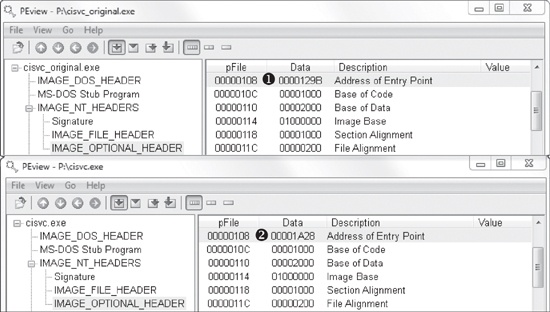
The top part of Figure C-41 shows the original cisvc.exe (named cisvc_original.exe) loaded into PEview, and the bottom part shows the trojanized cisvc.exe. At ❶ and ❷, we see that the entry point differs in the two binaries. If we load both binaries into IDA Pro, we see that the malware has performed entry-point redirection so that the shellcode runs before the original entry point any time that cisvc.exe is launched. Example C-61 shows a snippet of the shellcode in the trojanized version of cisvc.exe.
Example C-61. Important calls within the shellcode inside the trojanized cisvc.exe
01001B0A         call    dword ptr [ebp-4] ❶
01001B0D         mov     [ebp-10h], eax
01001B10         lea     eax, [ebx+24h]
01001B16         push    eax
01001B17         mov     eax, [ebp-10h]
01001B1A         push    eax
01001B1B         call    dword ptr [ebp-0Ch] ❷
01001B1E         mov     [ebp-8], eax
01001B21         call    dword ptr [ebp-8] ❸
01001B24         mov     esp, ebp
01001B26         pop     ebp
01001B27         jmp     _wmainCRTStartup ❹
Now we load the trojanized version of cisvc.exe into a debugger and
set a breakpoint at 0x1001B0A. We find that at ❶, the
malware calls LoadLibrary to load
inet_epar32.dll into memory. At ❷,
the malware calls GetProcAddress with the argument zzz69806582 to get the address of the exported function. At ❸, the malware calls zzz69806582. Finally, the malware jumps to the original entry point at ❹, so that the service can run as it would normally. The
shellcode’s function matches our earlier suspicion that it loads
inet_epar32.dll and calls its export.
Next, we analyze inet_epar32.dll, which is the same as
Lab11-03.dll. We load Lab11-03.dll into IDA Pro and begin
to analyze the file. The majority of the code stems from the zzz69806582 export. This export starts a thread and returns, so we will focus on
analyzing the thread, as shown in Example C-62.
Example C-62. Mutex and file creation performed by the thread created by zzz69806582
1000149D         push    offset Name             ; "MZ"
100014A2         push    1                       ; bInitialOwner
100014A4         push    0                       ; lpMutexAttributes
100014A6         call    ds:CreateMutexA ❶
...
100014BD         push    0                       ; hTemplateFile
100014BF         push    80h                     ; dwFlagsAndAttributes
100014C4         push    4                       ; dwCreationDisposition
100014C6         push    0                       ; lpSecurityAttributes
100014C8         push    1                       ; dwShareMode
100014CA         push    0C0000000h              ; dwDesiredAccess
100014CF         push    offset FileName         ; "C:\\WINDOWS\\System32\\
                                                   kernel64x.dll"
100014D4         call    ds:CreateFileA ❷
At ❶, the malware creates a mutex named MZ. This mutex prevents the malware from running more than one instance of
itself, since a previous call to OpenMutex (not shown) will
terminate the thread if the mutex MZ already exists. Next, at
❷, the malware opens or creates a file named
kernel64x.dll for writing.
After getting a handle to kernel64x.dll, the malware sets the file
pointer to the end of the file and calls sub_10001380, which
contains a loop. This loop contains calls to GetAsyncKeyState,
GetForegroundWindow, and WriteFile. This is consistent with the keylogging method we discussed in User-Space Keyloggers.